https://github.com/feli0x/workspace-code-snippets
Create code snippets in your workspace and share them with your team.
https://github.com/feli0x/workspace-code-snippets
visual-studio-code vscode-extension vscode-snippets-extension
Last synced: 4 months ago
JSON representation
Create code snippets in your workspace and share them with your team.
- Host: GitHub
- URL: https://github.com/feli0x/workspace-code-snippets
- Owner: feli0x
- License: mit
- Created: 2023-10-02T22:18:00.000Z (over 2 years ago)
- Default Branch: main
- Last Pushed: 2023-11-29T17:06:21.000Z (over 2 years ago)
- Last Synced: 2025-12-04T06:54:59.435Z (7 months ago)
- Topics: visual-studio-code, vscode-extension, vscode-snippets-extension
- Language: TypeScript
- Homepage: https://marketplace.visualstudio.com/items?itemName=feli0x.workspace-code-snippets
- Size: 67.7 MB
- Stars: 0
- Watchers: 1
- Forks: 0
- Open Issues: 0
-
Metadata Files:
- Readme: README.md
- Changelog: CHANGELOG.md
- Funding: .github/FUNDING.yml
- License: LICENSE
Awesome Lists containing this project
README
# Workspace Code Snippets
> This extension allows you to quickly add code snippets to a repository for your team to benefit from.
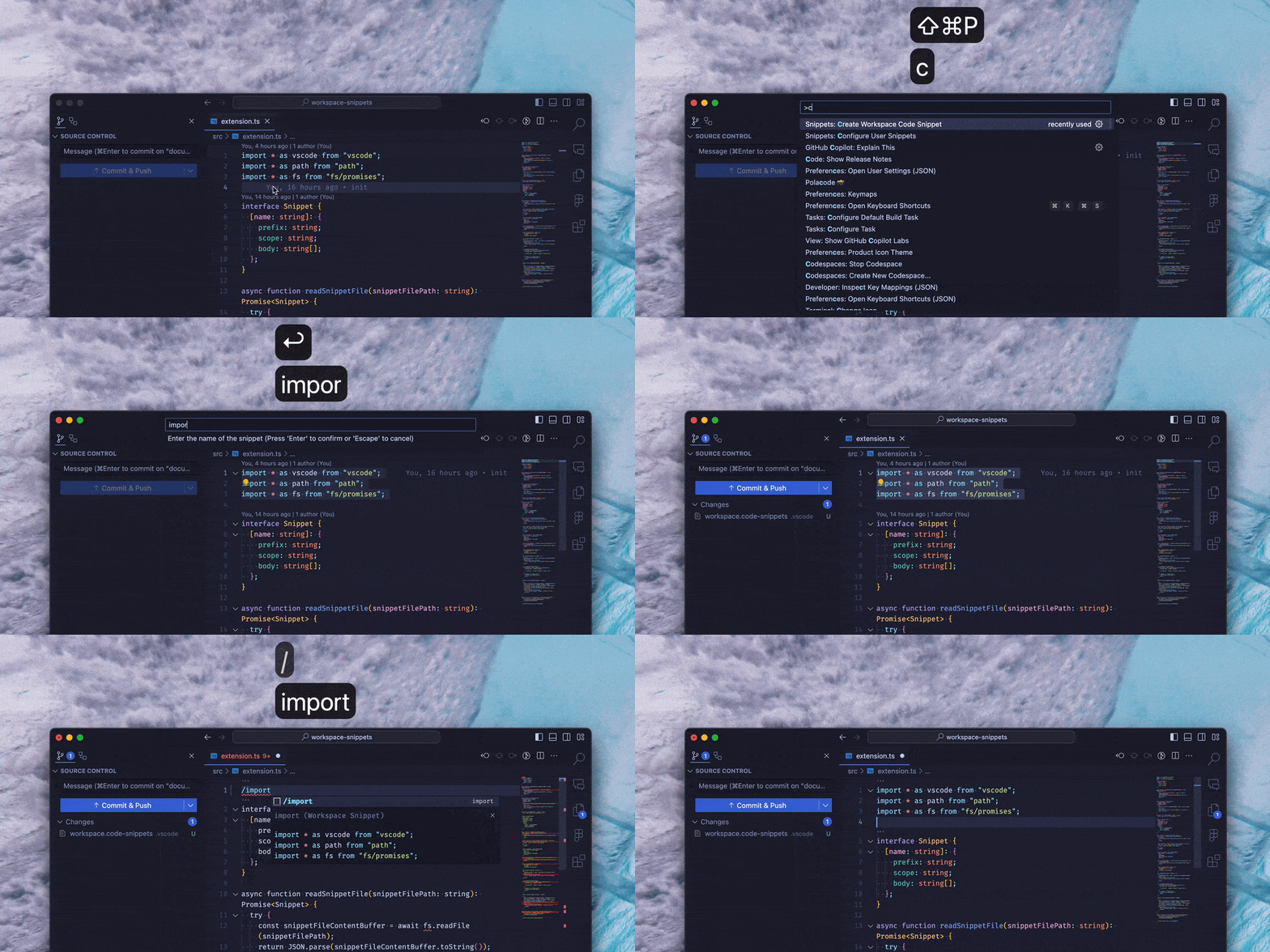
## Usage
1. Select the code you want to turn into a snippet.
2. Press `cmd+shift+p` (or `ctrl+shift+p` on Windows/Linux) to open the Command Palette.
3. Type `Create Workspace Code Snippet` and select the option from the list.
4. Choose a name for your snippet and press Enter.
5. Your snippet will be saved in `.vscode/workspace.code-snippets`.
## Contributing
If you find any issues or have suggestions for improvement, please submit an issue or pull request on the [GitHub repository](https://github.com/feli0x/workspace-code-snippets).