https://github.com/felicegeracitano/webperf-dashboard
Web Performance Dashboard forked from https://github.com/boyney123/garie
https://github.com/felicegeracitano/webperf-dashboard
bot dashboard docker grafana influxdb lighthouse metrics travis-ci typescript
Last synced: 4 months ago
JSON representation
Web Performance Dashboard forked from https://github.com/boyney123/garie
- Host: GitHub
- URL: https://github.com/felicegeracitano/webperf-dashboard
- Owner: FeliceGeracitano
- License: other
- Created: 2018-12-17T16:46:44.000Z (over 7 years ago)
- Default Branch: master
- Last Pushed: 2019-08-29T15:32:42.000Z (almost 7 years ago)
- Last Synced: 2025-04-13T09:12:15.417Z (about 1 year ago)
- Topics: bot, dashboard, docker, grafana, influxdb, lighthouse, metrics, travis-ci, typescript
- Language: TypeScript
- Homepage:
- Size: 2.96 MB
- Stars: 51
- Watchers: 1
- Forks: 20
- Open Issues: 3
-
Metadata Files:
- Readme: README.md
- License: license
Awesome Lists containing this project
README
# WebPerformanceDashboard
- [Introduction](#Introduction)
- [Requirements](#Requirements)
- [Installation](#Installation)
- [Run The project](#Run-The-project)
- [Configuration](#Configuration)
- [Dashboards Built-in](#Dashboards-Built-in)
- [Develop `packages/lighthouse`](#develop-packageslighthouse)
- [Test local container for `packages/lighthouse`](#test-local-container-for-packageslighthouse)
- [Deploy your container](#Deploy-your-container)
- [GitHub BOT](#GitHub-BOT)
- [Troubleshooting](#Troubleshooting)
- [Other Tips](#Other-Tips)
### Introduction
Web performance dashboard powered by Lighthouse, forked from [https://github.com/boyney123/garie](https://github.com/boyney123/garie)
with addition of
- Typescript
- Monorepo approach
- GitHub BOT
- Removed Pagespeed Insights (now powered by lighthouse)
- Latest lighthouse
- Grafana dashboards with more details
- more to come.. (Performance delta on target Branch, more metrics, parallel page analysis)
### Requirements
- docker >= 18 and Node >= 8
### Installation
```bash
git clone https://github.com/FeliceGeracitano/webperf-dashboard.git
```
### Run the project
```bash
$ docker-compose -f "docker-compose.yml" up -d --build
```
open dashboard at `localhost`, user: `admin` pass: `secret`
> this will run 4 services `influxdb`, `chronograf`, `grafana` & `felicegeracitano/webperf-dashboard-lighthouse`
### Configuration
In the root of the application there is a `config.json` file, which is propagated to `packages/lighthouse` during docker build step.
example,
```js
{
"cron": "0 */10 * * * *",
"urls": [
{ "url": "https://reactjs.org", "options": { "report": true } },
{ "url": "https://vuejs.org", "options": { "report": true } },
{ "url": "https://angular.io", "options": { "report": true } }
]
}
```
> Set `report` if you want to save lighthouse report as html.
> More info about the cron pattern at https://www.npmjs.com/package/cron
### Dashboards Built-in
- Single Audit
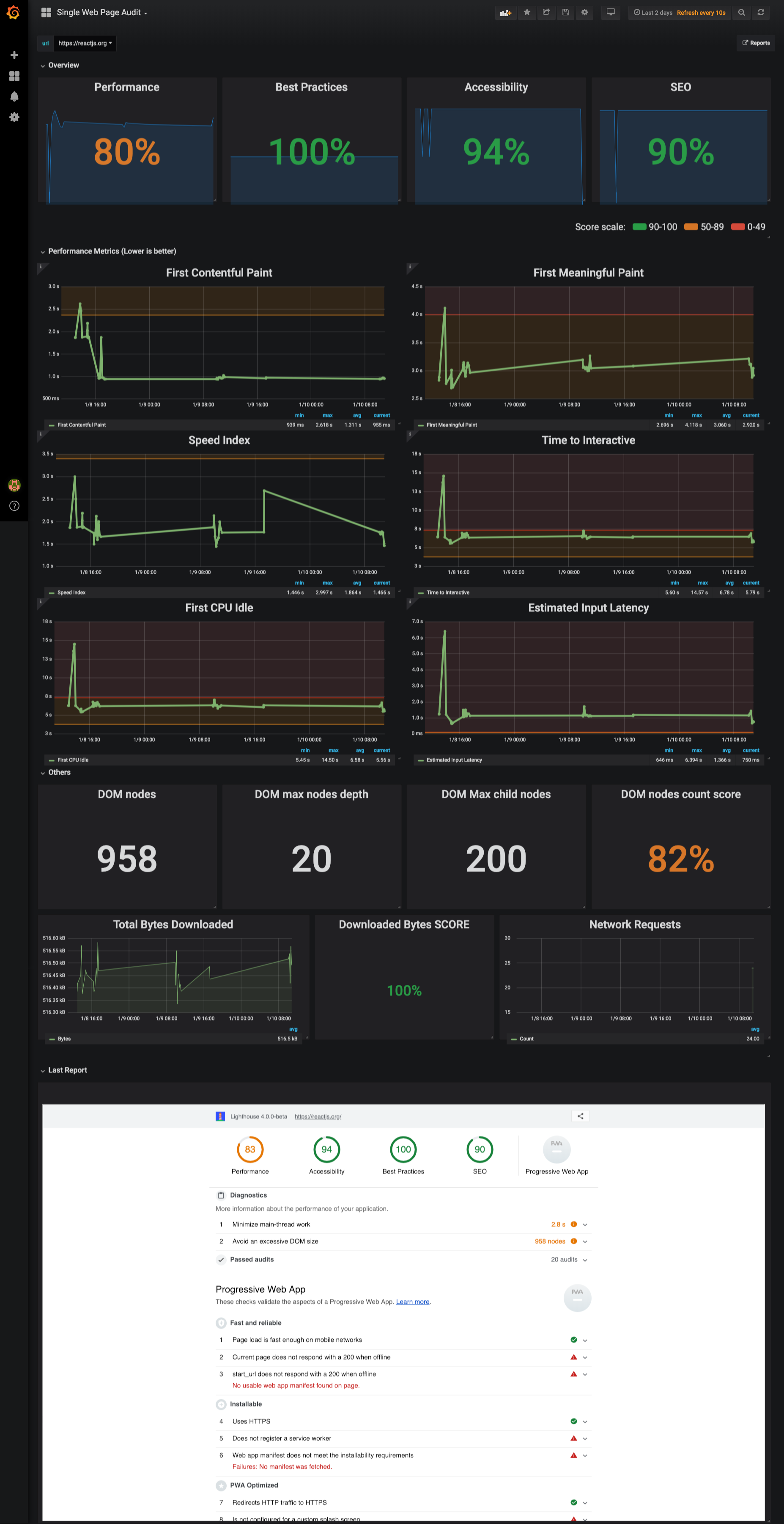
Inspired by the lighthouse report, analyze score trend over time, identify performance metric and their thresholds. Read suggestions directly from Latest Lighthouse report embedded in the dashboard
- Versus
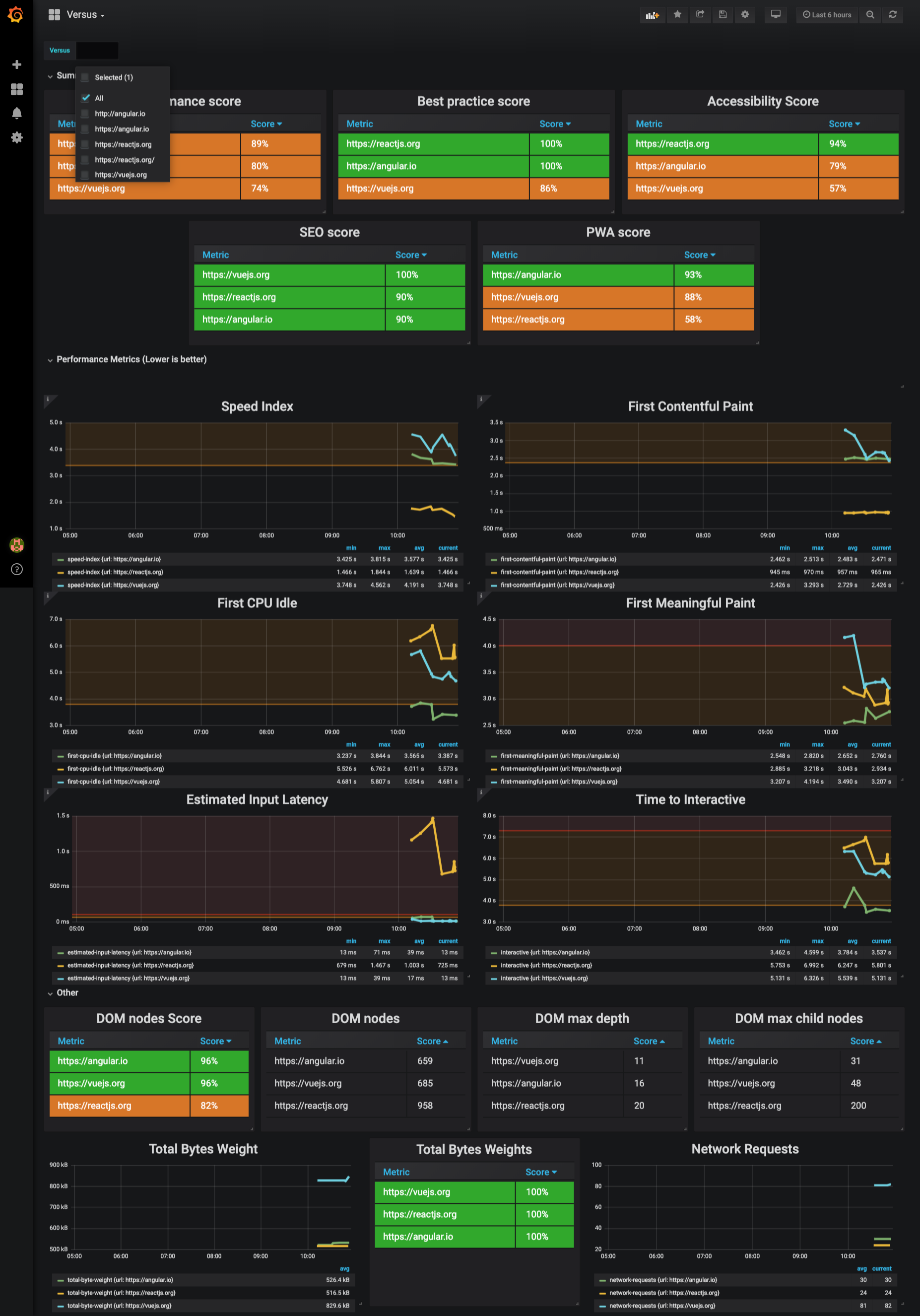
Pretty much a like Single Page Dashboard but oriented to `1vs1` or `all` comparision.
### Develop `packages/lighthouse`
Comment out `felicegeracitano/webperf-dashboard-lighthouse` service in `docker-compose.yml`, then run to spin up dependecies:
```bash
$ docker-compose -f "docker-compose.yml" up -d --build
$ cd packages/lighthouse && npm start
```
### Test local container for `packages/lighthouse`
In `docker-compose.yml` replace `felicegeracitano/webperf-dashboard-lighthouse` with
`webperf-dashboard-lighthouse` (or any other local name you prefer), then run:
```
$ cd packages/lighthouse && docker build -t webperf-dashboard-lighthouse .
$ cd ../.. && docker-compose up
```
### Deploy your container
```
$ cd packages/lighthouse
$ docker tag webperf-dashboard-lighthouse:latest felicegeracitano/webperf-dashboard-lighthouse:latest
$ docker push felicegeracitano/webperf-dashboard-lighthouse:latest
```
> Tip:
> replace latest tag with fixed version etc 1.1, 2.0...
### Troubleshooting
- Kills all running containers with `docker kill $(docker ps -q)`
- Delete all stopped containers with `docker rm $(docker ps -a -q)`
- Delete all images with `docker rmi $(docker images -q)`
### GitHub BOT
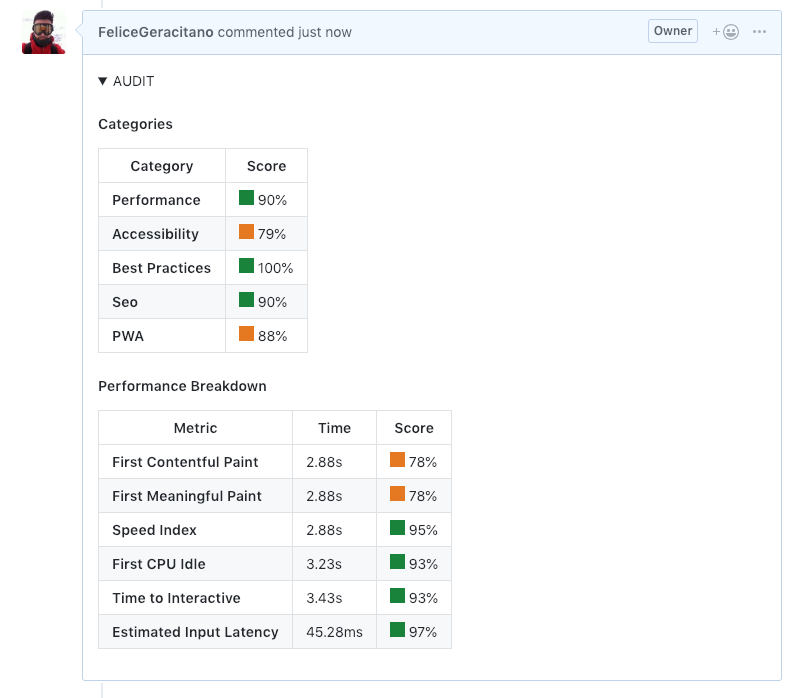
You can improve reviewers life running Lighthouse audit on every PR update.
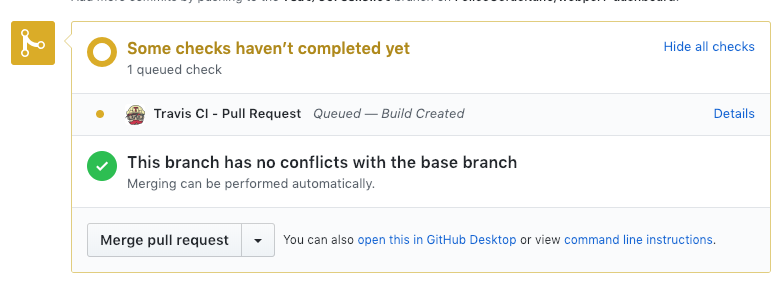
In this repo there is an example using a Travis CI, the job communicate progress and result to GitHub.
Running Job:
Result Comment from the BOT:
Configure your repo with a Travis Job:
- Enbale Travis Intergation for your repo (https://travis-ci.com/)
- Enable build on Pull request: https://travis-ci.com/{owner}/{repo}/settings
- Generate Github Access token here: https://github.com/settings/tokens
- Set enviroment an variable called `GITHUB_TOKEN` for your Travis job with the GitHub token here: https://travis-ci.com/{owner}/{repo}/settings
- Commit a `.travis.yml` file in your repo similar to: https://github.com/FeliceGeracitano/webperf-dashboard/blob/master/.travis.yml
> if you inspect run_audit.sh you will notice that you need to provide an url of your running up. This obsvously depends on your app, you can choose to build your app in the travis job itsels or provide an external URL.
- `run_audit.sh` will launch the lighthouse service and inspectig your app, posting the result in the PR created.
### Other Tips
- if you use VSCODE install docker extensions to manage, start & stop containers: https://marketplace.visualstudio.com/items?itemName=peterjausovec.vscode-docker