https://github.com/femessage/el-form-renderer
🎩A data-driven dynamic and complex form solution
https://github.com/femessage/el-form-renderer
data-driven el-form element-ui
Last synced: about 1 year ago
JSON representation
🎩A data-driven dynamic and complex form solution
- Host: GitHub
- URL: https://github.com/femessage/el-form-renderer
- Owner: FEMessage
- License: mit
- Created: 2018-12-26T02:30:08.000Z (over 7 years ago)
- Default Branch: dev
- Last Pushed: 2022-11-07T01:32:59.000Z (over 3 years ago)
- Last Synced: 2024-10-17T03:14:44.012Z (over 1 year ago)
- Topics: data-driven, el-form, element-ui
- Language: JavaScript
- Homepage: https://femessage.github.io/el-form-renderer/
- Size: 9.64 MB
- Stars: 231
- Watchers: 15
- Forks: 63
- Open Issues: 7
-
Metadata Files:
- Readme: README-zh.md
- License: LICENSE
Awesome Lists containing this project
README
# el-form-renderer
[](https://travis-ci.com/FEMessage/el-form-renderer)
[](https://www.npmjs.com/package/@femessage/el-form-renderer)
[](https://www.npmjs.com/package/@femessage/el-form-renderer)
[](https://github.com/FEMessage/el-form-renderer/blob/master/LICENSE)
[](https://github.com/FEMessage/el-form-renderer/pulls)
[](https://github-tools.github.io/github-release-notes/)
## Table of Contents
- [Introduction](#introduction)
- [内部集成](#内部集成)
- [外部扩展](#外部扩展)
- [Feature](#feature)
- [Links](#links)
- [Quick Start](#quick-start)
- [Inspiration](#inspiration)
- [Contributing](#contributing)
- [Contributors](#contributors)
- [License](#license)
## Introduction
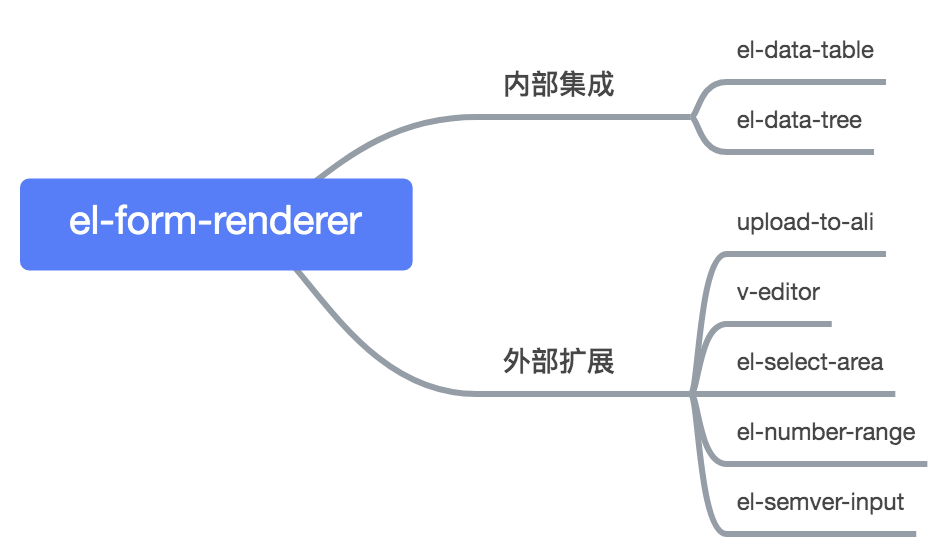
我们 [github 有这些组件](https://github.com/FEMessage),它们并非孤立的,而是有关联的
我们开发的表单相关的组件都可以配合 [@femessage/el-form-renderer](https://github.com/FEMessage/el-form-renderer)(以下简称为 el-form-renderer)使用
可以说 el-form-renderer 是核心,扮演着枢纽的角色
### 内部集成
el-data-table、el-data-tree 等组件内部集成该组件,用于更加灵活的配置内部表单渲染的场景。
以 el-data-table 为例,我们知道通过 el-data-table 可以快速生成一个列表的 CRUD 页面。而其中的搜索框,新增编辑的内容弹框,就是由 el-form-renderer 生成的。通过传入对应的配置项,就能生成相应的内容,不需要写 template。
### 外部扩展
在一些表单项场景,el-form-renderer 可用于表单项进行扩展。
自定义组件按一定的格式实现 v-model,就能让 el-form-render 能渲染自定义组件
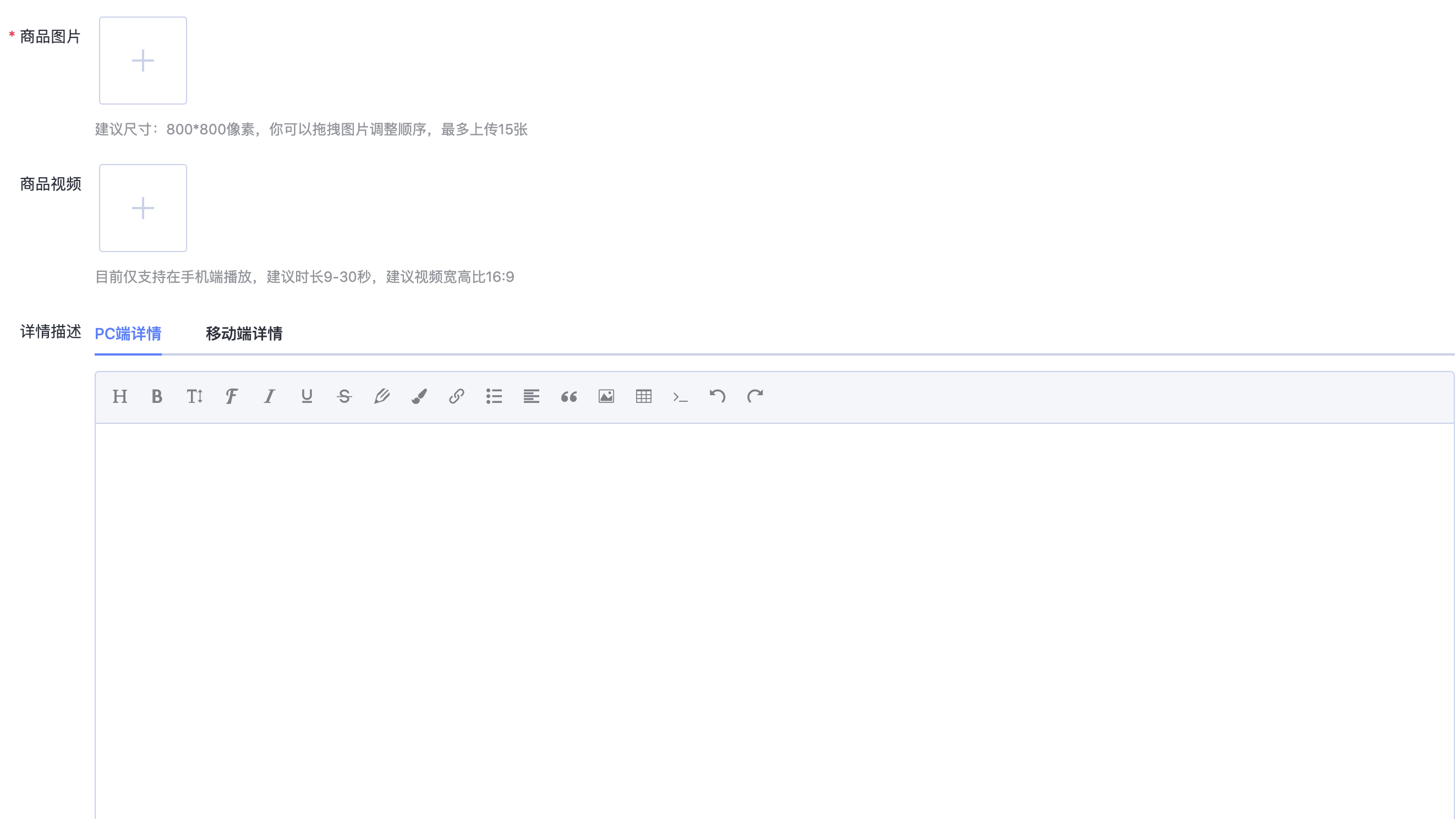
如下图所示,两个图片上传、一个富文本编辑器,都是借助 el-form-renderer 渲染的。
## Feature
- 只需进行简单的配置,即可实现常用表单功能
- 支持 setOptions 方法,动态改变 select 的 options
- content 支持 `inputFormat`、`outputFormat`、`trim`,对组件输入输出值处理
- 支持 `on` 进行事件监听,处理表单数据联动
- 支持 `hidden` 进行表单项动态显示与隐藏
- 支持渲染自定义组件
- 支持自定义组件设置校验规则
- 支持 v-model
[⬆ Back to Top](#table-of-contents)
## Links
- [钉钉交流群](https://github.com/FEMessage/el-data-table/issues/181)
- [api doc and online demo](https://femessage.github.io/el-form-renderer/)
- [自定义组件接入指南](https://github.com/femessage/el-form-renderer/blob/master/docs/guide-custom-component.md)
- [自定义组件设置校验规则](https://github.com/FEMessage/el-form-renderer/blob/master/docs/guide-custom-rules-in-custom-component.md)
- [fem-vscode-helper](https://marketplace.visualstudio.com/items?itemName=FEMessage.fem-vscode-helper)
- [实践案例](https://zhuanlan.zhihu.com/p/95725645)
- [设置动态 options 指南](https://zhuanlan.zhihu.com/p/97827063)
- [v-model 落地实践分析](https://zhuanlan.zhihu.com/p/108055158)
[⬆ Back to Top](#table-of-contents)
## Quick Start
```sh
# Step1 确认你已经正确安装并使用了 element-ui
yarn add @femessage/el-form-renderer
```
```html
import ElFormRenderer from '@femessage/el-form-renderer'
export default {
components: {
ElFormRenderer,
},
data() {
return {
content: [],
}
},
}
```
[⬆ Back to Top](#table-of-contents)
## Inspiration
thanks to [element-patch](https://github.com/leezng/element-patch)
## Contributing
For those who are interested in contributing to this project, such as:
- report a bug
- request new feature
- fix a bug
- implement a new feature
Please refer to our [contributing guide](https://github.com/FEMessage/.github/blob/master/CONTRIBUTING.md).
[⬆ Back to Top](#table-of-contents)
## Contributors
Thanks goes to these wonderful people ([emoji key](https://allcontributors.org/docs/en/emoji-key)):

Alvin
💻 👀 🐛 📝 🤔

levy
👀 🚇 🤔

EVILLT
💻 🐛 📝 🤔

Donald Shen
📖 💡

ColMugX
💻 ⚠️ 📖

OuZuYu
🐛
This project follows the [all-contributors](https://github.com/all-contributors/all-contributors) specification. Contributions of any kind welcome!
## License
[MIT](./LICENSE)
[⬆ Back to Top](#table-of-contents)