https://github.com/ffiruzi/website-rag-qa-assistant
Transform any website into an intelligent AI assistant with ONE Docker command. Complete RAG system with web crawling, vector embeddings, and beautiful chat interface. Built with FastAPI, React, and LangChain.
https://github.com/ffiruzi/website-rag-qa-assistant
artificial-intelligence chatbot docker fastapi full-stack langchain openai python question-answering rag rag-chatbot react typescript vector-database web-crawling
Last synced: 4 months ago
JSON representation
Transform any website into an intelligent AI assistant with ONE Docker command. Complete RAG system with web crawling, vector embeddings, and beautiful chat interface. Built with FastAPI, React, and LangChain.
- Host: GitHub
- URL: https://github.com/ffiruzi/website-rag-qa-assistant
- Owner: ffiruzi
- License: mit
- Created: 2025-07-31T10:13:32.000Z (about 1 year ago)
- Default Branch: main
- Last Pushed: 2025-07-31T10:36:43.000Z (about 1 year ago)
- Last Synced: 2025-07-31T13:55:00.344Z (about 1 year ago)
- Topics: artificial-intelligence, chatbot, docker, fastapi, full-stack, langchain, openai, python, question-answering, rag, rag-chatbot, react, typescript, vector-database, web-crawling
- Language: Python
- Homepage:
- Size: 241 KB
- Stars: 0
- Watchers: 0
- Forks: 0
- Open Issues: 0
-
Metadata Files:
- Readme: README.md
- License: LICENSE
Awesome Lists containing this project
README
# 🤖 Website RAG Q&A System
> **Transform any website into an intelligent AI assistant with ONE Docker command**
## 🎬 **LIVE DEMO - CLICK TO WATCH** 🎬
[](https://youtu.be/lnuF3FhVzbg)
[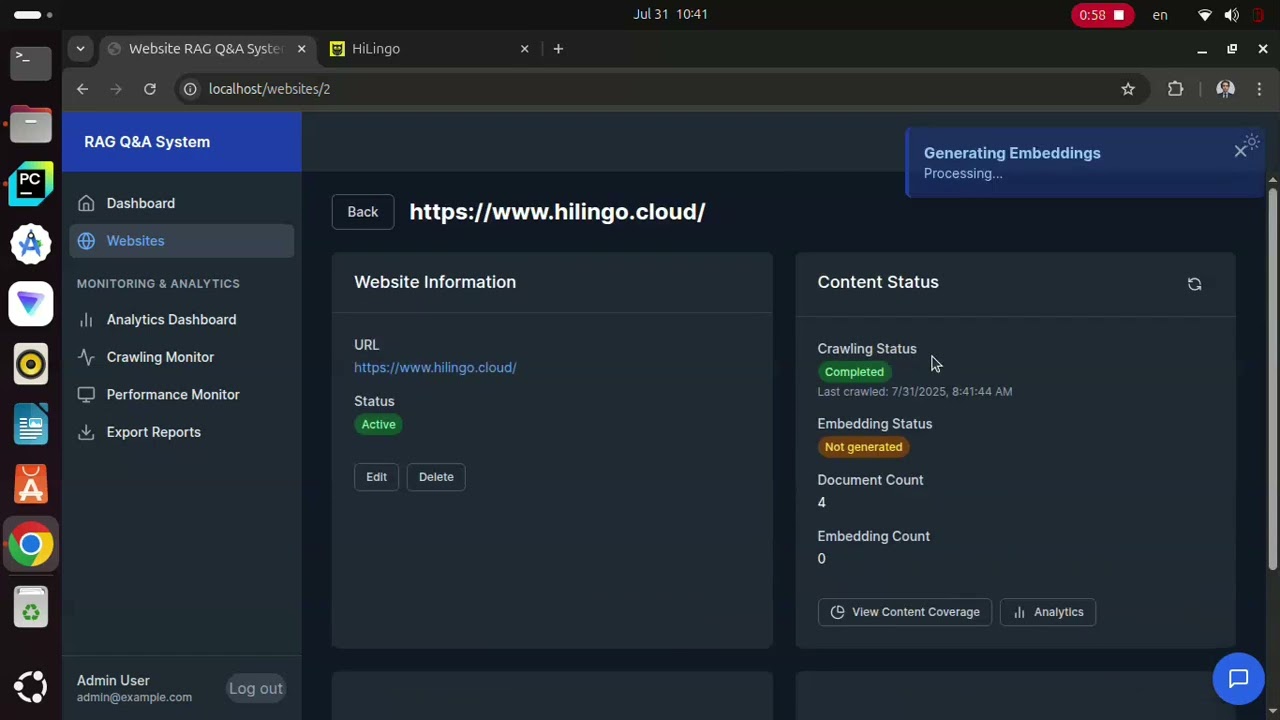](https://youtu.be/lnuF3FhVzbg)
### 🚀 **3-Minute Demo: Setup → Crawling → AI Chat**
*Click the thumbnail above to see the complete system in action!*
[](https://github.com/ffiruzi/Website-RAG-QA-Assistant)
[]()





A **complete RAG (Retrieval-Augmented Generation) system** that crawls websites, processes content into searchable embeddings, and provides intelligent AI-powered answers through a beautiful chat interface. **Everything runs in a single Docker container** for maximum simplicity.
---
## ✨ **Key Features**
### 🔍 **Intelligent Content Processing**
- **Smart Web Crawling**: Automatically discovers and extracts content from any website
- **Vector Embeddings**: Converts content into searchable vectors using OpenAI embeddings
- **FAISS Vector Database**: Lightning-fast similarity search across content
- **Real-time Processing**: Watch your content being processed in real-time
### 🤖 **Advanced AI Question Answering**
- **RAG Pipeline**: Retrieves relevant context and generates accurate, source-cited responses
- **Conversational Memory**: Maintains context across multiple questions
- **Source Attribution**: Always shows where answers come from
- **Multi-Website Support**: Switch between different websites in one chat
### 💼 **Professional Admin Interface**
- **Real-time Dashboard**: Monitor crawling, processing, and usage
- **Website Management**: Add, remove, and configure websites easily
- **Analytics**: Track popular queries and system performance
- **Job Monitoring**: Watch crawling and embedding progress live
### 💬 **Beautiful Chat Widget**
- **Instant Responses**: AI-powered answers in seconds
- **Mobile Responsive**: Works perfectly on all devices
- **Multi-Website Chat**: Ask questions about different websites
- **Source Citations**: See exactly where answers come from
---
## 🚀 **One-Command Setup** (Seriously!)
### **Prerequisites**
- **Docker installed** ([Get Docker](https://docs.docker.com/get-docker/))
- **OpenAI API key** ([Get key](https://platform.openai.com/api-keys))
### **Setup in 30 seconds:**
```bash
# 1. Clone the repository
git clone https://github.com/ffiruzi/Website-RAG-QA-Assistant.git
cd Website-RAG-QA-Assistant
# 2. Run the setup script
chmod +x run.sh
./run.sh
```
**That's it!** 🎉
- **Frontend + Backend**: http://localhost
- **API Documentation**: http://localhost/docs
- **Health Check**: http://localhost/health
---
## 🏗️ **What Runs in the Container**
```
┌─────────────────────────────────────────┐
│ Single Docker Container │
├─────────────────────────────────────────┤
│ 🌐 Nginx (Port 80) │
│ ├── Serves React Frontend │
│ └── Proxies API calls to FastAPI │
├─────────────────────────────────────────┤
│ ⚡ FastAPI Backend (Port 8000) │
│ ├── RAG Processing Engine │
│ ├── OpenAI Integration │
│ ├── FAISS Vector Database │
│ └── SQLite Database │
├─────────────────────────────────────────┤
│ 🤖 Background Services │
│ ├── Web Crawler │
│ ├── Content Processor │
│ └── Embedding Generator │
└─────────────────────────────────────────┘
```
---
## 🛠️ **Full Technology Stack**
### **Backend**
- **FastAPI**: High-performance Python API framework
- **LangChain**: Advanced RAG and LLM orchestration
- **FAISS**: Meta's efficient vector similarity search
- **OpenAI API**: GPT models for embeddings and completions
- **SQLAlchemy**: Database ORM with SQLite
- **Trafilatura**: Advanced web content extraction
### **Frontend**
- **React 18**: Modern reactive user interface
- **TypeScript**: Type-safe development
- **Tailwind CSS**: Beautiful, responsive styling
- **React Query**: Efficient data fetching
- **Lucide Icons**: Professional icon library
### **Infrastructure**
- **Docker**: Single-container deployment
- **Nginx**: High-performance reverse proxy
- **SQLite**: Embedded database (no setup required)
- **Multi-stage build**: Optimized container size
---
## 📱 **How to Use**
### **1. Add Your First Website**
1. **Open**: http://localhost
2. **Click**: "Add Website"
3. **Enter URL**: Like `https://docs.python.org` or any website
4. **Click**: "Create"
### **2. Process the Content**
1. **Start Crawling**: Click "Crawl" button next to your website
2. **Wait**: Watch the progress in real-time
3. **Process Embeddings**: Click "Process" to create searchable vectors
4. **Done**: Your website is now AI-ready!
### **3. Start Chatting**
1. **Click**: Blue chat widget in bottom-right corner
2. **Select**: Your website from dropdown
3. **Ask**: "What is this website about?"
4. **Get**: Intelligent AI response with source citations!
---
## 🎯 **Perfect For**
### **🏢 Business Websites**
- **Customer Support**: Instant answers to product questions
- **Documentation**: Make technical docs conversational
- **E-commerce**: Help customers find products
### **📚 Educational Content**
- **Course Materials**: Interactive learning assistance
- **Research Papers**: Make academic content accessible
- **Training Resources**: Corporate onboarding and training
### **🔧 Developer Tools**
- **API Documentation**: Natural language API queries
- **Code Repositories**: Ask questions about codebases
- **Technical Blogs**: Interactive programming tutorials
### **📰 Content Sites**
- **News Websites**: Query articles and archives
- **Blogs**: Interactive content exploration
- **Knowledge Bases**: Conversational information access
---
## 🚦 **Quick Demo**
After setup, try these example questions:
```
🤖 "What is this website about?"
🤖 "Summarize the main topics covered"
🤖 "How do I install [technology mentioned]?"
🤖 "What are the key features described?"
🤖 "Find information about pricing"
```
---
## 📊 **Performance**
### **Benchmarks**
- **Setup Time**: ~30 seconds (first run ~3 minutes)
- **Query Response**: 2-5 seconds for complex questions
- **Crawling Speed**: 5-10 pages per minute
- **Container Size**: ~2GB (includes everything)
- **Memory Usage**: ~512MB-1GB depending on content
### **Scalability**
- **Websites**: Support for multiple websites
- **Content**: Handles thousands of pages per website
- **Users**: Concurrent chat sessions supported
- **Queries**: No practical limit on questions
---
## 🔧 **Configuration**
### **Environment Variables** (in `.env`)
```bash
# Required
OPENAI_API_KEY=sk-your-actual-key-here # Get from OpenAI
SECRET_KEY=your-secret-key # Any secure string
# Optional
DEBUG=True # Enable debug mode
DATABASE_URL=sqlite:///./app.db # Database location
```
### **Advanced Docker Options**
```bash
# Run with custom port
docker run -p 8080:80 website-rag-qa
# Run with persistent data
docker run -v ./data:/app/data website-rag-qa
# Run with custom environment
docker run --env-file custom.env website-rag-qa
```
---
## 🐛 **Troubleshooting**
Common Issues & Quick Fixes
### **Container won't start**
```bash
# Check Docker is running
docker ps
# View container logs
docker logs website-rag-qa
# Restart container
docker restart website-rag-qa
```
### **Can't access the website**
```bash
# Check if port 80 is free
sudo lsof -i :80
# Try different port
docker run -p 8080:80 website-rag-qa
# Then access: http://localhost:8080
```
### **OpenAI API errors**
```bash
# Verify API key
echo $OPENAI_API_KEY
# Test API key
curl -H "Authorization: Bearer $OPENAI_API_KEY" \
https://api.openai.com/v1/models
```
### **Database issues**
```bash
# Reset everything
docker rm -f website-rag-qa
rm -rf data/
./run.sh
```
---
## 🔒 **Security & Privacy**
- **Local Processing**: Everything runs on your machine
- **No Data Sharing**: Your website content stays private
- **OpenAI Integration**: Only sends text chunks for embedding/completion
- **Secure Defaults**: No exposed services beyond port 80
- **Input Validation**: Prevents malicious input injection
---
## 🤝 **Contributing**
Love this project? Here's how to contribute:
### **Quick Contributions**
- ⭐ **Star the repository**
- 🐛 **Report bugs** via GitHub Issues
- 💡 **Suggest features** in Discussions
- 📖 **Improve documentation**
### **Code Contributions**
1. **Fork** the repository
2. **Create** feature branch: `git checkout -b feature/amazing-feature`
3. **Commit** changes: `git commit -m 'Add amazing feature'`
4. **Push** branch: `git push origin feature/amazing-feature`
5. **Open** Pull Request
---
## 🌟 **Why This Project Stands Out**
### **🚀 Zero Configuration**
- **One command setup**: No complex configuration files
- **Everything included**: No external dependencies to install
- **Works anywhere**: Runs on any system with Docker
### **🧠 Production-Quality AI**
- **Modern RAG architecture**: Uses latest techniques
- **Real source attribution**: Always shows where answers come from
- **Conversational memory**: Understands follow-up questions
- **Multiple websites**: Switch contexts seamlessly
### **💼 Professional Interface**
- **Admin dashboard**: Complete management interface
- **Real-time monitoring**: Watch processes live
- **Analytics**: Usage patterns and performance metrics
- **Mobile responsive**: Works on all devices
### **🔧 Developer Friendly**
- **Clean architecture**: Well-organized, documented code
- **Modern tech stack**: Current best practices
- **Easy to extend**: Modular design for customization
- **Docker ready**: One-command deployment
---
## 📄 **License**
This project is licensed under the **MIT License** - see the [LICENSE](LICENSE) file for details.
---
## ⭐ **Star this repository if you found it helpful!** ⭐
### 🚀 **Ready to try it?**
```bash
git clone https://github.com/ffiruzi/Website-RAG-QA-Assistant.git
cd Website-RAG-QA-Assistant
./run.sh
```
**Your AI-powered website assistant will be running in under a minute!**
---
**Built with ❤️ by ffiruzi**
[🚀 **Quick Start**](#-one-command-setup-seriously) | [📖 **How to Use**](#-how-to-use) | [🤝 **Contribute**](#-contributing)