https://github.com/filelize/filelize-java
Filelize is a lightweight database designed to simplify writing and reading data into human-readable files, requiring just one line of code
https://github.com/filelize/filelize-java
database filelize java kotlin
Last synced: about 2 months ago
JSON representation
Filelize is a lightweight database designed to simplify writing and reading data into human-readable files, requiring just one line of code
- Host: GitHub
- URL: https://github.com/filelize/filelize-java
- Owner: filelize
- Created: 2024-03-11T20:08:23.000Z (over 2 years ago)
- Default Branch: main
- Last Pushed: 2026-04-01T08:53:49.000Z (3 months ago)
- Last Synced: 2026-04-01T10:30:40.691Z (3 months ago)
- Topics: database, filelize, java, kotlin
- Language: Java
- Homepage:
- Size: 242 KB
- Stars: 58
- Watchers: 2
- Forks: 6
- Open Issues: 4
-
Metadata Files:
- Readme: README.md
- Funding: .github/FUNDING.yml
Awesome Lists containing this project
- awesome-java - Filelize
README
# Filelize for java, android and kotlin
 

Filelize is a lightweight database that simplifies writing and reading data into human-readable files, requiring just one line of code. As highlighted in [Navigate Early Development | Simplify Data Storage](https://medium.com/@jtbsorensen/navigate-early-development-simplify-data-storage-c76013878cb4), Filelize focuses on reducing development overhead and optimizing data storage practices.
One of the biggest advantages is in the annotations and methods provided, eliminating the need for repetitive boilerplate code. Additionally, it offers flexibility with options for both single and multiple file storage, giving an easy way to work with very large collections distributed among multiple files.
Filelize is most commonly used to save files as json for [Test Data Setup](https://github.com/filelize/filelize-java?tab=readme-ov-file#filelize-for-test-data-setup) or when a full-fledged database isn't necessary.
### Usage
To integrate [Filelizer](https://mvnrepository.com/artifact/io.github.filelize/filelize-java) into your project, add the following dependency to your pom.xml
```xml
io.github.filelize
filelize-java
0.9.6
```
For Gradle, you can use:
```groovy
implementation 'io.github.filelize:filelize-java:0.9.5'
```
Ref: [Publish your artifact to the Maven Central Repository using GitHub Actions](https://medium.com/@jtbsorensen/publish-your-artifact-to-the-maven-central-repository-using-github-actions-15d3b5d9ce88)
## Getting started
Initialize a `Filelizer` with your preferred location of your files. (For subdirectories you can add them directly on your domain object)
```java
Filelizer filelizer = new Filelizer("src/test/resources/");
```
#### Save an object
```java
String id = filelizer.save(something);
```
#### SaveAll objects in one or multiple file(s):
```java
List ids = filelizer.saveAll(somethings);
```
#### Find a object
```java
Something something = filelizer.find("id1", Something.class);
```
#### FindAll objects:
```java
List somethings = filelizer.findAll(Something.class);
```
### Saving to a single file
To save an object to a single file, annotate your model class with `@Filelize` and set the `type` parameter to `FilelizeType.SINGLE_FILE`. Additionally, mark the identifying attribute with `@Id`.
```java
import io.github.filelize.Filelize;
import io.github.filelize.Id;
@Filelize(name = "something_single", type = FilelizeType.SINGLE_FILE, directory = "something_single")
public class Something {
@Id
private String id;
private String name;
...
}
```
### Saving to multiple files
For saving objects to multiple files, follow the same steps as for single-file saving, but set the type parameter to `FilelizeType.MULTIPLE_FILES`.
```java
import io.github.filelize.Filelize;
import io.github.filelize.Id;
@Filelize(name = "my_something", type = FilelizeType.MULTIPLE_FILES, directory = "something_multiple/mydirectory")
public class Something {
@Id
private String id;
private String name;
...
}
```
## Filelize in Spring Boot
Spring Boot applications typically leverage annotations and configuration classes for managing beans and functionalities.
Here's how you can use Filelizer in a Spring Boot application:
```java
import com.fasterxml.jackson.databind.ObjectMapper;
import org.springframework.stereotype.Service;
import io.github.filelize.FilelizeType;
import io.github.filelize.Filelizer;
@Service
public class FilelizerService {
private final ObjectMapper objectMapper;
private final Filelizer filelizer;
public FilelizerService(ObjectMapper objectMapper) {
this.objectMapper = objectMapper;
this.filelizer = new Filelizer("src/main/resources/", objectMapper, FilelizeType.OBJECT_FILE);
}
public void updateName(String id, String name){
var something = filelizer.find(id, Something.class);
something.setName(name);
filelizer.save(something);
}
}
```
## Filelize for Test Data Setup
So you are working on setting up test data scenario for your unit test. This manual process is typically involving alot of boilerplate code. This is especially true when working on complex classes that contain many fields and collections.
What we usually need is the presence of an object, where only a few values are important to be able to make a meaningful test.
Here are some steps you could take to setup your test data:
1. Create a Filelizer service that saves your objects or collections to a test data folder
```java
Filelizer filelizer = new Filelizer("src/test/resources/testdata");
```
2. Run the application with the scenarios that you wanna test. Make sure to save the result for each scenario, e.g. `filelizer.save("somethingTest1", something);`
3. Now you should have some test data files in your testdata folder like: `.../testdata/somethingTest1.json` and `.../testdata/somethingTest2.json`
4. Create a test and load your test data
```java
@Test
public void testSomething() {
var something = filelizer.find("somethingTest2", Something.class);
assertEquals("somethingTest2", something.getId());
}
```
## Contribute
Contributions are welcomed! Feel free to create a pull request to contribute.
[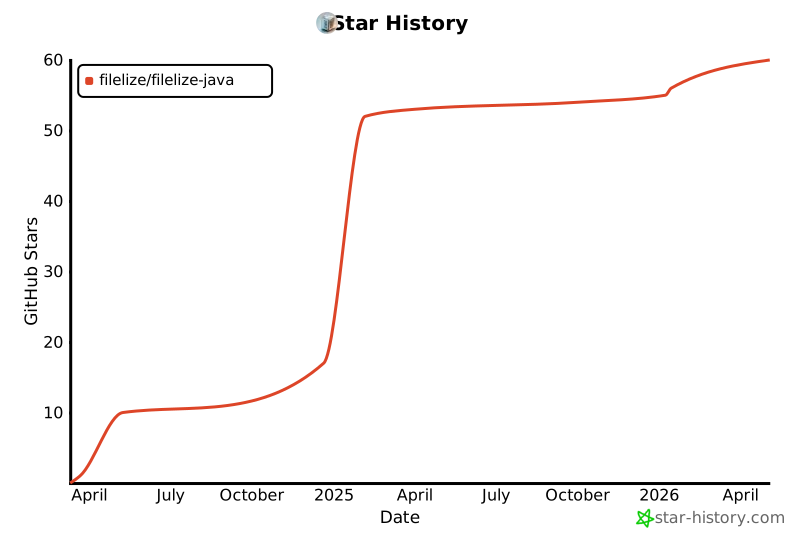](https://star-history.com/#filelize/filelize-java&Date)