https://github.com/filipebraida/adonisjs-starter-kit
Starter kit for AdonisJS projects using a monorepo setup
https://github.com/filipebraida/adonisjs-starter-kit
adonisjs monorepo react shadcn-ui tailwindcss
Last synced: about 1 month ago
JSON representation
Starter kit for AdonisJS projects using a monorepo setup
- Host: GitHub
- URL: https://github.com/filipebraida/adonisjs-starter-kit
- Owner: filipebraida
- License: mit
- Created: 2025-02-25T14:55:52.000Z (over 1 year ago)
- Default Branch: main
- Last Pushed: 2026-04-04T14:55:08.000Z (3 months ago)
- Last Synced: 2026-04-04T16:57:29.880Z (3 months ago)
- Topics: adonisjs, monorepo, react, shadcn-ui, tailwindcss
- Language: TypeScript
- Homepage:
- Size: 6.9 MB
- Stars: 79
- Watchers: 2
- Forks: 10
- Open Issues: 1
-
Metadata Files:
- Readme: README.md
- License: LICENSE
Awesome Lists containing this project
README
# AdonisJS Starter Kit
AdonisJS Starter Kit is a monorepo-based template for developing full-stack applications with AdonisJS. It combines AdonisJS, Inertia.js, Tuyau, a shared UI package based on shadcn/ui, Tailwind CSS, and PostgreSQL to help you bootstrap production-ready applications faster.
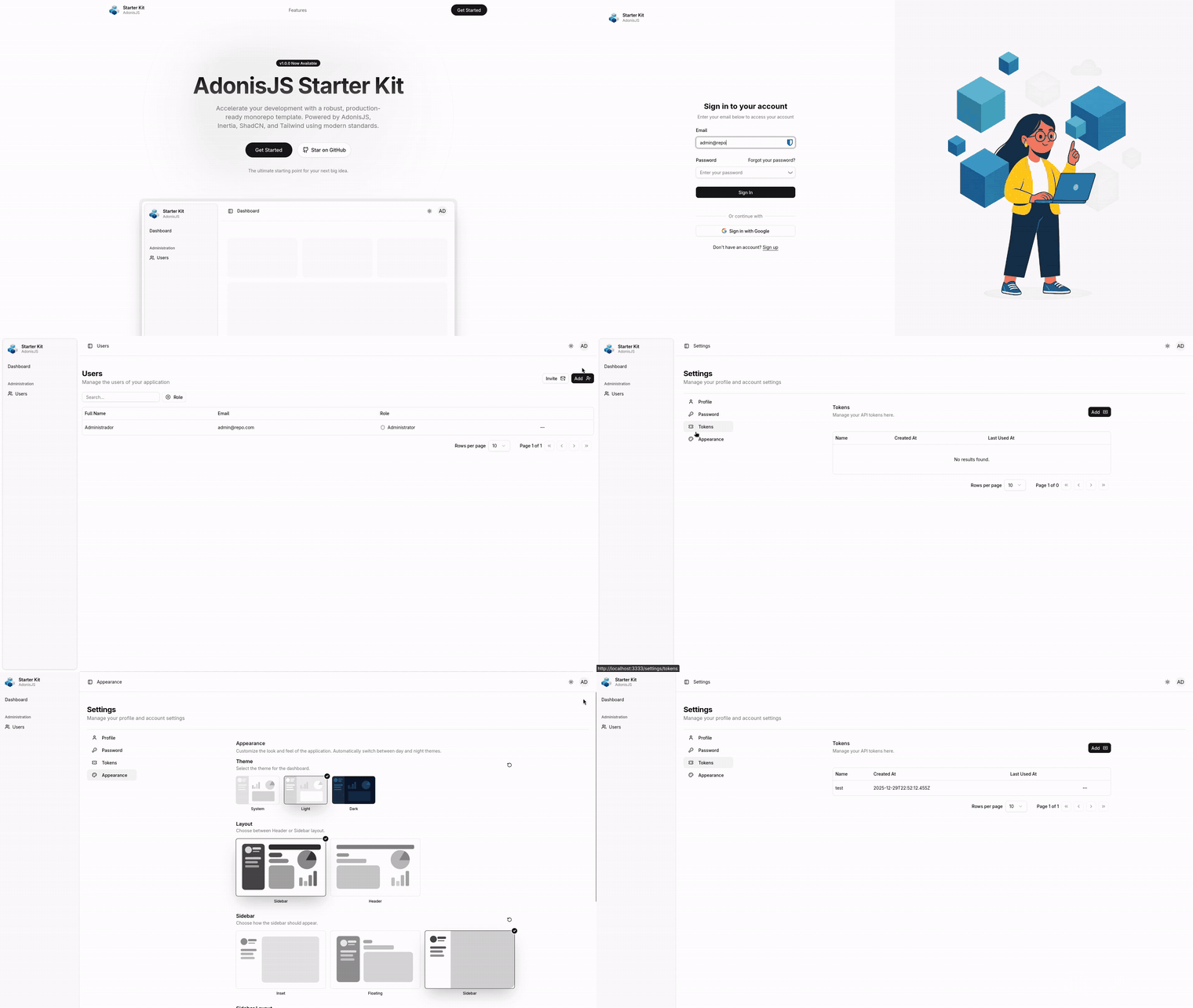
## Features
- **Monorepo Setup**: Efficient package management and build processes powered by TurboRepo and pnpm.
- **Shared UI Package**: Reusable and customizable components provided by `@workspace/ui`, built on top of shadcn/ui.
- **Frontend Integration**: Inertia.js delivers a modern single-page application (SPA) experience.
- **Type-safe Routing & API Client**: Tuyau provides route-aware URLs and type-safe client calls.
- **Styling**: Rapid and responsive UI development using Tailwind CSS.
- **Database**: PostgreSQL ensures robust, scalable, and high-performance data storage.
- **User Management**: Comprehensive user management system.
- **Authorization & Authentication**: Secure access control mechanisms.
- **Password Recovery**: Built-in functionality for password reset and recovery.
- **Social Authentication**: Easily authenticate users via social providers (Google, GitHub, etc.) using the [@adonisjs/ally package](https://docs.adonisjs.com/guides/authentication/social-authentication).
- **User Impersonation**: Administrators can temporarily assume any user's identity for support or testing purposes.
- **API Tokens**: Users can generate and revoke personal access tokens for use in APIs.
- **i18n Support**: Built-in internationalization with default support for English and Portuguese using [@adonisjs/i18n](https://docs.adonisjs.com/guides/i18n).
- **Appearance Settings**: Comprehensive controls for Theme (Light/Dark), Layout (Sidebar/Header), Sidebar variants, and Direction (LTR/RTL), with local persistence.
## Tools and Technologies
- **TurboRepo**: Monorepo management and build caching.
- **pnpm**: Fast and efficient package management.
- **shadcn/ui**: Baseline for the shared UI package.
- **Inertia.js**: Seamless integration between frontend and backend.
- **Tuyau**: Type-safe route generation and API client integration.
- **Tailwind CSS**: Utility-first CSS framework for rapid styling.
- **PostgreSQL**: Reliable and high-performance relational database.
- **Mailpit**: Small, fast, low memory, zero-dependency, multi-platform email testing tool & API for developers.
- **PgAdmin**: Most popular and feature rich Open Source administration and development platform for PostgreSQL.
## Requirements
- Node.js `>=24`
- pnpm `10.33.0` — install with `npm install -g pnpm@10.33.0`
## Installation
### Cloning the Repository
To create a new project using this starter kit, run:
```bash
pnpm create adonisjs@latest -K="filipebraida/adonisjs-starter-kit"
```
Or, if cloning directly:
```bash
git clone https://github.com/filipebraida/adonisjs-starter-kit.git
cd adonisjs-starter-kit
pnpm install
```
### Setting Up the Environment
1. **Copy the Example Environment File**
Duplicate the example file to create your own environment configuration.
```bash
cp apps/web/.env.example apps/web/.env
```
> **Note:** Some features (email, social auth, file storage) are optional but their environment variables must still be present with placeholder values due to startup validation. The `.env.example` file already includes all required placeholders.
2. **Generate the App Key**
Generate a cryptographically secure key and assign it to the `APP_KEY` environment variable.
```bash
node apps/web/ace generate:key
```
3. **Configure Social Auth & Email**
Social authentication and email settings can be configured later as needed.
### Database Setup
The project includes a Dockerfile that automatically initializes the necessary configurations using your environment variables. To set up the database:
1. **Start the Database with Docker**
Launch the database container:
```bash
docker compose up -d
```
2. **Run Migrations**
Apply all migrations to create the database schema:
```bash
pnpm --filter web exec node ace migration:run
```
3. **Seed the Database**
Populate the database with initial data (e.g., default users and roles):
```bash
pnpm --filter web exec node ace db:seed
```
## Running the Development Server
Start the development server with the following command:
```bash
pnpm run dev
```
This command launches the AdonisJS server along with any associated applications.
## Project Structure
```bash
root/
├── apps/
│ └── web/ # Backend and frontend application using AdonisJS with Inertia.js
├── packages/ # Shared packages and utilities
├── pnpm-workspace.yaml # Monorepo configuration
└── turbo.json # TurboRepo configuration
```
This project follows a monorepo architecture using **TurboRepo**. Here's a quick breakdown of the structure:
- **apps/** contains runnable applications. In this case, `web/` is the full-stack AdonisJS application, including both backend and frontend (via Inertia.js).
- **packages/** holds shared libraries and tooling, such as the shared UI package and shared lint/type configurations.
- **pnpm-workspace.yaml** defines the workspace boundaries.
- **turbo.json** configures TurboRepo pipelines for tasks like build, lint, test, and dev.
This modular design allows you to isolate features, enforce code reuse, and scale your architecture with clarity. For example, you can add more apps in `apps/` or extract common logic into `packages/` as your project grows.
## Feature-based Organization
The `apps/web` application follows a feature-based structure inside the `app/` directory. Instead of grouping files only by technical type, the codebase is organized by domain areas such as `auth`, `users`, `marketing`, `common`, and `core`.
This approach keeps related controllers, validators, UI components, hooks, routes, and supporting files close to each other, which makes the project easier to navigate and scale over time.
For example, a feature can look like this:
```bash
apps/web/app/
├── auth/
│ ├── controllers/
│ ├── middleware/
│ ├── routes.ts
│ └── ui/
├── users/
│ ├── controllers/
│ ├── policies/
│ ├── routes.ts
│ ├── validators.ts
│ └── ui/
```
This structure is a project convention and does not depend on an external modules package.
## Adding a New Component
The shared UI package lives in `packages/ui` and uses `components.json` as the shadcn/ui source of truth.
To add a new base component, run from the repository root:
```bash
pnpm dlx shadcn@latest add button --cwd packages/ui
```
This command updates files inside `packages/ui`. Custom project-specific components such as `field`, `password-input`, `copy-button`, and `data-table` are maintained manually on top of that base.
## Libraries Used
This starter kit makes use of the following libraries to support file handling, SPA integration, type-safe routing, and structured data flow. Refer to their documentation for more details:
- [@jrmc/adonis-attachment](https://github.com/batosai/adonis-attachment)
- [@tuyau/inertia](https://github.com/Julien-R44/tuyau)
- [@adocasts.com/dto](https://github.com/adocasts/package-dto)
## Inspirations
This project draws inspiration from the following sources:
- [ShadCN UI](https://ui.shadcn.com/)
- [AdonisJS Starter Kit by Batosai](https://github.com/batosai/adonis-starter-kit)
- [ShadCN Blocks](https://www.shadcnblocks.com/)
- [ShadCN Admin by Satnaing](https://github.com/satnaing/shadcn-admin)
- [Laravel React Starter Kit](https://github.com/laravel/react-starter-kit)
## Contributing
Contributions are welcome! Please feel free to open issues or submit pull requests with improvements and suggestions to enhance this starter kit.
**Contributors:** [Sayed Ahmed](https://github.com/sayeed205), [Lupiac](https://github.com/Lupiac) and [Corentin Clichy](https://github.com/corentinclichy)
## License
This project is licensed under the [MIT License](LICENSE).