https://github.com/fingerart/flutter_hypertext
Hypertext is a highly extensible flutter rich text widget that automatically parses styles.
https://github.com/fingerart/flutter_hypertext
flutter localization rich-text
Last synced: 3 months ago
JSON representation
Hypertext is a highly extensible flutter rich text widget that automatically parses styles.
- Host: GitHub
- URL: https://github.com/fingerart/flutter_hypertext
- Owner: fingerart
- License: mit
- Created: 2025-04-29T13:48:16.000Z (about 1 year ago)
- Default Branch: main
- Last Pushed: 2026-01-22T07:34:25.000Z (5 months ago)
- Last Synced: 2026-02-16T19:30:15.367Z (4 months ago)
- Topics: flutter, localization, rich-text
- Language: Dart
- Homepage: https://fingerart.github.io/flutter_hypertext/
- Size: 555 KB
- Stars: 1
- Watchers: 1
- Forks: 0
- Open Issues: 0
-
Metadata Files:
- Readme: README.md
- Changelog: CHANGELOG.md
- License: LICENSE
Awesome Lists containing this project
README
[](https://pub.dartlang.org/packages/flutter_hypertext)
[](https://github.com/fingerart/flutter_hypertext/stargazers)
[](https://github.com/fingerart/flutter_hypertext/network)
[](https://github.com/fingerart/flutter_hypertext/blob/main/LICENSE)
[](https://github.com/fingerart/flutter_hypertext/issues)
Language: English | [中文](./README_zh.md)
Hypertext is a highly extensible rich text widget that automatically parses styles.
## Preview
View [online demo](https://fingerart.github.io/flutter_hypertext)
| EN | ZH |
|--------------------------------------------------------------------------------------------|--------------------------------------------------------------------------------------------|
| 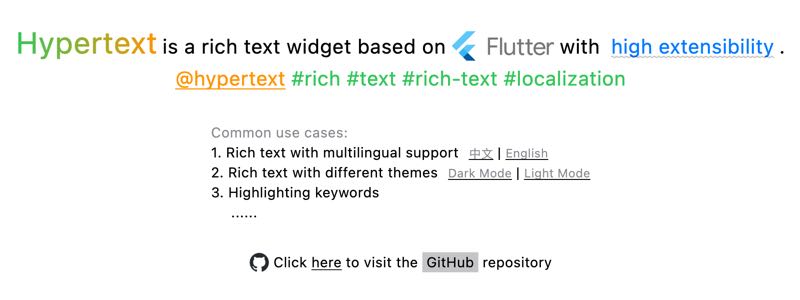 | 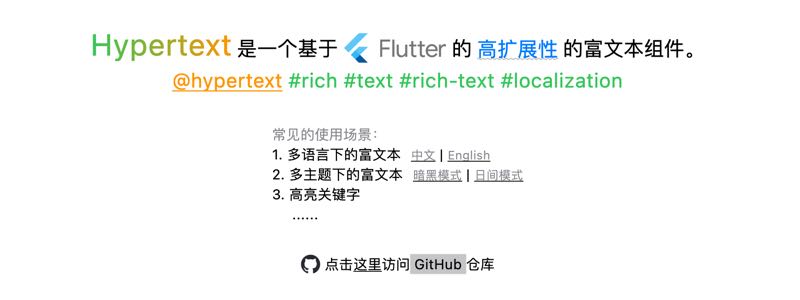 |
## Features
1. Built-in support for common [HTML-like tags](#predefined-markup-tags), such as:
* Links (with tap and long-press events)
* Images
* Text styles: *italic*, **bold**, ~~strikethrough~~, underline, text color, gradients, etc.
* ...
2. Event handling support
3. Custom markup support
4. Customize color or style name mapping to easily support multi-theme scenes
5. Text style inheritance for `WidgetSpan`'s inner `child`
## Table of contents
* [Preview](#preview)
* [Features](#features)
* [Table of contents](#table-of-contents)
* [Getting Started](#getting-started)
* [Supported Parameters](#supported-parameters)
* [Use Cases](#use-cases)
* [Predefined Markup Tags](#predefined-markup-tags)
* [1) LinkMarkup](#1-linkmarkup)
* [2) StyleMarkup](#2-stylemarkup)
* [1. FontWeightMarkup](#1-fontweightmarkup)
* [2. BoldMarkup](#2-boldmarkup)
* [3. FontStyleMarkup](#3-fontstylemarkup)
* [4. ItalicMarkup](#4-italicmarkup)
* [5. TextDecorationMarkup](#5-textdecorationmarkup)
* [6. DelMarkup](#6-delmarkup)
* [7. UnderlineMarkup](#7-underlinemarkup)
* [8. ColorMarkup](#8-colormarkup)
* [9. SizeMarkup](#9-sizemarkup)
* [4) GradientMarkup](#4-gradientmarkup)
* [5) ImageMarkup](#5-imagemarkup)
* [6) GapMarkup](#6-gapmarkup)
* [7) PaddingMarkup](#7-paddingmarkup)
* [6) PatternMarkup](#6-patternmarkup)
* [Advanced](#advanced)
* [Custom Markups](#custom-markups)
* [Support for multiple themes](#support-for-multiple-themes)
* [Special Notes](#special-notes)
* [Color Names](#color-names)
* [Hex Colors](#hex-colors)
* [Margin Values](#margin-values)
* [Things to Keep in Mind](#things-to-keep-in-mind)
* [TODO](#todo)
## Getting Started
```yaml
dependencies:
flutter_hypertext: ^1.0.0+1
```
```dart
import 'package:flutter_hypertext/markup.dart';
Hypertext("Hello Hypertext")
```
### Supported Parameters
| Parameter | Default | Description |
|------------------------|-------------------|--------------------------------------------------|
| `onMarkupEvent` | | Receive events like `a` |
| `lowercaseAttrName` | `true` | Convert attribute names to lowercase |
| `lowercaseElementName` | `true` | Convert element names to lowercase |
| `ignoreErrorMarkup` | `false` | Ignore erroneous tags |
| `colorMapper` | `kBasicCSSColors` | Color name mapping (default is CSS basic colors) |
| `styleMapper` | | Supported style collections |
| `markups` | `kDefaultMarkups` | Supported markup tags |
> Global default configuration can be set via `HypertextThemeExtension`
## Use Cases
1. Rich text in multiple languages
2. Rich text with multiple themes
3. Highlighting keywords (search, mentions, topics...)
## Predefined Markup Tags
### 1) LinkMarkup
Marks a range as a hyperlink, specifically for adding click events.
**Tag Name: `a`**
Parameters:
| Parameter | Value | Required | Description |
|--------------|---------------------------------------|----------|----------------------------------------------|
| `href` | URI string | ✅ | URI |
| `tap` | - | ☑️ | Handle click (can also specify `long-press`) |
| `long-press` | - | ☑️ | Handle long press (can also specify `tap`) |
| `title` | String | ☑️ | Tooltip content |
| `cursor` | `basic` `click` `text` `defer`... | ☑️ | See [SystemMouseCursors] |
| `alignment` | `baseline` `middle` `top` `bottom`... | ☑️ | See [PlaceholderAlignment] |
| `baseline` | `alphabetic` `ideographic` | ☑️ | See [TextBaseline] |
Example:
```dart
Hypertext(
text,
onMarkupEvent: (MarkupEvent event){
// event.tag
// event.data
},
);
```
### 2) StyleMarkup
Sets text styles for a specified range, such as text color, background color, font size, font family, font weight, italic, text decorations (underline, overline, strikethrough)...
**Tag: `style`**
Parameters:
| Parameter | Value | Required | Description |
|---------------|--------------------------------------------------------|----------|-------------------------------------------------------------------------------------------------------------------------|
| `color` | [Hex Color](#hex-colors) or [Color Name](#color-names) | ☑️ | Text color, default supports [CSS Basic Colors](https://www.w3.org/wiki/CSS/Properties/color/keywords)[kBasicCSSColors] |
| `background` | [Hex Color](#hex-colors) or [Color Name](#color-names) | ☑️ | Text background color |
| `size` | double | ☑️ | Text size |
| `font-family` | font family name | ☑️ | Font family |
| `weight` | `100`~`900`、`bold`、`normal` | ☑️ | See [FontWeight] |
| `font-style` | `normal` `italic` | ☑️ | Font style [FontStyle] |
| `decor` | `none` `underline` `overline` `lineThrough` | ☑️ | Text decoration [TextDecoration] |
| `decor-style` | `double` `dashed` `dotted` `solid` `wavy` | ☑️ | Decoration style [TextDecorationStyle] |
| `decor-color` | [Hex Color](#hex-colors) or [Color Name](#color-names) | ☑️ | Decoration color |
| `thickness` | double | ☑️ | Decoration line thickness |
Example:
```html
hypertext
hypertext
```
**`StyleMarkup` is a superset of the following tags:**
#### 1. FontWeightMarkup
Tag: `weight`
| Parameter | Value | Required | Description |
|---------------------|-----------------------------|----------|------------------|
| `weight` (simplify) | `100`~`900`、`bold`、`normal` | ✅️ | See [FontWeight] |
Example:
```html
foo
bar
```
#### 2. BoldMarkup
Tags: `b` `bold` `strong`
| Parameter | Value | Required | Description |
|---------------------|-----------------------------|----------|------------------|
| `weight` (simplify) | `100`~`900`、`bold`、`normal` | ✅️ | See [FontWeight] |
```html
Hypertext
Hypertext
Hypertext
```
#### 3. FontStyleMarkup
Tag: `font-style`
| Parameter | Value | Required | Description |
|-------------------------|-------------------|----------|------------------|
| `font-style` (simplify) | `normal` `italic` | ✅ | See [FontWeight] |
Example:
```html
foo
bar
```
#### 4. ItalicMarkup
Tag: `i`
Example:
```html
bar
```
#### 5. TextDecorationMarkup
Tag: `text-decor`
| Parameter | Value | Required | Description |
|--------------------|--------------------------------------------------------|----------|----------------------------------------|
| `decor` (simplify) | `none` `underline` `overline` `lineThrough` | ✅ | Text decoration [TextDecoration] |
| `style` | `double` `dashed` `dotted` `solid` `wavy` | ☑️ | Decoration style [TextDecorationStyle] |
| `color` | [Hex Color](#hex-colors) or [Color Name](#color-names) | ☑️ | Decoration color |
| `thickness` | double | ☑️ | Decoration line thickness |
Example:
```html
foo
bar
```
#### 6. DelMarkup
Tag: `del`
| Parameter | Value | Required | Description |
|-------------|--------------------------------------------------------|----------|----------------------------------------|
| `style` | `double` `dashed` `dotted` `solid` `wavy` | ☑️ | Decoration style [TextDecorationStyle] |
| `color` | [Hex Color](#hex-colors) or [Color Name](#color-names) | ☑️ | Decoration color |
| `thickness` | double | ☑️ | Decoration line thickness |
Example:
```html
bar
```
#### 7. UnderlineMarkup
Tag: `u` `ins`
| Parameter | Value | Required | Description |
|-------------|--------------------------------------------------------|----------|----------------------------------------|
| `style` | `double` `dashed` `dotted` `solid` `wavy` | ☑️ | Decoration style [TextDecorationStyle] |
| `color` | [Hex Color](#hex-colors) or [Color Name](#color-names) | ☑️ | Decoration color |
| `thickness` | double | ☑️ | Decoration line thickness |
Example:
```html
bar
```
#### 8. ColorMarkup
Tag: `color`
Parameters:
| Parameter | Value | Required | Description |
|--------------------|--------------------------------------------------------|----------|-------------|
| `color` (simplify) | [Hex Color](#hex-colors) or [Color Name](#color-names) | ✅ | Text color |
Example:
```html
bar
bar
```
#### 9. SizeMarkup
Tag: `size`
Parameters:
| Parameter | Value | Required | Description |
|-------------------|--------|----------|-------------|
| `size` (simplify) | double | ✅ | Text size |
Example:
```html
bar
bar
```
### 4) GradientMarkup
Sets a linear gradient for the specified range of text.
Tag: `gradient`
Parameters:
| Parameter | Value | Required | Description |
|-------------|--------------------------------------------------------|----------|----------------------------------------------------------------|
| `colors` | [Hex Color](#hex-colors) or [Color Name](#color-names) | ✅ | Gradient colors |
| `stops` | List | ☑️ | Values between 0.0 and 1.0 for gradient stops [LinearGradient] |
| `rotation` | Angle (0~360) | ☑️ | Rotation angle for gradient |
| `tile-mode` | `clamp` (default) `repeated` `mirror` `decal` | ☑️ | Tiling mode |
| `alignment` | `baseline` `middle` `top` `bottom`... | ☑️ | See [PlaceholderAlignment] |
| `baseline` | `alphabetic` `ideographic` | ☑️ | See [TextBaseline] |
Example:
```html
bar
bar
```
### 5) ImageMarkup
Add image, support custom parsing `src` and creating image widgets through `imageBuilder`.
> [Note] The default implementation of network image is `NetworkImage`, which does not support disk
> caching. If necessary, please use `ImageMarkup.imagebuilder`.
Tag: `img` `image`
Parameters:
| Parameter | Value | Required | Description |
|-------------|--------------------------------------------------------------------|----------|--------------------------------------------------------|
| `src` | URI string | ✅ | Image path (supports `http[s]://`, `asset://`, `path`) |
| `size` | List\ | ☑️ | Image width and height (1~2 values) |
| `width` | double | ☑️ | Image width |
| `height` | double | ☑️ | Image height |
| `color` | [Hex Color](#hex-colors) or [Color Name](#color-names) | ☑️ | Colorize the picture |
| `fit` | `fill` `contain` `cover` `fitWidth` `fitHeight` `none` `scaleDown` | ☑️ | BoxFit modes |
| `align` | `topLeft` `center` `bottomLeft`... | ☑️ | Alignment options |
| `alignment` | `baseline` `middle` `top` `bottom`... | ☑️ | See [PlaceholderAlignment] |
| `baseline` | `alphabetic` `ideographic` | ☑️ | See [TextBaseline] |
Example:
```html

![]()

```
### 6) GapMarkup
Adds space gaps.
Tag: `gap`
Parameters:
| Parameter | Value | Required | Description |
|------------------|--------|----------|-------------|
| `gap` (simplify) | double | ✅ | Gap size |
Example:
```html
```
### 7) PaddingMarkup
Adds padding inside an element.
Tag: `padding`
Parameters:
| Parameter | Value | Required | Description |
|----------------------|---------------------------------------|----------|----------------------------------------------|
| `padding` (simplify) | double | ✅ | [Padding value](#margin-values) (1~4 values) |
| `hor` | List\ | ☑️ | Horizontal padding (1~2 values) |
| `ver` | List\ | ☑️ | Vertical padding (1~2 values) |
| `alignment` | `baseline` `middle` `top` `bottom`... | ☑️ | See [PlaceholderAlignment] |
| `baseline` | `alphabetic` `ideographic` | ☑️ | See [TextBaseline] |
Example:
```html
foo
```
## 6) PatternMarkup
A pattern-matching-based markup, used for recognizing and styling specific patterns such as user mentions (`@foo`), topics (`#flutter`), and email addresses (`foo@bar.com`).
You can define custom pattern markups by extending `PatternMarkup` or `DefaultPatternMarkup`.
**Public Constructor Parameters:**
| Parameter Name | Type | Required | Description |
|:------------------|:-----------------------|:---------|:------------------------------------------------------------------------------|
| `style` | `TextStyle` | ✅️ | The text style to apply to the matched pattern. |
| `pattern` | `String` | ✅️ | The regular expression string used for pattern matching. |
| `tag` | `String` | ✅️ | The corresponding tag name in the lexical tree. |
| `startCharacter` | `int` | ☑️ | The starting matching character (used to reduce the number of regex matches). |
| `enableLongPress` | `bool` | ☑️ | Whether to enable the long-press event. |
| `enableTap` | `bool` | ☑️ | Whether to enable the tap (click) event. |
| `cursor` | `MouseCursor` | ☑️ | The mouse cursor style when hovering over the pattern. |
| `tooltip` | `String` | ☑️ | The tooltip text displayed on mouse hover. |
| `alignment` | `PlaceholderAlignment` | ☑️ | The alignment of the inline placeholder. |
| `baseline` | `TextBaseline` | ☑️ | The text baseline for the inline placeholder. |
**Predefined Pattern Markups:**
> [!WARNING]
> Using pattern markups may result in **slower performance** compared to not using them.
> The default predefined markups are **not** automatically added to `Hypertext` and must be added manually (via `Hypertext.markups` or `HypertextThemeExtension.markups`).
| Markup | Description | Usage Example |
|:----------------|:------------------|:--------------|
| `MentionMarkup` | Mention Tag | `@foo` |
| `EmailMarkup` | Email Address Tag | `foo@bar.com` |
| `TopicMarkup` | Topic Tag | `#flutter` |
## Advanced
### Custom Markups
**Defining a Custom Markup:**
```dart
class CustomMarkup extends TagMarkup {
const CustomMarkup() : super('your-tag');
@override
HypertextSpan onMarkup(List? children, MarkupContext ctx) {
return HypertextTextSpan(children: children, style: TextStyle());
return HypertextWidgetSpan(child: child);
}
}
```
**Setting Custom Markup:**
```dart
Hypertext(
text,
markups: [...kDefaultMarkups, CustomMarkup()],
)
```
Or
```dart
ThemeData(
extensions: [HypertextThemeExtension(markups: [...kDefaultMarkups, CustomMarkup()])],
)
```
### Support for multiple themes
> You can see an **[ example ](example/lib/settings.dart)** of a theme adaptation。
**1. Define color mapper**
```dart
final lightColorMapper = {
'appRed': appLightRed,
'appGreen': appLightGreen,
};
final darkColorMapper = {
'appRed': appDarkRed,
'appGreen': appDarkGreen,
};
```
**2. Define style mapper**
```dart
final styleMapper = {
'myStyle': TextStyle(
fontSize: 12,
decoration: TextDecoration.underline,
),
};
```
**3. Apply to the theme**
```dart
final lightHypertextThemeExt = HypertextThemeExtension(
colorMapper: lightColorMapper,
styleMapper: styleMapper,
);
final darkHypertextThemeExt = HypertextThemeExtension(
colorMapper: darkColorMapper,
styleMapper: styleMapper,
);
final lightTheme = ThemeData(extensions: [lightHypertextThemeExt]);
final darkTheme = ThemeData(extensions: [darkHypertextThemeExt]);
MaterialApp(
themeMode: ThemeMode.light,
theme: lightTheme,
darkTheme: darkTheme,
locale: settings.local,
localizationsDelegates: L.localizationsDelegates,
supportedLocales: L.supportedLocales,
home: HomePage(),
)
```
**4. Usage**
```dart
Hypertext(
"Hypertext是一个基于Flutter的高扩展性的富文本组件。"
)
```
## Special Notes
### Color Names
By default, [CSS Basic Colors](https://www.w3.org/wiki/CSS/Properties/color/keywords)[kBasicCSSColors] are supported. You can customize color name mappings via `Hypertext.colorMapper` and `HypertextThemeExtension.colorMapper`.
### Hex Colors
Supports the following [formats](https://developer.mozilla.org/en-US/docs/Web/CSS/hex-color#syntax):
1. **RGB**, e.g., `#0F0`
2. **RGBA**, e.g., `#0F0F`
3. **RRGGBB**, e.g., `#00FF00`
4. **RRGGBBAA**, e.g., `#00FF00FF`
### Margin Values
Supports the following formats:
1. `10` → `left=10 top=10 right=10 bottom=10`
2. `10, 20` → `left=20 top=10 right=20 bottom=10`
3. `10, 20, 30` → `left=20 top=10 right=20 bottom=30`
4. `10, 20, 30, 40` → `left=10 top=20 right=30 bottom=40`
## Things to Keep in Mind
1. When customizing Markups, it is recommended to use `HypertextTextSpan` or `HypertextWidgetSpan` to help inherit styles from parent `WidgetSpan` for text within it.
## TODO
- ☑️ Improve selectability: Add built-in selectability options and pass selectability to `WidgetSpan`.