https://github.com/firatgoktepe/data-structures-for-react
Some real world examples about data structures commonly used for React
https://github.com/firatgoktepe/data-structures-for-react
data-structures javascript react vitejs
Last synced: 3 months ago
JSON representation
Some real world examples about data structures commonly used for React
- Host: GitHub
- URL: https://github.com/firatgoktepe/data-structures-for-react
- Owner: firatgoktepe
- Created: 2022-11-23T13:19:56.000Z (over 3 years ago)
- Default Branch: main
- Last Pushed: 2022-11-28T12:06:10.000Z (over 3 years ago)
- Last Synced: 2025-10-23T01:59:28.390Z (9 months ago)
- Topics: data-structures, javascript, react, vitejs
- Language: JavaScript
- Homepage:
- Size: 55.7 KB
- Stars: 0
- Watchers: 1
- Forks: 0
- Open Issues: 0
-
Metadata Files:
- Readme: README.md
Awesome Lists containing this project
README
Most Common Data Structures for React
Data Structures In Frontend JavaScript/React In The Real World
Data structures can be intimidating. Especially for the self-taught
folks among us. If you already tried to study data structures in
JavaScript/React you know what typically happens:
- 🌎 A bunch of CS theory is thrown at you.
- 🔭 You read pages of code that manually implement e.g. a linked list.
- 📖 All the examples are abstract using foo and bar or cats and dogs.
Now in this repo, you can find simple real world data structure
examples for React
Table of Contents
1. Set
A Set is a keyed collection as well that is natively supported
in JavaScript. But while it’s easier to think of a Map as an object, a
Set is more like an array. It’s important to note that each value in a
Set is unique. You can’t add a value twice. That’s why you may see a
Set used to remove duplicates from an array.

Compared to an array, the main advantage is that you can check
if a Set contains a value in a performant way.
Real-World Example: Keeping track of selected items
https://user-images.githubusercontent.com/47864126/203786175-6ea6329f-99fe-4e90-b1de-e3dea5a6cc66.mov
2. Map
A (hash) map, hash table, or dictionary is basically a
key-value storage. In JavaScript we actually use this all the time. We
also have a native JavaScript alternative in form of a Map. It has a
few handy methods and properties (such as Map.size), is optimized
performance-wise for accessing values by key, and allows any kind of
type as keys (even objects).
Another advantage of the Map: with objects the keys are converted to
strings. A Map on the other hand preserves the original
type
Real-World Example: Messages with user names

3. Stack
A basic stack has two features:
You can add an item to the top of the stack.
You can remove an item from the top of the stack.
This is called “Last in, first out” (aka LIFO). Might sound
complicated but we can implement it with a simple array (as it’s not
natively supported in JavaScript).

Real-World Example: Undo previous actions
https://user-images.githubusercontent.com/47864126/203981727-ff28b357-bf2b-4939-b64f-21fab1043b07.mov
4. Queue
A queue is very similar to a stack. But instead of removing
the element that was added last, we remove the element that was first
added to the queue. This is called “First in, first out” (aka FIFO).
Like a queue in the supermarket.
We can implement it again using a simple array as it's not natively
supported in JavaScript.

Real-World Example: Notifications
https://user-images.githubusercontent.com/47864126/203981735-a3d94dcb-9b0e-42f9-8fcb-0f4dbded129c.mov
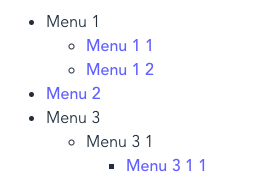
5. Tree
A tree is a nested data structure. It starts with a parent that
has children. The children again can have children of their own and so
on. Together with trees you often find recursive functions.
Here is one example using a nested object:

Real-World Example: Nested menus or comments