https://github.com/firecrawl/open-agent-builder
🔥 Visual workflow builder for AI agents powered by Firecrawl - drag-and-drop web scraping pipelines with real-time execution
https://github.com/firecrawl/open-agent-builder
Last synced: 5 months ago
JSON representation
🔥 Visual workflow builder for AI agents powered by Firecrawl - drag-and-drop web scraping pipelines with real-time execution
- Host: GitHub
- URL: https://github.com/firecrawl/open-agent-builder
- Owner: firecrawl
- Created: 2025-10-16T15:34:46.000Z (9 months ago)
- Default Branch: main
- Last Pushed: 2025-10-20T15:15:47.000Z (9 months ago)
- Last Synced: 2026-01-24T03:30:20.301Z (6 months ago)
- Language: TypeScript
- Size: 1.05 MB
- Stars: 2,025
- Watchers: 14
- Forks: 388
- Open Issues: 11
-
Metadata Files:
- Readme: README.md
Awesome Lists containing this project
README
# Open Agent Builder
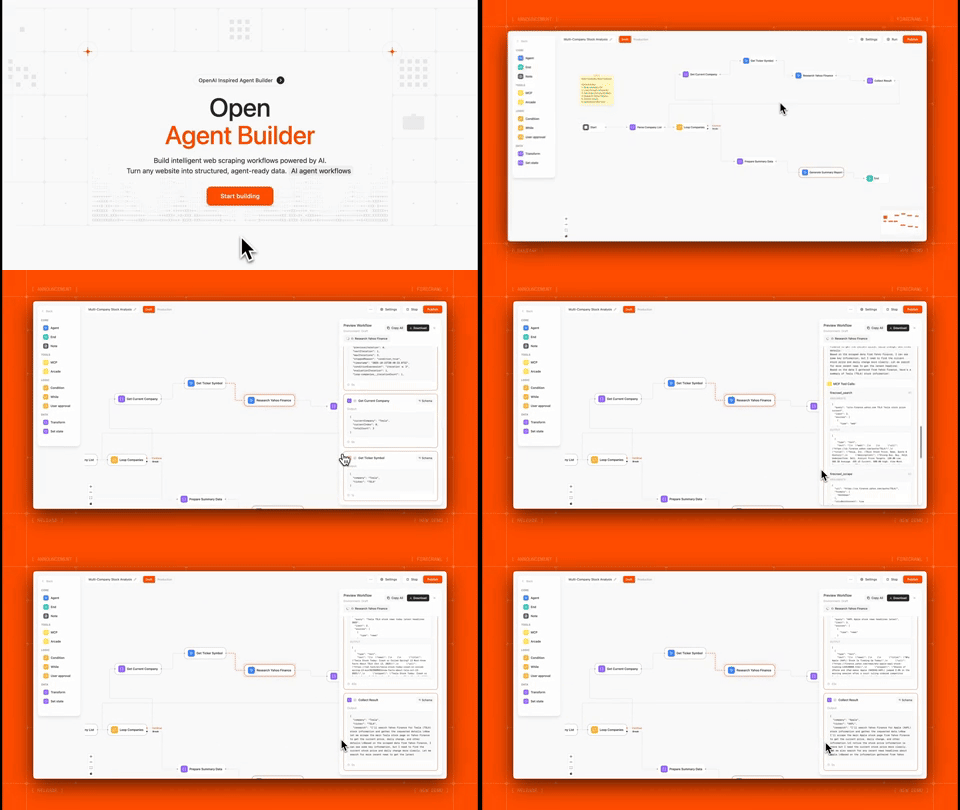
**Build, test, and deploy AI agent workflows with a visual no-code interface**
[](https://choosealicense.com/licenses/mit/)
[](https://firecrawl.dev)
[Documentation](#documentation) • [Examples](#example-workflows)
---
## What is Open Agent Builder?
Open Agent Builder is a visual workflow builder for creating AI agent pipelines powered by [Firecrawl](https://firecrawl.dev). Design complex agent workflows with a drag-and-drop interface, then execute them with real-time streaming updates.
**Perfect for:**
- Web scraping and data extraction workflows
- Multi-step AI agent pipelines
- Automated research and content generation
- Data transformation and analysis
- Web automation with human-in-the-loop approvals
> **Note:** This project is actively under development. Some features are still in progress and we welcome contributions and PRs!
---
## Key Features
### Visual Workflow Builder
- **Drag-and-drop interface** for building agent workflows
- **Real-time execution** with streaming updates
- **8 core node types**: Start, Agent, MCP Tools, Transform, If/Else, While Loop, User Approval, End
- **Template library** with pre-built workflows
- **MCP protocol support** for extensible tool integration
### Powered by Firecrawl
- **Native Firecrawl integration** for web scraping and searching
### Enterprise Features
- **LangGraph execution engine** for reliable state management
- **Clerk authentication** for secure multi-user access
- **Convex database** for persistent storage
- **API endpoints** for programmatic execution
- **Human-in-the-loop** approvals for sensitive operations
---
## Tech Stack
| Technology | Purpose |
|-----------|---------|
| **[Firecrawl](https://firecrawl.dev)** | Web scraping API for converting websites into LLM-ready data |
| **[Next.js 16 (canary)](https://nextjs.org/)** | React framework with App Router for frontend and API routes |
| **[TypeScript](https://www.typescriptlang.org/)** | Type-safe development across the stack |
| **[LangGraph](https://github.com/langchain-ai/langgraph)** | Workflow orchestration engine with state management, conditional routing, and human-in-the-loop support |
| **[Convex](https://convex.dev)** | Real-time database with automatic reactivity for workflows, executions, and user data |
| **[Clerk](https://clerk.com)** | Authentication and user management with JWT integration |
| **[Tailwind CSS](https://tailwindcss.com/)** | Utility-first CSS framework for responsive UI |
| **[React Flow](https://reactflow.dev/)** | Visual workflow builder canvas with drag-and-drop nodes |
| **[Anthropic](https://www.anthropic.com/)** | Claude AI integration with native MCP support (Claude Haiku 4.5 & Sonnet 4.5) |
| **[OpenAI](https://platform.openai.com/)** | gpt-5 integration (MCP support coming soon) |
| **[Groq](https://groq.com/)** | Fast inference for open models (MCP support coming soon) |
| **[E2B](https://e2b.dev)** | Sandboxed code execution for secure transform nodes |
| **[Vercel](https://vercel.com)** | Deployment platform with edge functions |
---
## Prerequisites
Before you begin, you'll need:
1. **Node.js 18+** installed on your machine
2. **Firecrawl API key** (Required for web scraping) - [Get one here](https://firecrawl.dev)
3. **Convex account** - [Sign up free](https://convex.dev)
4. **Clerk account** - [Sign up free](https://clerk.com)
> **Note:** LLM API keys can be added directly in the UI via Settings → API Keys after setup. For MCP tool support, Anthropic Claude (Haiku 4.5 or Sonnet 4.5) is currently recommended as the default option.
---
## Installation & Setup
### 1. Clone the Repository
```bash
git clone https://github.com/firecrawl/open-agent-builder.git
cd open-agent-builder
npm install
```
### 2. Set Up Convex (Database)
Convex handles all workflow and execution data persistence.
```bash
# Install Convex CLI globally
npm install -g convex
# Initialize Convex project
npx convex dev
```
This will:
- Open your browser to create/link a Convex project
- Generate a `NEXT_PUBLIC_CONVEX_URL` in your `.env.local`
- Start the Convex development server
Keep the Convex dev server running in a separate terminal.
### 3. Set Up Clerk (Authentication)
Clerk provides secure user authentication and management.
1. Go to [clerk.com](https://clerk.com) and create a new application
2. In your Clerk dashboard:
- Go to **API Keys**
- Copy your keys
3. Go to **JWT Templates** → **Convex**:
- Click "Apply"
- Copy the issuer URL
Add to your `.env.local`:
```bash
# Clerk Authentication
NEXT_PUBLIC_CLERK_PUBLISHABLE_KEY=pk_test_...
CLERK_SECRET_KEY=sk_test_...
# Clerk + Convex Integration
CLERK_JWT_ISSUER_DOMAIN=https://your-clerk-domain.clerk.accounts.dev
```
### 4. Configure Convex Authentication
Edit `convex/auth.config.ts` and update the domain:
```typescript
export default {
providers: [
{
domain: "https://your-clerk-domain.clerk.accounts.dev", // Your Clerk issuer URL
applicationID: "convex",
},
],
};
```
Then push the auth config to Convex:
```bash
npx convex dev
```
### 5. Set Up Firecrawl (Required)
**Firecrawl is the core web scraping engine** that powers most workflows.
1. Get your API key at [firecrawl.dev](https://firecrawl.dev)
2. Add to `.env.local`:
```bash
# Firecrawl API (REQUIRED)
FIRECRAWL_API_KEY=fc-...
```
> **Note:** Users can also add their own Firecrawl keys in Settings → API Keys, but having a default key in `.env.local` enables the template workflows.
### 6. Optional: Configure Default LLM Provider
While users can add their own LLM API keys through the UI (Settings → API Keys), you can optionally set a default provider in `.env.local`:
```bash
# Optional: Choose one as default
# Anthropic Claude (Recommended - Native MCP support with Haiku 4.5 & Sonnet 4.5)
ANTHROPIC_API_KEY=sk-ant-...
# OpenAI GPT-5 (MCP support coming soon)
OPENAI_API_KEY=sk-...
# Groq (MCP support coming soon)
GROQ_API_KEY=gsk_...
```
> **Important:** For workflows using MCP tools (like Firecrawl integration), Anthropic Claude is currently the recommended provider as it has native MCP support. OpenAI and Groq MCP support is coming soon.
### 7. Optional: E2B Code Interpreter
For advanced transform nodes with sandboxed code execution:
```bash
# E2B Code Interpreter (Optional)
E2B_API_KEY=e2b_...
```
Get your key at [e2b.dev](https://e2b.dev)
---
## Running the Application
### Development Mode
```bash
# Terminal 1: Convex dev server
npx convex dev
# Terminal 2: Next.js dev server
npm run dev
```
Or run both with one command:
```bash
npm run dev:all
```
Visit [http://localhost:3000](http://localhost:3000)
### Production Build
```bash
npm run build
npm start
```
---
## Quick Start Guide
### Your First Workflow
1. **Sign Up/Login** at `http://localhost:3000`
2. **Add your LLM API key** in Settings → API Keys
- For MCP tool support: Use Anthropic Claude (Haiku 4.5 or Sonnet 4.5)
- For basic workflows: OpenAI or Groq also work
3. **Click "New Workflow"** or select a template
4. **Try the "Simple Web Scraper" template:**
- Pre-configured to scrape any website
- Uses Firecrawl for extraction
- AI agent summarizes the content
5. **Click "Run"** and enter a URL
6. **Watch real-time execution** with streaming updates
### Understanding Node Types
| Node Type | Purpose | Example Use |
|-----------|---------|-------------|
| **Start** | Workflow entry point | Define input variables |
| **Agent** | AI reasoning with LLMs | Analyze data, make decisions |
| **MCP Tool** | External tool calls | Firecrawl scraping, APIs |
| **Transform** | Data manipulation | Parse JSON, filter arrays |
| **If/Else** | Conditional logic | Route based on conditions |
| **While Loop** | Iteration | Process multiple pages |
| **User Approval** | Human-in-the-loop | Review before posting |
| **End** | Workflow completion | Return final output |
---
## MCP Tool Support
### Current Support
**Anthropic Claude** - Full native MCP support
- Claude Sonnet 4.5 (Recommended)
- Claude Haiku 4.5
Anthropic's MCP implementation provides MCP support, other providers are currently in progress.
### Coming Soon
- **OpenAI** - MCP support in development
- **Gemini** - MCP support in development
- **Open Router** - coming soon...
### Using MCP Tools
MCP tools enable agents to interact with external services like Firecrawl:
1. Add an **Agent** node to your workflow
2. In the node settings, select **MCP Tools**
3. Choose **Firecrawl** or add a custom MCP server
4. The agent can now call Firecrawl tools like `scrape`, `search`, `crawl`
**Example workflow with MCP:**
```
Start → Agent (with Firecrawl MCP) → End
```
The agent can intelligently decide when to scrape pages, search the web, or crawl sites based on your instructions.
---
## Example Workflows
### 1. Simple Web Scraper
**What it does:** Scrape any website and get an AI summary
**Nodes:** Start → Firecrawl Scrape → Agent Summary → End
**Try it:**
```bash
Input: https://firecrawl.dev
Output: "Firecrawl is a web scraping API that converts websites into LLM-ready markdown..."
```
### 2. Multi-Page Research
**What it does:** Search web, scrape top results, synthesize findings
**Nodes:** Start → Firecrawl Search → Loop (Scrape Each) → Agent Synthesis → End
### 3. Competitive Analysis
**What it does:** Research companies, extract structured data, generate report
**Nodes:** Start → Parse Companies → Loop (Research + Extract) → Approval → Export → End
**Features used:**
- Firecrawl web search
- Structured JSON extraction
- While loops for iteration
- Human approval gates
- Conditional routing
### 4. Price Monitoring
**What it does:** Track product prices across multiple sites
**Nodes:** Start → Loop (Scrape + Extract Price) → Compare → Notify → End
---
## Configuration
### User-Level API Keys
Users can add their own API keys via **Settings → API Keys**:
- **LLM Providers:** Anthropic (Recommended for MCP), OpenAI, Groq (Required - add at least one)
- **Firecrawl:** Personal API key (Optional - falls back to environment variable)
- **Custom MCP Servers:** Authentication tokens
This allows:
- Each user to use their own API quotas
- Fallback to environment variables if not set
- Easy key rotation and management
### MCP Server Registry
Add custom MCP servers in **Settings → MCP Registry**:
1. Click "Add MCP Server"
2. Enter server URL and authentication
3. Test connection to discover available tools
4. Use in Agent nodes by selecting from MCP tools dropdown
**Supported MCP Servers:**
- Firecrawl (built-in)
- Custom HTTP endpoints
- Environment variable substitution: `{API_KEY}`
---
## Deployment
### Deploying to Vercel
1. **Push your code to GitHub**
2. **Deploy to Vercel:**
```bash
# Install Vercel CLI
npm i -g vercel
# Deploy
vercel
```
3. **Set environment variables** in Vercel dashboard:
- `NEXT_PUBLIC_CONVEX_URL` (from Convex)
- Clerk keys
- `FIRECRAWL_API_KEY` (Required)
- Optional: Default LLM provider keys
4. **Deploy Convex to production:**
```bash
npx convex deploy
```
5. **Update Clerk settings:**
- Add your Vercel domain to allowed origins
- Update redirect URLs
### Environment Variables Checklist
**Required:**
- `NEXT_PUBLIC_CONVEX_URL` - Convex database
- `NEXT_PUBLIC_CLERK_PUBLISHABLE_KEY` - Clerk auth
- `CLERK_SECRET_KEY` - Clerk auth
- `CLERK_JWT_ISSUER_DOMAIN` - Clerk + Convex integration
- `FIRECRAWL_API_KEY` - Web scraping
**Optional (can be added in UI instead):**
- `ANTHROPIC_API_KEY` - Default Claude provider (Recommended for MCP)
- `OPENAI_API_KEY` - Default gpt-5 provider (MCP coming soon)
- `GROQ_API_KEY` - Default Groq provider (MCP coming soon)
- `E2B_API_KEY` - Sandboxed code execution
## API Usage
### Programmatic Execution
Generate an API key in **Settings → API Keys**, then:
```bash
curl -X POST https://your-domain.com/api/workflows/my-workflow-id/execute-stream \
-H "Authorization: Bearer sk_live_..." \
-H "Content-Type: application/json" \
-d '{"url": "https://example.com"}'
```
**Response:** Server-Sent Events (SSE) stream with real-time updates
## Architecture
```mermaid
%%{init: {'flowchart': {'htmlLabels': false}} }%%
flowchart TD
subgraph Frontend
A["Next.js Frontend\n(React + Tailwind)"]
A_desc["Visual workflow builder, real-time execution display, user settings and API key management"]
A --> A_desc
end
subgraph Backend
B["API Routes (Next.js)"]
B_desc["Workflow execution, authentication middleware, streaming SSE responses"]
C["LangGraph Executor (Server-side only)"]
C_desc["StateGraph orchestration, conditional routing, loop handling, human-in-the-loop interrupts"]
B --> B_desc
C --> C_desc
A_desc --> B
B_desc --> C
end
subgraph Integrations
D1["Firecrawl API"]
D2["LLMs (Claude, gpt-5, Groq)"]
D3["MCP Servers"]
C_desc --> D1
C_desc --> D2
C_desc --> D3
end
D_common["Convex Database"]
D_common_desc["Workflows, executions, user settings, MCP configurations"]
D1 --> D_common
D2 --> D_common
D3 --> D_common
D_common --> D_common_desc
```
---
## Project Status & Roadmap
### In Progress
- **MCP Support for OpenAI & Groq** - Adding native MCP protocol support
- **OAuth MCP Authentication** - Support for OAuth-based MCP servers
- **Additional MCP Integrations** - More pre-built MCP server connections
- **Workflow Sharing** - Public template marketplace
- **Scheduled Executions** - Cron-based workflow triggers
### Partial Support
- **E2B Code Interpreter** - Transform node sandboxing (requires E2B API key)
- **Complex Loop Patterns** - Nested loops and advanced iteration
- **Custom Node Types** - Plugin system for community nodes
### Coming Soon
- Full MCP support for all LLM providers
- OAuth authentication for MCP servers
We welcome contributions and PRs to help build these features!
## License
This project is licensed under the MIT License
**[Star us on GitHub](https://github.com/firecrawl/open-agent-builder)** | **[Try Firecrawl](https://firecrawl.dev)**
Made with love by the Firecrawl team