https://github.com/fiskaltrust/middleware-launcher
The Middleware Launcher is used to host fiskaltrust's Middleware for POS systems on desktop operating systems like Windows, Linux and macOS.
https://github.com/fiskaltrust/middleware-launcher
fiscalization middleware pos pos-software pos-systems
Last synced: 3 months ago
JSON representation
The Middleware Launcher is used to host fiskaltrust's Middleware for POS systems on desktop operating systems like Windows, Linux and macOS.
- Host: GitHub
- URL: https://github.com/fiskaltrust/middleware-launcher
- Owner: fiskaltrust
- License: eupl-1.2
- Created: 2020-05-11T09:51:56.000Z (about 6 years ago)
- Default Branch: main
- Last Pushed: 2026-03-25T13:38:03.000Z (3 months ago)
- Last Synced: 2026-03-25T14:17:48.209Z (3 months ago)
- Topics: fiscalization, middleware, pos, pos-software, pos-systems
- Language: C#
- Homepage: https://docs.fiskaltrust.cloud
- Size: 1.46 MB
- Stars: 2
- Watchers: 6
- Forks: 1
- Open Issues: 5
-
Metadata Files:
- Readme: README.md
- Changelog: CHANGELOG.md
- Contributing: CONTRIBUTING.md
- License: LICENSE
- Codeowners: .github/CODEOWNERS
Awesome Lists containing this project
README
# fiskaltrust Launcher
The **fiskaltrust Launcher** is an application that hosts the packages of the **fiskaltrust Middleware**, a modular fiscalization and POS platform that can be embedded into POS systems to suffice international fiscalization regulations.
> **Warning**
> This all-new fiskaltrust Launcher is currently in development. We plan to release a preview version to interested customers soon - please reach out to us in the [discussion section](https://github.com/fiskaltrust/middleware-launcher/discussions) if you want to participate.
**You can track the ongoing development of the first release in the project's [backlog and board](https://github.com/orgs/fiskaltrust/projects/3/).**
## Overview
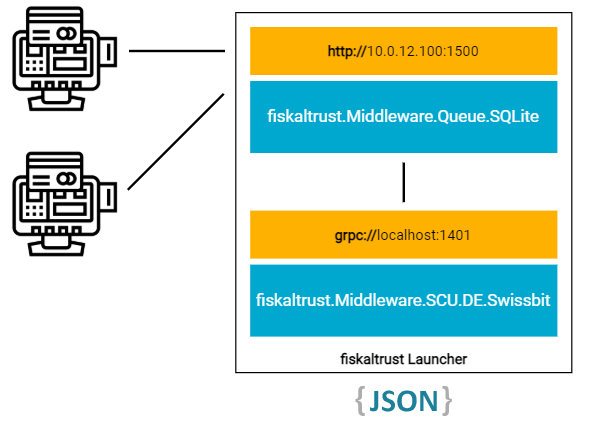
Middleware packages each provide specific fiscalization-, data source- and security device implementations. These package can be aggregated into a configuration container (_Cashbox_) in the fiskaltrust Portal. The Launcher then uses this configuration to decide which packages to download and run, and provides configurable hosted endpoints so that the POS software can communicate with them (e.g. gRPC or HTTP).
Below, we illustrate a minimal sample configuration with the international SQLite _Queue_ package (with a configured HTTP endpoint) and a German _Signature Creation Unit_ (with a gRPC endpoint) that abstracts a Swissbit TSS.
## Getting Started
Download the latest release from GitHub. We always recommend using the latest release to benefit from the newest improvements.
Unzip the downloaded release.
You can also download the Launcher from the fiskaltrust Portal (only sandbox at the moment), the Launcher will come with a preconfigured `launcher.configuration.json` file.
The download will contain the `fiskaltrust.Launcher` executable and `launcher-test`, `launcher-install`, `launcher-uninstall` `.cmd` or `.sh` scripts and a `launcher-migrate.cmd` script on Windows.
* The `launcher-test.cmd` or `launcher-test.sh` script can be used to test the Launcher.
It will start the Launcher with `--log-level` parameter set to debug.
* The `launcher-install.cmd` or `launcher-install.sh` script can be used to install the Launcher as a service.
* The `launcher-uninstall.cmd` or `launcher-uninstall.sh` script can be used to uninstall the Launcher as a service.
* The `launcher-migrate.cmd` script can be used to from migrate the Launcher 1.3 to the Launcher 2.0 (See [Migration Script](#automatic-migration-using-the-migration-script) for more information).
Alternatively you can start the Launcher via the command line:
```ps1
# Will use the configuration file `launcher.configuration.json` in the current directory
fiskaltrust.Launcher.exe run
# Will use the cashbox id and access token from the cli parameters
fiskaltrust.Launcher.exe run --cashbox-id --access-token --sandbox
```
To stop the Launcher press Ctrl + C.
> See help for other start parameters:
> ```sh
> fiskaltrust.Launcher.exe run --help
> ```
>
> See help for other available commands:
> ```sh
> fiskaltrust.Launcher.exe --help
> ```
> See [CLI](#cli) for more information.
### Installation
On Debian based Linux systems the Launcher can also be installed via `apt-get` . The executable will be installed at `/usr/bin/fiskaltrust.Launcher` and can be run like that `fiskaltrust.Launcher --help` .
```bash
curl -L http://downloads.fiskaltrust.cloud/apt-repo/KEY.gpg | gpg --dearmor | sudo tee /usr/share/keyrings/fiskaltrust-archive-keyring.gpg > /dev/null
echo "deb [signed-by=/usr/share/keyrings/fiskaltrust-archive-keyring.gpg] https://downloads.fiskaltrust.cloud/apt-repo stable main" | sudo tee /etc/apt/sources.list.d/fiskaltrust.list
sudo apt update
sudo apt install fiskaltrust-middleware-launcher
```
> When installed this way the self-update functionality of the launcher is disabled and it has to be updated via `apt-get` .
>
> ```bash
> sudo apt update && sudo apt install --only-upgrade fiskaltrust-middleware-launcher
> ```
### Supported Platforms
We build the launcher for the following platforms:
| OS | architecture |
|---------|--------------|
| Linux | `arm` |
| Linux | `arm64` |
| Linux | `x64` |
| MacOS | `x64` |
| MacOS | `arm64` |
| Windows | `x64` |
| Windows | `x86` |
For these build configurations the OS Versions [that .NET 8 supports](https://github.com/dotnet/core/blob/main/release-notes/8.0/supported-os.md) are supported by the launcher.
## Migration guide
Before switching from a 1.3 Launcher to a Launcher 2.0, please update the Queues, SCUs and Helpers to the latest packages.
Then download the new launcher from the Portal or the [GitHub release page](https://github.com/fiskaltrust/middleware-launcher/releases).
Run the `uninstall-service.cmd` or `uninstall-service.sh` command to deinstall the old launcher.
If you did not download the Launcher from the Portal manually create the [configuration file](#launcher-configuration), and make sure to include the `cashboxId` and `accessToken` and to set `sandbox` to true if needed.
In the new launcher folder execute the `launcher-install.cmd` or `launcher-install.sh` script or run the following command `.\fiskaltrust.Launcher.exe install`.
To check that the switch was successful, e.g. try sending receipt to the middleware using our Postman collection.
### Automatic Migration using the Migration Script
On Windows we provide a `launcher-migrate.cmd` script that can be used to migrate the Launcher 1.3 to the Launcher 2.0.
This script will migrate an existing service installation of the Launcher 1.3 to the Launcher 2.0.
To run this script unzip the downloaded Launcher 2.0 files into the folder containing the old Launcher 1.3.
> _The folder should now contain at least the following files:_
> ```
> .
> ├─ fiskaltrust.Launcher.exe
> ├─ launcher.configuration.json
> ├─ launcher-migrate.cmd
> └─ fiskaltrust.exe
> ```
And then run the `launcher-migrate.cmd` script as an administrator.
The script will do the following:
* Find the service of the old Launcher (`fiskaltrust.exe`)
* Stop and uninstall the service
* Install the new Launcher 2.0 as a service using the same service name as the old Launcher
* Backup the old Launcher 1.3 files to the `.backup` folder
## Launcher configuration
The Launcher 2.0 configuration is now read from a JSON file ( `launcher.configuration.json` in the working directory per default). The configuration has to be created manually.
This file can be set via the `--launcher-configuration-file` cli argument.
The configuration file should contain the following config keys:
```jsonc
{
"ftCashBoxId": "", // string
"accessToken": "", // string
"launcherPort": "", // int (default: 0)
"serviceFolder": "", // string (default-windows: "C:/ProgramData/fiskaltrust", default-linux: "/var/lib/fiskaltrust", default-macos: "/Library/Application Support/fiskaltrust")
"launcherDataFolder": "", // string (default-windows: "C:/ProgramData/fiskaltrust.Launcher", default-linux: "/var/lib/fiskaltrust.Launcher", default-macos: "/Library/Application Support/fiskaltrust.Launcher")
"sandbox": "", // bool (default: true)
"useOffline": "", // bool (default: false)
"launcherVersion": "", // string (default: null)
"logFolder": "", // string (default: "/logs")
"logLevel": "", // string (default: "Information")
"packageCache": "", // string (default: "/cache")
"packagesUrl": "", // string (default: "https://packages-2-0[-sandbox].fiskaltrust.cloud")
"helipadUrl": "", // string (default: "https://helipad[-sandbox].fiskaltrust.cloud")
"downloadRetry": "", // int (default: 1)
"sslValidation": "", // bool (default: false)
"proxy": "", // string (default: null)
"configurationUrl": "", // string (default: "https://configuration[-sandbox].fiskaltrust.cloud")
"downloadTimeoutSec": "", // int (default: 15)
"processHostPingPeriodSec": "", // int (default: 10)
"cashboxConfigurationFile": "", // string (default: "/service/Configuration-.json")
"useHttpSysBinding": "useHttpSysBinding", // bool (default: false)
}
```
All of these config keys can be overridden using the corresponding cli arguments.
## CLI
### `run`
The `run` command of the fiskaltrust.Launcher is used to execute the launcher, providing users with various options to configure its behaviour and logging details.
| Option | Description | Default |
|---------------------------------------------------------------|------------------------------------------------------------------------------------------------------------------|----------------------------------------------------------------------------------------------------------------------------------------------------------------|
| `--cashbox-id ` | Specifies the ID of the cashbox. | |
| `--access-token ` | Token used for authentication. | |
| `--sandbox` | Enables sandbox mode. | `false` |
| `--log-folder ` | Path to the folder where logs will be saved. | `"/logs"` |
| `--log-level ` | Determines the logging level. Accepts values like Critical, Debug, etc. | `"Information"` |
| `--launcher-configuration-file ` | Path to the launcher configuration file. | `"launcher.configuration.json"` |
| `--legacy-configuration-file ` | Path to the legacy configuration file. | `"fiskaltrust.exe.config"` |
| `--merge-legacy-config-if-exists` | If set, merges legacy configuration if it exists. | `true` |
| `--launcher-port ` | Specifies the port which the launcher will use for internal communication. A dynamic binding is used by default. | `0` |
| `--use-offline` | Enables offline mode. | `false` |
| `--service-folder ` | Path to the service folder. | Windows: `"C:/ProgramData/fiskaltrust"`
Linux: `"/var/lib/fiskaltrust"`
MacOS: `"/Library/Application Support/fiskaltrust"` |
| `--launcher-data-folder ` | Path to the launcher data folder. | Windows: `"C:/ProgramData/fiskaltrust.Launcher"`
Linux: `"/var/lib/fiskaltrust.Launcher"`
MacOS: `"/Library/Application Support/fiskaltrust.Launcher"` |
| `--configuration-url ` | URL to fetch the configuration from. | `"https://configuration[-sandbox].fiskaltrust.cloud"` |
| `--packages-url ` | URL to fetch packages from. | `"https://packages-2-0[-sandbox].fiskaltrust.cloud"` |
| `--package-cache ` | Cache directory for the packages. | `"/cache"` |
| `--helipad-url ` | URL for the helipad. | `"https://helipad[-sandbox].fiskaltrust.cloud"` |
| `--download-timeout-sec ` | Timeout for downloads in seconds. | `15` |
| `--download-retry ` | Number of times to retry a failed download. | `1` |
| `--ssl-validation` | Validates SSL certificates. | `true` |
| `--proxy ` | Proxy server details. | |
| `--processhost-ping-period-sec ` | Ping period for the process host in seconds. | `10` |
| `--cashbox-configuration-file ` | Path to the cashbox configuration file. | `""/service/Configuration-.json"` |
| `--tls-certificate-path ` | Path to the TLS certificate. | |
| `--tls-certificate-base64 ` | Base64 encoded TLS certificate. | |
| `--tls-certificate-password ` | Password for the TLS certificate. | |
| `--use-http-sys-binding ` | Uses HTTP sys binding. | `false` |
| `--use-legacy-data-protection ` | Enables use of legacy data protection. | `false` |
| `-?` , `-h` , `--help` | Displays help and usage information. | |
## `config`
### `config get`
The `config get` command of the fiskaltrust.Launcher can be used to get the current values of the Launcher configuration file.
> **Usage:**
>
> `fiskaltrust.Launcher.exe config get`
>
> `fiskaltrust.Launcher.exe config --launcher-configuration-file get` To use an other location of the configuration file.
### `config set`
The `config set` command of the fiskaltrust.Launcher can be used to set configuration values in the Launcher configuration file.
> **Usage:**
>
> `fiskaltrust.Launcher.exe config set -- `
>
> E.g. `fiskaltrust.Launcher.exe config set --log-leve Debug`
## `doctor`
The `doctor` command of the fiskaltrust.Launcher can be used to for troubleshooting launcher problems. It can be run with the same cli parameters as the `run` command.
The `doctor` command should give the following output when run successfully:
```
[10:11:09 INF] ✅ Parse launcher configuration
[10:11:10 INF] ✅ Load ECDH Curve
[10:11:10 INF] ✅ Download cashbox configuration
[10:11:10 INF] ✅ Parse cashbox configuration in launcher configuration
[10:11:11 INF] ✅ Parse cashbox configuration
[10:11:11 INF] ✅ Decrypt cashbox configuration
[10:11:11 INF] ✅ Setup data protection
[10:11:11 INF] ✅ Decrypt launcher configuration
[10:11:11 INF] ✅ Setup monarch services
[10:11:11 INF] ✅ Setup monarch ProcessHostService
[10:11:11 INF] ✅ Build monarch WebApplication
[10:11:11 INF] ✅ Start monarch WebApplication
[10:11:11 INF] ✅ Start plebian processhostservice client
[10:11:11 INF] ✅ Setup plebian services
[10:11:11 INF] ✅ Build plebian Host
[10:11:11 INF] ✅ Start plebian Host
[10:11:11 INF] ✅ Shutdown launcher gracefully
[10:11:11 INF] Doctor found no issues.
```
## Service
The Launcher 2.0 can be installed as a service on Windows and Linux (when `systemd` is available) using the `install` command:
```sh
fiskaltrust.Launcher.exe install --cashbox-id --access-token --launcher-configuration-file
```
## Self update
The Launcher 2.0 can update itself automatically. For this the `launcherVersion` must be set in the [launcher configuration file](#launcher-configuration).
This can be set to a specific version (e.g. `"launcherVersion": "2.0.0-preview3"` updates to version `2.0.0-preview3` ).
Or this can be set to a [SemVer Range](https://devhints.io/semver#ranges) (e.g. `"launcherVersion": ">= 2.0.0-preview3 < 2.0.0"` automatically updates to all preview versions greater or equal to `2.0.0-preview3` but does not update to non preview versions).
## Getting Started for developers
Clone this GitHub repository and build the project with Visual Studio.
When using VS Code, please ensure that the following command line parameters are passed to `dotnet build` to enable seamless debugging: `-p:PublishSingleFile=true -p:PublishReadyToRun=true` .
## FAQ
**Q:** Are additional components required to be installed to be able to run the Launcher 2.0?
**A:** The Launcher 2.0 does not require any additional components to be installed.
---
**Q:** Which market can test the launcher 2.0?
**A:** Right now only the German and Italian market can test the launcher 2.0. It is possible for everyone to register to the German/Italian sandbox and test the launcher 2.0. Also, we are working on making the launcher available for all markets.
---
**Q:** Is it possible to update the launcher version (e.g. from 1.3 to 2.0)?
**A:** It is possible to switch the launcher version from 1.3 to 2.0 using the version Launcher `2.0.0-rc.3` and later versions.
---
**Q:** Can I use port sharing to run multiple Queues or SCUs on the same port (e.g. `rest://localhost:1500/queue1` and `rest://localhost:1500/queue2` )
**A:** Yes this is possible by setting the launcher config parameter `useHttpSysBinding` to true.
HttpSysBinding has some limitations:
* It is only supported on windows
* It is not supported for GRPC communication
* The launcher may need to be run as an administrator
* No TLS certificates can be set
## Known Issues
* The Launcher has access problems when writing to the keyring on Linux if run as a service.
The launcher configuration parameter `useLegacyDataProtection` needs to be set to `true` as a workaround. ([#100](https://github.com/fiskaltrust/middleware-launcher/issues/100)
## Contributing
We welcome all kinds of contributions and feedback, e.g. via issues or pull requests, and want to thank every future contributors in advance!
Please check out the [contribution guidelines](CONTRIBUTING.md) for more detailed information about how to proceed.
## License
The fiskaltrust Middleware is released under the [EUPL 1.2](./LICENSE).
As a Compliance-as-a-Service provider, the security and authenticity of the products installed on our users' endpoints is essential to us. To ensure that only peer-reviewed binaries are distributed by maintainers, fiskaltrust explicitly reserves the sole right to use the brand name "fiskaltrust Middleware" (and the brand names of related products and services) for the software provided here as open source - regardless of the spelling or abbreviation, as long as conclusions can be drawn about the original product name.
The fiskaltrust Middleware (and related products and services) as contained in these repositories may therefore only be used in the form of binaries signed by fiskaltrust.