https://github.com/fityannugroho/openmusic-api
API that store free-music playlist to everybody
https://github.com/fityannugroho/openmusic-api
api dicoding dicoding-submission music playlist
Last synced: about 1 year ago
JSON representation
API that store free-music playlist to everybody
- Host: GitHub
- URL: https://github.com/fityannugroho/openmusic-api
- Owner: fityannugroho
- License: mit
- Created: 2022-07-15T06:52:54.000Z (almost 4 years ago)
- Default Branch: main
- Last Pushed: 2024-12-10T22:57:26.000Z (over 1 year ago)
- Last Synced: 2025-02-11T11:57:04.232Z (over 1 year ago)
- Topics: api, dicoding, dicoding-submission, music, playlist
- Language: JavaScript
- Homepage:
- Size: 768 KB
- Stars: 0
- Watchers: 0
- Forks: 1
- Open Issues: 1
-
Metadata Files:
- Readme: README.md
- License: LICENSE
Awesome Lists containing this project
README
OpenMusic API
API that store free-music playlist to everybody.
Table of Contents
- [Data](#data)
- [User](#user)
- [Album](#album)
- [Song](#song)
- [Playlist](#playlist)
- [Collaboration](#collaboration)
- [Data Relations](#data-relations)
- [API Endpoint](#api-endpoint)
- [User](#user-1)
- [1. Create a user](#1-create-a-user)
- [Authentication](#authentication)
- [1. Login](#1-login)
- [2. Update the access token](#2-update-the-access-token)
- [3. Logout](#3-logout)
- [Album](#album-1)
- [1. Add an album](#1-add-an-album)
- [2. Get an album](#2-get-an-album)
- [3. Edit an album](#3-edit-an-album)
- [4. Delete an album](#4-delete-an-album)
- [5. Upload album cover](#5-upload-album-cover)
- [6. Like an album](#6-like-an-album)
- [7. Unlike an album](#7-unlike-an-album)
- [8. Get total likes of an album](#8-get-total-likes-of-an-album)
- [Song](#song-1)
- [1. Add a song](#1-add-a-song)
- [2. Get songs](#2-get-songs)
- [3. Get a song](#3-get-a-song)
- [4. Edit a song](#4-edit-a-song)
- [5. Delete a song](#5-delete-a-song)
- [Playlist](#playlist-1)
- [1. Add a playlist](#1-add-a-playlist)
- [2. Get playlists](#2-get-playlists)
- [3. Delete a playlist](#3-delete-a-playlist)
- [4. Add a song to playlist](#4-add-a-song-to-playlist)
- [5. Get songs from playlist](#5-get-songs-from-playlist)
- [6. Remove a song from playlist](#6-remove-a-song-from-playlist)
- [7. Get playlist activities](#7-get-playlist-activities)
- [Collaboration](#collaboration-1)
- [1. Add a collaborator](#1-add-a-collaborator)
- [2. Remove a collaborator](#2-remove-a-collaborator)
- [Export](#export)
- [Export your playlist](#export-your-playlist)
## Data
This API will store data that has attributes like the following:
### User
The user has the following attributes:
```json
{
"id": "string",
"username": "string",
"password": "string",
"fullname": "string",
}
```
This is an example of the user:
```json
{
"id": "user-RpSB2ThuGNLvYkdx",
"username": "johndoe",
"password": "secretpassword",
"fullname": "John Doe"
}
```
### Album
The album has the following attributes:
```json
{
"id": "string",
"name": "string",
"year": "number"
}
```
This is an example of the album:
```json
{
"id": "album-Mk8AnmCp210PwT6B",
"name": "Viva la Vida",
"year": 2008
}
```
### Song
The song has the following attributes:
```json
{
"id": "string",
"title": "string",
"year": "number",
"genre": "string",
"performer": "string",
"duration": "number",
"albumId": "string"
}
```
This is an example of the song:
```json
{
"id": "song-Qbax5Oy7L8WKf74l",
"title": "Life in Technicolor",
"year": 2008,
"performer": "Coldplay",
"genre": "Indie",
"duration": 120,
"albumId": "album-Mk8AnmCp210PwT6B"
}
```
### Playlist
The playlist has the following attributes:
```json
{
"id": "string",
"name": "string",
"owner": "string",
}
```
This is an example of the playlist:
```json
{
"id": "playlist-Xm0SsnNJDP4p56kt",
"name": "Viva la Vida",
"owner": "user-RpSB2ThuGNLvYkdx"
}
```
### Collaboration
The collaboration has the following attributes:
```json
{
"id": "string",
"playlistId": "string",
"userId": "string"
}
```
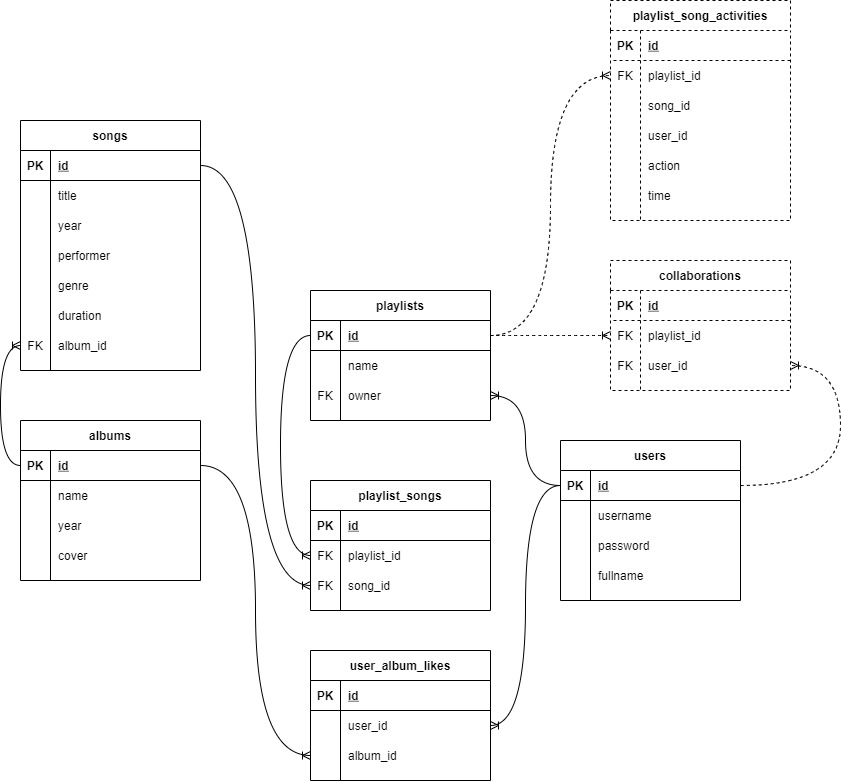
### Data Relations
The following is the relations between the data:
## API Endpoint
### User
#### 1. Create a user
Use this endpoint to create a new user.
```raml
/users:
post:
description: Create a new user.
request:
body:
application/json:
example: |
{
"username": "johndoe",
"password": "secretpassword",
"fullname": "John Doe"
}
responses:
201:
body:
application/json:
example: |
{
"status": "success",
"data": {
"userId": "user-RpSB2ThuGNLvYkdx"
}
}
400:
body:
application/json:
example: |
{
"status": "fail",
"message": ""
}
500:
body:
application/json:
example: |
{
"status": "error",
"message": "Something went wrong in our server."
}
```
### Authentication
To authenticate a user, you need to send a username and password. The username and password will be checked against the database. If the username and password are correct, some **tokens** will be returned.
- The **`accessToken`** will be used to access the restricted endpoints.
- The **`refreshToken`** will be used to refresh the `accessToken` if it expires.
Both tokens use **JWT format** which contains the `userId` in the payload.
> See [JWT](https://jwt.io/) for more information.
#### 1. Login
Use this endpoint to login.
```raml
/authentications:
post:
description: User login.
request:
body:
application/json:
example: |
{
"username": "johndoe",
"password": "secretpassword"
}
responses:
201:
body:
application/json:
example: |
{
"status": "success",
"data": {
"accessToken": "",
"refreshToken": "",
}
}
400:
body:
application/json:
example: |
{
"status": "fail",
"message": ""
}
500:
body:
application/json:
example: |
{
"status": "error",
"message": "Something went wrong in our server."
}
```
#### 2. Update the access token
Use this endpoint to update the user's access token.
```raml
/authentications:
put:
description: Update the access token.
request:
body:
application/json:
example: |
{
"refreshToken": ""
}
responses:
200:
body:
application/json:
example: |
{
"status": "success",
"data": {
"accessToken": ""
}
}
400:
body:
application/json:
example: |
{
"status": "fail",
"message": ""
}
500:
body:
application/json:
example: |
{
"status": "error",
"message": "Something went wrong in our server."
}
```
#### 3. Logout
Use this endpoint to logout.
```raml
/authentications:
delete:
description: User logout.
request:
body:
application/json:
example: |
{
"refreshToken": ""
}
responses:
200:
body:
application/json:
example: |
{
"status": "success",
"message": "User successfully logged out."
}
400:
body:
application/json:
example: |
{
"status": "fail",
"message": ""
}
500:
body:
application/json:
example: |
{
"status": "error",
"message": "Something went wrong in our server."
}
```
### Album
#### 1. Add an album
Use this endpoint to add a new album.
```raml
/albums:
post:
description: Add a new album.
request:
body:
application/json:
example: |
{
"name": "Viva la Vida",
"year": 2008
}
responses:
201:
body:
application/json:
example: |
{
"status": "success",
"data": {
"albumId": "album-Mk8AnmCp210PwT6B"
}
}
400:
body:
application/json:
example: |
{
"status": "fail",
"message": ""
}
500:
body:
application/json:
example: |
{
"status": "error",
"message": "Something went wrong in our server."
}
```
#### 2. Get an album
Use this endpoint to get an album.
> `coverUrl` will be `null` if album doesn't have any cover.
```raml
/albums/{albumId}:
get:
description: Get an album.
responses:
200:
body:
application/json:
example: |
{
"status": "success",
"data": {
"album": {
"id": "album-Mk8AnmCp210PwT6B",
"name": "Viva la Vida",
"year": 2008,
"coverUrl": "http://..."
"songs": [
{
"id": "song-Qbax5Oy7L8WKf74l",
"title": "Life in Technicolor",
"year": 2008,
"performer": "Coldplay",
"genre": "Indie",
"duration": 120,
"albumId": "album-Mk8AnmCp210PwT6B"
}
]
}
}
}
404:
body:
application/json:
example: |
{
"status": "fail",
"message": "Album not found."
}
500:
body:
application/json:
example: |
{
"status": "error",
"message": "Something went wrong in our server."
}
```
#### 3. Edit an album
Use this endpoint to edit an album.
```raml
/albums/{albumId}:
put:
description: Edit an album.
request:
body:
application/json:
example: |
{
"name": "Viva la Vida",
"year": 2008
}
responses:
200:
body:
application/json:
example: |
{
"status": "success",
"message": "Album successfully updated."
}
400:
body:
application/json:
example: |
{
"status": "fail",
"message": ""
}
404:
body:
application/json:
example: |
{
"status": "fail",
"message": "Album not found."
}
500:
body:
application/json:
example: |
{
"status": "error",
"message": "Something went wrong in our server."
}
```
#### 4. Delete an album
Use this endpoint to delete an album.
```raml
/albums/{albumId}:
delete:
description: Delete an album.
responses:
200:
body:
application/json:
example: |
{
"status": "success",
"message": "Album successfully deleted."
}
404:
body:
application/json:
example: |
{
"status": "fail",
"message": "Album not found."
}
500:
body:
application/json:
example: |
{
"status": "error",
"message": "Something went wrong in our server."
}
```
#### 5. Upload album cover
Use this endpoint to upload an album cover.
Please note that the old cover will be replaced by new cover.
```raml
/albums/{albumId}/cover:
post:
description: Upload an album cover.
request:
body:
multipart/form-data:
example: |
{
"cover": ""
}
responses:
200:
body:
application/json:
example: |
{
"status": "success",
"message": "Album cover successfully uploaded."
}
400:
body:
application/json:
example: |
{
"status": "fail",
"message": ""
}
404:
body:
application/json:
example: |
{
"status": "fail",
"message": "Album not found."
}
500:
body:
application/json:
example: |
{
"status": "error",
"message": "Something went wrong in our server."
}
```
#### 6. Like an album
Use this endpoint to like an album.
```raml
/albums/{albumId}/likes:
post:
description: Like an album.
responses:
201:
body:
application/json:
example: |
{
"status": "success",
"message": "Album successfully liked."
}
400:
body:
application/json:
example: |
{
"status": "fail",
"message": "You already liked this album."
}
401:
body:
application/json:
example: |
{
"status": "fail",
"message": "You must be logged in to like an album."
}
404:
body:
application/json:
example: |
{
"status": "fail",
"message": "Album not found."
}
500:
body:
application/json:
example: |
{
"status": "error",
"message": "Something went wrong in our server."
}
```
#### 7. Unlike an album
Use this endpoint to unlike an album.
```raml
/albums/{albumId}/likes:
delete:
description: Unlike an album.
responses:
200:
body:
application/json:
example: |
{
"status": "success",
"message": "Album successfully unliked."
}
401:
body:
application/json:
example: |
{
"status": "fail",
"message": "You must be logged in to unlike an album."
}
404:
body:
application/json:
example: |
{
"status": "fail",
"message": "Album not found."
}
500:
body:
application/json:
example: |
{
"status": "error",
"message": "Something went wrong in our server."
}
```
#### 8. Get total likes of an album
Use this endpoint to get total likes of an album.
```raml
/albums/{albumId}/likes:
get:
description: Get total likes of an album.
responses:
200:
body:
application/json:
example: |
{
"status": "success",
"data": {
"likes": 100
}
}
404:
body:
application/json:
example: |
{
"status": "fail",
"message": "Album not found."
}
500:
body:
application/json:
example: |
{
"status": "error",
"message": "Something went wrong in our server."
}
```
### Song
#### 1. Add a song
Use this endpoint to add a new song.
```raml
/songs:
post:
description: Add a new song.
request:
body:
application/json:
example: |
{
"title": "Life in Technicolor",
"year": 2008,
"genre": "Indie",
"performer": "Coldplay",
"duration": 120,
"albumId": "album-Mk8AnmCp210PwT6B"
}
responses:
201:
body:
application/json:
example: |
{
"status": "success",
"data": {
"songId": "song-Qbax5Oy7L8WKf74l"
}
}
400:
body:
application/json:
example: |
{
"status": "fail",
"message": ""
}
500:
body:
application/json:
example: |
{
"status": "error",
"message": "Something went wrong in our server."
}
```
#### 2. Get songs
Use this endpoint to get songs, and optionally filter them by `title` and `performer`.
```raml
/songs:
get:
description: Get all songs.
queryParameters:
- name: title
type: string
description: Title of the song.
required: false
- name: performer
type: string
description: Performer of the song.
required: false
responses:
200:
body:
application/json:
example: |
{
"status": "success",
"data": {
"songs": [
{
"id": "song-Qbax5Oy7L8WKf74l",
"title": "Life in Technicolor",
"performer": "Coldplay",
}
]
}
}
500:
body:
application/json:
example: |
{
"status": "error",
"message": "Something went wrong in our server."
}
```
#### 3. Get a song
Use this endpoint to get a song.
```raml
/songs/{songId}:
get:
description: Get a song.
responses:
200:
body:
application/json:
example: |
{
"status": "success",
"data": {
"song": {
"id": "song-Qbax5Oy7L8WKf74l",
"title": "Life in Technicolor",
"year": 2008,
"genre": "Indie",
"performer": "Coldplay",
"duration": 120,
"albumId": "album-Mk8AnmCp210PwT6B"
}
}
}
404:
body:
application/json:
example: |
{
"status": "fail",
"message": "Song not found."
}
500:
body:
application/json:
example: |
{
"status": "error",
"message": "Something went wrong in our server."
}
```
#### 4. Edit a song
Use this endpoint to edit a song.
```raml
/songs/{songId}:
put:
description: Edit a song.
request:
body:
application/json:
example: |
{
"title": "Life in Technicolor",
"year": 2008,
"genre": "Indie",
"performer": "Coldplay",
"duration": 120,
"albumId": "album-Mk8AnmCp210PwT6B"
}
responses:
200:
body:
application/json:
example: |
{
"status": "success",
"message": "Song successfully updated."
}
400:
body:
application/json:
example: |
{
"status": "fail",
"message": ""
}
404:
body:
application/json:
example: |
{
"status": "fail",
"message": "Song not found."
}
500:
body:
application/json:
example: |
{
"status": "error",
"message": "Something went wrong in our server."
}
```
#### 5. Delete a song
Use this endpoint to delete a song.
```raml
/songs/{songId}:
delete:
description: Delete a song.
responses:
200:
body:
application/json:
example: |
{
"status": "success",
"message": "Song successfully deleted."
}
404:
body:
application/json:
example: |
{
"status": "fail",
"message": "Song not found."
}
500:
body:
application/json:
example: |
{
"status": "error",
"message": "Something went wrong in our server."
}
```
### Playlist
Playlist is a restricted resource. To access it requires an access token. Only the playlist owner (or collaborator) can add, view, and delete songs to/from the playlist.
#### 1. Add a playlist
Use this endpoint to add a new playlist.
```raml
/playlists:
post:
description: Add a new playlist.
request:
body:
application/json:
example: |
{
"name": "My Playlist",
}
responses:
201:
body:
application/json:
example: |
{
"status": "success",
"data": {
"playlistId": "playlist-8b8b8b8b8b8b8b8b"
}
}
400:
body:
application/json:
example: |
{
"status": "fail",
"message": ""
}
401:
body:
application/json:
example: |
{
"status": "fail",
"message": "Unauthorized"
}
500:
body:
application/json:
example: |
{
"status": "error",
"message": "Something went wrong in our server."
}
```
#### 2. Get playlists
Use this endpoint to get playlists. The playlists that appear are the ones that the user has access to (as the owner or the collaborator).
```raml
/playlists:
get:
description: Get all playlists that user own it or collaborates to it.
responses:
200:
body:
application/json:
example: |
{
"status": "success",
"data": {
"playlists": [
{
"id": "playlist-8b8b8b8b8b8b8b8b",
"name": "Lagu Indie Hits Indonesia",
"username": "dicoding"
},
]
}
}
401:
body:
application/json:
example: |
{
"status": "fail",
"message": "Unauthorized"
}
500:
body:
application/json:
example: |
{
"status": "error",
"message": "Something went wrong in our server."
}
```
#### 3. Delete a playlist
Use this endpoint to delete a playlist.
```raml
/playlists/{playlistId}:
delete:
description: Delete a playlist.
responses:
200:
body:
application/json:
example: |
{
"status": "success",
"message": "Playlist successfully deleted."
}
401:
body:
application/json:
example: |
{
"status": "fail",
"message": "Unauthorized"
}
404:
body:
application/json:
example: |
{
"status": "fail",
"message": "Playlist not found."
}
500:
body:
application/json:
example: |
{
"status": "error",
"message": "Something went wrong in our server."
}
```
#### 4. Add a song to playlist
Use this endpoint to add a song to a playlist. The songId inserted/deleted to/from the playlist must be a valid song id.
```raml
/playlists/{playlistId}/songs:
post:
description: Add a song to a playlist.
request:
body:
application/json:
example: |
{
"songId": "song-Qbax5Oy7L8WKf74l"
}
responses:
201:
body:
application/json:
example: |
{
"status": "success",
"message": "Song successfully added to playlist."
}
400:
body:
application/json:
example: |
{
"status": "fail",
"message": ""
}
401:
body:
application/json:
example: |
{
"status": "fail",
"message": "Unauthorized"
}
404:
body:
application/json:
example: |
{
"status": "fail",
"message": "Playlist not found."
}
500:
body:
application/json:
example: |
{
"status": "error",
"message": "Something went wrong in our server."
}
```
#### 5. Get songs from playlist
```raml
/playlists/{playlistId}/songs:
get:
description: Get all song in a playlist.
responses:
200:
body:
application/json:
example: |
{
"status": "success",
"data": {
"playlist": {
"id": "playlist-8b8b8b8b8b8b8b8b",
"name": "Lagu Indie Hits Indonesia",
"username": "dicoding",
"songs": [
{
"id": "song-Qbax5Oy7L8WKf74l",
"title": "Life in Technicolor",
"performer": "Coldplay"
}
}
},
]
}
401:
body:
application/json:
example: |
{
"status": "fail",
"message": "Unauthorized"
}
404:
body:
application/json:
example: |
{
"status": "fail",
"message": "Playlist not found."
}
500:
body:
application/json:
example: |
{
"status": "error",
"message": "Something went wrong in our server."
}
```
#### 6. Remove a song from playlist
Use this endpoint to remove a song from playlist.
```raml
/playlists/{playlistId}/songs:
delete:
description: Remove a song from playlist.
request:
body:
application/json:
example: |
{
"songId": "song-Qbax5Oy7L8WKf74l"
}
responses:
200:
body:
application/json:
example: |
{
"status": "success",
"message": "Song successfully removed from playlist."
}
400:
body:
application/json:
example: |
{
"status": "fail",
"message": ""
}
401:
body:
application/json:
example: |
{
"status": "fail",
"message": "Unauthorized"
}
404:
body:
application/json:
example: |
{
"status": "fail",
"message": "Playlist not found."
}
500:
body:
application/json:
example: |
{
"status": "error",
"message": "Something went wrong in our server."
}
```
#### 7. Get playlist activities
Use this endpoint to get all activities in a playlist.
```raml
/playlists/{playlistId}/activities:
get:
description: Get all activities in a playlist.
responses:
200:
body:
application/json:
example: |
{
"status": "success",
"data": {
"playlistId": "playlist-8b8b8b8b8b8b8b8b",
"activities": [
{
"id": "activity-8b8b8b8b8b8b8b8b",
"username": "dicoding",
"songTitle": "Life in Technicolor",
"timestamp": "2021-08-08T07:17:01.000Z",
"action": "add"
}
]
}
}
401:
body:
application/json:
example: |
{
"status": "fail",
"message": "Unauthorized"
}
404:
body:
application/json:
example: |
{
"status": "fail",
"message": "Playlist not found."
}
500:
body:
application/json:
example: |
{
"status": "error",
"message": "Something went wrong in our server."
}
```
### Collaboration
Manage who can see and modify the songs in your playlist.
#### 1. Add a collaborator
Use this endpoint to add a collaborator to a playlist. The collaborator must be a valid user.
```raml
/collaborations:
post:
description: Add a collaborator to a playlist.
request:
body:
application/json:
example: |
{
"playlistId": "playlist-8b8b8b8b8b8b8b8b",
"userId": "user-8b8b8b8b8b8b8b8b"
}
responses:
201:
body:
application/json:
example: |
{
"status": "success",
"message": "Collaborator successfully added to playlist."
}
400:
body:
application/json:
example: |
{
"status": "fail",
"message": ""
}
401:
body:
application/json:
example: |
{
"status": "fail",
"message": "Unauthorized"
}
404:
body:
application/json:
example: |
{
"status": "fail",
"message": "Playlist or user not found."
}
500:
body:
application/json:
example: |
{
"status": "error",
"message": "Something went wrong in our server."
}
```
#### 2. Remove a collaborator
```raml
/collaborations:
delete:
description: Remove a collaborator from a playlist.
request:
body:
application/json:
example: |
{
"playlistId": "playlist-8b8b8b8b8b8b8b8b",
"userId": "user-8b8b8b8b8b8b8b8b"
}
responses:
200:
body:
application/json:
example: |
{
"status": "success",
"message": "Collaborator successfully deleted from playlist."
}
400:
body:
application/json:
example: |
{
"status": "fail",
"message": ""
}
401:
body:
application/json:
example: |
{
"status": "fail",
"message": "Unauthorized"
}
404:
body:
application/json:
example: |
{
"status": "fail",
"message": "Playlist or user not found."
}
500:
body:
application/json:
example: |
{
"status": "error",
"message": "Something went wrong in our server."
}
```
### Export
#### Export your playlist
Use this endpoint to export your playlist to a file and will be send it to your email.
Only playlist owner can export the playlist.
```raml
/export/playlists/{playlistId}:
post:
description: Export your playlist to a file and will be send it to your email.
request:
body:
application/json:
example: |
{
"targetEmail": "your@email.com"
}
responses:
201:
body:
application/json:
example: |
{
"status": "success",
"message": "Permintaan Anda sedang kami proses."
}
401:
body:
application/json:
example: |
{
"status": "fail",
"message": "Unauthorized"
}
403:
body:
application/json:
example: |
{
"status": "fail",
"message": "You are not the owner of this playlist."
}
404:
body:
application/json:
example: |
{
"status": "fail",
"message": "Playlist not found."
}
500:
body:
application/json:
example: |
{
"status": "error",
"message": "Something went wrong in our server."
}
```
The exported data will be attached in the email as json file like this:
```json
{
"playlist": {
"id": "playlist-Mk8AnmCp210PwT6B",
"name": "My Favorite Coldplay Song",
"songs": [
{
"id": "song-Qbax5Oy7L8WKf74l",
"title": "Life in Technicolor",
"performer": "Coldplay"
},
{
"id": "song-poax5Oy7L8WKllqw",
"title": "Centimeteries of London",
"performer": "Coldplay"
},
{
"id": "song-Qalokam7L8WKf74l",
"title": "Lost!",
"performer": "Coldplay"
}
]
}
}
```