https://github.com/fiveelementninja/steam-count-ready-badges
Shows how many badges you have waiting to be crafted on the badges page
https://github.com/fiveelementninja/steam-count-ready-badges
Last synced: about 1 month ago
JSON representation
Shows how many badges you have waiting to be crafted on the badges page
- Host: GitHub
- URL: https://github.com/fiveelementninja/steam-count-ready-badges
- Owner: FiveElementNinja
- License: mit
- Created: 2016-01-27T00:54:35.000Z (over 10 years ago)
- Default Branch: master
- Last Pushed: 2019-05-22T23:16:25.000Z (about 7 years ago)
- Last Synced: 2025-03-10T18:45:23.791Z (over 1 year ago)
- Language: JavaScript
- Size: 140 KB
- Stars: 0
- Watchers: 1
- Forks: 0
- Open Issues: 0
-
Metadata Files:
- Readme: README.md
- License: LICENSE
Awesome Lists containing this project
README
# Steam Count Ready Badges
This script adds a count of badges ready to craft on your [Badges](https://steamcommunity.com/my/badges) page on Steam.
## Installation
1. Make sure you have [Greasemonkey](https://addons.mozilla.org/firefox/addon/greasemonkey/) if you're using Firefox, or [Tampermonkey](https://chrome.google.com/webstore/detail/tampermonkey/dhdgffkkebhmkfjojejmpbldmpobfkfo) if you're using Chome. Steam Count Ready Badges will not work without Greasemonkey or Tampermonkey.
2. After Greasemonkey/Tampermonkey are installed, visit https://raw.githubusercontent.com/FiveElementNinja/Steam-Count-Ready-Badges/master/steam-count-ready-badges.user.js and it will prompt you to install the script.
**Note:** If you get a message saying scripts can't be installed from this site, you'll need to go to the Tampermonkey dashboard and in the Utilities tab there is a field to import from URL. Simply paste
```
https://raw.githubusercontent.com/FiveElementNinja/Steam-Count-Ready-Badges/master/steam-count-ready-badges.user.js
```
in there and click Import and then it should prompt you to install.
## Usage
1. Once Steam Count Ready Badges is installed, visit your [Badges](https://steamcommunity.com/my/badges) page to see the count.

3. You can also hover over the **(?)** to see a list of games that the badges are for.
[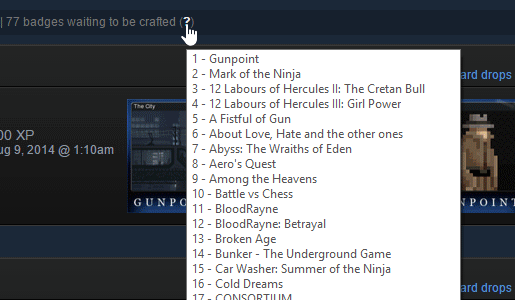](https://github.com/FiveElementNinja/Steam-Count-Ready-Badges/blob/master/assets/badges-ready.gif?raw=true)
## Notes
* **This script probably won't serve any purpose for you if you craft badges as you get them.**
* This will only show the badges ready count for the page you're on. There is some logic to try and figure out the count for pages *up to* the page you're on, but it isn't foolproof.
* Similarly, the games list tooltip will only list games for the page you're on.
* The games list tooltip height is limited to your screen size, so if your list gets too long to fit on screen it will get truncated in its current implementation.
* If you run into any issues or errors, shoot me a message me on Twitter: [@FivElementNinja](https://twitter.com/FivElementNinja)
* ***This script is auto-updating. You should only install auto-updating scripts from sources you trust. If you are not comfortable with that, don't install this script.***
## Wishlist/To-Do
* Add a way to get the badges ready count and games list for all badge pages, not just the page you're on.
* Change how the games list popup is done so that it won't get truncated.
* Calculate and show how much XP you'll gain and what level you'll be after crafting all your ready badges.
* Find a way to use the user's localization for the text without having to add localization strings into this script.
## Why?
I like to wait until a Summer or Winter sale to craft my badges so that I get a sale card for each one, which helps me craft the sale badge even higher than I would normally. Eventually, I have so many badges waiting that it gets hard to tell how many are ready, which is why I made this script. It also gives me an idea how many sale cards I'll be getting once I do craft them all, helping me to determine how many times I can craft the sale badge and how much XP I'll gain.
Additionally, this has the added benefit of letting me know when I have new badges ready to craft after doing some trading.