https://github.com/fivetran/dbt_shopify
Fivetran's Shopify dbt package
https://github.com/fivetran/dbt_shopify
dbt dbt-packages fivetran shopify
Last synced: 6 months ago
JSON representation
Fivetran's Shopify dbt package
- Host: GitHub
- URL: https://github.com/fivetran/dbt_shopify
- Owner: fivetran
- License: apache-2.0
- Created: 2020-08-27T19:21:53.000Z (almost 6 years ago)
- Default Branch: main
- Last Pushed: 2025-03-27T16:10:20.000Z (over 1 year ago)
- Last Synced: 2025-03-30T02:04:14.440Z (over 1 year ago)
- Topics: dbt, dbt-packages, fivetran, shopify
- Language: Shell
- Homepage: https://fivetran.github.io/dbt_shopify/
- Size: 4.48 MB
- Stars: 62
- Watchers: 43
- Forks: 40
- Open Issues: 6
-
Metadata Files:
- Readme: README.md
- Changelog: CHANGELOG.md
- License: LICENSE
Awesome Lists containing this project
README
# Shopify dbt Package





This dbt package transforms data from Fivetran's Shopify connector into analytics-ready tables.
## Resources
- Number of materialized models¹: 107 (REST API) / 117 (GraphQL API)
- Connector documentation
- [Shopify connector documentation](https://fivetran.com/docs/connectors/applications/shopify)
- [Shopify ERD](https://fivetran.com/docs/connectors/applications/shopify#schemainformation)
- dbt package documentation
- [GitHub repository](https://github.com/fivetran/dbt_shopify)
- [dbt Docs](https://fivetran.github.io/dbt_shopify/#!/overview)
- [DAG](https://fivetran.github.io/dbt_shopify/#!/overview?g_v=1)
- [Changelog](https://github.com/fivetran/dbt_shopify/blob/main/CHANGELOG.md)
## What does this dbt package do?
This package enables you to transform core object tables into analytics-ready models and understand customer behavior over time through cohort analysis. It creates enriched models with metrics focused on customer retention, product performance, and revenue analysis.
### Output schema
Final output tables are generated in the following target schema:
```
._shopify
```
### Final output tables
By default, this package materializes the following final tables:
| Table | Description |
| :---- | :---- |
| [shopify__customer_cohorts](https://fivetran.github.io/dbt_shopify/#!/model/model.shopify.shopify__customer_cohorts) or
[shopify_gql__customer_cohorts](https://fivetran.github.io/dbt_shopify/#!/model/model.shopify.shopify_gql__customer_cohorts) | Monthly customer behavior tracking by acquisition cohorts, showing retention rates, spending patterns, and lifetime value progression for each customer ID.
**Example Analytics Questions:**
• What is the month-over-month retention rate for customers by their first purchase month?
• Which customer cohorts have the highest lifetime value progression over their first 12 months? |
| [shopify__customers](https://fivetran.github.io/dbt_shopify/#!/model/model.shopify.shopify__customers) or
[shopify_gql__customers](https://fivetran.github.io/dbt_shopify/#!/model/model.shopify.shopify_gql__customers) | Complete customer profiles with lifetime spending, order history, abandoned checkouts, and customer tags. Includes `CUSTOMER` metafields if enabled.
**Example Analytics Questions:**
• Who are the top 100 customers by lifetime spending and what are their purchase patterns?
• How many customers have abandoned checkouts but never completed a purchase? |
| [shopify__customer_email_cohorts](https://fivetran.github.io/dbt_shopify/#!/model/model.shopify.shopify__customer_email_cohorts) or
[shopify_gql__customer_email_cohorts](https://fivetran.github.io/dbt_shopify/#!/model/model.shopify.shopify_gql__customer_email_cohorts) | Email-based cohort analysis showing retention and purchasing behavior grouped by email address rather than customer ID, useful for tracking guest checkout behavior.
**Example Analytics Questions:**
• How does email-based customer retention compare across different acquisition months?
• What is the average time between first and second purchase for email addresses acquired in each cohort month? |
| [shopify__customer_emails](https://fivetran.github.io/dbt_shopify/#!/model/model.shopify.shopify__customer_emails) or
[shopify_gql__customer_emails](https://fivetran.github.io/dbt_shopify/#!/model/model.shopify.shopify_gql__customer_emails) | Email address performance summary with lifetime value, order count, and purchase timing metrics, perfect for email marketing segmentation.
**Example Analytics Questions:**
• Which email addresses have the highest lifetime value and how many orders have they placed?
• What percentage of customer emails have made repeat purchases vs one-time purchases? |
| [shopify__orders](https://fivetran.github.io/dbt_shopify/#!/model/model.shopify.shopify__orders) or
[shopify_gql__orders](https://fivetran.github.io/dbt_shopify/#!/model/model.shopify.shopify_gql__orders) | Enhanced order details with shipping costs, discounts, refunds, fulfillment tracking, and new vs repeat customer classification. Includes `ORDER` metafields if enabled.
**Example Analytics Questions:**
• What is the distribution of order values and how many orders are new vs repeat customer purchases?
• Which fulfillment services have the fastest processing times and lowest shipping costs? |
| [shopify__order_lines](https://fivetran.github.io/dbt_shopify/#!/model/model.shopify.shopify__order_lines) or
[shopify_gql__order_lines](https://fivetran.github.io/dbt_shopify/#!/model/model.shopify.shopify_gql__order_lines) | Individual line items from orders with product details, quantities, pricing, refunds, and variant information for detailed product performance analysis.
**Example Analytics Questions:**
• Which product variants generate the highest revenue per order line and have the lowest refund rates?
• What is the average quantity and tax amount per order line for different product categories? |
| [shopify__products](https://fivetran.github.io/dbt_shopify/#!/model/model.shopify.shopify__products) or
[shopify_gql__products](https://fivetran.github.io/dbt_shopify/#!/model/model.shopify.shopify_gql__products) | Product performance summary with sales volume, revenue, discounts, refunds, and order timing for inventory and marketing optimization. Includes `PRODUCT` metafields if enabled.
**Example Analytics Questions:**
• Which products have the highest profit margins based on quantity sold vs total discount given?
• What products have been selling consistently but haven't been ordered recently (potential inventory issues)? |
| [shopify__transactions](https://fivetran.github.io/dbt_shopify/#!/model/model.shopify.shopify__transactions) or
[shopify_gql__transactions](https://fivetran.github.io/dbt_shopify/#!/model/model.shopify.shopify_gql__transactions) | Payment transaction details with currency exchange calculations, payment methods, and transaction status for financial reporting and fraud analysis.
**Example Analytics Questions:**
• What is the breakdown of payment methods used and their success/failure rates?
• How do currency exchange rates impact transaction amounts for international orders? |
| [shopify__daily_shop](https://fivetran.github.io/dbt_shopify/#!/model/model.shopify.shopify__daily_shop) or
[shopify_gql__daily_shop](https://fivetran.github.io/dbt_shopify/#!/model/model.shopify.shopify_gql__daily_shop) | Daily business performance metrics including orders, revenue, customers, abandoned checkouts, and fulfillment events for operational dashboards. Includes `SHOP` metafields if enabled.
**Example Analytics Questions:**
• What are the peak sales days and how does daily revenue trend over the past year?
• How do daily order counts correlate with shipping costs and discount usage? |
| [shopify__discounts](https://fivetran.github.io/dbt_shopify/#!/model/model.shopify.shopify__discounts) or
[shopify_gql__discounts](https://fivetran.github.io/dbt_shopify/#!/model/model.shopify.shopify_gql__discounts) | Discount code performance with redemption rates, revenue impact, and customer usage patterns for promotional campaign analysis.
**Example Analytics Questions:**
• Which discount codes have the highest redemption rates and total revenue impact?
• What is the average order value for customers using percentage vs fixed amount discounts? |
| [shopify__inventory_levels](https://fivetran.github.io/dbt_shopify/#!/model/model.shopify.shopify__inventory_levels) or
[shopify_gql__inventory_levels](https://fivetran.github.io/dbt_shopify/#!/model/model.shopify.shopify_gql__inventory_levels) | Product variant inventory tracking by location with sales performance, stock levels, and fulfillment metrics for supply chain optimization. Includes `PRODUCT_VARIANT` metafields if enabled.
**Example Analytics Questions:**
• Which product variants have the lowest inventory levels relative to their sales velocity?
• What is the total inventory value by location and which locations are most profitable? |
| [shopify__line_item_enhanced](https://fivetran.github.io/dbt_shopify/#!/model/model.shopify.shopify__line_item_enhanced) or
[shopify_gql__line_item_enhanced](https://fivetran.github.io/dbt_shopify/#!/model/model.shopify.shopify_gql__line_item_enhanced) | Standardized billing model that aligns with other platforms (Recharge, Stripe, Zuora, Recurly) for cross-platform revenue analysis and reporting. This comprehensive view enables consistent reporting across billing platforms. To see example insights, explore the [Fivetran Billing Model Streamlit App](https://fivetran-billing-model.streamlit.app/).
**Example Analytics Questions:**
• What are the monthly recurring revenue trends and how do subscription vs one-time purchase patterns compare?
• Which product categories and customer segments drive the highest lifetime value and retention rates? |
¹ Each Quickstart transformation job run materializes these models if all components of this data model are enabled. This count includes all staging, intermediate, and final models materialized as `view`, `table`, or `incremental`.
---
## Visualizations
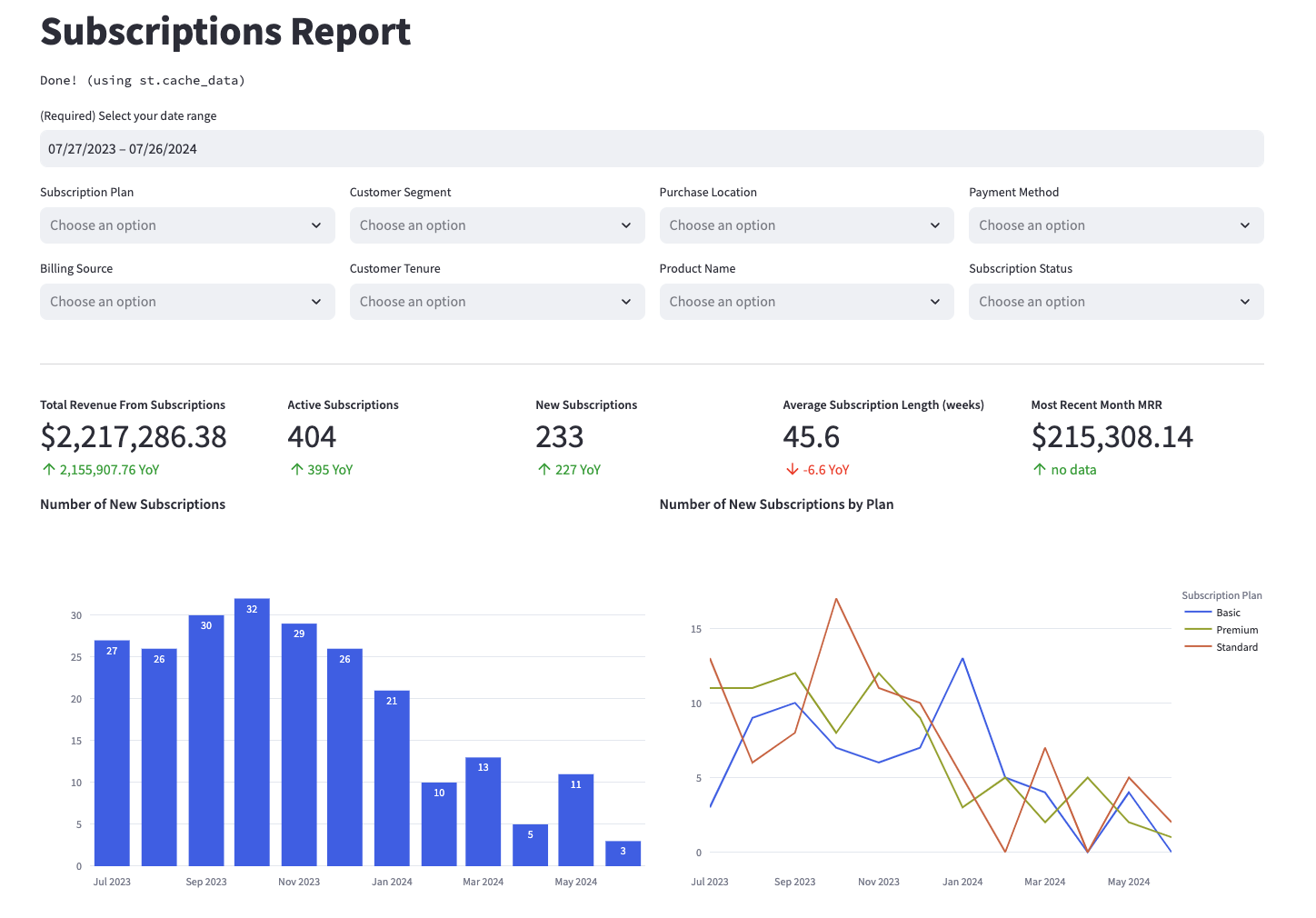
Many of the above reports are now configurable for [visualization via Streamlit](https://github.com/fivetran/streamlit_shopify). Check out some [sample reports here](https://fivetran-shopify.streamlit.app/).
## Prerequisites
To use this dbt package, you must have the following:
- At least one Fivetran Shopify connection syncing data into your destination.
- A **BigQuery**, **Snowflake**, **Redshift**, **PostgreSQL**, or **Databricks** destination.
## How do I use the dbt package?
You can either add this dbt package in the Fivetran dashboard or import it into your dbt project:
- To add the package in the Fivetran dashboard, follow our [Quickstart guide](https://fivetran.com/docs/transformations/data-models/quickstart-management#quickstartmanagement).
- To add the package to your dbt project, follow the setup instructions in the dbt package's [README file](https://github.com/fivetran/dbt_shopify/blob/main/README.md#how-do-i-use-the-dbt-package) to use this package.
### Install the package (skip if also using the `shopify_holistic_reporting` package)
If you are **not** using the [Shopify Holistic reporting package](https://github.com/fivetran/dbt_shopify_holistic_reporting), include the following shopify package version in your `packages.yml` file:
> TIP: Check [dbt Hub](https://hub.getdbt.com/) for the latest installation instructions or [read the dbt docs](https://docs.getdbt.com/docs/package-management) for more information on installing packages.
```yml
packages:
- package: fivetran/shopify
version: [">=1.5.0", "<1.6.0"]
```
> All required sources and staging models are now bundled into this transformation package. Do not include `fivetran/shopify_source` in your `packages.yml` since this package has been deprecated.
#### Databricks dispatch configuration
If you are using a Databricks destination with this package, you must add the following (or a variation of the following) dispatch configuration within your `dbt_project.yml`. This is required in order for the package to accurately search for macros within the `dbt-labs/spark_utils` then the `dbt-labs/dbt_utils` packages respectively.
```yml
dispatch:
- macro_namespace: dbt_utils
search_order: ['spark_utils', 'dbt_utils']
```
### Define REST API or GraphQL API Source
Fivetran has released a version of the Shopify connector that leverages Shopify's newer [GraphQL](https://shopify.dev/docs/apps/build/graphql) API instead of the REST API, as Shopify deprecated the REST API in October 2024.
To use this dbt package, you must have either at least one Fivetran REST API-based Shopify connection or one Fivetran GraphQL-based Shopify connection syncing these respective tables to your destination:
> If any table is not present, the package will create an empty staging model to ensure the success of downstream transformations. This behavior can be circumvented for select tables (see [Step 5](https://github.com/fivetran/dbt_shopify?tab=readme-ov-file#step-5-disable-models-for-non-existent-sources)).
#### Shopify REST API
- customer
- order_line_refund
- order_line
- order
- product
- product_variant
- transaction
- refund
- order_adjustment
- abandoned_checkout
- collection_product
- collection
- customer_tag
- discount_allocation
- discount_application
- discount_code_app
- discount_code_basic
- discount_code_bxgy
- discount_code_free_shipping
- discount_redeem_code
- fulfillment
- inventory_item
- inventory_level
- inventory_quantity
- location
- media
- media_image
- metafield
- order_note_attribute
- order_shipping_line
- order_shipping_tax_line
- order_tag
- order_url_tag
- product_media
- product_variant_media
- product_tag
- shop
- tender_transaction
- abandoned_checkout_discount_code
- order_discount_code
- abandoned_checkout_shipping_line
- fulfillment_event
- tax_line
#### Shopify GraphQL
- collection_product
- collection
- customer_tag
- discount_allocation
- discount_application
- discount_code_app
- discount_code_basic
- discount_code_bxgy
- discount_code_free_shipping
- discount_redeem_code
- fulfillment
- inventory_item
- inventory_level
- inventory_quantity
- location
- media
- media_image
- metafield
- order_note_attribute
- order_shipping_line
- order_shipping_tax_line
- order_tag
- product_media
- product_variant_media
- product_tag
- shop
- tender_transaction
- tax_line
- order_discount_code
- abandoned_checkout
- abandoned_checkout_discount_code
- fulfillment_event
- fulfillment_tracking_info
- fulfillment_order_line_item
- customer_visit
- customer_address
- collection_rule
#### Database Compatibility
To use this package, you will need to have one of the following kinds of destinations:
- [BigQuery](https://fivetran.com/docs/destinations/bigquery)
- [Snowflake](https://fivetran.com/docs/destinations/snowflake)
- [Redshift](https://fivetran.com/docs/destinations/redshift)
- [PostgreSQL](https://fivetran.com/docs/destinations/postgresql)
- [Databricks](https://fivetran.com/docs/destinations/databricks) with [Databricks Runtime](https://docs.databricks.com/en/compute/index.html#databricks-runtime)
The GraphQL and REST API-based schemas are slightly different, so this package is designed to run either or, not both. It will do so based on the value of the `shopify_api` variable.
By default, `shopify_api` is set to `rest` and will run the `shopify__*` models in the [rest](https://github.com/fivetran/dbt_shopify/tree/main/models/rest) folder. If you would like to run the package on a GraphQL-based schema, adjust `shopify_api` accordingly.
> This variable is dynamically configured for you in Fivetran Quickstart based on your Shopify connection details.
```yml
vars:
shopify_api: graphql # By default = rest. Must be lowercase
```
Overall, the package aims for parity across the different API versions and aligns column names with their REST names, **if the fields are supported in GraphQL**. There will be a 1:1 relationship between REST API and GraphQL based end models, but please note that the following source tables are not present in GraphQL and will therefore not be included in any transformations:
- `ABANDONED_CHECKOUT_SHIPPING_LINE`: The absence of this table will result in no `shopify_gql__discounts.total_abandoned_checkout_shipping_price` field.
- `ORDER_URL_TAG`: The absence of this table will result in no `shopify_gql__orders.order_url_tags` field.
### Define database and schema variables
#### Single connection
By default, this package runs using your destination and the `shopify` schema. If this is not where your Shopify data is (for example, if your Shopify schema is named `shopify_fivetran`), add the following configuration to your root `dbt_project.yml` file:
```yml
# dbt_project.yml
vars:
shopify_database: your_database_name
shopify_schema: your_schema_name
```
#### Union multiple connections
If you have multiple Shopify connections in Fivetran and would like to use this package on all of them simultaneously, we have provided functionality to do so. The package will union all of the data together and pass the unioned table into the transformations. You will be able to see which source it came from in the `source_relation` column of each model. To use this functionality, you will need to set either the `shopify_union_schemas` OR `shopify_union_databases` variables (cannot do both) in your root `dbt_project.yml` file:
```yml
# dbt_project.yml
vars:
shopify_union_schemas: ['shopify_usa','shopify_canada'] # use this if the data is in different schemas/datasets of the same database/project
shopify_union_databases: ['shopify_usa','shopify_canada'] # use this if the data is in different databases/projects but uses the same schema name
```
> NOTE: The native `source.yml` connection set up in the package will not function when the union schema/database feature is utilized. Although the data will be correctly combined, you will not observe the sources linked to the package models in the Directed Acyclic Graph (DAG). This happens because the package includes only one defined `source.yml`.
To connect your multiple schema/database sources to the package models, follow the steps outlined in the [Union Data Defined Sources Configuration](https://github.com/fivetran/dbt_fivetran_utils/tree/releases/v0.4.latest#union_data-source) section of the Fivetran Utils documentation for the union_data macro. This will ensure a proper configuration and correct visualization of connections in the DAG.
### Disable models for non-existent sources
The Shopify package will automatically create null staging models for missing tables so as to not break downstream transformations. However, you may avoid the creation of certain null tables by leveraging the following variable configurations.
#### REST API
> If your Shopify connection is leveraging the older Shopify REST API and you are not running the package via Fivetran Quickstart, refer to the following variables.
The package takes into consideration that not every Shopify connection may have the `fulfillment_event`, `metadata`, `discount_code_app`, `product_variant_media`, or `abandoned_checkout` tables (including `abandoned_checkout`, `abandoned_checkout_discount_code`, and `abandoned_checkout_shipping_line`) and allows you to enable or disable the corresponding functionality. To enable/disable the modeling of the mentioned source tables and their downstream references, add the following variable to your `dbt_project.yml` file:
```yml
# dbt_project.yml
vars:
shopify_using_abandoned_checkout: false # TRUE by default. Setting to false will disable `abandoned_checkout`, `abandoned_checkout_discount_code`, and `abandoned_checkout_shipping_line`.
shopify_using_metafield: false # TRUE by default.
shopify_using_discount_code_app: true # FALSE by default.
shopify_using_fulfillment_event: true # FALSE by default.
shopify_using_product_variant_media: true # FALSE by default.
```
#### GraphQL API
> If your Shopify connection is leveraging the newer Shopify GraphQL API and you are not running the package via Fivetran Quickstart, refer to the following variables.
The package takes into consideration that not every Shopify connection may have the `collection_rule`, `customer_visit`, `fulfillment_event`, `fulfillment_tracking_info`, `fulfillment_order_line_item`, `metafield`, `discount_code_app`, `product_variant_media` or `abandoned_checkout` tables (including `abandoned_checkout` and `abandoned_checkout_discount_code`) and allows you to enable or disable the corresponding functionality. To enable/disable the modeling of the mentioned source tables and their downstream references, add the following variable to your `dbt_project.yml` file:
```yml
# dbt_project.yml
vars:
shopify_gql_using_abandoned_checkout: false # TRUE by default. Setting to false will disable `abandoned_checkout` and `abandoned_checkout_discount_code`
shopify_gql_using_customer_visit: false # TRUE by default
shopify_gql_using_fulfillment_order_line_item: false # TRUE by default
shopify_gql_using_metafield: false # TRUE by default.
shopify_gql_using_collection_rule: true # FALSE by default.
shopify_gql_using_discount_code_app: true # FALSE by default.
shopify_gql_using_fulfillment_event: true # FALSE by default.
shopify_gql_using_fulfillment_tracking_info: true # FALSE by default.
shopify_gql_using_product_variant_media: true # FALSE by default.
```
### Setting your timezone
By default, the data in your Shopify schema is in UTC. However, you may want reporting to reflect a specific timezone for more realistic analysis or data validation.
To convert the timezone of **all** timestamps in the package, update the `shopify_timezone` variable to your target zone in [IANA tz Database format](https://en.wikipedia.org/wiki/List_of_tz_database_time_zones):
```yml
# dbt_project.yml
vars:
shopify_timezone: "America/New_York" # Replace with your timezone
```
> **Note**: This will only **numerically** convert timestamps to your target timezone. They will however have a "UTC" appended to them. This is a current limitation of the dbt-date `convert_timezone` [macro](https://github.com/calogica/dbt-date#convert_timezone-column-target_tznone-source_tznone) we have leveraged and replicated in the [shopify](https://github.com/fivetran/dbt_shopify/tree/main/macros/fivetran_date_macros/fivetran_convert_timezone.sql) package with minimal modifications.
### (Optional) Additional configurations
Expand/Collapse details
#### Enabling Standardized Billing Model
This package contains the `shopify__line_item_enhanced` model which constructs a comprehensive, denormalized analytical table that enables reporting on key revenue, subscription, customer, and product metrics from your billing platform. It's designed to align with the schema of the `*__line_item_enhanced` model found in Recurly, Recharge, Stripe, Shopify, and Zuora, offering standardized reporting across various billing platforms. To see the kinds of insights this model can generate, explore example visualizations in the [Fivetran Billing Model Streamlit App](https://fivetran-billing-model.streamlit.app/). For the time being, this model is disabled by default. If you would like to enable this model you will need to adjust the `shopify__standardized_billing_model_enabled` variable to be `true` within your `dbt_project.yml`:
```yml
vars:
shopify__standardized_billing_model_enabled: true # false by default.
```
#### Passing Through Additional Fields
This package includes all source columns defined in the macros folder. You can add more columns using our pass-through column variables. These variables allow for the pass-through fields to be aliased (`alias`) and casted (`transform_sql`) if desired, but not required. Datatype casting is configured via a sql snippet within the `transform_sql` key. You may add the desired sql while omitting the `as field_name` at the end and your custom pass-though fields will be casted accordingly. Use the below format for declaring the respective pass-through variables:
```yml
# dbt_project.yml
vars:
shopify:
customer_pass_through_columns:
- name: "customer_custom_field"
alias: "customer_field"
order_line_refund_pass_through_columns:
- name: "unique_string_field"
alias: "field_id"
transform_sql: "cast(field_id as string)"
order_line_pass_through_columns:
- name: "that_field"
order_pass_through_columns:
- name: "sub_field"
alias: "subsidiary_field"
product_pass_through_columns:
- name: "this_field"
product_variant_pass_through_columns:
- name: "new_custom_field"
alias: "custom_field"
```
#### Adding Metafields
In [May 2021](https://fivetran.com/docs/applications/shopify/changelog#may2021) the Shopify connector introduced support for the [metafield resource](https://shopify.dev/api/admin-rest/2023-01/resources/metafield).
By default, the package will pivot out metafields associated with the following source objects into columns in `shopify...__[object]_metafields` models and subsequently join them into the appropriate end models:
>**Note**: Please ensure that the `shopify_using_metafield` is not disabled to use metafields. (Enabled by default)
| Source Object | Metafield Pivoting Model | End Model Joined Into |
|----------------|---------------------------|---------------------------|
| `CUSTOMER` | `shopify___customer_metafields` | `shopify___customers` |
| `ORDER` | `shopify___order_metafields` | `shopify___orders` |
| `PRODUCT` | `shopify___product_metafields` | `shopify___products` |
| `PRODUCT_VARIANT` | `shopify___product_variant_metafields` | `shopify___inventory_levels` |
| `SHOP` | `shopify___shop_metafields` | `shopify___daily_shop` |
| `COLLECTION` | `shopify___collection_metafields` | NA |
>**Note**: The `shopify...__[object]_metafields` models will contain all the same records as the corresponding staging models with the exception of the metafield columns being added.
If you would like to disable this behavior, add the following configurations within your `dbt_project.yml`.
```yml
vars:
shopify_using_all_metafields: False ## True by default. Will enable/disable ALL metafield models. If you are disabling any of the below variables, this MUST also be set to False.
shopify_using_collection_metafields: False ## True by default. Will enable/disable ONLY the collection metafield model.
shopify_using_customer_metafields: False ## True by default. Will enable/disable ONLY the customer metafield model.
shopify_using_order_metafields: False ## True by default. Will enable/disable ONLY the order metafield model.
shopify_using_product_metafields: False ## True by default. Will enable/disable ONLY the product metafield model.
shopify_using_product_variant_metafields: False ## True by default. Will enable/disable ONLY the product variant metafield model.
shopify_using_shop_metafields: False ## True by default. Will enable/disable ONLY the shop metafield model.
```
##### Configure the Number of Metafields
By default, the package pivots out the 50 most commonly used metafields per object. Metafields are ranked by their frequency in the `METAFIELD` source table, with the most prevalent selected first.
To decrease or increase this number, adjust the `shopify_max_metafields` variable:
```yml
vars:
shopify_max_metafields: 200 # (Any positive integer) Default is 50
```
The package automatically adheres to the following data warehouse column limits. The total column count includes both source/model columns and metafield columns. If this total would exceed your warehouse limit, the package will cap the number of metafields to avoid failure:
- BigQuery: 10,000
- Redshift: 1,600
- Postgres: 1,600
- Databricks: 32,768
- Snowflake: No limit
#### Change the calendar start date
Our date-based models start at `2019-01-01` by default. To customize the start date, add the following variable to your `dbt_project.yml` file:
```yml
vars:
shopify:
shopify__calendar_start_date: 'yyyy-mm-dd' # default is 2019-01-01
```
#### Customizing Inventory States
You can customize the inventory quantity states included in the `shopify__inventory_levels` model to control which `*_quantity` fields are created. [See the list of expected values](https://shopify.dev/docs/apps/build/orders-fulfillment/inventory-management-apps#inventory-states).
To override the default list, define the following variable in your `dbt_project.yml` file:
```yml
vars:
shopify_inventory_states: ['available', 'committed'] # Default: ['incoming', 'on_hand', 'available', 'committed', 'reserved', 'damaged', 'safety_stock', 'quality_control']
```
#### Leveraging Legacy Connector Table Names (GraphQL Only)
For Fivetran Shopify connections created after November 2025, the following tables have been renamed:
- `ORDER_NOTE_ATTRIBUTE` -> `ORDER_CUSTOM_ATTRIBUTE`
- `TAX_LINE` -> `ORDER_LINE_TAX_LINE`
- `ORDER_LINE_REFUND` -> `REFUND_LINE_ITEM`
This package prioritizes using the new tables if available, but dynamically falls back to the old names otherwise. If you have both old and new tables in your schema and would like to specify this package to leverage the older tables, you can set the following variables to false in your `dbt_project.yml`:
```yml
vars:
shopify:
shopify_gql_using_order_custom_attribute: false # If false, uses ORDER_NOTE_ATTRIBUTE even if ORDER_CUSTOM_ATTRIBUTE is present
shopify_gql_using_order_line_tax_line: false # If false, uses TAX_LINE even if ORDER_LINE_TAX_LINE is present
shopify_gql_using_refund_line_item: false # If false, uses ORDER_LINE_REFUND even if REFUND_LINE_ITEM is present
```
#### Changing the Build Schema
By default this package will build the Shopify staging models within a schema titled ( + `_stg_shopify`) and the Shopify final models within a schema titled ( + `_shopify`) in your target database. If this is not where you would like your modeled Shopify data to be written to, add the following configuration to your `dbt_project.yml` file:
```yml
# dbt_project.yml
models:
shopify:
+schema: my_new_schema_name # Leave +schema: blank to use the default target_schema.
staging:
+schema: my_new_schema_name # Leave +schema: blank to use the default target_schema.
```
#### Change the source table references
If an individual source table has a different name than the package expects, add the table name as it appears in your destination to the respective variable:
> IMPORTANT: See this project's [`dbt_project.yml`](https://github.com/fivetran/dbt_shopify/blob/main/dbt_project.yml) variable declarations to see the expected names.
```yml
# dbt_project.yml
vars:
shopify__identifier: your_table_name
```
#### Lookback Window
Records from the source can sometimes arrive late. Since several of the models in this package are incremental, by default we look back 7 days to ensure late arrivals are captured while avoiding the need for frequent full refreshes. While the frequency can be reduced, we still recommend running `dbt --full-refresh` periodically to maintain data quality of the models. For more information on our incremental decisions, see the [Incremental Strategy section](https://github.com/fivetran/dbt_shopify/blob/main/DECISIONLOG.md#incremental-strategy) of the DECISIONLOG.
To change the default lookback window, add the following variable to your `dbt_project.yml` file:
```yml
vars:
shopify:
lookback_window: number_of_days # default is 7
```
### (Optional) Orchestrate your models with Fivetran Transformations for dbt Core™
Expand for details
Fivetran offers the ability for you to orchestrate your dbt project through [Fivetran Transformations for dbt Core™](https://fivetran.com/docs/transformations/dbt#transformationsfordbtcore). Learn how to set up your project for orchestration through Fivetran in our [Transformations for dbt Core setup guides](https://fivetran.com/docs/transformations/dbt/setup-guide#transformationsfordbtcoresetupguide).
## Does this package have dependencies?
This dbt package is dependent on the following dbt packages. These dependencies are installed by default within this package. For more information on the following packages, refer to the [dbt hub](https://hub.getdbt.com/) site.
> IMPORTANT: If you have any of these dependent packages in your own `packages.yml` file, we highly recommend that you remove them from your root `packages.yml` to avoid package version conflicts.
```yml
packages:
- package: fivetran/fivetran_utils
version: [">=0.4.0", "<0.5.0"]
- package: dbt-labs/dbt_utils
version: [">=1.0.0", "<2.0.0"]
- package: dbt-labs/spark_utils
version: [">=0.3.0", "<0.4.0"]
```
## How is this package maintained and can I contribute?
### Package Maintenance
The Fivetran team maintaining this package only maintains the [latest version](https://hub.getdbt.com/fivetran/shopify/latest/) of the package. We highly recommend you stay consistent with the latest version of the package and refer to the [CHANGELOG](https://github.com/fivetran/dbt_shopify/blob/main/CHANGELOG.md) and release notes for more information on changes across versions.
### Contributions
A small team of analytics engineers at Fivetran develops these dbt packages. However, the packages are made better by community contributions.
We highly encourage and welcome contributions to this package. Learn how to contribute to a package in dbt's [Contributing to an external dbt package article](https://discourse.getdbt.com/t/contributing-to-a-dbt-package/657).
## Are there any resources available?
- If you have questions or want to reach out for help, see the [GitHub Issue](https://github.com/fivetran/dbt_shopify/issues/new/choose) section to find the right avenue of support for you.
- If you would like to provide feedback to the dbt package team at Fivetran or would like to request a new dbt package, fill out our [Feedback Form](https://www.surveymonkey.com/r/DQ7K7WW).