https://github.com/fjrevoredo/mini-diarium
A local-only journal with serious encryption. Free, open source, and never touches the internet.
https://github.com/fjrevoredo/mini-diarium
journaling open-source privacy privacy-tools rust
Last synced: 18 days ago
JSON representation
A local-only journal with serious encryption. Free, open source, and never touches the internet.
- Host: GitHub
- URL: https://github.com/fjrevoredo/mini-diarium
- Owner: fjrevoredo
- License: mit
- Created: 2026-02-14T02:22:58.000Z (5 months ago)
- Default Branch: master
- Last Pushed: 2026-06-27T16:05:05.000Z (19 days ago)
- Last Synced: 2026-06-27T18:05:49.561Z (19 days ago)
- Topics: journaling, open-source, privacy, privacy-tools, rust
- Language: TypeScript
- Homepage: https://mini-diarium.com/
- Size: 17.1 MB
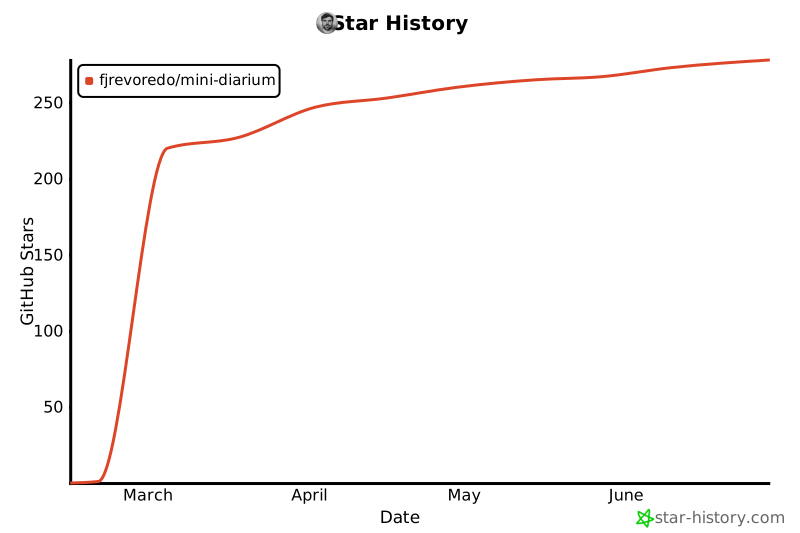
- Stars: 278
- Watchers: 1
- Forks: 18
- Open Issues: 4
-
Metadata Files:
- Readme: README.md
- Changelog: CHANGELOG.md
- Contributing: CONTRIBUTING.md
- Funding: .github/FUNDING.yml
- License: LICENSE
- Code of conduct: CODE_OF_CONDUCT.md
- Security: SECURITY.md
- Agents: AGENTS.md
Awesome Lists containing this project
README

# Mini Diarium
**A local-only journal with serious encryption.**
Free, open source, and never touches the internet.
[](https://github.com/fjrevoredo/mini-diarium/actions/workflows/ci.yml)
[](https://codecov.io/gh/fjrevoredo/mini-diarium)
[](https://sonarcloud.io/summary/new_code?id=fjrevoredo_mini-diarium)
[](https://opensource.org/licenses/MIT)
[](https://github.com/fjrevoredo/mini-diarium/releases)
[](https://github.com/fjrevoredo/mini-diarium#download)
[](https://x.com/MiniDiarium)
[](https://ko-fi.com/fjrevoredo)
[](https://tauri.app)
[](https://solidjs.com)
[](https://www.rust-lang.org)
[](https://flathub.org/apps/io.github.fjrevoredo.mini-diarium)
[mini-diarium.com](https://mini-diarium.com) · [Download](#download) · [Documentation](https://mini-diarium.com/docs) · [Features](#features) · [Philosophy](PHILOSOPHY.md) · [Benchmarks](https://fjrevoredo.github.io/mini-diarium/benchmarks/)

## ☕ Support the Project
Mini Diarium is free, open source, and will always be. If you find it useful and want to support its development, consider buying me a coffee on Ko-fi. Every donation goes directly toward keeping this project alive and improving.

## Download
Download the latest release for your platform from [GitHub Releases](https://github.com/fjrevoredo/mini-diarium/releases).
Quick install:
- Windows (WinGet): `winget install fjrevoredo.MiniDiarium`
- macOS (Homebrew): `brew tap fjrevoredo/mini-diarium` then `brew install --cask mini-diarium`
- Linux (Flatpak): `flatpak install flathub io.github.fjrevoredo.mini-diarium`
- NixOS / Nix (Flakes): `nix run github:fjrevoredo/mini-diarium`
For package formats, first-run notes (Gatekeeper / SmartScreen), and checksum verification, see [docs/INSTALLATION.md](docs/INSTALLATION.md).
## Quick Start
1. Launch Mini Diarium
2. Create a password (this encrypts your journal; there is no recovery if forgotten)
3. Write your first entry. It auto-saves as you type
4. Navigate between days with `Ctrl+[` / `Ctrl+]` or click dates on the calendar
5. Lock your journal when you're done
## Background
Mini Diarium is a spiritual successor to [Mini Diary](https://github.com/samuelmeuli/mini-diary) by Samuel Meuli. I loved the original tool. It was simple, private, and did exactly what a journal app should do. Unfortunately, it's been unmaintained for years and its dependencies have aged out. I initially thought about forking it and modernizing the stack, but turned out impractical. So I started over from scratch, keeping the same core philosophy (encrypted, local-only, focused) while rebuilding completely with Tauri 2, SolidJS, and Rust. The result is a lighter, faster app with stronger encryption and a few personal touches.
## Philosophy First
Mini Diarium is intentionally opinionated. The philosophy is not a side note, it is the product:
- **Small, extensible core**: keep core responsibilities tight (encrypt, store, authenticate) and push extras to extension points
- **Boring security**: use established algorithms and audited libraries, never custom crypto
- **Local-only by design**: no cloud sync, no telemetry, no analytics, no hidden network behavior
- **Easy in, easy out**: import from common formats and export in open formats to avoid lock-in
- **Focused scope**: private journaling over feature sprawl
- **Simplicity over cleverness**: fewer moving parts, smaller attack surface, easier maintenance
Read the full principles and how these translates to the architecture in [PHILOSOPHY.md](PHILOSOPHY.md).
> [!NOTE]
> Mini Diarium uses AI tooling as leverage for human engineers, never as a replacement. Every change still passes through deliberate design, careful implementation, proper testing, and direct feedback. Responsibility, authorship, and final judgment remain human.
## Features
- **Key file authentication**: unlock your journal with an X25519 private key file instead of (or alongside) your password, like SSH keys for your journal. See [docs/KEY_FILE_AUTHENTICATION.md](docs/KEY_FILE_AUTHENTICATION.md).
- **Local-only journals**: create journals that auto-unlock on your device (no password prompt) while still encrypting entries at rest.
- **AES-256-GCM encryption**: all entries are encrypted with a random master key. Each auth method holds its own wrapped copy of that key, so adding or removing a method is O(1), with no re-encryption of your entries.
- **Multiple journals**: keep separate journals for different purposes (personal, work, travel).
- **Rich text editor**: including images.
- **Tags**
- **Multiple entries per day**: keep separate entries for the same date without merging them together
- **Calendar navigation**
- **Import**: Mini Diary JSON, Day One JSON/TXT, and jrnl JSON with additive imports that preserve separate same-date entries
- **Export**: JSON for structural fidelity and Markdown for human-readable best-effort export
- **Themes**
- **Automatic backups**: backup on unlock with rotation
- **Statistics**
- **Preferences**: first day of week, future entries toggle, title visibility, spellcheck, auto-lock, password change, authentication method management
- **Cross-platform**: Windows, macOS, and Linux
- **Zero network access**: no telemetry, no analytics, no update checks
## Documentation
- Online user docs: https://mini-diarium.com/docs
- Offline / GitHub user guide: [docs/USER_GUIDE.md](docs/USER_GUIDE.md)
- Installation: [docs/INSTALLATION.md](docs/INSTALLATION.md)
- Key file authentication: [docs/KEY_FILE_AUTHENTICATION.md](docs/KEY_FILE_AUTHENTICATION.md)
- Architecture diagrams and flows: [docs/ARCHITECTURE.md](docs/ARCHITECTURE.md)
- Known issues / tradeoffs: [docs/KNOWN_ISSUES.md](docs/KNOWN_ISSUES.md)
- Privacy: [docs/PRIVACY.md](docs/PRIVACY.md)
- Security model + reporting: [SECURITY.md](SECURITY.md)
- User plugins (Rhai): [docs/user-plugins/USER_PLUGIN_GUIDE.md](docs/user-plugins/USER_PLUGIN_GUIDE.md)
## Architecture
For the diagrams and detailed data flows, see [docs/ARCHITECTURE.md](docs/ARCHITECTURE.md).
## Keyboard Shortcuts
| Action | Shortcut |
| -------------- | -------------- |
| Previous Day | `Ctrl+[` |
| Next Day | `Ctrl+]` |
| Go to Today | `Ctrl+T` |
| Go to Date | `Ctrl+G` |
| Previous Month | `Ctrl+Shift+[` |
| Next Month | `Ctrl+Shift+]` |
| Preferences | `Ctrl+,` |
Statistics, Import, and Export are available via the Journal menu (no default keyboard accelerators).
On macOS, use `Cmd` instead of `Ctrl`.
## Building from Source
**Prerequisites:** Rust (see `rust-toolchain.toml`), Bun 1.x, and [Tauri v2 system dependencies](https://v2.tauri.app/start/prerequisites/).
For detailed platform-specific instructions (Linux package names, Fedora setup, Wayland troubleshooting), see [CONTRIBUTING.md](CONTRIBUTING.md).
```bash
git clone https://github.com/fjrevoredo/mini-diarium.git
cd mini-diarium
bun install
bun run tauri build
```
Artifacts will be in `src-tauri/target/release/bundle/`.
## Tech Stack
- [Tauri 2](https://v2.tauri.app/): desktop app framework (Rust backend, web frontend)
- [SolidJS](https://www.solidjs.com/): reactive UI framework
- [Rust](https://www.rust-lang.org/): backend logic, encryption, database
- `x25519-dalek`, `hkdf`, `sha2`: X25519 ECIES key wrapping for key file authentication
- [SQLite](https://www.sqlite.org/): local encrypted database storage
- [TipTap](https://tiptap.dev/): rich text editor
- [UnoCSS](https://unocss.dev/): utility-first CSS
- [Kobalte](https://kobalte.dev/): accessible UI primitives
## Known Issues
For the full list of known limitations, deliberate tradeoffs, and technical debt, see [docs/KNOWN_ISSUES.md](docs/KNOWN_ISSUES.md).
**User-facing highlights:**
- Concurrent access to the same journal file is not supported (by design)
- No password recovery — losing all credentials is permanent (by design)
- Full-text search runs as an in-memory scan over decrypted entries (added back after the v0.2.0 FTS removal); nothing searchable is written to disk
- Importing the same file twice creates duplicate entries (no deduplication)
- Plugin changes require an app restart to take effect
## Extending Mini Diarium
You can add local import/export extensions using Rhai scripts in your journal's `plugins/` folder.
See [docs/user-plugins/USER_PLUGIN_GUIDE.md](docs/user-plugins/USER_PLUGIN_GUIDE.md) for requirements, best practices, and a complete example plugin.
## Performance Benchmarks
Criterion benchmarks for the crypto and database hot paths are tracked on every push to `master` and published at **[fjrevoredo.github.io/mini-diarium/benchmarks/](https://fjrevoredo.github.io/mini-diarium/benchmarks/)**.
The page covers four areas: Argon2id key derivation (intentionally slow — ~200 ms to resist brute-force), AES-256-GCM encrypt/decrypt at three entry sizes, SQLite operations (insert, update, delete, date enumeration, full scan), and word-count calculation. Each card shows the latest timing and a Chart.js trend chart over the last 30 CI runs.
## Contributing
See [CONTRIBUTING.md](CONTRIBUTING.md) for setup instructions, development workflow, and conventions.
For maintainers adding official plugins, see [docs/BUILTIN_PLUGIN_GUIDE.md](docs/BUILTIN_PLUGIN_GUIDE.md).
For maintainers changing frontend UI/state, the Rust backend, Tauri IPC boundary, WebView security, or CI, see [docs/best-practices](docs/best-practices/README.md).
### Translations
Mini Diarium ships in the following languages:
- English
- Spanish (Español)
- German (Deutsch)
- French (Français)
- Hindi (हिन्दी)
- Italian (Italiano)
If you'd like to add support for another language, see [docs/TRANSLATIONS.md](docs/TRANSLATIONS.md) for instructions on creating a locale file and submitting a PR.
## Releasing
For maintainers: See [docs/RELEASING.md](docs/RELEASING.md) for step-by-step release instructions.
## Security
See [SECURITY.md](SECURITY.md) for the security model and how to report vulnerabilities.
## License
Mini Diarium is licensed under the MIT License. See [LICENSE](LICENSE).
## Credits
Made with love by [Francisco J. Revoredo](https://github.com/fjrevoredo) (with a little help from Claude Code).
## Contributors
Thanks to everyone who has contributed code, translations, or improvements to Mini Diarium:


## Star History