https://github.com/flashbots/builder-hub
BuilderHub service for provisioning and permissioning BuilderNet instances
https://github.com/flashbots/builder-hub
Last synced: 5 months ago
JSON representation
BuilderHub service for provisioning and permissioning BuilderNet instances
- Host: GitHub
- URL: https://github.com/flashbots/builder-hub
- Owner: flashbots
- License: mit
- Created: 2024-09-18T12:34:02.000Z (almost 2 years ago)
- Default Branch: main
- Last Pushed: 2026-02-03T14:31:32.000Z (6 months ago)
- Last Synced: 2026-02-04T01:10:14.164Z (6 months ago)
- Language: Go
- Homepage: https://buildernet.org
- Size: 241 KB
- Stars: 16
- Watchers: 6
- Forks: 2
- Open Issues: 1
-
Metadata Files:
- Readme: README.md
- License: LICENSE
- Agents: AGENTS.md
Awesome Lists containing this project
README
# BuilderHub
[](https://goreportcard.com/report/github.com/flashbots/builder-hub)
[](https://github.com/flashbots/builder-hub/actions?query=workflow%3A%22Checks%22)
[](https://hub.docker.com/r/flashbots/builder-hub/tags)
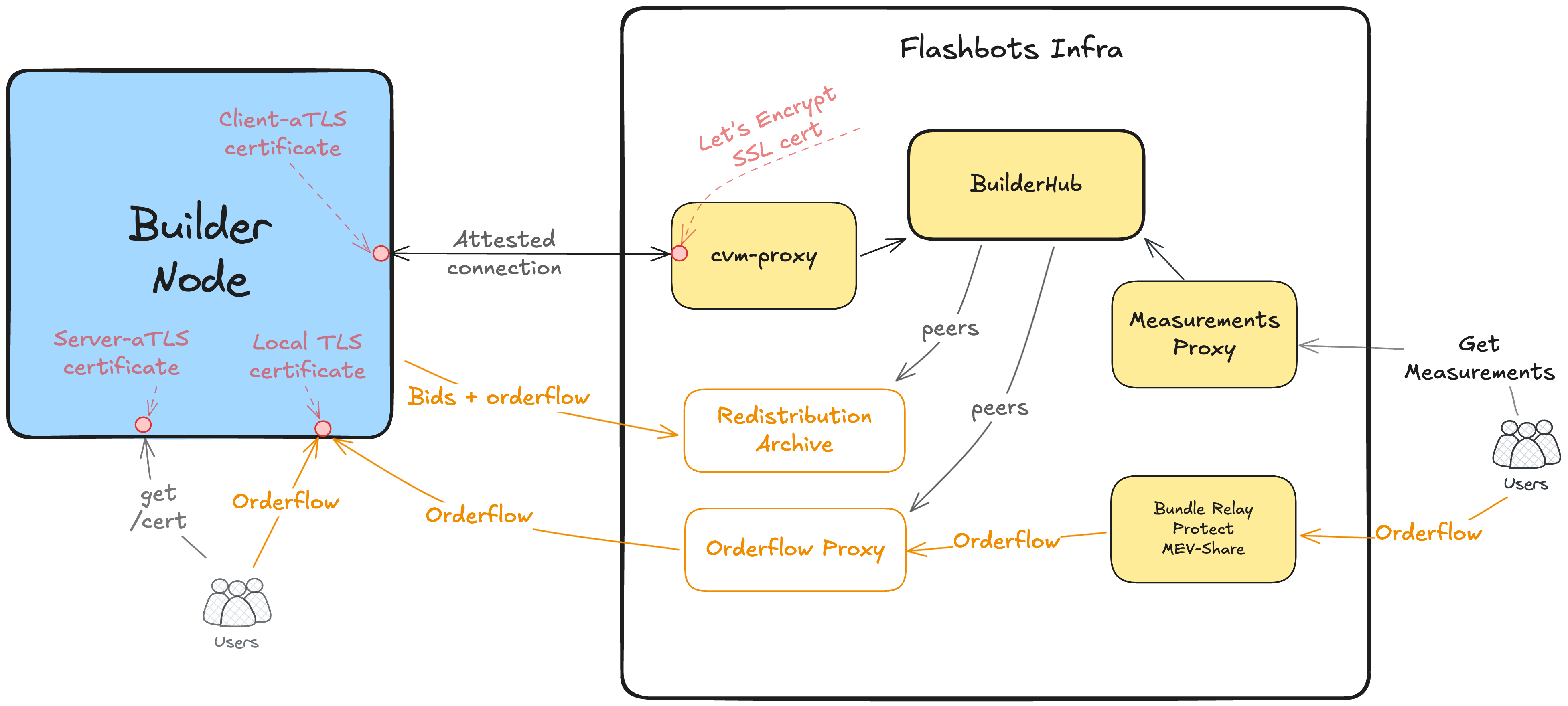
BuilderHub is the central data source for BuilderNet builder registration and configuration.
Docs here: https://buildernet.org/docs/flashbots-infra
BuilderHub has these responsibilities:
1. Builder identity management
2. Provisioning of secrets and configuration
3. Peer discovery
---
---
## Getting started
### Admin authentication
The Admin API (port 8081) requires HTTP Basic Auth. Configure via env vars or flags:
- `ADMIN_BASIC_USER` (default: `admin`)
- `ADMIN_BASIC_PASSWORD_BCRYPT` (bcrypt hash of the password; required)
Generate a bcrypt hash (example using htpasswd):
```bash
htpasswd -nbBC 10 "" 'secret' | cut -d: -f2
```
Run with:
```bash
export ADMIN_BASIC_USER=admin
export ADMIN_BASIC_PASSWORD_BCRYPT='$2y$12$...'
go run cmd/httpserver/main.go
```
Use Basic Auth when calling admin endpoints, e.g.:
```bash
curl -u admin:secret http://localhost:8081/api/admin/v1/measurements
```
Local development only: you can disable Admin API auth with `--disable-admin-auth` or `DISABLE_ADMIN_AUTH=1`. This is unsafe; never use in production.
### Manual setup
**Start the database and the server:**
```bash
# Start a Postgres database container
docker run -d --name postgres-test -p 5432:5432 -e POSTGRES_USER=postgres -e POSTGRES_PASSWORD=postgres -e POSTGRES_DB=postgres postgres
# Apply the DB migrations
for file in schema/*.sql; do psql "postgres://postgres:postgres@localhost:5432/postgres?sslmode=disable" -f $file; done
# Start the server
go run cmd/httpserver/main.go
```
### Using Docker
- See instructions on using Docker to run the full stack at [`docs/devenv-setup.md`](./docs/devenv-setup.md)
- Also check out the [`docker-compose.yaml`](../docker/docker-compose.yaml) file, which sets up the BuilderHub, a mock proxy, and a Postgres database.
- Finally, there's an e2e api spec test suite you can run: [`./scripts/ci/integration-test.sh`](./scripts/ci/integration-test.sh)
### Example requests
```bash
# Public endpoints
curl localhost:8080/api/l1-builder/v1/measurements
# client-aTLS secured endpoints
curl localhost:8080/api/l1-builder/v1/builders
curl localhost:8080/api/l1-builder/v1/configuration
curl -X POST localhost:8080/api/l1-builder/v1/register_credentials/rbuilder
```
### Testing
Run test suite with database tests included:
```bash
RUN_DB_TESTS=1 make test
```
---
## Contributing
**Install dev dependencies**
```bash
go install mvdan.cc/gofumpt@v0.4.0
go install honnef.co/go/tools/cmd/staticcheck@v0.4.2
go install github.com/golangci/golangci-lint/cmd/golangci-lint@v1.60.3
go install go.uber.org/nilaway/cmd/nilaway@v0.0.0-20240821220108-c91e71c080b7
go install github.com/daixiang0/gci@v0.11.2
```
**Lint, test, format**
```bash
make lint
make test
make fmt
```
---
## API Documentation
`BuilderHub` exposes a JSON+REST API with these methods:
| API | Exposure | Authentication | Requested by | Served by |
| ------------------------ | -------- | ---------------------------- | ----------------------------- | ---------------------- |
| Get Secrets + Config | TDX Node | IP + Client-ATLS Attestation | Builder (via cvm-proxy) | cvm-proxy → BuilderHub |
| Register Credentials | TDX Node | IP + Client-ATLS Attestation | Builder (via cvm-proxy) | cvm-proxy → BuilderHub |
| Get Active Builders | TDX Node | IP + Client-ATLS Attestation | Builder (via cvm-proxy) | cvm-proxy → BuilderHub |
| Get Active Builders | Internal | HTTP Basic Auth | MEV-Share, block processor, … | BuilderHub |
| Get Allowed Measurements | Internal | HTTP Basic Auth | Users, Builders | nginx → BuilderHub |
| Admin Endpoints | Internal | HTTP Basic Auth | | |
See also a [Bruno collection](https://www.usebruno.com/) (Postman alternative) in [`docs/api-docs/`](./docs/api-docs/).
---
### Get Secrets + Configuration
`GET /api/l1-builder/v1/configuration`
Auth:
- IP + Client-ATLS Attestation
Response: [testdata/get-configuration.json](https://github.com/flashbots/builder-config-hub/blob/main/testdata/get-configuration.json)
---
### Register Credentials
`POST /api/l1-builder/v1/register_credentials/`
Auth:
- IP + Client-ATLS Attestation
Request:
- [service: `instance`]: TLS cert
```json
{
"tls_cert": string (\n instead of newlines)
}
```
- [service: `orderflow_proxy`]: ECDSA pubkey address (for orderflow)
```json
{
"ecdsa_pubkey_address": string
}
```
- [service: `rbuilder`]: ECDSA pubkey address (for bids)
```json
{
"ecdsa_pubkey_address": string
}
```
Response: 200 OK
---
### Get Active Builders
`GET /api/l1-builder/v1/builders` (external, requests from builder via cvm-proxy)
`GET /api/internal/l1-builder/v1/builders` (internal, no auth, uses `production` network by default)
`GET /api/internal/l1-builder/v2/network/{network}/builders` (internal, no auth, for specific peer network)
Response: [testdata/get-builders.json](https://github.com/flashbots/builder-config-hub/blob/main/testdata/get-builders.json)
---
### Get Allowed Measurements
Auth: public
`GET /api/l1-builder/v1/measurements`
Response: Array with currently allowed measurement JSONs
[testdata/get-measurements.json](https://github.com/flashbots/builder-config-hub/blob/main/testdata/get-measurements.json)
---
## Admin Endpoints
### Add measurements
(created disabled by default)
`POST /api/admin/v1/measurements`
Payload
```json
{
"measurement_id": "v1.2.3-20241010-rc1",
"attestation_type": "azure-tdx",
"measurements": {
"11": {
"expected_any": ["efa43e0beff151b0f251c4abf48152382b1452b4414dbd737b4127de05ca31f7", "abc123..."]
},
"4": {
"expected": "ea92ff762767eae6316794f1641c485d4846bc2b9df2eab6ba7f630ce6f4d66f"
}
}
}
```
Two fields are available for specifying expected values:
- `expected` (string): A single expected value
- `expected_any` (array): Multiple expected values - any matching value is accepted (OR semantics)
Use `expected_any` when multiple firmware versions or configurations should be accepted for a single measurement key.
Note that only the measurements given are expected, and any non-present will be ignored.
To allow _any_ measurement, use an empty measurements field:
`"measurements": {}`.
```json
{
"measurement_id": "test-blanket-allow",
"attestation_type": "azure-tdx",
"measurements": {}
}
```
### Enable/disable measurements
`POST /api/admin/v1/measurements/activation/{measurement_id}`
```json
{
"enabled": true
}
```
### Adding a new builder instance
(created inactive by default)
`POST /api/admin/v1/builders/`
Payload
```json
{
"name": string,
"ip_address": string
}
```
### Enable/disable builder instance
`POST /api/admin/v1/builders/activation/{builder_name}`
```json
{
"enabled": true
}
```
Errors:
- if no active configuration available
### Get builder configuration
`GET /api/admin/v1/builders/configuration/{builder_name}/active`
gets always the latest/active configuration
### Get builder configuration with secrets
`GET /api/admin/v1/builders/configuration/{builder_name}/full`
gets always the latest/active configuration
### Update builder configuration
if valid JSON, will create a new active configuration and disable the old configuration
`POST /api/admin/v1/builders/configuration/{builder_name}`
```json
{
...
}
```
### Update secrets configuration
POST `/api/admin/v1/builders/secrets/{builderName}`
Payload: JSON with secrets, both flattened/unflattened
```json
{
...
}
```