https://github.com/flipkart/now-you-see-react
View tracking framework for React Native on iOS
https://github.com/flipkart/now-you-see-react
ios react react-native swift tracking viewability
Last synced: about 1 year ago
JSON representation
View tracking framework for React Native on iOS
- Host: GitHub
- URL: https://github.com/flipkart/now-you-see-react
- Owner: Flipkart
- License: apache-2.0
- Created: 2020-09-22T11:38:07.000Z (almost 6 years ago)
- Default Branch: master
- Last Pushed: 2024-04-10T10:28:10.000Z (about 2 years ago)
- Last Synced: 2025-03-26T05:51:07.258Z (over 1 year ago)
- Topics: ios, react, react-native, swift, tracking, viewability
- Language: Swift
- Homepage:
- Size: 2.21 MB
- Stars: 7
- Watchers: 4
- Forks: 4
- Open Issues: 1
-
Metadata Files:
- Readme: README.md
- License: LICENSE
Awesome Lists containing this project
README

Now You See Me
[](https://github.com/Flipkart/now-you-see-react)
[](https://developer.apple.com/swift/)
[](https://github.com/Flipkart/now-you-see-me/blob/master/LICENSE)
NowYouSeeReact adds support for react native views on top of the iOS tracking framework [NowYouSeeMe](https://github.com/Flipkart/now-you-see-me).
## Need
*There is no Cell class in React Native equivalent to ```UIKit```'s ```UITableViewCell``` or ```UICollectionViewCell```.*
Hence, it becomes difficult to identify when a react native view (```RCTView```) is recycled as we do not have access to the actual recycled view (cell) which in turn causes problems in calculating the absolute frame and viewability of the view and its subviews once recycled.
Hence, as a solution to the problem, we have enabled tracking for all the react native views by default, so that we can get hold of the recycled react native view (cell) and successfully update the viewability of all of its children.
## Usage
To enable the framework you need to call the following method before the UI is created:
~~~swift
NowYou.seeReact() // didFinishLaunchingWithOptions is a good place to initialise the framework
~~~
The method internally calls ```NowYou.seeMe()``` to enable the parent framework
For all other usage details, please refer [NowYouSeeMe](https://github.com/Flipkart/now-you-see-me).
## Demo project
There is a demo project present in the Example directory.
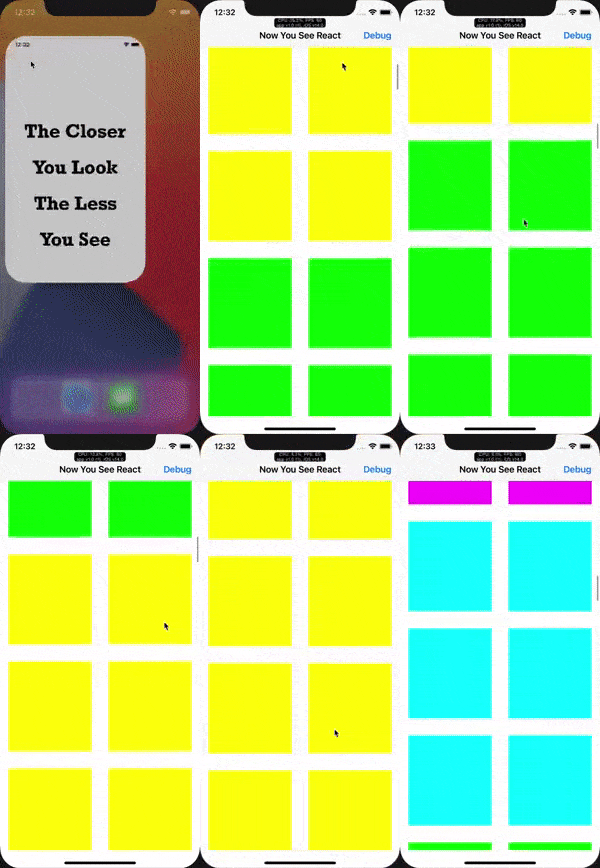
The demo project contains a react native app which consists of a recyler list view, and each item in the recyler list view is a native view component with viewability conditions attached to it.
Demo is created using [react-native-cli](https://www.npmjs.com/package/react-native-cli)
#### Steps to run demo project
* Clone the repo
* ```cd``` into Example/ios folder
* ```pod install```
* open NowYouSeeReact.xcworkspace
* Build and run
* In case port 8081 is already occupied and you get an error, replace all occurrences of 8081 with some other port number and run ```npm start --port={port number}``` in terminal, post which you can build and run the demo app
#### Running demo
## Installation
To integrate NowYouSeeMe into your Xcode project using CocoaPods, specify it in your ```Podfile```:
```ruby
pod 'NowYouSeeReact', :git => 'https://github.com/Flipkart/now-you-see-react.git', :tag => '1.0.0'
# Not able to push to cocoapods due to React dependency
```
Then, run the following command:
```bash
$ pod install
```
## Dependencies
* [NowYouSeeMe](https://github.com/Flipkart/now-you-see-me)
* [React Native](https://github.com/facebook/react-native)
## Requirements
* iOS 10.0+
* Swift 5
---
[](http://clayallsopp.github.io/readme-score/?url=flipkart/now-you-see-react)