https://github.com/fllesser/nonebot-plugin-parser
社交媒体分享链接解析插件
https://github.com/fllesser/nonebot-plugin-parser
nonebot-plugin nonebot2
Last synced: about 1 month ago
JSON representation
社交媒体分享链接解析插件
- Host: GitHub
- URL: https://github.com/fllesser/nonebot-plugin-parser
- Owner: fllesser
- License: mit
- Created: 2024-11-30T10:43:02.000Z (over 1 year ago)
- Default Branch: master
- Last Pushed: 2026-02-16T04:02:48.000Z (4 months ago)
- Last Synced: 2026-02-17T20:35:34.175Z (4 months ago)
- Topics: nonebot-plugin, nonebot2
- Language: Python
- Homepage:
- Size: 7.99 MB
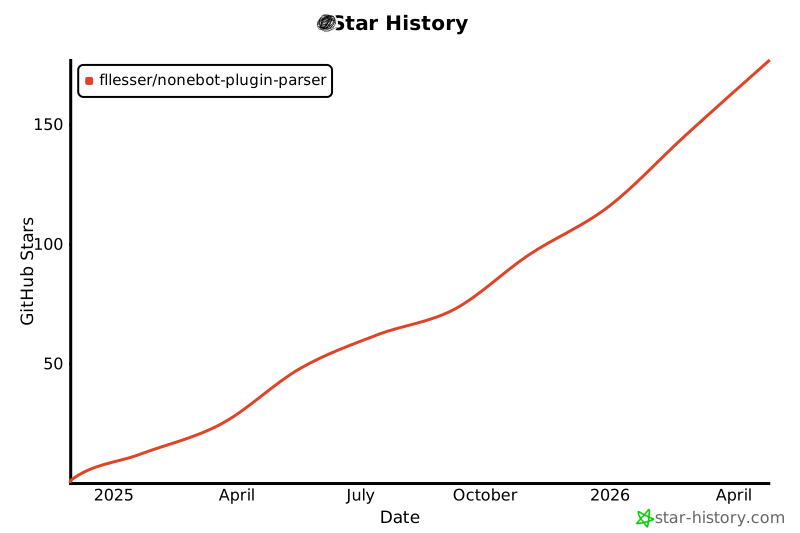
- Stars: 144
- Watchers: 1
- Forks: 21
- Open Issues: 8
-
Metadata Files:
- Readme: README.md
- License: LICENSE
Awesome Lists containing this project
README

## ✨ [Nonebot2](https://github.com/nonebot/nonebot2) 链接分享自动解析插件 ✨
[](./LICENSE)
[](https://pypi.python.org/pypi/nonebot-plugin-parser)
[](https://python.org)
[](https://github.com/astral-sh/uv)
[](https://github.com/astral-sh/ruff)
[](https://github.com/j178/prek)
[](https://codecov.io/gh/fllesser/nonebot-plugin-parser)
[](https://qm.qq.com/q/y4T4CjHimc)
> [!IMPORTANT]
> **收藏项目**,你将从 GitHub 上无延迟地接收所有发布通知~ ⭐️

## 📖 介绍
| 平台 | 触发的消息形态 | 视频 | 图集 | 音频 |
| ------- | --------------------------------- | ---- | ---- | ---- |
| B 站 | av 号/BV 号/链接/短链/卡片/小程序 | ✅ | ✅ | ✅ |
| 抖音 | 链接(分享链接,兼容电脑端链接) | ✅ | ✅ | ❌️ |
| 微博 | 链接(博文,视频,show, 文章) | ✅ | ✅ | ❌️ |
| 小红书 | 链接(含短链)/卡片 | ✅ | ✅ | ❌️ |
| 快手 | 链接(包含标准链接和短链) | ✅ | ✅ | ❌️ |
| acfun | 链接 | ✅ | ❌️ | ❌️ |
| youtube | 链接(含短链) | ✅ | ❌️ | ✅ |
| tiktok | 链接 | ✅ | ❌️ | ❌️ |
| twitter | 链接 | ✅ | ✅ | ❌️ |
支持的链接,可参考 [测试链接](https://github.com/fllesser/nonebot-plugin-parser/blob/master/tests/others/test_urls.md)
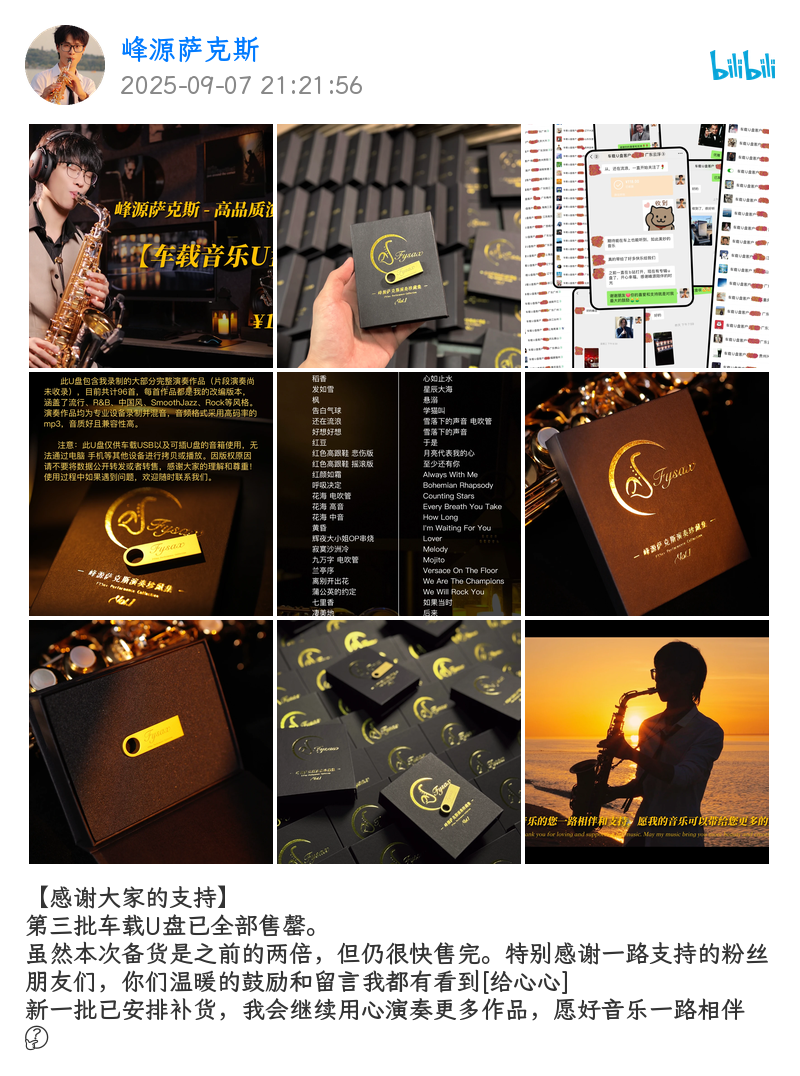
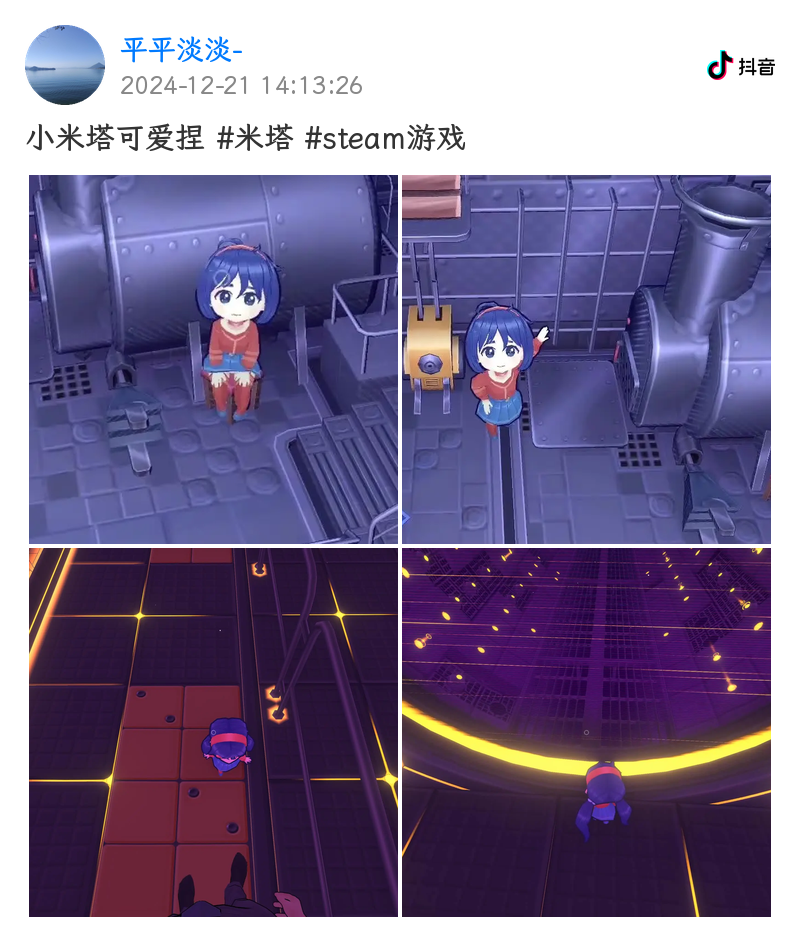
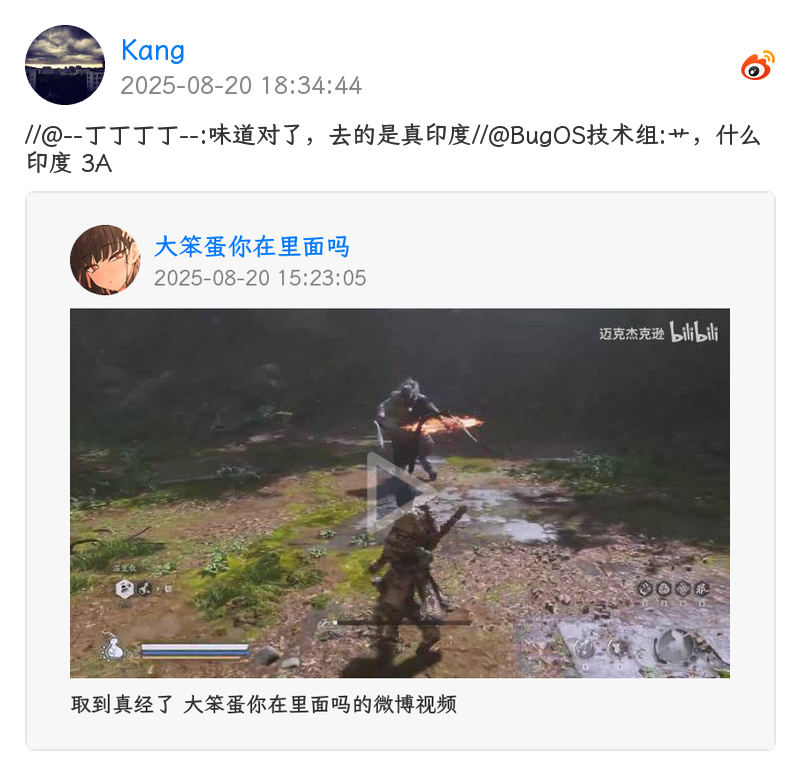
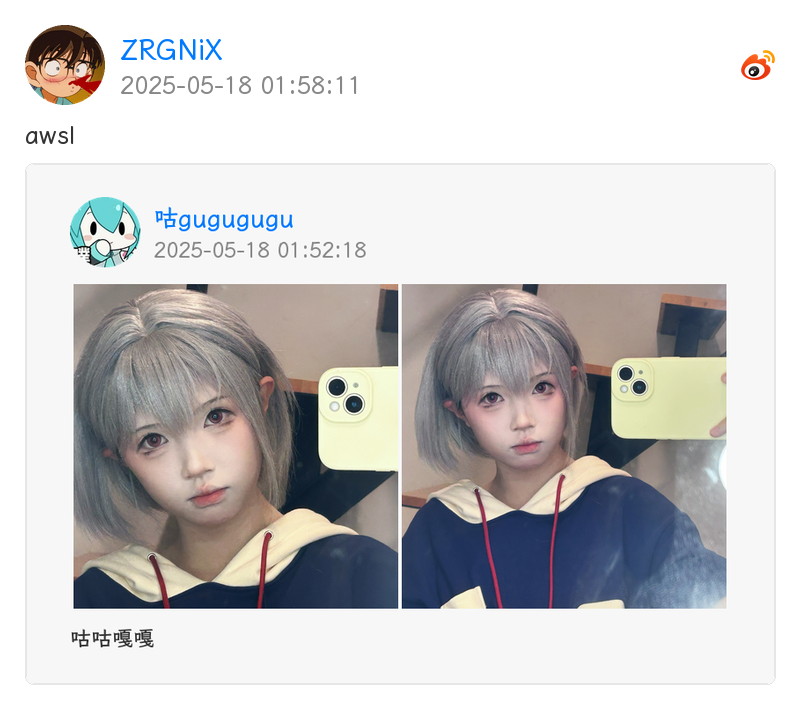
## 🎨 效果图
插件默认启用 PIL 实现的通用媒体卡片渲染,效果图如下

## 💿 安装
> [!Warning]
> **如果你已经在使用 nonebot-plugin-resolver[2],请在安装此插件前卸载**
使用 nb-cli 安装/更新
在 nonebot2 项目的根目录下打开命令行, 输入以下指令即可安装
nb plugin install nonebot-plugin-parser --upgrade
使用 pypi 源更新
nb plugin install nonebot-plugin-parser --upgrade -i https://pypi.org/simple
安装仓库 dev 分支
uv pip install git+https://github.com/fllesser/nonebot-plugin-parser.git@dev
使用包管理器安装
在 nonebot2 项目的插件目录下, 打开命令行, 根据你使用的包管理器, 输入相应的安装命令
uv
使用 uv 安装
uv add nonebot-plugin-parser
安装仓库 dev 分支
uv add git+https://github.com/fllesser/nonebot-plugin-parser.git@master
pip
pip install --upgrade nonebot-plugin-parser
pdm
pdm add nonebot-plugin-parser
poetry
poetry add nonebot-plugin-parser
打开 nonebot2 项目根目录下的 `pyproject.toml` 文件, 在 `[tool.nonebot]` 部分追加写入
plugins = ["nonebot_plugin_parser"]
使用 nbr 安装(使用 uv 管理依赖可用)
[nbr](https://github.com/fllesser/nbr) 是一个基于 uv 的 nb-cli,可以方便地管理 nonebot2
nbr plugin install nonebot-plugin-parser
使用 **pypi** 源安装
nbr plugin install nonebot-plugin-parser -i "https://pypi.org/simple"
使用**清华源**安装
nbr plugin install nonebot-plugin-parser -i "https://pypi.tuna.tsinghua.edu.cn/simple"
安装可选依赖
`ytdlp`, 用于解析 `youtube` 和 `tiktok` 视频
uv add "nonebot-plugin-parser[ytdlp]"
[emosvg](https://github.com/fllesser/emosvg) 用于渲染 `emoji` 表情, 基于 `cairo` 和 `svg` 实现,`win/mac` 用户,请确保自己会配置 `cairo`, 插件默认使用的依赖于网络的 `apilmoji`,已缓存的 `emoji` 渲染速度略快于 `emosvg`
uv add "nonebot-plugin-parser[emosvg]"
`htmlkit`, 无 js 渲染 `html`, 插件目前还没有供 `htmlkit` 使用的模版, 因此可忽略此依赖
uv add "nonebot-plugin-parser[htmlkit]"
`htmlrender`, 使用 `playwright` 渲染 `html`, 插件自 `v2.5.0` 起已正式支持
uv add "nonebot-plugin-parser[htmlrender]"
现版本推荐组合
uv add "nonebot-plugin-parser[ytdlp,emosvg]"
`all` 顾名思义,安装所有可选依赖
uv add "nonebot-plugin-parser[all]"
安装必要组件
部分解析依赖 `ffmpeg`
`ubuntu/debian`
sudo apt-get install ffmpeg
其他 `Linux` 参考(原项目推荐): https://gitee.com/baihu433/ffmpeg
`Windows` 参考(原项目推荐): https://www.jianshu.com/p/5015a477de3c
`yt-dlp` 自 `2025.11.12` 起要求用户安装外部 `JavaScript Runtime`,参考 https://github.com/yt-dlp/yt-dlp/releases/tag/2025.11.12, 推荐安装 [Deno](https://deno.com)
`macOS / Linux`
curl -fsSL https://deno.land/install.sh | sh
`windows`
irm https://deno.land/install.ps1 | iex
## ⚙️ 配置
配置项
```bash
# [可选] nonebot2 内置配置,若服务器上传带宽太低,建议调高,防止超时
API_TIMEOUT=30.0
# [可选] B 站 cookie, 必须含有 SESSDATA 项,可附加 B 站 AI 总结功能
# 如果需要长期使用此凭据则不应该在浏览器登录账户导致 cookie 被刷新,建议注册个小号获取
# 各项获取方式 https://nemo2011.github.io/bilibili-api/#/get-credential
# ac_time_value 相对特殊,仅用于刷新 Cookies
# B站网页打开开发者工具,进入控制台,输入 window.localStorage.ac_time_value 即可获取其值。
parser_bili_ck="SESSDATA=xxxxxxxxxx;ac_time_value=131231241231241"
# [可选] 允许的 B 站视频编码,越靠前的编码优先级越高
# 可选 "avc"(H.264,体积较大), "hev"(HEVC), "av01"(AV1)
# 后两项在不同设备可能有兼容性问题,如需完全避免,可只填一项,如 '["avc"]'
parser_bili_video_codes='["avc", "av01", "hev"]'
# [可选] B 站视频清晰度
# 360p(16), 480p(32), 720p(64), 1080p(80), 1080p+(112), 1080p_60(116), 4k(120)
parser_bili_video_quality=80
# [可选] 小红书 Cookie, 部分链接解析有水印,可填
parser_xhs_ck=""
# [可选] Youtube Cookie, Youtube 视频因人机检测下载失败,需填
parser_ytb_ck=""
# [可选] 代理, 仅作用于 youtube, tiktok 解析
# 推特解析会自动读取环境变量中的 http_proxy / https_proxy(代理软件通常会自动设置)
parser_proxy=None
# [可选] 音频解析,是否需要上传群文件
parser_need_upload=False
# [可选] 视频,图片,音频是否使用 base64 发送
# 注意:编解码和传输 base64 会占用更多的内存,性能和带宽, 甚至可能会使 websocket 连接崩溃
# 因此该配置项仅推荐 nonebot 和 协议端不在同一机器的用户配置
parser_use_base64=False
# [可选] 视频最大解析时长,单位:秒
parser_duration_maximum=480
# [可选] 音视频下载最大文件大小,单位 MB,超过该配置将阻断下载
parser_max_size=90
# [可选] 全局禁止的解析
# 示例 parser_disabled_platforms=["bilibili", "douyin"] 表示禁止了哔哩哔哩和抖音
# 可选值: ["bilibili", "douyin", "kuaishou", "twitter", "youtube", "acfun", "tiktok", "weibo", "xiaohongshu"]
parser_disabled_platforms='["twitter"]'
# [可选] 渲染器类型
# 可选 "default"(无图片渲染), "common"(PIL 通用图片渲染), "htmlrender"(htmlrender), "htmlkit"(htmlkit, 暂不可用)
parser_render_type="common"
# [可选] 是否在解析结果中附加原始URL
parser_append_url=False
# [可选] 自定义渲染字体
# 配置字体文件名,并将字体文件放置于 localstore 生成的插件 config 目录下
# 例如: ./config/nonebot_plugin_parser/
parser_custom_font="LXGWZhenKaiGB-Regular.ttf"
# [可选] 用户名及标题字体粗细程度(仅 htmlrender),如果使用 LXGW ZhenKai 字体建议设置为 500~600 之间
parser_custom_font_weight: int = 700
# [可选] 是否需要转发媒体内容(超过 4 项时始终使用合并转发)
parser_need_forward_contents=True
# [可选] emoji 渲染 CDN
# 例如 ELK_SH_CDN = "https://emojicdn.elk.sh", MQRIO_DEV_CDN = "https://emoji-cdn.mqrio.dev"
parser_emoji_cdn="https://emojicdn.elk.sh"
# [可选] emoji 渲染样式 "apple", "google", "twitter", "facebook"(默认)
parser_emoji_style="facebook"
```
推荐的字体
- [LXGW ZhenKai / 霞鹜臻楷](https://github.com/lxgw/LxgwZhenKai) 效果图使用字体
- [LXGW Neo XiHei / 霞鹜新晰黑](https://github.com/lxgw/LxgwNeoXiHei)
- [LXGW Neo ZhiSong / 霞鹜新致宋 / 霞鶩新緻宋](https://github.com/lxgw/LxgwNeoZhiSong)
## 🎉 使用
| 指令 | 权限 | 需要@ | 范围 | 说明 |
| :------: | :-------------------: | :---: | :--: | :---------------: |
| 开启解析 | SUPERUSER/OWNER/ADMIN | 是 | 群聊 | 开启解析 |
| 关闭解析 | SUPERUSER/OWNER/ADMIN | 是 | 群聊 | 关闭解析 |
| bm | - | 否 | 群聊 | 下载 B 站音频 |
| ym | - | 否 | 群聊 | 下载 youtube 音频 |
| blogin | SUPERUSER | 否 | 私聊 | 扫码获取 B 站凭证 |
## 🧩 扩展
> [!IMPORTANT]
> 插件自 `v2.2.0` 版本开始支持自定义解析器,通过继承 `BaseParser` 类并实现 `platform`, `handle` 即可
完整示例
```python
from re import Match
from typing import ClassVar
from httpx import AsyncClient
from nonebot import require
require("nonebot_plugin_parser")
from nonebot_plugin_parser.parsers import BaseParser, Platform, handle
class ExampleParser(BaseParser):
"""示例视频网站解析器"""
platform: ClassVar[Platform] = Platform(name="example", display_name="示例网站")
@handle("ex.short", r"ex\.short/\w+)")
async def _parse_short_link(self, searched: Match[str]):
"""解析短链"""
url = f"https://{searched.group(0)}"
# 重定向再解析,请确保重定向链接的 handle 存在
# 比如 url 重定向到 example.com/... 就会调用 _parse 解析
return await self.parse_with_redirect(url)
@handle("example.com", r"example\.com/video/(?P\w+)")
@handle("exam.ple", r"exam\.ple/(?P\w+)")
async def _parse(self, searched: Match[str]):
# 1. 提取视频 ID
video_id = searched.group("video_id")
# 2. 请求 API 获取视频信息
async with AsyncClient(headers=self.headers, timeout=self.timeout) as client:
resp = await client.get(f"https://api.example.com/video/{video_id}")
resp.raise_for_status()
data = resp.json()
# 3. 提取数据
title = data["title"]
author_name = data["author"]["name"]
avatar_url = data["author"]["avatar"]
video_url = data["video_url"]
cover_url = data["cover_url"]
duration = data["duration"]
timestamp = data["publish_time"]
description = data.get("description", "")
# 4. 视频内容
author = self.create_author(author_name, avatar_url)
video = self.create_video(video_url, cover_url, duration)
# 5. 图集内容
image_urls = data.get("images")
images = self.create_image(image_urls)
# 6. 返回解析结果
return self.result(
title=title,
text=description,
author=author,
video=video,
contents=[*images],
timestamp=timestamp,
url=f"https://example.com/video/{video_id}",
)
```
辅助函数
> 构建作者
```python
author = self.create_author(
name="作者名",
avatar_url="https://example.com/avatar.jpg", # 可选,会自动下载
description="个性签名" # 可选
)
```
> 构建视频内容
```python
# 方式1:传入 URL,自动下载
video = self.create_video(
url_or_task="https://example.com/video.mp4",
cover_url="https://example.com/cover.jpg", # 可选
duration=120.5 # 可选,单位:秒
)
# 方式2:传入已创建的下载任务
from nonebot_plugin_parser.download import DOWNLOADER
video_task = DOWNLOADER.download_video(url, ext_headers=self.headers)
video = self.create_video(
url_or_task=video_task,
cover_url=cover_url,
duration=duration
)
```
> 构建图集内容
```python
# 并发下载图集内容
images = self.create_images([
"https://example.com/img1.jpg",
"https://example.com/img2.jpg",
])
```
> 重定向 url
```python
real_url = await self.get_redirect_url(
url="https://short.url/abc",
headers=self.headers # 可选
)
```
## 🌟 星星
[](https://www.star-history.com/#fllesser/nonebot-plugin-parser&type=date&legend=top-left)
## 🎉 致谢
- [nonebot-plugin-resolver](https://github.com/zhiyu1998/nonebot-plugin-resolver) - 本项目最初基于此插件进行开发,在此表示感谢。尽管当前版本代码已完全重构,但仍感谢原项目提供的初始思路和参考。
- [parse-video-py](https://github.com/wujunwei928/parse-video-py) - 在抖音解析功能实现方面提供了技术参考和借鉴。