https://github.com/floatpane/floatpane
Hyprpaper inspired MacOS application for an easy change of Wallpapers
https://github.com/floatpane/floatpane
Last synced: 3 months ago
JSON representation
Hyprpaper inspired MacOS application for an easy change of Wallpapers
- Host: GitHub
- URL: https://github.com/floatpane/floatpane
- Owner: floatpane
- License: mit
- Created: 2025-07-15T13:41:47.000Z (about 1 year ago)
- Default Branch: master
- Last Pushed: 2025-07-31T10:50:56.000Z (about 1 year ago)
- Last Synced: 2025-07-31T14:19:24.045Z (about 1 year ago)
- Language: JavaScript
- Homepage: http://floatpane.andrinoff.com/
- Size: 11.7 MB
- Stars: 1
- Watchers: 0
- Forks: 0
- Open Issues: 4
-
Metadata Files:
- Readme: README.md
- Changelog: CHANGELOG.md
- Funding: .github/FUNDING.yml
- License: LICENSE
Awesome Lists containing this project
README
# floatpane
A lightweight, floating wallpaper selector for macOS.


---
**floatpane** is a minimal utility for macOS that lets you quickly browse and set your desktop wallpaper. It's designed to be invoked with a global keyboard shortcut and floats above all other windows, making it compatible with tiling window managers like **Aerospace** and **yabai**.
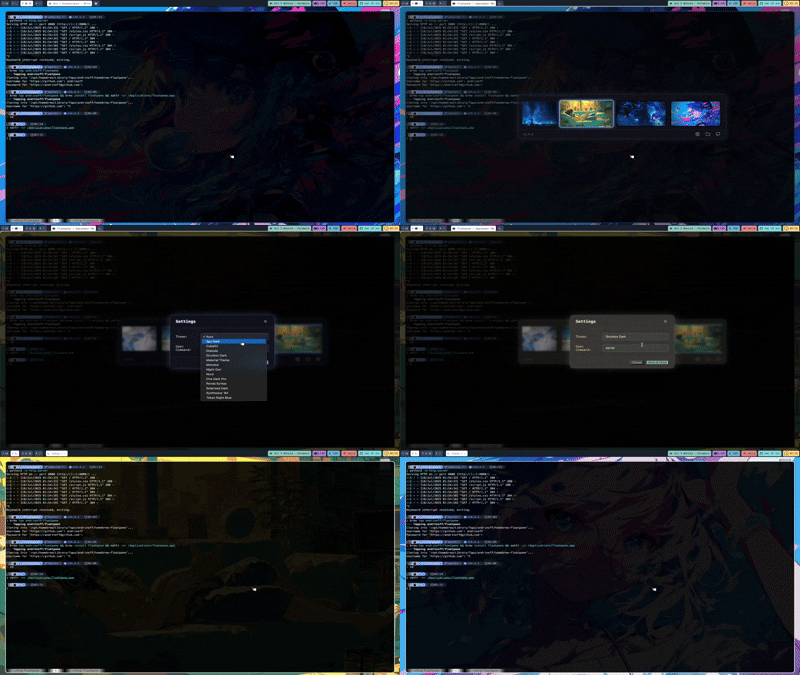
## 🎬 Demo
## ✨ Features
- **⚡ Summon:** Bring up the wallpaper grid from anywhere with `Cmd+Shift+P`.
- **🖼️ Floating Window:** Floats on top of all other applications for easy access.
- **🧩 Tiling WM Friendly:** Integrates smoothly with Aerospace, yabai, and Amethyst.
- **⌨️ Keyboard Navigation:** Use arrow keys to browse, `Enter` to apply, and `Esc` to dismiss.
- **🚀 Lazy Loading:** Thumbnails load as you scroll for a fast, responsive experience.
- **✅ Current Wallpaper Indicator:** Your active wallpaper is always highlighted.
- **🎨 Themes:** Customize the look and feel with multiple built-in themes.
## 📋 Requirements
- macOS
- A `~/wallpapers` directory containing your images.
## 🚀 Installation
### Homebrew (Recommended)
```bash
brew tap floatpane/floatpane
brew install floatpane
```
Builds (DMG's) are also available [here](https://github.com/floatpane/flotpane/releases).
> [!WARNING]
> The Builds are not signed with an Apple Developer ID. You need to run `xattr -cr /Applications/floatpane.app` after downloading and before opening it for the first time.
### For Developers
1. **Clone the repository:**
```sh
git clone https://github.com/floatpane/floatpane.git
cd floatpane
```
2. **Install dependencies:**
```sh
npm install
```
3. **Run in development mode:**
You'll need two terminal windows for this.
- In **Terminal 1**, start the webpack watcher:
```sh
npm run watch
```
- In **Terminal 2**, start the Electron app:
```sh
npm start
```
## 🌅 Wallpapers
You can find all the wallpapers I use by going to [andrinoff/wallpapers](https://github.com/andrinoff/wallpapers)
OR
```sh
curl -sS https://andrinoff.com/wallpapers/download.sh | sh
```
## 🎨 Available Themes
Floatpane includes a variety of themes to match your style. You can change the theme in the settings (`Cmd+,`, or by clicking the gear icon).
- Aura
- Ayu Dark
- Cobalt2
- Dracula
- Gruvbox Dark
- Material Theme
- Monokai
- Night Owl
- Nord
- One Dark Pro
- Panda Syntax
- Solarized Dark
- Synthwave '84
- Tokyo Night Blue
## 📜 License
This project is licensed under the **MIT License** - see the [LICENSE](LICENSE) file for details.