https://github.com/flopp/activities
Your self-hosted activities overview (running, cycling, ...). Synced with Strava.
https://github.com/flopp/activities
leaflet strava stravalib
Last synced: over 1 year ago
JSON representation
Your self-hosted activities overview (running, cycling, ...). Synced with Strava.
- Host: GitHub
- URL: https://github.com/flopp/activities
- Owner: flopp
- License: mit
- Created: 2020-06-14T12:46:56.000Z (about 6 years ago)
- Default Branch: master
- Last Pushed: 2024-01-31T22:05:43.000Z (over 2 years ago)
- Last Synced: 2025-03-18T05:35:03.608Z (over 1 year ago)
- Topics: leaflet, strava, stravalib
- Language: JavaScript
- Homepage: https://activities.flopp.net
- Size: 426 KB
- Stars: 29
- Watchers: 3
- Forks: 2
- Open Issues: 8
-
Metadata Files:
- Readme: README.md
- License: LICENSE
Awesome Lists containing this project
README
# Activities
[](https://github.com/ambv/black)

Your self-hosted activities overview (running, cycling, ...). Synced with [Strava](https://www.strava.com).
https://activities.flopp.net
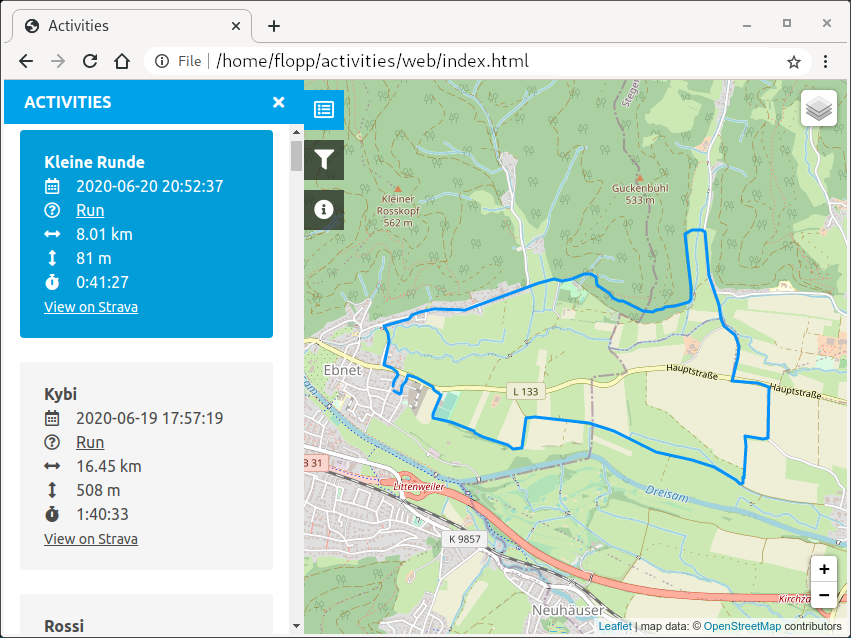
## Features
- Built-in http server to authenticate with Strava.
- Fetching of Strava activities.
- Visited POI (predefined point-of-interest) matching.
- Filtering by activity name, activity type, min/max distance, visited POI.
- Running streak computation.
- Heatmaps.
## Usage
### Installation
```
git clone https://github.com/flopp/activities.git
cd activities
python3 -m venv .env
.env/bin/pip install --upgrade pip
.env/bin/pip install .
```
### Fetch API Config from Strava (once!)
1. Create an "Application" on https://www.strava.com/settings/api; for "Authorization Callback Domain" use `localhost`, for all other properties you can basically use whatever you want ;)
2. Copy `config-example.json` to `config.json` and fill in the "Client ID" and the "Client Secret" from the "My API Application" section on https://www.strava.com/settings/api.
### Authenticate with Strava (once!)
```
.env/bin/activities \
--auth
```
Now a web browser window should open with an "Authenticate with Strava" button. If not, manually open `localhost:5000` in a web browser of your choice. Click "Authenticate with Strava". Allow access for the app.
The authentication data is now saved in `data.db` for later use.
### Sync
```
.env/bin/activities \
--sync \
--browser
```
This fetches your Strava data, creates a static website, and opens a browser to view the website.
You can also manually point a web browser of your choice to `file:///INSTALLATION_PATH/web/index.html`...
### Visited POI Computation
If you want to know which points-of-interest (POI), e.g. peaks of mountains, you have visited on each activity, create a JSON file containing the names and lat/lon pairs of your POI, e.g.
```
{
"Belchen": {"lat": 47.822496, "lon": 7.833198},
"Feldberg": {"lat": 47.873986, "lon": 8.004683},
"Hinterwaldkopf": {"lat": 47.918979, "lon": 8.016681},
"Kandel": {"lat": 48.062517, "lon": 8.011391},
"Kybfelsen": {"lat": 47.960851, "lon": 7.885071},
"Rosskopf": {"lat": 48.010010, "lon": 7.901702},
"Schauinsland": {"lat": 47.911940, "lon": 7.898506},
"Schönberg": {"lat": 47.954722, "lon": 7.805504}
}
```
Then just add the option `--poi mypoi.json` to your `.env/bin/activities` command.
## Made with
- [Bulma](https://bulma.io/)
- [Click](https://click.palletsprojects.com/)
- [Flask](https://flask.palletsprojects.com/)
- [heatmap.js](https://www.patrick-wied.at/static/heatmapjs/)
- [geopy](https://github.com/geopy/geopy)
- [jQuery](https://jquery.com/)
- [Leaflet](https://leafletjs.com/)
- [Leaflet.BeautifyMarker](https://github.com/masajid390/BeautifyMarker)
- [Leaflet.distance-markers](https://github.com/adoroszlai/leaflet-distance-markers)
- [Leaflet.encoded](https://github.com/jieter/Leaflet.encoded)
- [noUiSlider](https://refreshless.com/nouislider/)
- [polyline](https://github.com/hicsail/polyline)
- [SQLAlchemy](https://www.sqlalchemy.org)
- [Stravalib](https://github.com/hozn/stravalib)
## License
```
MIT License
Copyright (c) 2020 Florian Pigorsch
```