https://github.com/flowllm-ai/flowllm
FlowLLM: Simplifying LLM-based HTTP/MCP Service Development
https://github.com/flowllm-ai/flowllm
agent http-server llm llm-workflow mcp-server sharing
Last synced: 6 months ago
JSON representation
FlowLLM: Simplifying LLM-based HTTP/MCP Service Development
- Host: GitHub
- URL: https://github.com/flowllm-ai/flowllm
- Owner: FlowLLM-AI
- License: apache-2.0
- Created: 2025-08-12T08:54:42.000Z (10 months ago)
- Default Branch: main
- Last Pushed: 2025-12-15T07:01:08.000Z (6 months ago)
- Last Synced: 2025-12-15T08:22:18.110Z (6 months ago)
- Topics: agent, http-server, llm, llm-workflow, mcp-server, sharing
- Language: Python
- Homepage: https://flowllm-ai.github.io/flowllm/
- Size: 4.31 MB
- Stars: 20
- Watchers: 0
- Forks: 1
- Open Issues: 1
-
Metadata Files:
- Readme: README.md
- License: LICENSE
Awesome Lists containing this project
README

FlowLLM: Simplifying LLM-based HTTP/MCP Service Development
If you find it useful, please give us a ⭐ Star. Your support drives our continuous improvement.




English | 简体中文
---
## 📖 Introduction
FlowLLM encapsulates LLM, Embedding, and vector_store capabilities as HTTP/MCP services. It is suitable for AI assistants, RAG applications, and workflow services, and can be integrated into MCP-compatible client tools.
### 🏗️ Architecture Overview

### 🌟 Applications Based on FlowLLM
| Project Name | Description |
|-----------------------------------------------|--------------------------------------|
| [ReMe](https://github.com/agentscope-ai/ReMe) | Memory management toolkit for agents |
### 📢 Recent Updates
| Date | Update Content |
|------------|---------------------------------------------------------------------------------------------------------------------------------------------------------------------------------------------------------------------------------------------------------------------------|
| 2025-11-15 | Added [File Tool Op](docs/zh/guide/file_tool_op_guide.md) feature with 13 file operation tools, supporting file reading, writing, editing, searching, directory operations, system command execution, and task management |
| 2025-11-14 | Added Token counting capability, supporting accurate calculation of token counts for messages and tools via `self.token_count()` method, with support for multiple backends (base, openai, hf). See configuration examples in [default.yaml](flowllm/config/default.yaml) |
### 📚 Learning Resources
Project developers will share their latest learning materials here.
| Date | Title | Description |
|------------|--------------------------------------------------------------------------------------------------------|-----------------------------------------------------------------------------------|
| 2025-11-24 | [Mem-PAL: Memory-Augmented Personalized Assistant](./docs/zh/reading/20251124-mem-pal.md) | Mem-PAL: Memory-Augmented Personalized Assistant with Log-based Structured Memory |
| 2025-11-14 | [HaluMem Analysis](./docs/zh/reading/20251114-halumem.md) | HaluMem: Evaluating Hallucinations in Memory Systems of Agents Analysis |
| 2025-11-13 | [Gemini CLI Context Management Mechanism](./docs/zh/reading/20251113-gemini-cli-context-management.md) | Multi-layer Context Management Strategy for Gemini CLI |
| 2025-11-10 | [Context Management Guide](./docs/zh/reading/20251110-manus-context-report.md) | Context Management Guide |
| 2025-11-10 | [LangChain&Manus Video Materials](./docs/zh/reading/20251110-manus-context-raw.md) | LangChain & Manus Context Management Video |
### ⭐ Core Features
- **Simple Op Development**: Inherit from `BaseOp` or `BaseAsyncOp` and implement your business logic. FlowLLM provides lazy-initialized LLM, Embedding models, and vector stores accessible via `self.llm`, `self.embedding_model`, and `self.vector_store`. It also offers prompt template management through `prompt_format()` and `get_prompt()` methods. Additionally, FlowLLM includes built-in token counting capabilities. Use `self.token_count()` to accurately calculate token counts for messages and tools, supporting multiple backends (base, openai, hf, etc.).
- **Flexible Flow Orchestration**: Compose Ops into Flows via YAML configuration. `>>` denotes serial composition; `|` denotes parallel composition. For example, `SearchOp() >> (AnalyzeOp() | TranslateOp()) >> FormatOp()` builds complex workflows. Define input/output schemas and start the service with `flowllm config=your_config`.
- **Automatic Service Generation**: FlowLLM automatically generates HTTP, MCP, and CMD services. The HTTP service provides RESTful APIs with synchronous JSON and HTTP Stream responses. The MCP service registers as Model Context Protocol tools for MCP-compatible clients. The CMD service executes a single Op in command-line mode for quick testing and debugging.
---
## ⚡ Quick Start
### 📦 Step0 Installation
#### 📥 From PyPI
```bash
pip install flowllm
```
#### 🔧 From Source
```bash
git clone https://github.com/flowllm-ai/flowllm.git
cd flowllm
pip install -e .
```
For detailed installation and configuration, refer to the [Installation Guide](docs/zh/guide/installation.md).
### ⚙️ Configuration
Create a `.env` file and configure your API keys. Copy from `example.env` and modify:
```bash
cp example.env .env
```
Configure your API keys in the `.env` file:
```bash
FLOW_LLM_API_KEY=sk-xxxx
FLOW_LLM_BASE_URL=https://xxxx/v1
FLOW_EMBEDDING_API_KEY=sk-xxxx
FLOW_EMBEDDING_BASE_URL=https://xxxx/v1
```
For detailed configuration, refer to the [Configuration Guide](docs/zh/guide/config_guide.md).
### 🛠️ Step1 Build Op
```python
from flowllm.core.context import C
from flowllm.core.op import BaseAsyncOp
from flowllm.core.schema import Message
from flowllm.core.enumeration import Role
@C.register_op()
class SimpleChatOp(BaseAsyncOp):
async def async_execute(self):
query = self.context.get("query", "")
messages = [Message(role=Role.USER, content=query)]
# Use token_count method to calculate token count
token_num = self.token_count(messages)
print(f"Input tokens: {token_num}")
response = await self.llm.achat(messages=messages)
self.context.response.answer = response.content.strip()
```
For details, refer to the [Simple Op Guide](docs/zh/guide/async_op_minimal_guide.md), [LLM Op Guide](docs/zh/guide/async_op_llm_guide.md), and [Advanced Op Guide](docs/zh/guide/async_op_advance_guide.md) (including Embedding, VectorStore, and concurrent execution).
### 📝 Step2 Configure Config
The following example demonstrates building an MCP (Model Context Protocol) service. Create a configuration file `my_mcp_config.yaml`:
```yaml
backend: mcp
mcp:
transport: sse
host: "0.0.0.0"
port: 8001
flow:
demo_mcp_flow:
flow_content: MockSearchOp()
description: "Search results for a given query."
input_schema:
query:
type: string
description: "User query"
required: true
llm:
default:
backend: openai_compatible
model_name: qwen3-30b-a3b-instruct-2507
params:
temperature: 0.6
token_count: # Optional, configure token counting backend
model_name: Qwen/Qwen3-30B-A3B-Instruct-2507
backend: hf # Supports base, openai, hf, etc.
params:
use_mirror: true
```
### 🚀 Step3 Start MCP Service
```bash
flowllm \
config=my_mcp_config \
backend=mcp \ # Optional, overrides config
mcp.transport=sse \ # Optional, overrides config
mcp.port=8001 \ # Optional, overrides config
llm.default.model_name=qwen3-30b-a3b-thinking-2507 # Optional, overrides config
```
After the service starts, refer to the [Client Guide](docs/zh/guide/client_guide.md) to use the service and obtain the tool_call required by the model.
---
## 📚 Detailed Documentation
### 🚀 Getting Started
- [Installation Guide](docs/zh/guide/installation.md)
- [Configuration Guide](docs/zh/guide/config_guide.md)
### 🔧 Op Development
- [Op Introduction](docs/zh/guide/op_introduction.md)
- [Simple Op Guide](docs/zh/guide/async_op_minimal_guide.md)
- [LLM Op Guide](docs/zh/guide/async_op_llm_guide.md)
- [Advanced Op Guide](docs/zh/guide/async_op_advance_guide.md)
- [Tool Op Guide](docs/zh/guide/async_tool_op_guide.md)
- [File Tool Op Guide](docs/zh/guide/file_tool_op_guide.md)
- [Vector Store Guide](docs/zh/guide/vector_store_guide.md)
### 🔀 Flow Orchestration
- [Flow Guide](docs/zh/guide/flow_guide.md)
### 🌐 Service Usage
- [HTTP Service Guide](docs/zh/guide/http_service_guide.md)
- [HTTP Stream Guide](docs/zh/guide/http_stream_guide.md)
- [MCP Service Guide](docs/zh/guide/mcp_service_guide.md)
- [CMD Service Guide](docs/zh/guide/cmd_service_guide.md)
- [Client Guide](docs/zh/guide/client_guide.md)
---
## 🤝 Contributing
Contributions of all forms are welcome! For participation methods, refer to the [Contribution Guide](docs/zh/guide/contribution.md).
---
## 📄 License
This project is licensed under the [Apache 2.0](LICENSE) license.
---
## Star 历史
[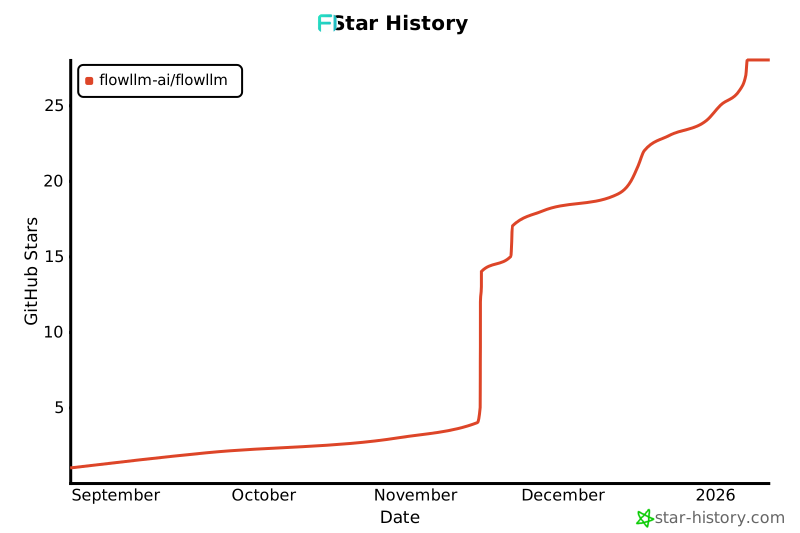](https://www.star-history.com/#flowllm-ai/flowllm&Date)
---
GitHub •
Documentation •
PyPI