https://github.com/fluxororg/fluxor
Unidirectional Data Flow in Swift 🚀 based on Combine 🚜
https://github.com/fluxororg/fluxor
combine data-flow redux swift swiftui
Last synced: over 1 year ago
JSON representation
Unidirectional Data Flow in Swift 🚀 based on Combine 🚜
- Host: GitHub
- URL: https://github.com/fluxororg/fluxor
- Owner: FluxorOrg
- License: mit
- Created: 2019-11-17T22:42:09.000Z (over 6 years ago)
- Default Branch: master
- Last Pushed: 2023-12-01T22:35:28.000Z (over 2 years ago)
- Last Synced: 2025-03-02T10:48:31.713Z (over 1 year ago)
- Topics: combine, data-flow, redux, swift, swiftui
- Language: Swift
- Homepage: https://fluxor.dev
- Size: 1.49 MB
- Stars: 133
- Watchers: 2
- Forks: 7
- Open Issues: 0
-
Metadata Files:
- Readme: README.md
- Funding: .github/FUNDING.yml
- License: LICENSE
Awesome Lists containing this project
README


Unidirectional Data Flow in Swift - inspired by Redux and NgRx.
Based on Combine - ideal for use with SwiftUI.







## Why do I need Fluxor?
When developing apps, it can quickly become difficult to keep track of the flow of data. Data flows in multiple directions and can easily become inconsistent with *Multiple Sources of Truth*.
With Fluxor, data flows in only one direction, there is only one *Single Source of Truth*, updates to the state are done with pure functions, the flow in the app can easily be followed, and all the individual parts can be unit tested separately.
## How does it work?
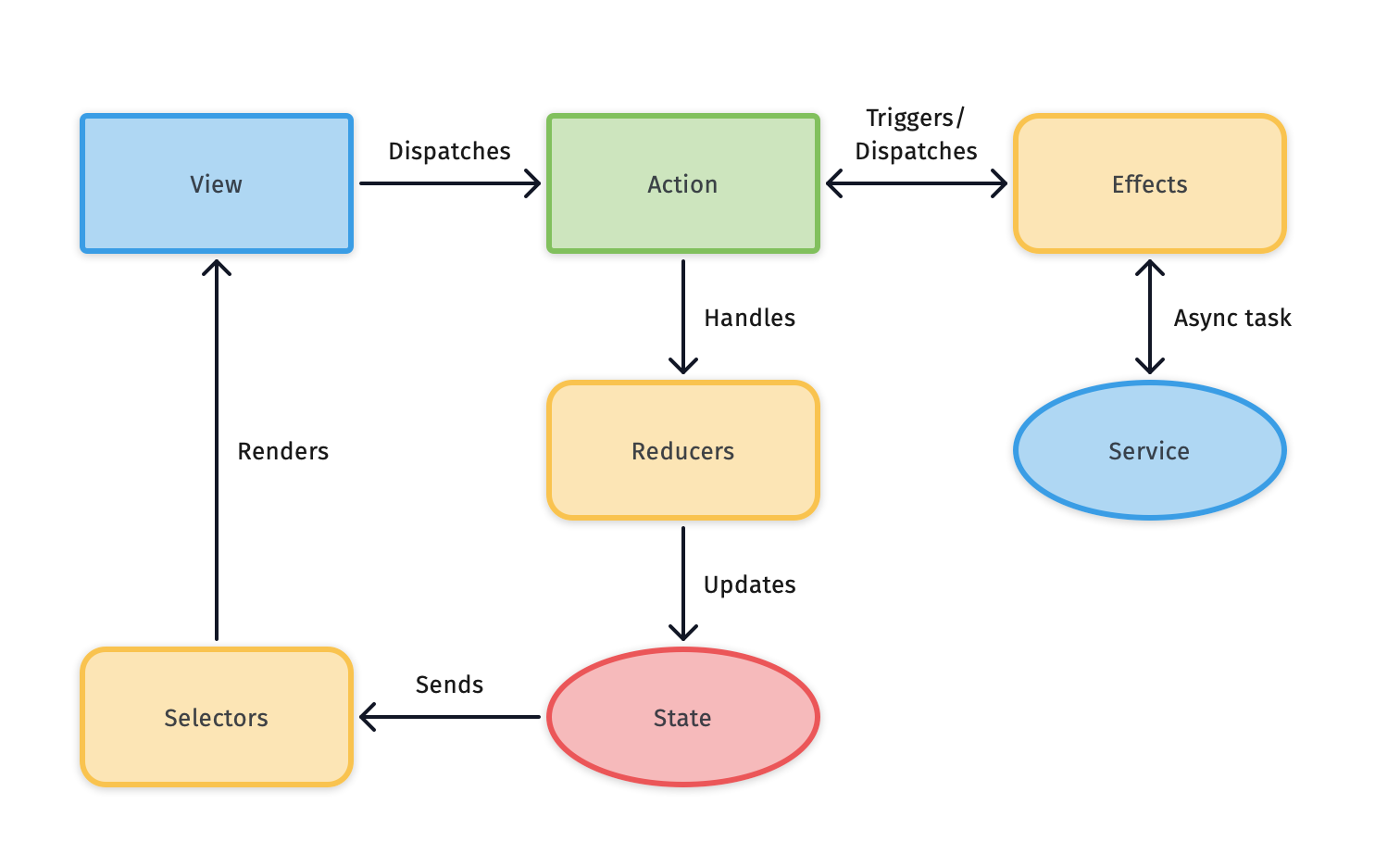
Fluxor is made up from the following types:
* `Store` contains an immutable state (the **Single Source of Truth**).
* `Action`s are dispatched on the **Store** to update the state.
* `Reducer`s gives the **Store** a new state based on the **Actions** dispatched.
* `Selector`s selects (and eventually transform) part(s) of the state to use (eg. in views).
* `Effect`s gets triggered by **Actions**, and can perform async task which in turn can dispatch new **Actions**.
* `Interceptor`s intercepts every dispatched **Action** and state change for easier debugging.
## Installation
Fluxor can be installed as a dependency to your project using [Swift Package Manager](https://swift.org/package-manager), by simply adding `https://github.com/FluxorOrg/Fluxor.git`.
### Requirements
- iOS 13.0+ / macOS 10.15+ / tvOS 13.0+ / watchOS 6.0+ / Linux
- Xcode 11.4+ / Swift 5.2+
## Usage
As a minimum, an app using Fluxor will need a `Store`, an `Action`, a `Reducer`, a `Selector` and a state.
Here is a setup where firing the `IncrementAction` (1) will increment the `counter` (2) in `AppState` (3), and when selecting with the `counterSelector` (4) on the `Store` will publish the `counter` everytime the state changes (5).
```swift
import Combine
import Fluxor
import Foundation
// 3
struct AppState {
var counter: Int
}
// 1
struct IncrementAction: Action {
let increment: Int
}
// 4
let counterSelector = Selector(keyPath: \AppState.counter)
let store = Store(initialState: AppState(counter: 0))
store.register(reducer: Reducer(
ReduceOn(IncrementAction.self) { state, action in
state.counter += action.increment // 2
}
))
let cancellable = store.select(counterSelector).sink {
print("Current count: \($0)") // 5
}
store.dispatch(action: IncrementAction(increment: 42))
// Will print out "Current count: 42"
```
### Side Effects
The above example is a simple use case, where an `Action` is dispatched and the state is updated by a `Reducer`. In cases where something should happen when an `Action` is dispatched (eg. fetching data from the internet or some system service), Fluxor provides `Effects`.
`Effects` are registered in the `Store` and will receive all `Action`s dispatched. An `Effect` will in most cases be a `Publisher` mapped from the dispatched `Action` - the mapped `Action` will be dispatched on the `Store`.
Alternatively an `Effect` can also be a `Cancellable` when it don't need to have an `Action` dispatched.
```swift
import Combine
import Fluxor
import Foundation
class TodosEffects: Effects {
typealias Environment = AppEnvironment
let fetchTodos = Effect.dispatchingOne { actions, environment in
actions.ofType(FetchTodosAction.self)
.flatMap { _ in
environment.todoService.fetchTodos()
.map { DidFetchTodosAction(todos: $0) }
.catch { _ in Just(DidFailFetchingTodosAction(error: "An error occurred.")) }
}
.eraseToAnyPublisher()
}
}
```
### Intercepting actions and changes
If read-only access to all `Action`s dispatched and state changes is needed, an `Interceptor` can be used. `Interceptor` is just a protocol, and when registered in the `Store`, instances of types conforming to this protocol will receive a callback everytime an `Action` is dispatched.
Fluxor comes with two implementations of `Interceptor`:
* `PrintInterceptor` for printing `Action`s and state changes to the log.
* `TestInterceptor` to help assert that specific `Action`s was dispatched in unit tests.
## Packages for using it with SwiftUI and testing
Fluxor comes with packages, to make it easier to use it with SwiftUI and for testing apps using Fluxor.
* [More info on how to use it with SwiftUI](https://fluxor.dev/Using%20Fluxor%20with%20SwiftUI.html)
* [More info on how to test apps using Fluxor](https://fluxor.dev/Test%20Support.html)
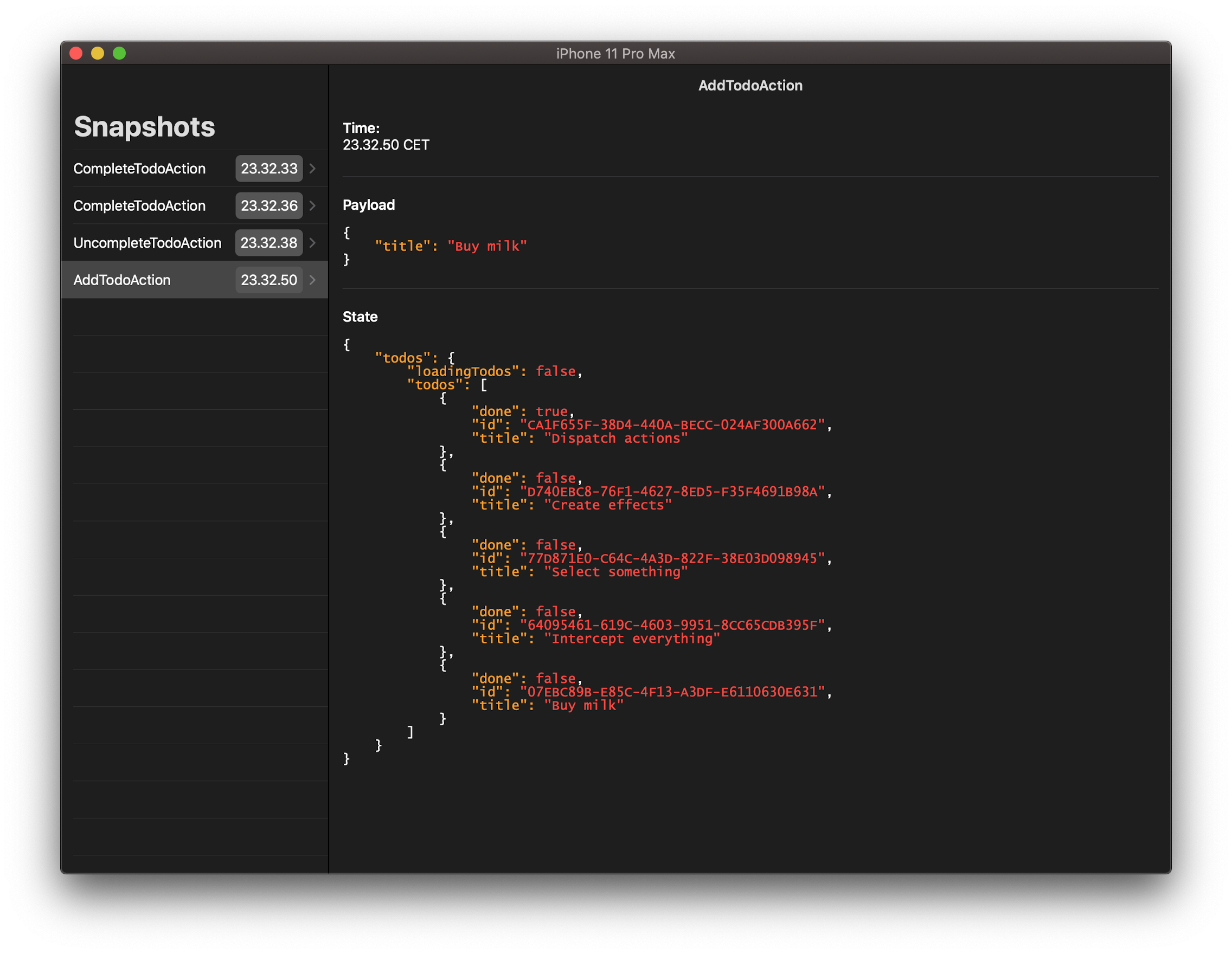
## Debugging with FluxorExplorer
Fluxor has a companion app, [**FluxorExplorer**](https://github.com/FluxorOrg/FluxorExplorer), which helps when debugging apps using Fluxor. FluxorExplorer lets you look through the dispatched `Action`s and state changes, to debug the data flow of the app.
FluxorExplorer is available on the App Store but also available as open source.

To learn more about how to use FluxorExplorer, [go to the repository for the app](https://github.com/FluxorOrg/FluxorExplorer).
## Apps using Fluxor
### Real world apps
* [FluxorExplorer](https://github.com/FluxorOrg/FluxorExplorer)
### Sample apps
* [FluxorSampleToDo](https://github.com/FluxorOrg/FluxorSampleToDo)