https://github.com/fniessink/next-action
Next-action: determine the next action to work on from a list of actions in a todo.txt file
https://github.com/fniessink/next-action
command-line-tool getting-things-done gtd task-list tasklist todo todo-list todoapp todolist todotxt
Last synced: 7 months ago
JSON representation
Next-action: determine the next action to work on from a list of actions in a todo.txt file
- Host: GitHub
- URL: https://github.com/fniessink/next-action
- Owner: fniessink
- License: apache-2.0
- Archived: true
- Created: 2018-04-30T10:35:50.000Z (about 8 years ago)
- Default Branch: main
- Last Pushed: 2024-12-08T21:56:10.000Z (over 1 year ago)
- Last Synced: 2025-12-16T14:31:48.218Z (7 months ago)
- Topics: command-line-tool, getting-things-done, gtd, task-list, tasklist, todo, todo-list, todoapp, todolist, todotxt
- Language: Python
- Homepage:
- Size: 9.22 MB
- Stars: 17
- Watchers: 0
- Forks: 1
- Open Issues: 33
-
Metadata Files:
- Readme: README.md
- Changelog: CHANGELOG.md
- License: LICENSE
Awesome Lists containing this project
README
# Next-action
[](https://pypi.org/project/next-action/)
[](https://pyup.io/repos/github/fniessink/next-action/)
[](https://travis-ci.com/fniessink/next-action)
[](https://sonarcloud.io/dashboard?id=fniessink%3Anext-action)
Determine the next action to work on from a list of actions in a todo.txt file.
Don't know what *Todo.txt* is? See for the *Todo.txt* specification.
*Next-action* is not a tool for editing todo.txt files, see for available options.
## Table of contents
- [Demo](#demo)
- [Installation](#installation)
- [*Next-action*](#next-action)
- [Tab completion for *Next-action*](#tab-completion-for-next-action)
- [Usage](#usage)
- [Limiting the tasks from which next actions are selected](#limiting-the-tasks-from-which-next-actions-are-selected)
- [Showing more than one next action](#showing-more-than-one-next-action)
- [Task dependencies](#task-dependencies)
- [Output options](#output-options)
- [Configuring *Next-action*](#configuring-next-action)
- [Option details](#option-details)
- [Recent changes](#recent-changes)
- [Developing *Next-action*](#developing-next-action)
- [Installing the development environment and dependencies](#installing-the-development-environment-and-dependencies)
- [Running unit tests](#running-unit-tests)
- [Running feature tests](#running-feature-tests)
- [Running quality checks](#running-quality-checks)
- [Generating documentation](#generating-documentation)
- [Source code structure and dependencies](#source-code-structure-and-dependencies)
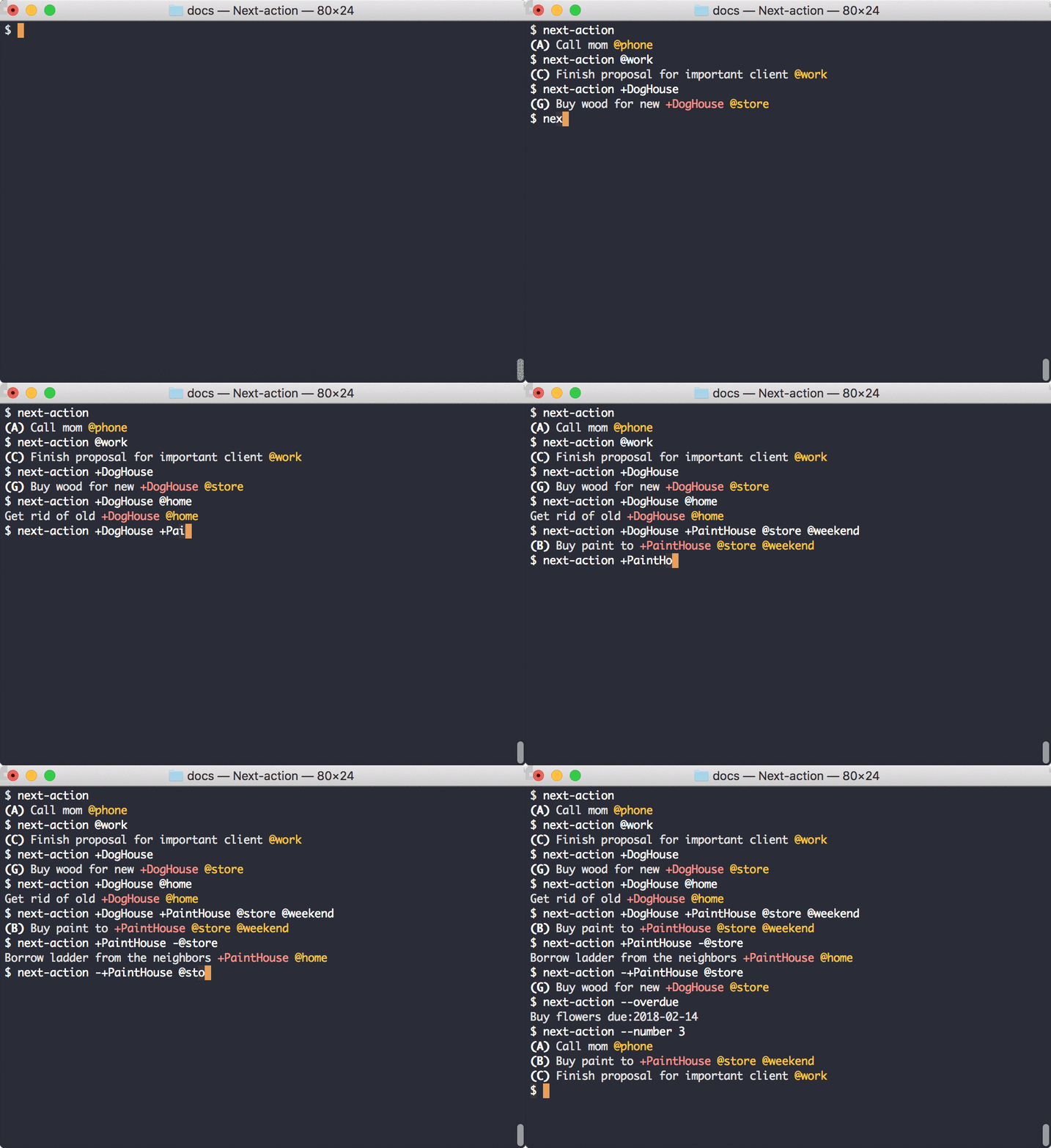
## Demo
## Installation
### *Next-action*
*Next-action* requires Python 3.6 or newer.
`pip install --upgrade next-action`
### Tab completion for *Next-action*
To install tab completion for *Next-action* in the Bash shell, follow these steps:
- Download [extra/.next-action-completion.bash](https://raw.githubusercontent.com/fniessink/next-action/master/extra/.next-action-completion.bash)
and save it in your home folder.
- Next, add this line to your `~/.bash_profile` file:
```bash
source ~/.next-action-completion.bash
```
- Then, open a new terminal.
Typing `next-action [TAB]` should give you the possible command line options. Hitting tab after an option that takes
arguments, shows the possible arguments.
## Usage
```console
$ next-action --help
Usage: next-action [-h] [-V] [-c [] | -w] [-f ...] [-b] [-g []] [-l] [-r ]
[-s []] [-a | -n <number>] [-d [<due date>] | -o] [-p [<priority>]] [-u] [--] [<context|project>
...]
Show the next action in your todo.txt. The next action is selected from the tasks in the todo.txt file based
on task properties such as priority, due date, and creation date. Limit the tasks from which the next action
is selected by specifying contexts the tasks must have and/or projects the tasks must belong to.
Options:
-h, --help show this help message and exit
-V, --version show program's version number and exit
Configuration options:
-c [<config.cfg>], --config-file [<config.cfg>]
filename of configuration file to read (default: ~/.next-action.cfg); omit filename
to not read any configuration file
-w, --write-config-file
generate a sample configuration file and exit
Input options:
-f <todo.txt>, --file <todo.txt>
filename of todo.txt file to read; can be '-' to read from standard input; argument
can be repeated to read tasks from multiple todo.txt files (default: ~/todo.txt)
Output options:
-b, --blocked show the tasks blocked by the next action, if any (default: False)
-g [<group>], --groupby [<group>]
group the next actions; available groups: context, duedate, priority, project,
source (default: None)
-l, --line-number reference next actions with the line number in their todo.txt file (default: False)
-r {always,never,multiple}, --reference {always,never,multiple}
reference next actions with the name of their todo.txt file (default: when reading
multiple todo.txt files)
-s [<style>], --style [<style>]
colorize the output; available styles: abap, algol, algol_nu, arduino, autumn,
borland, bw, colorful, default, dracula, emacs, friendly, friendly_grayscale,
fruity, github-dark, gruvbox-dark, gruvbox-light, igor, inkpot, lilypond, lovelace,
manni, material, monokai, murphy, native, nord, nord-darker, one-dark, paraiso-dark,
paraiso-light, pastie, perldoc, rainbow_dash, rrt, sas, solarized-dark, solarized-
light, staroffice, stata, stata-dark, stata-light, tango, trac, vim, vs, xcode,
zenburn (default: None)
-u, --open-urls open the urls in the next actions, if any (default: False)
Show multiple next actions:
-a, --all show all next actions
-n <number>, --number <number>
number of next actions to show (default: 1)
Limit the tasks from which the next actions are selected:
-d [<due date>], --due [<due date>]
show only next actions with a due date; if a date is given, show only next actions
due on or before that date
-o, --overdue show only overdue next actions
-p [<priority>], --priority [<priority>]
minimum priority (A-Z) of next actions to show (default: None)
@<context> ... contexts the next action must have
+<project> ... projects the next action must be part of; if repeated the next action must be part
of at least one of the projects
-@<context> ... contexts the next action must not have
-+<project> ... projects the next action must not be part of
Use -- to separate options with optional arguments from contexts and projects, in order to handle cases
where a context or project is mistaken for an argument to an option.
```
Assuming your todo.txt file is in your home folder, running *Next-action* without arguments will show the next action
you should do. For example, given this
[todo.txt](https://raw.githubusercontent.com/fniessink/next-action/master/docs/todo.txt), calling mom would be the next
action:
```console
$ next-action
(A) Call mom @phone
```
The next action is determined using priority. Due date is considered after priority, with tasks due earlier getting
precedence over tasks due later. Creation date is considered after due date, with older tasks getting precedence over
newer tasks. Finally, tasks that belong to more projects get precedence over tasks that belong to fewer projects.
Several types of tasks can not be a next action:
- completed tasks (~~`x This is a completed task`~~),
- tasks with a creation date in the future (`9999-01-01 Start preparing for five-digit years`),
- tasks with a future threshold date (`Start preparing for emigration to Mars t:3000-01-01`),
- blocked tasks (see [task dependencies](#task-dependencies) below), and
- hidden tasks (`This is a hidden task h:1`).
### Limiting the tasks from which next actions are selected
#### By contexts and/or projects
You can limit the tasks from which *Next-action* picks the next action by passing contexts and/or projects:
```console
$ next-action @work
(C) Finish proposal for important client @work
$ next-action +DogHouse
(G) Buy wood for new +DogHouse @store
$ next-action +DogHouse @home
Get rid of old +DogHouse @home
```
When you supply multiple contexts and/or projects, the next action belongs to all of the contexts and at least one of
the projects:
```console
$ next-action +DogHouse +PaintHouse @store @weekend
(B) Buy paint to +PaintHouse @store @weekend
```
It is also possible to exclude contexts, which means the next action will not have the specified contexts:
```console
$ next-action +PaintHouse -@store
Borrow ladder from the neighbors +PaintHouse @home
```
And of course, in a similar vein, projects can be excluded:
```console
$ next-action -+PaintHouse @store
(G) Buy wood for new +DogHouse @store
```
If no tasks match the combination of tasks and projects, it's time to get some coffee:
```console
$ next-action +DogHouse @weekend
Nothing to do! 😴
```
If there's nothing to do because you use contexts or projects that aren't present in the todo.txt file, *Next-action*
will warn you:
```console
$ next-action +PaintGarage @freetime
Nothing to do! (warning: unknown context: freetime; unknown project: PaintGarage)
```
#### By due date
To limit the the tasks from which the next action is selected to actions with a due date, use the `--due` option:
```console
$ next-action @home --due
(K) Pay October invoice @home due:2023-10-28
```
Add a due date to select a next action from tasks due on or before that date:
```console
$ next-action @home --due "2023-10-01"
(L) Pay September invoice @home due:2023-09-28
```
To make sure you have no overdue actions, or work on overdue actions first, limit the tasks from which the next action
is selected to overdue actions:
```console
$ next-action --overdue
Buy flowers due:2018-02-14
```
#### By priority
To make sure you work on important tasks rather than urgent tasks, you can make sure the tasks from which the
next action is selected have at least a minimum priority:
```console
$ next-action @work --priority C
(C) Finish proposal for important client @work
```
### Showing more than one next action
To show more than one next action, supply the number you think you can handle:
```console
$ next-action --number 3
(A) Call mom @phone
(B) Buy paint to +PaintHouse @store @weekend
(C) Finish proposal for important client @work
```
Or show all next actions, e.g. for a specific context:
```console
$ next-action --all @store
(B) Buy paint to +PaintHouse @store @weekend
(G) Buy wood for new +DogHouse @store
Buy groceries @store +DinnerParty before:meal
```
Note again that completed tasks, tasks with a future creation or threshold date, and blocked tasks are never the next
action.
### Task dependencies
*Next-action* takes task dependencies into account when determining the next actions. For example, that cooking a meal
depends on buying groceries and that doing the dishes comes after cooking the meal can be specified as follows:
```console
$ grep +DinnerParty docs/todo.txt
Buy groceries @store +DinnerParty before:meal
Cook meal @home +DinnerParty id:meal due:2018-07-01
Take out the garbage @home +DinnerParty due:2018-07-02
Do the dishes @home +DinnerParty after:meal
```
This means that buying groceries blocks cooking the meal; cooking, and thus doing the dishes as well, can't be done
until buying the groceries has been completed:
```console
$ next-action --all +DinnerParty
Buy groceries @store +DinnerParty before:meal
Take out the garbage @home +DinnerParty due:2018-07-02
```
Note how buying the groceries comes before taking out the garbage even though buying the groceries has no due date and
taking out the garbage does. As buying groceries has to be done before cooking the meal and cooking the meal does have
a due date, buying groceries takes on the same due date as cooking the meal. Priority is taken into account in a
similar way.
To show which tasks are blocked by the next action, use the `--blocked` option:
```console
$ next-action --blocked --all +DinnerParty
Buy groceries @store +DinnerParty before:meal
blocks:
- Cook meal @home +DinnerParty id:meal due:2018-07-01
blocks:
- Do the dishes @home +DinnerParty after:meal
Take out the garbage @home +DinnerParty due:2018-07-02
```
If you always want to see the tasks that are blocked by the next action, you can configure this in the configuration
file. See the section below on how to configure *Next-action*.
Additional notes:
- The ids can be any string without whitespace.
- Instead of `before` you can also use `p` (for "parent") because some other tools that work with *Todo.txt* files
use that.
- A task can block multiple other tasks by repeating the before key,
e.g. `Buy groceries before:cooking and before:sending_invites`.
- A task can be blocked by multiple other tasks by repeating the after key,
e.g. `Eat meal after:cooking and after:setting_the_table`.
- If a task blocks one or more tasks, the blocking task takes on the priority and due date of the tasks it is blocking:
- the blocking task is considered to have a priority that is the maximum of its own priority and the priorities of
the tasks it is blocking, and
- the blocking task is considered to have a due date that is the minimum of its own due date and the due dates of
the tasks it is blocking.
### Output options
By default, *Next-action* references the todo.txt file from which actions were read if you read tasks from multiple
todo.txt files. The `--reference` option controls this:
```console
$ next-action --reference always
(A) Call mom @phone [docs/todo.txt]
```
Use `--reference never` to not show the source files, even when tasks are read from multiple todo.txt files. To
permanently change this, configure the `reference` option in the configuration file. See the section below on how to
configure *Next-action*.
To make *Next-action* reference the line number that tasks have in their source todo.txt files, use the `--line-number`
option:
```console
$ next-action --line-number
(A) Call mom @phone [1]
```
It's also possible to have *Next-action* show both the source file and the line number:
```console
$ next-action --line-number --reference always
(A) Call mom @phone [docs/todo.txt:1]
```
See the section below on how to configure *Next-action* to always show the source file and/or line number.
The next actions can be colorized using the `--style` argument. Run `next-action --help` to see the list of possible
styles.
When you've decided on a style you prefer, it makes sense to configure the style in the configuration file. See the
section below on how to configure *Next-action*.
Not passing an argument to `--style` cancels the style that is configured in the configuration file, if any.
When showing multiple next actions, these can be grouped by passing the `--groupby` option:
```console
$ next-action --number 5 --groupby context
phone:
- (A) Call mom @phone
store:
- (B) Buy paint to +PaintHouse @store @weekend
- (G) Buy wood for new +DogHouse @store
weekend:
- (B) Buy paint to +PaintHouse @store @weekend
work:
- (C) Finish proposal for important client @work
home:
- (K) Pay October invoice @home due:2023-10-28
```
*Next-action* sorts the groups according to the most important next action in the group. Actions may be repeated
if they belong to multiple groups, as is the case with the `Buy paint` task above.
If you always want to group next actions, you can configure this in the configuration file. See the section
below on how to configure *Next-action*.
To open URLs in the description of the next actions, use the `--open-urls` command line option.
### Configuring *Next-action*
In addition to specifying options on the command-line, you can also configure options in a configuration file. The
configuration file format is [YAML](http://yaml.org). The options currently supported are which todo.txt files must be
read, how many next actions should be shown, output styling, and context and/or project filters.
#### Writing the configuration file
To get started, you can tell *Next-action* to generate a configuration file with the default options:
```console
$ next-action --write-config-file
# Configuration file for Next-action. Edit the settings below as you like.
file: ~/todo.txt
number: 1
reference: multiple
style: default
```
To make this the configuration that *Next-action* reads by default, redirect the output to `~/.next-action.cfg` like
this: `next-action --write-config-file > ~/.next-action.cfg`.
Any additional options specified on the command line are used to generate the configuration file:
```console
$ next-action --write-config-file --blocked --groupby context --number 3 --file ~/tasks.txt --style fruity --priority Z -@waiting
# Configuration file for Next-action. Edit the settings below as you like.
blocked: true
file: ~/tasks.txt
filters:
- -@waiting
groupby: context
number: 3
priority: Z
reference: multiple
style: fruity
```
#### Reading the configuration file
By default, *Next-action* tries to read a file called
[.next-action.cfg](https://raw.githubusercontent.com/fniessink/next-action/master/docs/.next-action.cfg) in your home
folder.
If you want to use a configuration file that is not in the default location (`~/.next-action.cfg`), you'll need to
explicitly specify its location:
```console
$ next-action --config-file docs/.next-action.cfg
(A) Call mom @phone
```
To skip reading the default configuration file, and also not read an alternative configuration file, use the
`--config-file` option without arguments.
#### Configuring a default todo.txt
A default todo.txt file to use can be specified like this in the configuration file:
```yaml
file: ~/Dropbox/todo.txt
```
Multiple todo.txt files can be listed, if needed:
```yaml
file:
- personal-todo.txt
- work-todo.txt
- big-project/tasks.txt
```
#### Configuring the number of next actions to show
The number of next actions to show can be specified like this:
```yaml
number: 3
```
Or you can have *Next-action* show all next actions:
```yaml
all: True
```
#### Configuring the tasks from which next actions are selected
##### Limiting by contexts and/or projects
You can limit the tasks from which the next action is selected by specifying contexts and/or projects to filter on,
just like you would do on the command line:
```yaml
filters: -+FutureProject @work -@waiting
```
This would make *Next-action* by default select next actions from tasks with a `@work` context and without the
`@waiting` context and not belonging to the `+FutureProject`.
An alternative syntax is:
```yaml
filters:
- -+FutureProject
- '@work'
- -@waiting
```
Note that filters starting with `@` need to be in quotes. This is a
[YAML restriction](http://yaml.org/spec/1.1/current.html#c-directive).
##### Limiting by priority
The minimum priority of next actions to show can be specified as well:
```yaml
priority: Z
```
This could be useful if you, for example, keep a backlog of ideas without priority in your todo.txt file and
prioritize only the tasks that are actionable.
Specifying a value on the command line overrides the priority in the configuration file, e.g.
`next-action --priority C`. To override the priority set in the configuration but not set another minimum priority,
use the priority option without argument: `next-action --priority`.
#### Configuring the output
Whether the next actions should have a reference to the todo.txt file from which they were read can be configured using
the `reference` keyword:
```yaml
reference: always
```
Possible values are `always`, `never`, or `multiple`. The latter means that the filename is only added when you read
tasks from multiple todo.txt files. The default value is `multiple`.
Whether the next actions should have a reference to their line number in the todo.txt file from which they were read
can be configured using the `line_number` keyword:
```yaml
line_number: true
```
The output style can be configured using the `style` keyword:
```yaml
style: colorful
```
Run `next-action --help` to see the list of possible styles.
To always see the tasks blocked by the next action, put this in your configuration file:
```yaml
blocked: true
```
Next actions can be configured to be grouped as follows:
```yaml
groupby: priority
```
Possible grouping options are by `context`, `duedate`, `priority`, `project`, and `source`. Specifying a value on
the command line overrides the grouping in the configuration file, e.g. `next-action --groupby project`.
To cancel the grouping set in the configuration file all together, use the groupby option without argument:
`next-action --groupby`.
To always open URLs, use the `open_urls` option:
```yaml
open_urls: true
```
### Option details
#### Precedence
Options in the configuration file override the default options. Command-line options in turn override options in the
configuration file.
If you have a configuration file with default options that you occasionally want to ignore, you can skip reading the
configuration file entirely with the `--no-config-file` option.
#### Optional arguments followed by positional arguments
When you use an option that takes an optional argument, but have it followed by a positional argument, *Next-action*
will interpret the positional argument as the argument to the option and complain, e.g.:
```console
$ next-action --due @home
Usage: next-action [-h] [-V] [-c [<config.cfg>] | -w] [-f <todo.txt> ...] [-b] [-g [<group>]] [-l] [-r <ref>]
[-s [<style>]] [-a | -n <number>] [-d [<due date>] | -o] [-p [<priority>]] [-u] [--] [<context|project>
...]
next-action: error: argument -d/--due: invalid date: @home
```
There's two ways to help *Next-action* figure out what you mean. Either reverse the order of the arguments:
```console
$ next-action @home --due
(K) Pay October invoice @home due:2023-10-28
```
Or use `--` to separate the option from the positional argument(s):
```console
$ next-action --due -- @home
(K) Pay October invoice @home due:2023-10-28
```
## Recent changes
See the [change log](https://github.com/fniessink/next-action/blob/master/CHANGELOG.md).
## Developing *Next-action*
### Installing the development environment and dependencies
We use Docker as development environment. To build the Docker image with all the development dependencies make sure
you have Git and Docker installed. Then, follow these steps:
- Clone the repository: `git clone https://github.com/fniessink/next-action.git`.
- Enter the folder: `cd next-action`.
- Build the Docker image: `docker build . -t next-action-dev`.
The `docker-compose.yml` contains services for each of the development tools. These are described below.
### Running unit tests
To run the unit tests and check their code coverage:
```console
$ docker-compose --ansi never up unittest
Starting next-action_unittest_1 ...
Starting next-action_unittest_1 ... done
Attaching to next-action_unittest_1
unittest_1 | ----------------------------------------------------------------------
unittest_1 | Ran 271 tests in 0.904s
unittest_1 |
unittest_1 | OK
unittest_1 | Wrote XML report to build/unittest-coverage.xml
unittest_1 | Wrote HTML report to build/unittest-coverage/index.html
unittest_1 | Name Stmts Miss Branch BrPart Cover
unittest_1 | -----------------------------------------
unittest_1 | TOTAL 1773 0 1028 0 100%
unittest_1 |
unittest_1 | 31 files skipped due to complete coverage.
next-action_unittest_1 exited with code 0
```
The HTML coverage report is written to `build/unittest-coverage/`.
### Running feature tests
To run the feature tests and measure their code coverage:
```console
$ docker-compose --ansi never up behave
Recreating next-action-behave-1 ...
Recreating next-action-behave-1 ... done
Attaching to next-action_behave_1
behave_1 | Combined data file .coverage.f9e48bea7d95.100.996597
behave_1 | Combined data file .coverage.f9e48bea7d95.101.468471
behave_1 | Combined data file .coverage.f9e48bea7d95.102.854521
behave_1 | Combined data file .coverage.f9e48bea7d95.103.361367
behave_1 | Combined data file .coverage.f9e48bea7d95.104.722380
behave_1 | Combined data file .coverage.f9e48bea7d95.105.691922
behave_1 | Combined data file .coverage.f9e48bea7d95.106.997495
behave_1 | Skipping duplicate data .coverage.f9e48bea7d95.107.853243
behave_1 | Skipping duplicate data .coverage.f9e48bea7d95.108.502747
behave_1 | Combined data file .coverage.f9e48bea7d95.109.685711
behave_1 | Skipping duplicate data .coverage.f9e48bea7d95.110.474711
behave_1 | Combined data file .coverage.f9e48bea7d95.111.106389
behave_1 | Skipping duplicate data .coverage.f9e48bea7d95.112.344641
behave_1 | Skipping duplicate data .coverage.f9e48bea7d95.113.436204
behave_1 | Skipping duplicate data .coverage.f9e48bea7d95.114.897070
behave_1 | Combined data file .coverage.f9e48bea7d95.115.679258
behave_1 | Combined data file .coverage.f9e48bea7d95.116.142323
behave_1 | Skipping duplicate data .coverage.f9e48bea7d95.117.252794
behave_1 | Combined data file .coverage.f9e48bea7d95.118.393226
behave_1 | Combined data file .coverage.f9e48bea7d95.119.830421
behave_1 | Combined data file .coverage.f9e48bea7d95.120.078151
behave_1 | Combined data file .coverage.f9e48bea7d95.121.212746
behave_1 | Combined data file .coverage.f9e48bea7d95.122.454488
behave_1 | Combined data file .coverage.f9e48bea7d95.123.606910
behave_1 | Combined data file .coverage.f9e48bea7d95.124.112553
behave_1 | Combined data file .coverage.f9e48bea7d95.125.180563
behave_1 | Combined data file .coverage.f9e48bea7d95.126.047724
behave_1 | Combined data file .coverage.f9e48bea7d95.127.622212
behave_1 | Combined data file .coverage.f9e48bea7d95.128.082620
behave_1 | Skipping duplicate data .coverage.f9e48bea7d95.129.132072
behave_1 | Skipping duplicate data .coverage.f9e48bea7d95.130.825663
behave_1 | Combined data file .coverage.f9e48bea7d95.131.310472
behave_1 | Combined data file .coverage.f9e48bea7d95.132.481878
behave_1 | Combined data file .coverage.f9e48bea7d95.133.188328
behave_1 | Combined data file .coverage.f9e48bea7d95.134.082220
behave_1 | Combined data file .coverage.f9e48bea7d95.136.993070
behave_1 | Combined data file .coverage.f9e48bea7d95.138.675878
behave_1 | Combined data file .coverage.f9e48bea7d95.139.839670
behave_1 | Combined data file .coverage.f9e48bea7d95.14.760860
behave_1 | Combined data file .coverage.f9e48bea7d95.140.879862
behave_1 | Combined data file .coverage.f9e48bea7d95.141.698673
behave_1 | Combined data file .coverage.f9e48bea7d95.142.706060
behave_1 | Combined data file .coverage.f9e48bea7d95.143.569652
behave_1 | Combined data file .coverage.f9e48bea7d95.144.010638
behave_1 | Skipping duplicate data .coverage.f9e48bea7d95.145.494133
behave_1 | Skipping duplicate data .coverage.f9e48bea7d95.146.546100
behave_1 | Combined data file .coverage.f9e48bea7d95.15.453513
behave_1 | Skipping duplicate data .coverage.f9e48bea7d95.16.871577
behave_1 | Combined data file .coverage.f9e48bea7d95.17.473306
behave_1 | Skipping duplicate data .coverage.f9e48bea7d95.18.987600
behave_1 | Combined data file .coverage.f9e48bea7d95.19.552598
behave_1 | Combined data file .coverage.f9e48bea7d95.20.307829
behave_1 | Combined data file .coverage.f9e48bea7d95.21.004194
behave_1 | Combined data file .coverage.f9e48bea7d95.22.396873
behave_1 | Combined data file .coverage.f9e48bea7d95.23.503332
behave_1 | Skipping duplicate data .coverage.f9e48bea7d95.24.937995
behave_1 | Skipping duplicate data .coverage.f9e48bea7d95.25.903019
behave_1 | Combined data file .coverage.f9e48bea7d95.26.566137
behave_1 | Skipping duplicate data .coverage.f9e48bea7d95.27.113632
behave_1 | Combined data file .coverage.f9e48bea7d95.28.069561
behave_1 | Skipping duplicate data .coverage.f9e48bea7d95.29.421169
behave_1 | Skipping duplicate data .coverage.f9e48bea7d95.30.731897
behave_1 | Skipping duplicate data .coverage.f9e48bea7d95.31.422909
behave_1 | Combined data file .coverage.f9e48bea7d95.32.651102
behave_1 | Combined data file .coverage.f9e48bea7d95.33.984725
behave_1 | Combined data file .coverage.f9e48bea7d95.34.169024
behave_1 | Combined data file .coverage.f9e48bea7d95.35.885876
behave_1 | Combined data file .coverage.f9e48bea7d95.36.142778
behave_1 | Combined data file .coverage.f9e48bea7d95.37.741503
behave_1 | Combined data file .coverage.f9e48bea7d95.38.339222
behave_1 | Combined data file .coverage.f9e48bea7d95.39.675483
behave_1 | Combined data file .coverage.f9e48bea7d95.40.956591
behave_1 | Combined data file .coverage.f9e48bea7d95.41.506336
behave_1 | Skipping duplicate data .coverage.f9e48bea7d95.42.368008
behave_1 | Skipping duplicate data .coverage.f9e48bea7d95.43.179873
behave_1 | Skipping duplicate data .coverage.f9e48bea7d95.44.797321
behave_1 | Combined data file .coverage.f9e48bea7d95.45.800435
behave_1 | Skipping duplicate data .coverage.f9e48bea7d95.46.146398
behave_1 | Combined data file .coverage.f9e48bea7d95.47.653462
behave_1 | Skipping duplicate data .coverage.f9e48bea7d95.48.240043
behave_1 | Combined data file .coverage.f9e48bea7d95.49.378486
behave_1 | Skipping duplicate data .coverage.f9e48bea7d95.50.708162
behave_1 | Combined data file .coverage.f9e48bea7d95.51.933167
behave_1 | Combined data file .coverage.f9e48bea7d95.52.043555
behave_1 | Combined data file .coverage.f9e48bea7d95.53.416687
behave_1 | Combined data file .coverage.f9e48bea7d95.54.113898
behave_1 | Combined data file .coverage.f9e48bea7d95.55.178675
behave_1 | Combined data file .coverage.f9e48bea7d95.56.648765
behave_1 | Combined data file .coverage.f9e48bea7d95.57.741583
behave_1 | Combined data file .coverage.f9e48bea7d95.58.681165
behave_1 | Combined data file .coverage.f9e48bea7d95.59.176869
behave_1 | Combined data file .coverage.f9e48bea7d95.60.333890
behave_1 | Combined data file .coverage.f9e48bea7d95.61.440367
behave_1 | Combined data file .coverage.f9e48bea7d95.62.243922
behave_1 | Combined data file .coverage.f9e48bea7d95.63.806391
behave_1 | Combined data file .coverage.f9e48bea7d95.64.694169
behave_1 | Combined data file .coverage.f9e48bea7d95.65.780015
behave_1 | Combined data file .coverage.f9e48bea7d95.66.933522
behave_1 | Combined data file .coverage.f9e48bea7d95.67.828830
behave_1 | Combined data file .coverage.f9e48bea7d95.68.476091
behave_1 | Combined data file .coverage.f9e48bea7d95.69.532228
behave_1 | Combined data file .coverage.f9e48bea7d95.70.877471
behave_1 | Combined data file .coverage.f9e48bea7d95.71.321021
behave_1 | Combined data file .coverage.f9e48bea7d95.72.838844
behave_1 | Combined data file .coverage.f9e48bea7d95.73.684358
behave_1 | Combined data file .coverage.f9e48bea7d95.74.479984
behave_1 | Combined data file .coverage.f9e48bea7d95.75.000009
behave_1 | Combined data file .coverage.f9e48bea7d95.76.397658
behave_1 | Skipping duplicate data .coverage.f9e48bea7d95.77.370677
behave_1 | Combined data file .coverage.f9e48bea7d95.78.157607
behave_1 | Combined data file .coverage.f9e48bea7d95.79.278957
behave_1 | Combined data file .coverage.f9e48bea7d95.80.670824
behave_1 | Combined data file .coverage.f9e48bea7d95.81.626418
behave_1 | Combined data file .coverage.f9e48bea7d95.82.347252
behave_1 | Combined data file .coverage.f9e48bea7d95.83.513331
behave_1 | Combined data file .coverage.f9e48bea7d95.84.330391
behave_1 | Combined data file .coverage.f9e48bea7d95.85.510453
behave_1 | Combined data file .coverage.f9e48bea7d95.86.173373
behave_1 | Combined data file .coverage.f9e48bea7d95.87.741144
behave_1 | Combined data file .coverage.f9e48bea7d95.88.205487
behave_1 | Combined data file .coverage.f9e48bea7d95.89.069661
behave_1 | Combined data file .coverage.f9e48bea7d95.90.032718
behave_1 | Combined data file .coverage.f9e48bea7d95.91.861635
behave_1 | Combined data file .coverage.f9e48bea7d95.92.160322
behave_1 | Combined data file .coverage.f9e48bea7d95.93.019135
behave_1 | Skipping duplicate data .coverage.f9e48bea7d95.94.061856
behave_1 | Skipping duplicate data .coverage.f9e48bea7d95.95.659068
behave_1 | Combined data file .coverage.f9e48bea7d95.96.165910
behave_1 | Skipping duplicate data .coverage.f9e48bea7d95.97.534646
behave_1 | Combined data file .coverage.f9e48bea7d95.98.430516
behave_1 | Skipping duplicate data .coverage.f9e48bea7d95.99.295454
behave_1 | Wrote HTML report to build/feature-coverage/index.html
behave_1 | 17 features passed, 0 failed, 0 skipped
behave_1 | 123 scenarios passed, 0 failed, 0 skipped
behave_1 | 411 steps passed, 0 failed, 0 skipped, 0 undefined
behave_1 | Took 0m38.196s
behave_1 | Name Stmts Miss Branch BrPart Cover
behave_1 | -----------------------------------------
behave_1 | TOTAL 510 0 256 0 100%
behave_1 |
behave_1 | 13 files skipped due to complete coverage.
next-action_behave_1 exited with code 0
```
The HTML coverage report is written to `build/feature-coverage/`.
### Running quality checks
The tools Mypy, Pylint, Pycodestyle, Pydocstyle, Bandit, Pyroma, and Vulture are used to check for quality issues in
the Python code. Shellcheck is used evaluate the Bash code. Gherkin feature files are checked with Gherkin-lint.
The Markdown files are evaluated with Markdownlint. The Dockerfile is checked with Hadolint. The docker-compose.yml is
checked with docker compose.
To run the quality checks:
```console
$ docker-compose --ansi never up quality
Starting next-action_quality_1 ...
Starting next-action_quality_1 ... done
Attaching to next-action_quality_1
quality_1 | Generated HTML report (via XSLT): /Users/fniessink/Developer/next-action/build/mypy/index.html
quality_1 | Success: no issues found in 13 source files
quality_1 |
quality_1 | --------------------------------------------------------------------
quality_1 | Your code has been rated at 10.00/10 (previous run: 10.00/10, +0.00)
quality_1 |
quality_1 | ------------------------------
quality_1 | Checking .
quality_1 | Getting metadata for wheel...
quality_1 | Found next-action
quality_1 | ------------------------------
quality_1 | Final rating: 10/10
quality_1 | Your cheese is so fresh most people think it's a cream: Mascarpone
quality_1 | ------------------------------
next-action_quality_1 exited with code 0
```
### Generating documentation
This `README.md` file is generated with `docker compose up docs`.
The dependency graph below is created with Pydeps and the package and class diagrams below are created with
Pyreverse (part of Pylint).
### Source code structure and dependencies
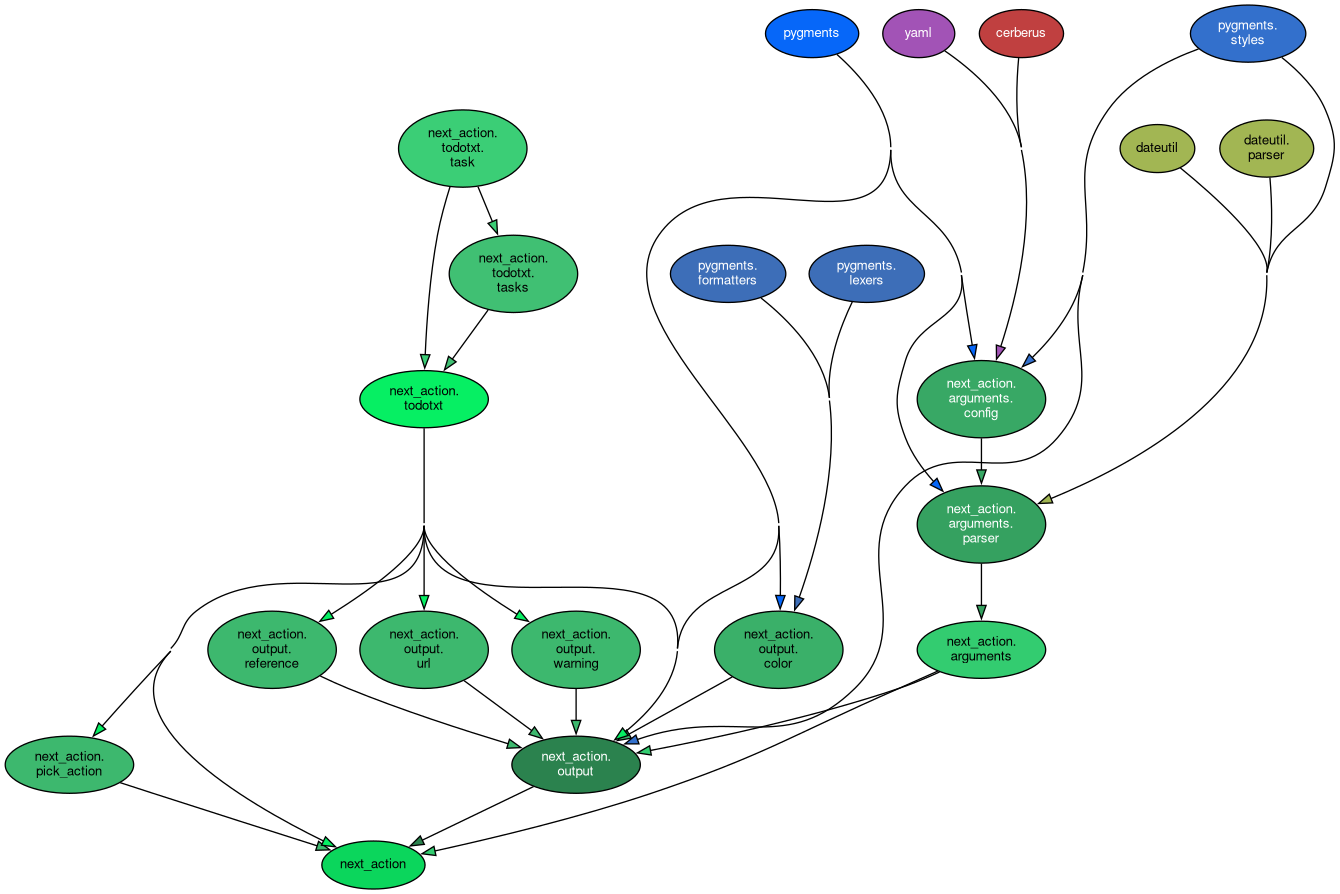
The dependency graph shows the relationships between the packages and modules in the code base and the third-party
packages used. When the user imvokes *Next-action* from the command-line, the `next_action()` method in the
`next_action` package is run. The `next_action()` method uses the `next_action.arguments` package to parse the
command-line arguments and the configuration file. The *Todo.txt* file is read into a domain model using the
`next_action.todotxt` package. The `next_action.pick_action` module contains the logic to select the next action.
Finally, the output is formatted using the `next_action.output` package.
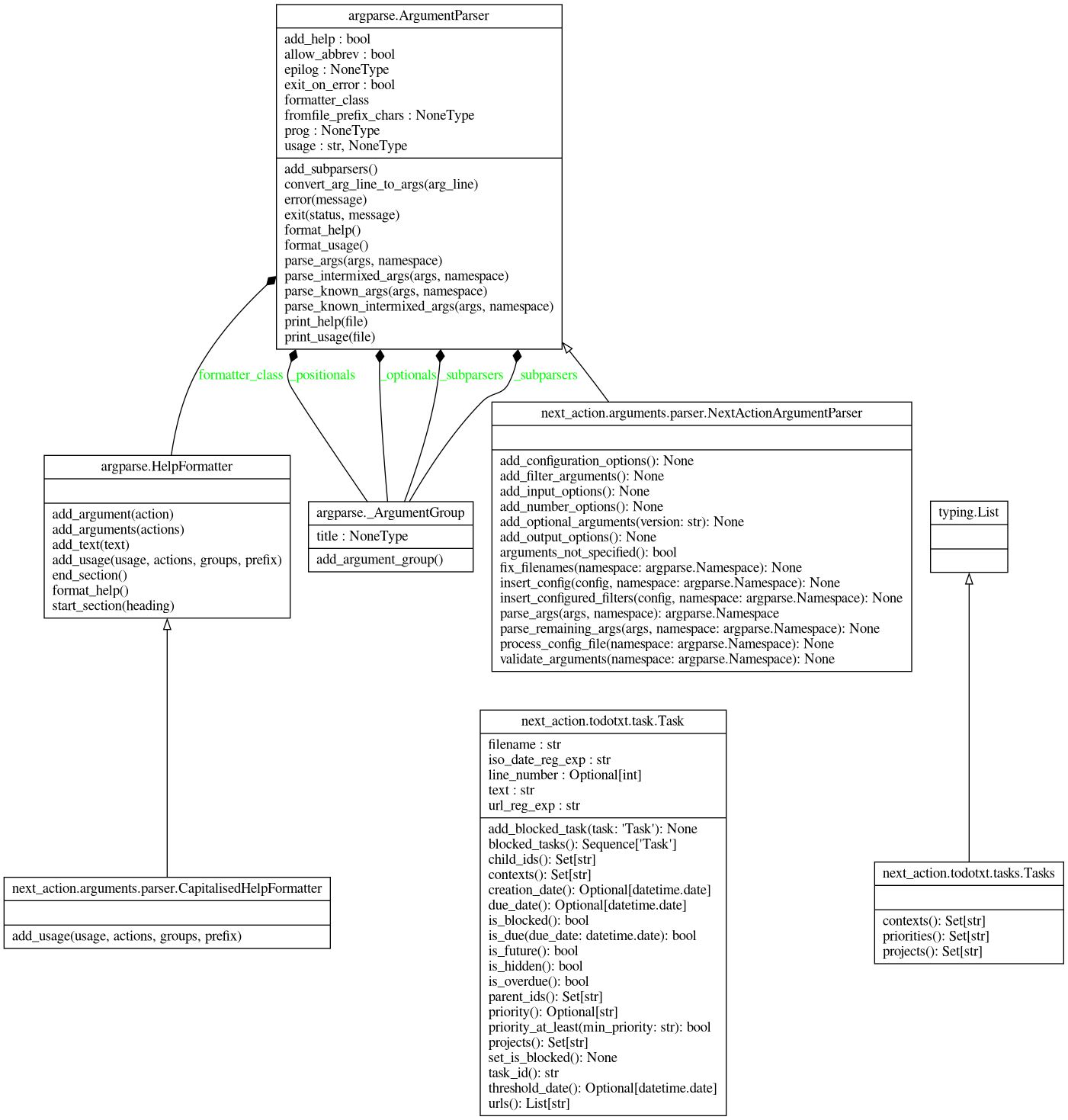
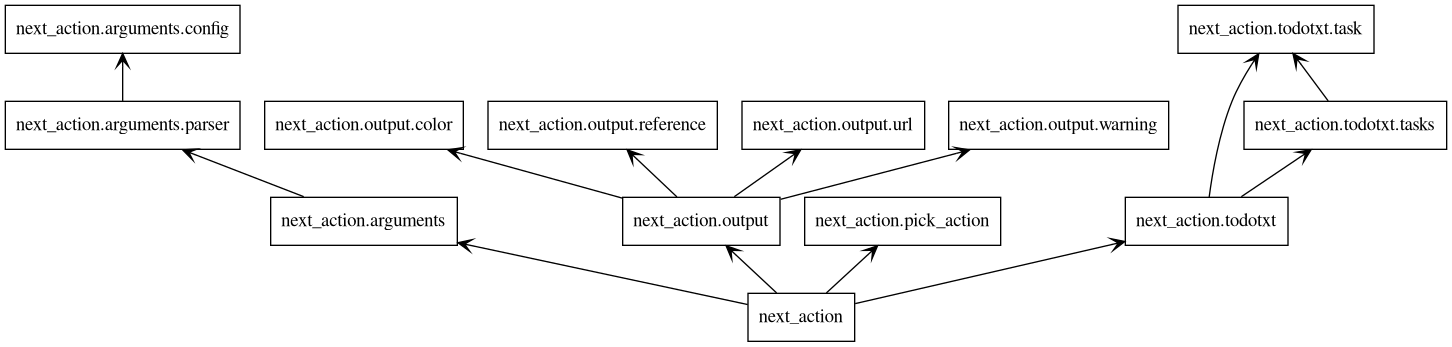
The package diagram created by Pyreverse looks quite similar.
The class diagram created by Pyreverse shows the classes used. The biggest one is the `NextActionArgumentParser` class,
responsible for parsing the command-line arguments. The other two relevant classes are the `Task` class for holding
information about an individual task and the `Tasks` class that contains a collection of tasks.