https://github.com/focusreactive/cms-kit
The project serves the idea of making Headless CMS-based development accessible, comfortable, and fast.
https://github.com/focusreactive/cms-kit
headless-cms sanity storyblok
Last synced: about 1 month ago
JSON representation
The project serves the idea of making Headless CMS-based development accessible, comfortable, and fast.
- Host: GitHub
- URL: https://github.com/focusreactive/cms-kit
- Owner: focusreactive
- Created: 2024-07-09T13:14:22.000Z (almost 2 years ago)
- Default Branch: main
- Last Pushed: 2026-05-01T09:41:12.000Z (about 2 months ago)
- Last Synced: 2026-05-01T11:32:58.359Z (about 2 months ago)
- Topics: headless-cms, sanity, storyblok
- Language: TypeScript
- Homepage: https://turbo-cms-kit-storyblok.vercel.app
- Size: 16.4 MB
- Stars: 18
- Watchers: 2
- Forks: 5
- Open Issues: 23
-
Metadata Files:
- Readme: README.md
- Changelog: CHANGELOG.md
Awesome Lists containing this project
README
# CMS-Kit 🔧🔧🔧
This production ready boilerplate accumulating the experience and best practices collected at [Focus Reactive](https://focusreactive.com/). The project serves the idea of making Headless CMS-based development accessible, comfortable, and fast.
## Features
- **Next.js 15 for performance:** Leverage the power of Next.js 15 for performance and SEO-friendly sites
- **Real-time editing:** Edit content and see changes live, creating dynamic experience
- **User-friendly interface:** Reduce friction for your team when working with the content
- **Advanced content management:** Collaborate with your team in real-time using publishing workflows and changes history
- **Instant publishing:** Make content live instantaneous without delays
- **Multi-CMS support:** Seamlessly switch between different headless CMS platforms
- **Type-safe development:** Full TypeScript integration with auto-generated types
- **Modern UI components:** Pre-built components using Radix UI for consistent design
- **Efficient caching:** Smart caching strategies for optimal performance
- **Theme customization:** Flexible theming system using CSS variables
- **Automated setup:** One-command initialization script that handles CMS platform integration, account linking, and Vercel deployment
## Demo 👀
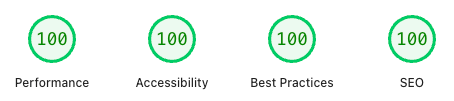
**Production website**
- [Sanity](https://turbo-cms-kit-sanity.vercel.app/)
- [Storyblok](https://turbo-cms-kit-storyblok.vercel.app/)
- Payload (self-hosted, requires PostgreSQL)
**Editing experience**
- Sanity

## Getting Started
### Prerequisites
- Make sure your Github account is linked to Vercel account. You can do it [here](https://github.com/settings/installations).
- Make sure pnpm package manages is [installed](https://pnpm.io/installation).
### Sanity
1. *Create Github repository, create Sanity project, deploy to Vercel*
[](https://vercel.com/new/clone?repository-url=https%3A%2F%2Fgithub.com%2Ffocusreactive%2Fcms-kit&project-name=sanity-cms-kit&repository-name=sanity-cms-kit&integration-ids=oac_hb2LITYajhRQ0i4QznmKH7gx&build-command=cd%20../../%20%26%26%20turbo%20run%20build%20--filter%3Dsanity&install-command=pnpm%20i&root-directory=apps/sanity&production-deploy-hook=trigger%20rebuild&demo-title=CMS-Kit%3A%20Sanity%20%2B%20Next.js%2015%20visual%20site%20builder&demo-description=Production%20ready%20boilerplate%20serves%20the%20idea%20of%20making%20Headless%20CMS-based%20development%20accessible%2C%20comfortable%2C%20and%20fast.&demo-url=https%3A%2F%2Fturbo-cms-kit-sanity.vercel.app%2F&demo-image=https%3A%2F%2Fcdn.sanity.io%2Fimages%2Fvftxng62%2Fproduction%2Fa6364de57a7566685ad87e201eb1fe99c89f1677-1200x630.png)
2. *Clone project locally*
- Navigate to your Github account and clone project repository locally.
- Navigate to project folder.
```shell
cd
```
- Install dependencies
```shell
pnpm install
```
3. *Pull required ENV variables*
Execute following command to pull ENV variables from Vercel and replace some of the with local development values
```shell
pnpm vercel link &&
pnpm vercel env pull &&
mv .env.local apps/sanity/
```
4. *Import templates and example pages data*
```shell
cd apps/sanity && pnpm import-dataset
```
5. *Run project locally*
```shell
pnpm dev
```
### Storyblok
[Sanity CMS Overview](https://focusreactive.com/storyblok-cms-overview/)
1. Create a new repository using this template by clicking the "Use this template" button at the top of the repository page.

2. Await the initial workflow to be finished

3. Clone your new repository:
```bash
git clone
```
4. Navigate to the project directory:
```bash
cd
```
5. Install dependencies using pnpm:
```bash
pnpm install
```
6. Navigate to the Storyblok CLI directory:
```bash
cd apps/storyblok/CLI
```
7. Run the setup script,
⚠️ command should be executed from _apps/storyblok/CLI_ (previous step), to consume correct environment variables:
```bash
node sb.mjs
```
8. Follow the interactive prompts in the CLI tool to:
- Enter your Storyblok Personal Access Token
- Enter your Vercel Personal Auth Token
- Select your Vercel team
- Choose a project name
- Complete the space creation and configuration process
9. Go to project settings in Vercel dashboard
- select **Git** section
- create deploy hook and copy it
- select **Environment variables** section
- add variables called **VERCEL_REDEPLOY_HOOK_URL** and assign it to created deploy hook value
- trigger rebuild
This process ensures that global component updates are displayed on all pages.
🏁 Your CMS-based project is ready 🏁
### Payload
Payload CMS with PostgreSQL, multi-tenancy, i18n, and A/B testing.
**Prerequisites:**
- Docker (for PostgreSQL)
- Node.js ≥20, pnpm ≥9
**Setup:**
1. Start PostgreSQL:
```bash
cd apps/payload
docker-compose up -d
```
2. Copy and fill environment variables:
```bash
cp apps/payload/.env.local.example apps/payload/.env.local
```
Required env vars:
```bash
DATABASE_URI="postgresql://postgres:password@localhost:5432/payload"
PAYLOAD_SECRET="your-secret-key"
NEXT_PUBLIC_SERVER_URL="http://localhost:3000"
# Auth0 (optional, for admin auth):
AUTH0_SECRET="..."
AUTH0_BASE_URL="http://localhost:3000"
AUTH0_ISSUER_BASE_URL="https://your-tenant.auth0.com"
AUTH0_CLIENT_ID="..."
AUTH0_CLIENT_SECRET="..."
```
3. Run migrations and generate types:
```bash
pnpm --filter payload payload migrate
pnpm --filter payload generate:types
pnpm --filter payload generate:importmap
```
4. Start dev server:
```bash
pnpm --filter payload dev
# or from monorepo root:
turbo dev --filter=payload
```
Admin panel: `http://localhost:3000/admin`
**Migrations:**
```bash
pnpm --filter payload payload migrate:create # create new migration
pnpm --filter payload payload migrate # run pending migrations
```
---
## Repo structure
- `apps/payload`: CMS app (Payload CMS + PostgreSQL)
- `apps/storyblok`: CMS app
- `apps/sanity`: CMS app
- `packages/ui`: UI components library, shared between both CMS apps
- `packages/eslint-config`: shared `eslint` configurations
- `packages/ts-config`: shared `ts-config` configuration
- `packages/tailwind-config`: shared `tailwind` configuration
### Types of components
- **UI component** - universal and sharable component between multiple CMSs
- **Controller component** - takes data from CMS, convert it to UI component format, and use UI component with converted props. Each CMS has it's own controller component for each UI component.
- All **controller components** have common propertiers to change style, such as margin, background, alignment etc.
### Components composition and hierarchy
The website structure follows a clear hierarchical composition:
1. Pages
- Top-level components that represent entire web pages
- Each page contains multiple sections, SEO properties and theme
2. Sections
- Container components that organize content into distinct areas
- Can be configured with settings like margin, background, width, alignment etc.
- Hold and arrange other components
3. Base Components
- Components like **link**, **image**, and **rich text**
- Combination of multiple functional components like **card**
- Can be combined and reused across different sections
**RichText** component has additional functionality. It allows to add sections inside, which gives ability to combine sections with text.
### Add new section
1. Create new component using generators
```bash
pnpm gen
```
2. Select type of component to create
```bash
- UI: Create a new UI component
- Storyblok: Create a new content section
- Sanity: Create a new content section
```
3. Enter name of the component
4. For Storyblok, add section component to the CMS
5. Update properties and design
6. Go to CMS folder
```bash
cd apps/storyblok
```
or
```bash
cd apps/sanity
```
7. Generate types for added section
```bash
pnpm sb-login
pnpm gen:types
```
### Update existing section
1. Updata design
2. Update fields
3. Go to CMS folder
```bash
cd apps/storyblok
```
or
```bash
cd apps/sanity
```
4. Generate types for updated section
```bash
pnpm gen:types
```
## Start project in dev mode
### Instalation
1. Clone repository
```bash
git clone https://github.com/focusreactive/cms-kit
```
2. Go to project directory
```bash
cd cms-kit
```
3. Install dependencies
```bash
pnpm install
```
4. Add and fill `.env` and `.env.local` file with proper data:
Create `.env` and `.env.local` files in project folder (apps/sanity or apps/storyblok) and add the following variables:
.env
```bash
REPO_PROD_BRANCH="main"
REPO_TYPE="github"
REPO_ID="[repo id]"
REPO_NAME="[nickname]/[repo name]"
```
**Storyblok project**
.env.local
```bash
NEXT_PUBLIC_DOMAIN="https://localhost:4050"
NEXT_PUBLIC_IS_PREVIEW="true"
NEXT_PUBLIC_STORYBLOK_TOKEN="[storyblok space preview token]"
NEXT_PUBLIC_STORYBLOK_API_GATE="https://api.storyblok.com/v2/cdn"
```
**Sanity project**
.env.local
```bash
NEXT_PUBLIC_BASE_URL="http://localhost:3000"
NEXT_PUBLIC_SANITY_PROJECT_ID="[project id]"
NEXT_PUBLIC_SANITY_DATASET="production"
SANITY_API_READ_TOKEN="[read token]"
```
5. Run dev server
```bash
pnpm dev
```
Happy hacking 👾