https://github.com/foliant-docs/foliantcontrib.meta
Metadata for Foliant
https://github.com/foliant-docs/foliantcontrib.meta
Last synced: 5 months ago
JSON representation
Metadata for Foliant
- Host: GitHub
- URL: https://github.com/foliant-docs/foliantcontrib.meta
- Owner: foliant-docs
- License: mit
- Created: 2019-06-28T14:37:20.000Z (almost 7 years ago)
- Default Branch: master
- Last Pushed: 2021-08-18T09:51:51.000Z (almost 5 years ago)
- Last Synced: 2025-12-02T06:57:29.510Z (6 months ago)
- Language: Python
- Size: 779 KB
- Stars: 0
- Watchers: 0
- Forks: 0
- Open Issues: 0
-
Metadata Files:
- Readme: README.md
- Changelog: changelog.md
- License: LICENSE
Awesome Lists containing this project
README
[](https://pypi.org/project/foliantcontrib.meta/) [](https://github.com/foliant-docs/foliantcontrib.meta)
# Metadata for Foliant
This extension adds metadata support for Foliant. It also allows to add meta commands which use project's metadata and are called like this: `foliant meta `. Finally, it adds the `meta generate` command to Foliant, which generates the yaml-file with project metadata.
## Installation
```bash
$ pip install foliantcontrib.meta
```
## Specifying metadata
Metadata for the *main section* (more on sections in **User's Guide** below) may be specified in the beginning of a Markdown-file using [YAML Front Matter](http://www.yaml.org/spec/1.2/spec.html#id2760395) format:
```yaml
---
id: MAIN_DOC
title: Description of the product
key: value
---
```
You may also use regular XML-like format with `meta` tag:
```html
```
> If `meta` tag is present, all Metadata from YAML Front Matter is ignored.
# Documentation
## User's guide
Metadata in Foliant allows you to assign additional properties to the *chapters* (Markdown files) and *sections* (parts of a Markdown file) of your project. These properties will be present in the Markdown sources but won't be directly rendered in the built documents. It is up to extensions to make use of these properties and alter your document in the desired way.
For instance, [Confluence](https://foliant-docs.github.io/docs/backends/confluence/) backend uses metadata to upload specific parts of your project into separate Confluence articles. [AltStructure](https://foliant-docs.github.io/docs/config/alt_structure/) config extension uses metadata to rearrange the chapters of your project in the final build. [TemplateParser](https://foliant-docs.github.io/docs/preprocessors/templateparser/) preprocessor can access the metadata and generate chunks of text using the properties defined in it.
The `foliantcontrib.meta` package is required for metadata to work, but you won't need to install it directly. Every extension which uses metadata will install it automatically.
### Syntax
There are two ways to define metadata:
- In a [YAML Front Matter](http://www.yaml.org/spec/1.2/spec.html#id2760395) — to define metadata for a whole chapter,
- Using the `` tag to define metadata for a section, as well as for the chapter.
**YAML Front Matter**
YAML Front Matter (or YFM for short) must be defined at the very beginning of a Markdown file. Properties in the YFM are applied to the whole chapter.
```yaml
---
author: John Smith
revision_date: 17 August 2021
---
```
In this example we've defined two properties: `author` and `revision_date` for one chapter.
**Meta tag**
Meta tags may add properties to smaller chunks of a Markdown file, as well as the whole chapter. If the meta tag is specified at the very beginning of the file, it acts similarly to the YAML Front Matter, e.g. is applied to the whole chapter. To add properties to a smaller chunk of a Markdown file, specify the tag under a heading. The metadata will be applied to the text under the heading and all nested headings.
```html
# Specification
Lorem, ipsum dolor sit amet consectetur adipisicing elit. Aliquid neque, in, necessitatibus maxime repudiandae cum.
## Additional notes
Lorem ipsum, dolor, sit amet consectetur adipisicing elit. Incidunt pariatur, vel voluptatum exercitationem quae cupiditate!
```
In this example both `Specification` and `Additional notes` have the `author` and `revision_date` properties.
### Sections
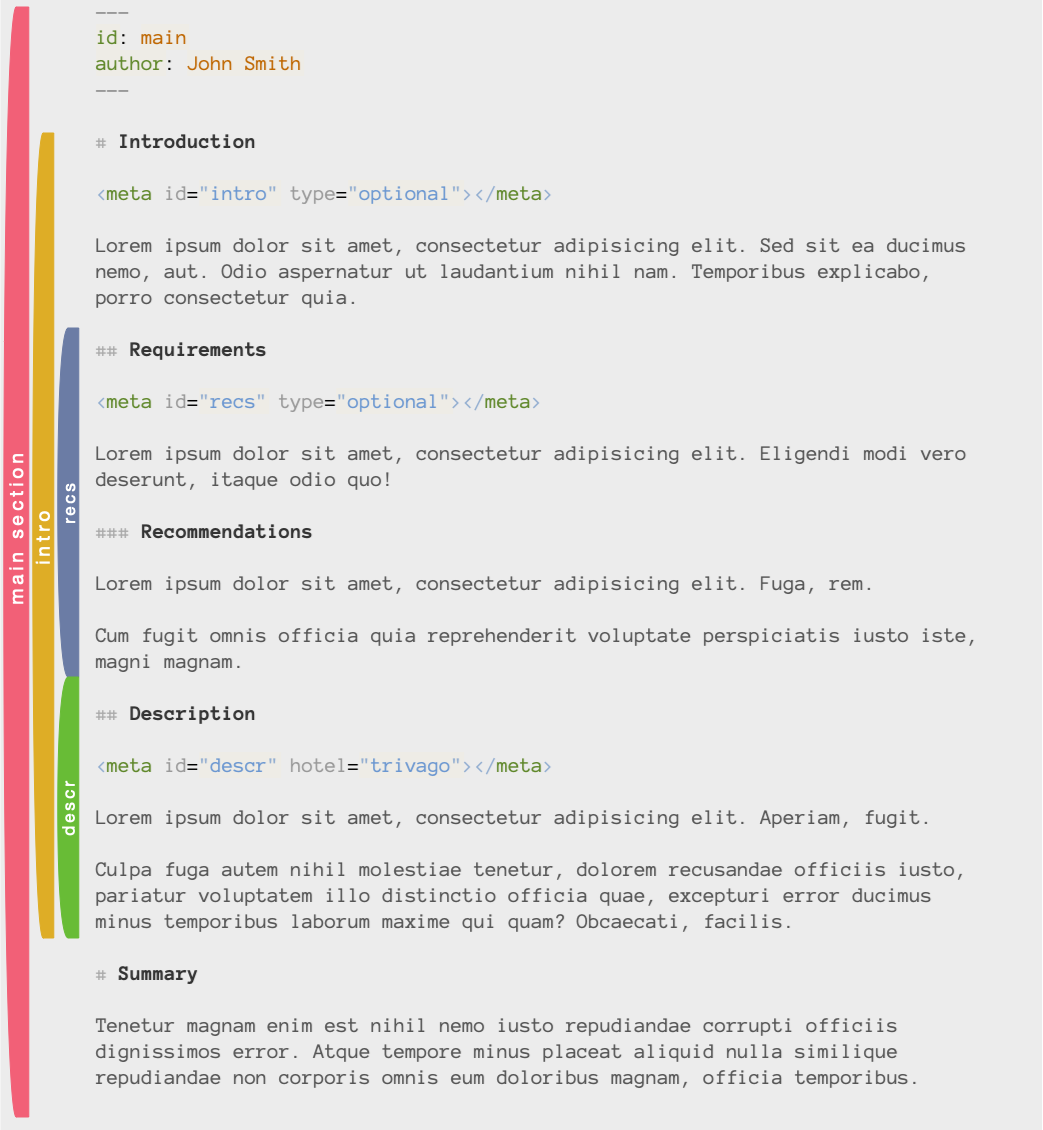
*Section* is a part of a Markdown file with defined metadata. Section begins with a Markdown heading (`## Heading`) and ends before the next heading of the same or higher level (`## Another heading` or `# Another heading`). A part of a Markdown document is only considered a section if the meta tag is defined in it, with one exception: the *main section*.
The main section is defined implicitly for every chapter of your project, even if there's no meta tag or YFM in it. In other words, if the Markdown file is specified in the `chapters` in `foliant.yml`, it will appear in the meta registry, with or without meta properties.
Here's an illustration of meta sections in a chapter:
### Special fields
Most meta properties don't mean anything if no extension is using them. The only exception right now is the `id` property. It is the identifier of a section.
IDs are used to distinguish meta sections in the project. They must me unique inside the project. By default IDs are generated by the Meta engine implicitly, but you may override them by defining the `id` property in the section's metadata. Just make sure that it is unique.
### The Meta registry
All extensions that work with metadata have access to the *Meta registry*. It is a hierarchical mapping of all sections in the project with all meta properties defined for each section.
To take a look at the Meta registry in your project run the `meta generate` command
```bash
$ foliant meta generate
Generating metadata... Done
────────────────────
Result: meta.yml
```
The registry is saved into the `meta.yml` file.
### Additional info
Metadata works only for files, mentioned in the `chapters` section in foliant.yml. All other files in `src` dir are ignored and won't appear in the Meta registry.
When using [includes](https://foliant-docs.github.io/docs/preprocessors/includes/), all metadata from the included content is removed.
## Developer's guide
You can use the powers of metadata in your preprocessors, backends and other extensions. You can define fields with special meaning for your tools and process sections based on the values in these fields.
### Getting metadata
Typical way to work with metadata is to run the `load_meta` function from the `foliant.meta.generate` module.
**load_meta(chapters: list, md_root: str or PosixPath = 'src') -> Meta**
This function returns the Meta registry in a `Meta` object, which gives access to all sections and meta-fields in the project.
The required parameter for `load_meta` is `chapters` — list of chapters loaded from foliant.yml
```python
>>> from foliant.meta.generate import load_meta
>>> meta = load_meta(['index.md'])
```
You can also specify the `md_root` parameter. If your tool is a CLI extension, `md_root` should point to the project's `src` dir. But if you are building a preprocessor or a backend, you would probably want to point it to the `__folianttmp__` dir with the current state of the sources.
### The Meta class
Meta class holds all project's metadata and offers few handy methods to work with it.
**load_meta_from_file(filename: str or PosixPath)**
This method allows you to load meta into the Meta class instance from previously generated yaml-file. Use it only with an empty Meta class:
```python
>>> from foliant.meta.classes import Meta
>>> meta = Meta()
>>> meta.load_meta_from_file('meta.yml')
```
**iter_sections()**
This method returns an iterator which yields project's meta-sections (`Section` objects) in the proper order from the first chapter to the last one.
**get_chapter(self, filename: str or PosixPath) -> Chapter**
Get chapter (`Chapter` object) by its path. `filename` should be path to chapter relative to the Project dir (or an absolute path).
**get_by_id(self, id_: str) -> Section**
Get section (`Section` object) by its id.
**chapters**
This property holds the list of chapters (`Chapter` objects).
### The Chapter class
`Chapter` class represents a project's chapter. It has several important methods which may be useful for working with metadata.
**iter_sections()**
This method returns an iterator which yields chapter's meta-sections (`Section` objects) in the proper order from the first chapter to the last one.
**get_section_by_offset(offset: int) -> Section:**
This method allows you to get section (`Section` object) by just pointing to a place in text. Pointing is performed by specifying offset from the beginning of the file in `offset` parameter.
*important properties*
**main_section**
A property which holds the main section of the chapter.
**name**
Chapter's name as stated in foliant.yml (e.g. `'chapter.md'`).
**filename**
Chapter's filepath string (e.g. `'src/chapter.md'`).
### The Section class
`Section` represents a meta section.
**iter_children()**
This method returns an iterator which yields the section's child sections (`Section` objects) in the proper order.
**get_source(self, without_meta=True) -> str**
Returns section's source. The section title is also included in the output. If `without_meta` is `True`, all meta tags are cut out from the text.
**is_main(self) -> bool**
Determine whether the section is a main section or not.
*important properties*
**id**
Holds section's ID.
**title**
Section's title.
**chapter**
Holds a reference to the section's `Chapter` object.
**parent**
Holds a reference to the section's parent section (`Section` object). Main sections have `None` in this property.
**children**
Holds list of section's children (`Section` objects) in proper order.
**data**
Holds a dictionary with meta properties and their values, defined in the `` tag (or the YAML front matter if it is a main section).
**level**
Section's level. Main section has level `0`, section, defined inside the `###` heading will have the level `3`.
**start** and **end**
Section's offsets from the beginning of the Markdown file.
**filename**
Holds a reference to section's chapter's filename for easy access.
# Meta Generate command
`meta generate` command collects metadata from the Foliant project and saves it into a YAML-file.
## Usage
To generate meta file run the `meta generate` command:
```bash
$ foliant meta generate
```
Metadata for the document will appear in the `meta.yml` file.
## Config
Meta generate command has just one option right now. It is specified under `meta` section in config:
```yaml
meta:
filename: meta.yml
```
`filename`
: name of the YAML-file with generated project metadata.