https://github.com/foo-software/lighthouse-check-orb
CircleCI Orb for running Lighthouse audits with all the bells and whistles 🔔 Multiple audits, Slack notifications and more!
https://github.com/foo-software/lighthouse-check-orb
Last synced: 9 months ago
JSON representation
CircleCI Orb for running Lighthouse audits with all the bells and whistles 🔔 Multiple audits, Slack notifications and more!
- Host: GitHub
- URL: https://github.com/foo-software/lighthouse-check-orb
- Owner: foo-software
- Created: 2019-09-28T14:54:45.000Z (almost 7 years ago)
- Default Branch: master
- Last Pushed: 2020-09-11T16:25:29.000Z (almost 6 years ago)
- Last Synced: 2025-03-31T07:22:11.310Z (over 1 year ago)
- Language: Shell
- Homepage: https://circleci.com/orbs/registry/orb/foo-software/lighthouse-check
- Size: 48.8 KB
- Stars: 7
- Watchers: 1
- Forks: 3
- Open Issues: 0
-
Metadata Files:
- Readme: README.md
Awesome Lists containing this project
README
# Lighthouse Check Orb
> A CircleCI Orb for running Lighthouse audits automatically in a workflow with a rich set of extra features. Simple implementation or advanced customization including **Slack** notifications, **AWS S3** HTML report uploads, and more!
This project provides **two ways of running audits** - "locally" by default in a dockerized environment or remotely via [Foo's Automated Lighthouse Check](https://www.foo.software/lighthouse) API. For basic usage, running locally will suffice, but if you'd like to maintain a historical record of Lighthouse audits and utilize other features, you can follow the [steps and examples](#usage-foo-api).



## How this Project Differs from Others
Simple configuration or choose from a variety of features below. See the [example Lighthouse Check Orb implementation](#example-usage).
- 💛 Lighthouse audit **multiple** URLs or just one.
- 💛 Save a record of all your audits via [Foo's Automated Lighthouse Check](#usage-foo-api).
- 💗 Save HTML reports locally.
- 💚 Upload HTML reports as artifacts.
- 💙 Upload HTML reports to AWS S3.
- ❤️ Fail a workflow when minimum scores aren't met. [Example at the bottom](#user-content-example-usage-failing-workflows-by-enforcing-minimum-scores).
- 💜 **Slack** notifications.
- 💖 Slack notifications **with Git info** (author, branch, PR, etc).
# Table of Contents
- [Screenshots](#screenshots)
- [Output](#screenshot-output)
- [Save HTML Reports as Artifacts](#screenshot-save-html-reports-as-artifacts)
- [HTML Reports](#screenshot-html-reports)
- [Slack Notifications](#screenshot-slack-notifications)
- [Fail Workflow when Minimum Scores Aren't Met](#screenshot-fail-workflow-when-minimum-scores-arent-met)
- [Parameters](#parameters)
- [Usage](#usage)
- [Standard Example](#usage-standard-example)
- [Failing Workflows by Enforcing Minimum Scores](#usage-failing-workflows-by-enforcing-minimum-scores)
- [Foo API](#usage-foo-api)
# Screenshots
A visual look at the things you can do.
## Screenshot: Output

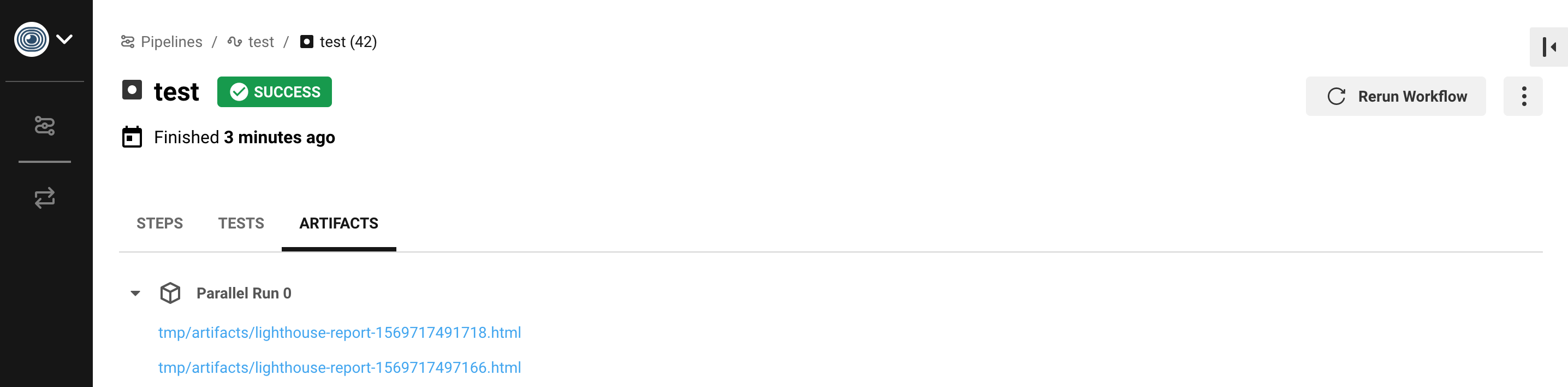
## Screenshot: Save HTML Reports as Artifacts
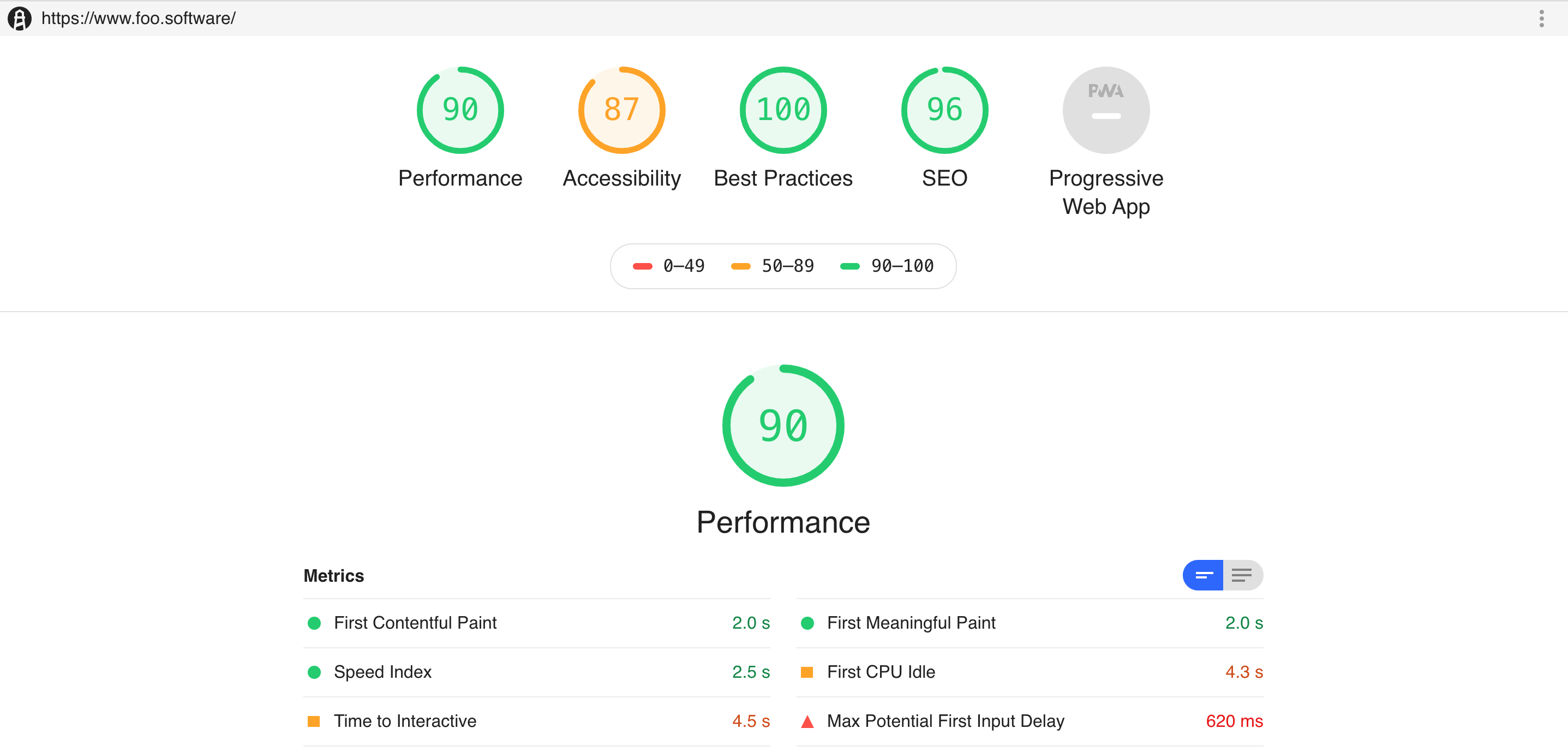
## Screenshot: HTML Reports
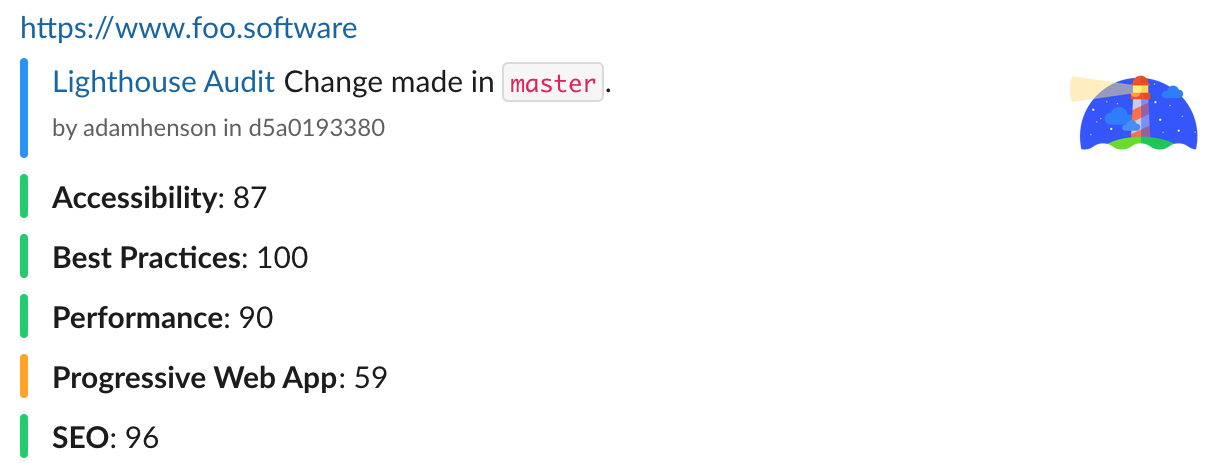
## Screenshot: Slack Notifications
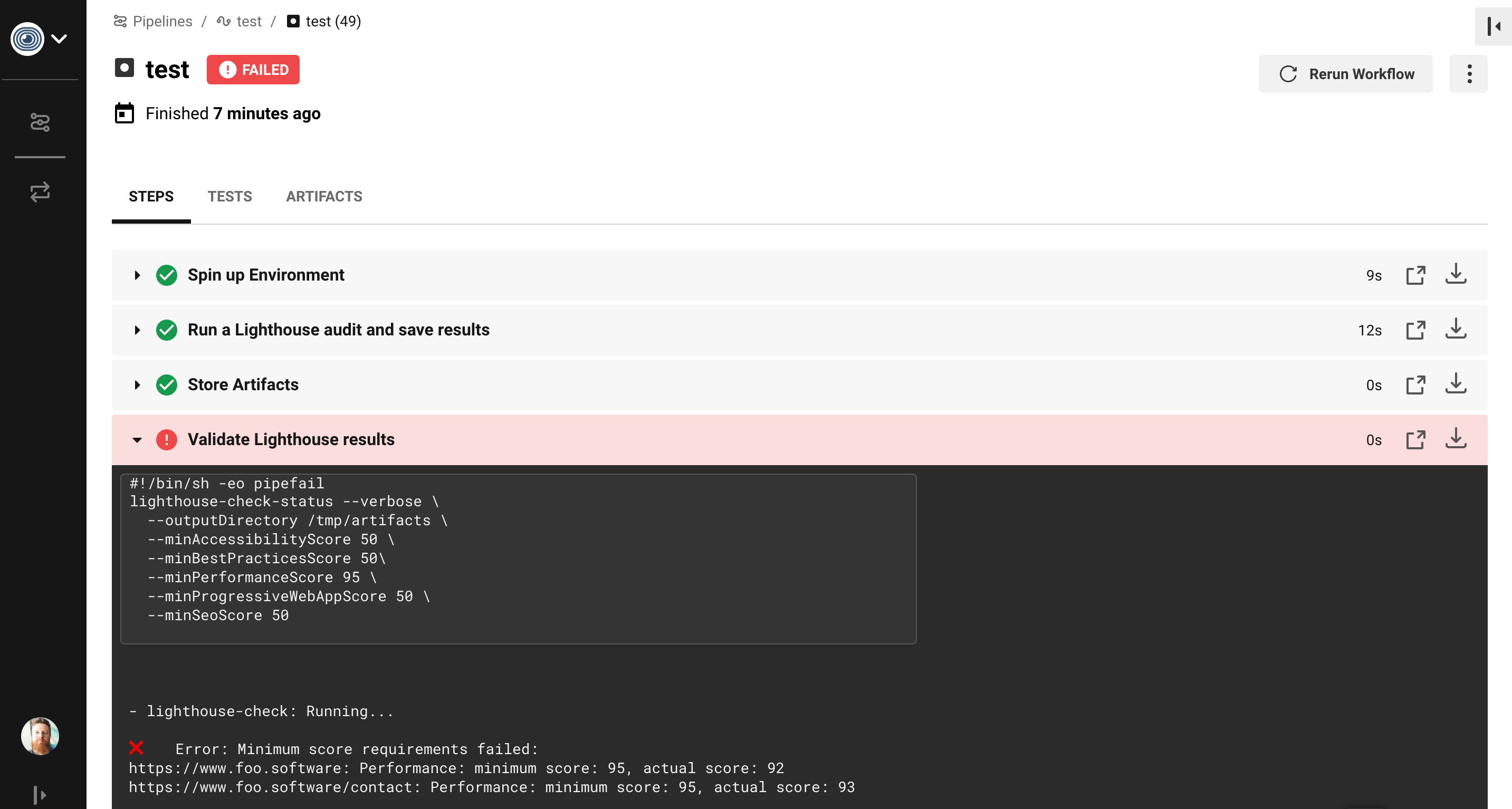
## Screenshot: Fail Workflow when Minimum Scores Aren't Met
## Parameters
You can choose from two ways of running audits - "locally" in a dockerized environment (by default) or remotely via the [Foo's Automated Lighthouse Check](https://www.foo.software/lighthouse) API. For directions about how to run remotely see the [Foo API Usage](#usage-foo-api) section. We denote which options are available to a run type with the `Run Type` values of either `local`, `remote`, or `both` respectively.
Name
Description
Type
Run Type
Default
apiToken
The foo.software account API token found in the dashboard.
string
remote
undefined
author
For Slack notifications: A user handle, typically from GitHub.
string
both
$CIRCLE_USERNAME
awsAccessKeyId
The AWS accessKeyId for an S3 bucket.
string
local
$LIGHTHOUSE_CHECK_AWS_ACCESS_KEY_ID
awsBucket
The AWS Bucket for an S3 bucket.
string
local
$LIGHTHOUSE_CHECK_AWS_BUCKET
awsRegion
The AWS region for an S3 bucket.
string
local
$LIGHTHOUSE_CHECK_AWS_REGION
awsSecretAccessKey
The AWS secretAccessKey for an S3 bucket.
string
local
$LIGHTHOUSE_CHECK_AWS_SECRET_ACCESS_KEY
branch
For Slack notifications: A version control branch, typically from GitHub.
string
both
$CIRCLE_BRANCH
configFile
A configuration file path in JSON format which holds all options defined here. This file should be relative to the file being interpretted. In this case it will most likely be the root of the repo ("./")
string
both
undefined
emulatedFormFactor
Lighthouse setting only used for local audits. See lighthouse-check comments for details.
oneOf(['mobile', 'desktop']
local
mobile
extraHeaders
Stringified HTTP Header object key/value pairs to send in requests. example: '{ \"x-hello-world\": \"foobar\", \"x-some-other-thing\": \"hi\" }'
string
local
undefined
locale
A locale for Lighthouse reports. Example: ja
string
local
undefined
maxWaitForLoad
The maximum amount of time to wait for a page to load in ms.
number
local
undefined
overridesJsonFile
A JSON file with config and option fields to overrides defaults. Read more here.
string
local
undefined
pr
For Slack notifications: A version control pull request URL, typically from GitHub.
string
both
undefined
prCommentAccessToken
Access token of a user to post PR comments.
string
both
undefined
prCommentEnabled
If true and prCommentAccessToken is set along with prCommentUrl, scores will be posted as comments.
boolean
both
true
prCommentSaveOld
If true and PR comment options are set, new comments will be posted on every change vs only updating once comment with most recent scores.
boolean
both
false
prCommentUrl
An endpoint to post comments to. Typically this will from GitHub's API. Example: https://api.github.com/repos/:owner/:repo/pulls/:pull_number/reviews
string
both
undefined
sha
For Slack notifications: A version control sha, typically from GitHub.
string
both
undefined
slackWebhookUrl
A Slack Incoming Webhook URL to send notifications to.
string
both
$LIGHTHOUSE_CHECK_SLACK_WEBHOOK_URL
throttling
Lighthouse setting only used for local audits. See lighthouse-check comments for details.
oneOf(['mobileSlow4G', 'mobileRegluar3G'])
local
mobileSlow4G
tag
An optional tag or name (example: build #2 or v0.0.2).
string
remote
undefined
throttlingMethod
Lighthouse setting only used for local audits. See lighthouse-check comments for details.
oneOf(['simulate', 'devtools', 'provided'])
local
simulate
timeout
Minutes to timeout. If wait is true (it is by default), we wait for results. If this timeout is reached before results are received an error is thrown.
string
local
10
urls
A comma-separated list of URLs to be audited.
string
both
undefined
wait
If true, waits for all audit results to be returned, otherwise URLs are only enqueued.
boolean
remote
true
## Usage
Below are example combinations of ways to use this Orb.
## Usage: Standard Example
In the below example we run Lighthouse on two URLs, log scores, save the HTML reports as artifacts, upload reports to AWS S3, notify via Slack with details about the change from Git data.
```yaml
version: 2.1
orbs:
lighthouse-check: foo-software/lighthouse-check@0.0.6 # ideally later :)
jobs:
test:
executor: lighthouse-check/default
steps:
- lighthouse-check/audit:
urls: https://www.foo.software,https://www.foo.software/contact
# this serves as an example, however if the below environment variables
# are set - the below params aren't even necessary. for example - if
# LIGHTHOUSE_CHECK_AWS_ACCESS_KEY_ID is already set - you don't need
# the line below.
awsAccessKeyId: $LIGHTHOUSE_CHECK_AWS_ACCESS_KEY_ID
awsBucket: $LIGHTHOUSE_CHECK_AWS_BUCKET
awsRegion: $LIGHTHOUSE_CHECK_AWS_REGION
awsSecretAccessKey: $LIGHTHOUSE_CHECK_AWS_SECRET_ACCESS_KEY
slackWebhookUrl: $LIGHTHOUSE_CHECK_SLACK_WEBHOOK_URL
workflows:
test:
jobs:
- test
```
## Usage: Failing Workflows by Enforcing Minimum Scores
We can optionally fail a workflow if minimum scores aren't met. We do this using the `validate-status` command.
```yaml
version: 2.1
orbs:
lighthouse-check: foo-software/lighthouse-check@0.0.6 # ideally later :)
jobs:
test:
executor: lighthouse-check/default
steps:
- lighthouse-check/audit:
urls: https://www.foo.software,https://www.foo.software/contact
- lighthouse-check/validate-status:
minAccessibilityScore: "50"
minBestPracticesScore: "50"
minPerformanceScore: "99"
minProgressiveWebAppScore: "50"
minSeoScore: "50"
workflows:
test:
jobs:
- test
```
## Usage: Foo API
[Foo's Automated Lighthouse Check](https://www.foo.software/lighthouse) can monitor your website's quality by running audits automatically! It can provide a historical record of audits over time to track progression and degradation of website quality. [Create a free account](https://www.foo.software/register) to get started. With this, not only will you have automatic audits, but also any that you trigger additionally. Below are steps to trigger audits on URLs that you've created in your account.
#### Trigger Audits on All Pages in an Account
- Navigate to [your account details](https://www.foo.software/account), click into "Account Management" and make note of the "API Token".
- Use the account token as the [`apiToken` parameter](#parameters).
> Basic example
```yaml
usage:
version: 2.1
orbs:
lighthouse-check: foo-software/lighthouse-check@0.0.7 # ideally later :)
jobs:
test:
executor: lighthouse-check/default
steps:
- lighthouse-check/audit:
apiToken: $LIGHTHOUSE_CHECK_API_TOKEN
workflows:
test:
jobs:
- test
```
#### Trigger Audits on Only Certain Pages in an Account
- Navigate to [your account details](https://www.foo.software/account), click into "Account Management" and make note of the "API Token".
- Navigate to [your dashboard](https://www.foo.software/dashboard) and once you've created URLs to monitor, click on the "More" link of the URL you'd like to use. From the URL details screen, click the "Edit" link at the top of the page. You should see an "API Token" on this page. It represents the token for this specific page (not to be confused with an **account** API token).
- Use the account token as the [`apiToken` parameter](#parameters) and page token (or group of page tokens) as [`urls` parameter](#parameters).
> Basic example
```yaml
usage:
version: 2.1
orbs:
lighthouse-check: foo-software/lighthouse-check@0.0.8 # ideally later :)
jobs:
test:
executor: lighthouse-check/default
steps:
- lighthouse-check/audit:
apiToken: $LIGHTHOUSE_CHECK_API_TOKEN
urls: 'mypagetoken1,mypagetoken2'
workflows:
test:
jobs:
- test
```
> Example with pull request comments
```yaml
usage:
version: 2.1
orbs:
lighthouse-check: foo-software/lighthouse-check@0.0.8 # ideally later :)
jobs:
test:
executor: lighthouse-check/default
steps:
- lighthouse-check/audit:
apiToken: $LIGHTHOUSE_CHECK_API_TOKEN
prCommentAccessToken: $LIGHTHOUSE_CHECK_ACCESS_TOKEN
prCommentUrl: https://api.github.com/repos/foo-software/lighthouse-check-orb/pulls/${CIRCLE_PULL_REQUEST##*/}/reviews
urls: 'mypagetoken1,mypagetoken2'
workflows:
test:
jobs:
- test
```
## Usage: Overriding Config and Option Defaults
> **Note:** this approach is only available when running "locally" (not using the REST API)
You can override default config and options by specifying `overridesJsonFile` option which is consumed by [`path.resolve(overridesJsonFile)`](https://nodejs.org/api/path.html#path_path_resolve_paths). Contents of this overrides JSON file can have two possible fields; `options` and `config`. These two fields are eventually used by Lighthouse to populate `opts` and `config` arguments respectively as illustrated in [Using programmatically](https://github.com/GoogleChrome/lighthouse/blob/master/docs/readme.md#using-programmatically). The two objects populating this JSON file are merged shallowly with the default [config](https://github.com/foo-software/lighthouse-check/blob/master/src/__snapshots__/lighthouseConfig.test.js.snap) and [options](https://github.com/foo-software/lighthouse-check/blob/master/src/__snapshots__/lighthouseOptions.test.js.snap).
> Example content of `overridesJsonFile`
```json
{
"config": {
"settings": {
"onlyCategories": ["performance"]
}
},
"options": {
"disableStorageReset": true
}
}
```
## Credits
>  This package was brought to you by [Foo - a website performance monitoring tool](https://www.foo.software). Create a **free account** with standard performance testing. Automatic website performance testing, uptime checks, charts showing performance metrics by day, month, and year. Foo also provides real time notifications. Users can integrate email, Slack and PagerDuty notifications.