https://github.com/fotoetienne/gru
manage minions like a boss
https://github.com/fotoetienne/gru
claude-code github-issues llm
Last synced: 3 months ago
JSON representation
manage minions like a boss
- Host: GitHub
- URL: https://github.com/fotoetienne/gru
- Owner: fotoetienne
- License: apache-2.0
- Created: 2025-12-01T00:50:05.000Z (7 months ago)
- Default Branch: main
- Last Pushed: 2026-04-04T01:42:22.000Z (3 months ago)
- Last Synced: 2026-04-04T03:29:44.119Z (3 months ago)
- Topics: claude-code, github-issues, llm
- Language: Rust
- Homepage:
- Size: 2.48 MB
- Stars: 2
- Watchers: 1
- Forks: 0
- Open Issues: 22
-
Metadata Files:
- Readme: README.md
- Changelog: CHANGELOG.md
- Contributing: CONTRIBUTING.md
- License: LICENSE
- Security: SECURITY.md
- Agents: docs/AGENTS.md
Awesome Lists containing this project
README
# Gru
[](https://github.com/fotoetienne/gru/actions/workflows/ci.yml)
[](LICENSE)
[](https://fotoetienne.github.io/gru/)
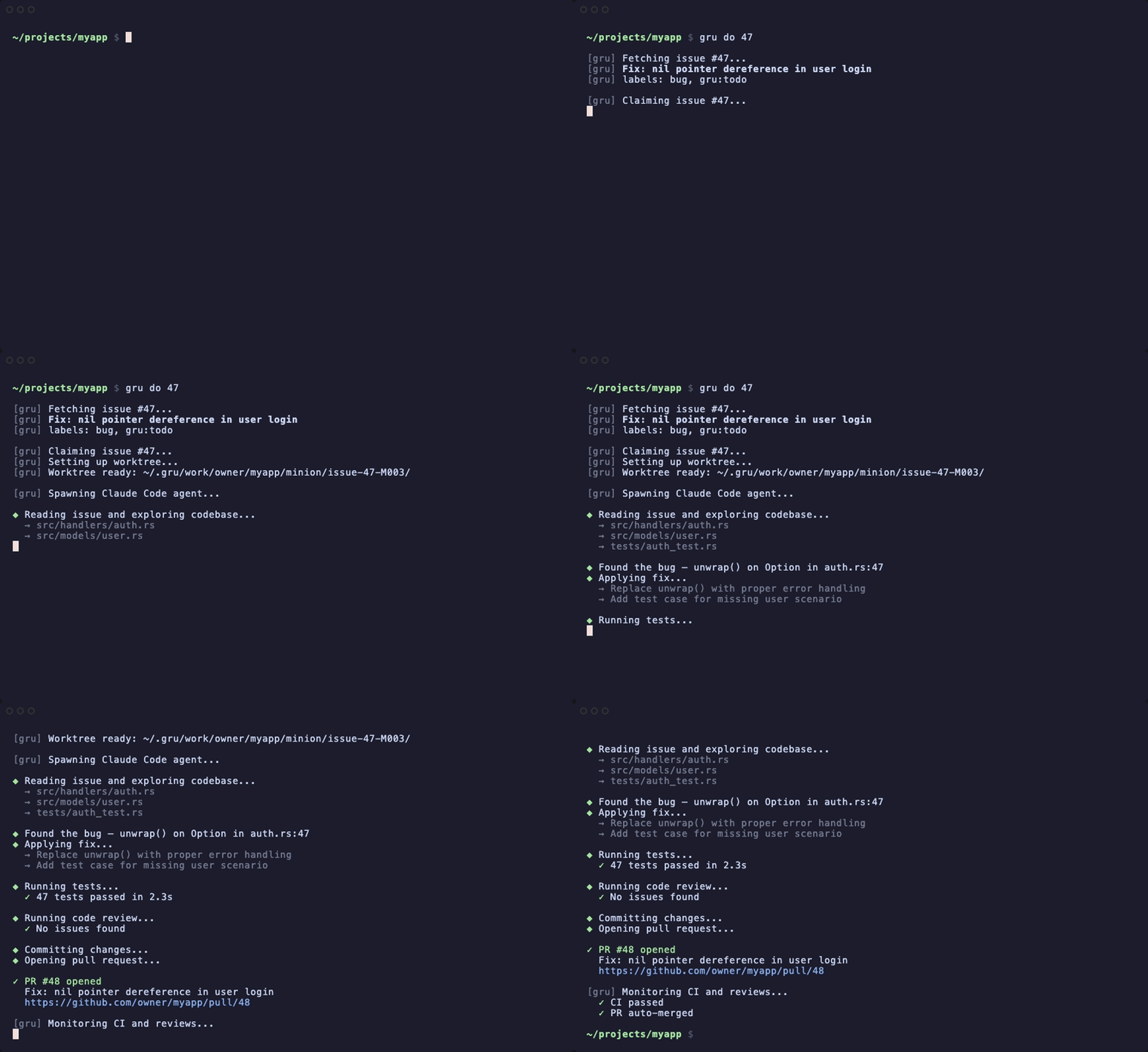
**Gru turns GitHub issues into merged PRs — autonomously, locally, with the AI coding agent of your choice.**
Point it at an issue and it handles the rest: implementation, PR, code review, CI fixes, rebases — all in an isolated worktree that never touches your working directory.
Gru is **agent-agnostic**. It ships with backends for [Claude Code](https://github.com/anthropics/claude-code) and [OpenAI Codex](https://github.com/openai/codex), and its pluggable architecture makes it straightforward to add more.
## Quick Start
```bash
# Install (macOS Apple Silicon — see Installation for other platforms)
curl -fL https://github.com/fotoetienne/gru/releases/latest/download/gru-aarch64-apple-darwin.tar.gz | tar xz
sudo mv gru /usr/local/bin/
# Initialize a repo
gru init owner/repo
# Fix an issue — Gru handles the rest
gru do 42
```
## Installation
### Prerequisites
- [GitHub CLI](https://cli.github.com/) (`gh`), authenticated
- At least one agent backend:
- [Claude Code](https://github.com/anthropics/claude-code) (default) — `npm install -g @anthropic-ai/claude-code`
- [OpenAI Codex](https://github.com/openai/codex) (optional) — `npm install -g @openai/codex`
### Download a Prebuilt Binary
Grab the latest release from [GitHub Releases](https://github.com/fotoetienne/gru/releases/latest):
```bash
# Set target: aarch64-apple-darwin, x86_64-apple-darwin, or x86_64-unknown-linux-gnu
TARGET=aarch64-apple-darwin
# Download binary and checksum
curl -fLO "https://github.com/fotoetienne/gru/releases/latest/download/gru-${TARGET}.tar.gz"
curl -fLO "https://github.com/fotoetienne/gru/releases/latest/download/gru-${TARGET}.tar.gz.sha256"
# Verify checksum
sha256sum --check "gru-${TARGET}.tar.gz.sha256" 2>/dev/null \
|| shasum -a 256 --check "gru-${TARGET}.tar.gz.sha256"
# Install
tar xzf "gru-${TARGET}.tar.gz"
sudo mv gru /usr/local/bin/
```
### Install from Source
Requires [Rust](https://rustup.rs/) 1.73 or later.
```bash
git clone https://github.com/fotoetienne/gru.git
cd gru
cargo install --path .
```
The `gru` binary is installed to `~/.cargo/bin/gru`. Make sure `~/.cargo/bin` is on your `$PATH`.
For a detailed walkthrough, see [docs/GETTING_STARTED.md](docs/GETTING_STARTED.md).
## Usage
### Work on Issues
```bash
# By issue number (from within the repo)
gru do 42
# By URL (from anywhere)
gru do https://github.com/owner/repo/issues/42
# With a timeout
gru do 42 --timeout 30m
# Review the prompt before launching
gru do 42 --discuss
# Using a different agent backend
gru do 42 --agent codex
```
Gru creates an isolated git worktree, spawns the agent, streams progress to your terminal, opens a PR when ready, then monitors CI and reviews — fixing failures and responding to feedback automatically.
### Review PRs
```bash
gru review 42
gru review https://github.com/owner/repo/pull/42
```
### Interactive Chat
```bash
gru chat
gru chat --repo owner/repo
```
### Product Manager / TPM
```bash
gru pm # Interactive product manager session
gru pm "write a PRD for hooks feature" # Start with a prompt
gru tpm # Interactive TPM session
gru tpm "what's the critical path?" # Start with a prompt
```
### Custom Prompts
```bash
gru prompt my-prompt --issue 42
gru prompts # List available prompts
```
### Manage Minions
Each agent session is a "Minion." Track and control them with:
```bash
gru status # List all active Minions
gru status M001 # Details for a specific Minion
gru logs M001 # View event stream
gru attach M001 # Attach terminal to a running Minion
gru stop M001 # Stop a running Minion
gru resume M001 # Resume a stopped Minion
gru rebase M001 # Rebase a Minion's branch onto latest base
gru path M001 # Print the Minion's worktree path
gru clean # Remove worktrees for merged/closed PRs
```
### Multi-Agent Support
Gru is not tied to any single AI backend. Use the `--agent` flag to switch:
```bash
gru do 42 # Claude Code (default)
gru do 42 --agent codex # OpenAI Codex
gru review 42 --agent codex
gru prompt my-prompt --agent codex
```
Set a default in `~/.gru/config.toml`:
```toml
[agent]
default = "codex"
```
`gru status` shows which agent each Minion is using:
```
MINION AGENT REPO ISSUE TASK PR BRANCH MODE UPTIME TOKENS
M001 claude owner/repo #42 do #43 minion/issue-42-M001 monitoring (PR ready) 5m 1.2M
M002 codex owner/repo #44 do - minion/issue-44-M002 working 2m -
```
See [docs/AGENTS.md](docs/AGENTS.md) for setup details and feature comparison.
## Lab Mode
Run Gru as a daemon that continuously polls for `gru:todo` issues and spawns Minions to work on them:
```bash
gru lab --repos owner/repo
```
Or configure repos in `~/.gru/config.toml` and run `gru lab` with no arguments:
```toml
[daemon]
repos = ["owner/frontend", "owner/backend"]
max_slots = 4 # default is 2
```
## MCP Server
Gru can act as an MCP (Model Context Protocol) server, giving any Claude session live access to Minion status, logs, and Gru knowledge:
```bash
gru mcp # Start stdio MCP server (used by Claude)
gru mcp install # Register in ~/.claude.json
gru mcp uninstall # Remove from ~/.claude.json
```
Once installed, Claude Code sessions can query Minion status and read Gru guides without leaving the conversation.
## Configuration
All configuration lives in `~/.gru/config.toml`. Everything is optional — Gru works out of the box with sensible defaults.
Copy the annotated example to get started:
```bash
cp docs/config.example.toml ~/.gru/config.toml
```
Key options: default agent backend, polling intervals, concurrency slots, merge confidence thresholds, and GitHub Enterprise Server hosts. See [docs/config.example.toml](docs/config.example.toml) for the full reference.
## How It Works
1. `gru init owner/repo` creates a bare git mirror at `~/.gru/repos/`
2. `gru do 42` creates an isolated worktree under `~/.gru/work/`, spawns the agent, and monitors its progress via streaming JSON
3. The agent reads the issue, explores the code, makes changes, and runs tests
4. After committing, the agent spawns a `code-reviewer` subagent to review changes for correctness, security, conventions, and test coverage — issues found are addressed before the PR is created
5. Gru opens a PR, watches CI, and feeds failures back to the agent for auto-fix (up to 2 attempts before escalating)
6. Review comments are forwarded to the agent for responses
7. Labels (`gru:todo` → `gru:in-progress` → `gru:done` / `gru:failed`) track state on GitHub
## Roadmap
V1 is feature-complete: autonomous issue fixing, worktree isolation, lab mode, CI monitoring, PR lifecycle management, multi-agent backends, and Minion management.
Future plans include multi-Lab coordination (V2), a web UI (V3), issue dependency graphs (V4), and multi-repo orchestration (V5). See [docs/DESIGN.md](docs/DESIGN.md) for the full architecture vision.
## Contributing
Contributions are welcome! See [CONTRIBUTING.md](CONTRIBUTING.md) for dev setup, build commands, testing, and PR workflow.
## License
[Apache License, Version 2.0](LICENSE)
## Related Projects
- [Claude Code](https://github.com/anthropics/claude-code) — CLI for Claude
- [OpenAI Codex](https://github.com/openai/codex) — CLI for OpenAI models
- [Emdash](https://github.com/generalaction/emdash) — Orchestration layer supporting 15+ agent CLIs
- [Code Conductor](https://github.com/ryanmac/code-conductor) — Parallel Claude Code sub-agents with GitHub-native orchestration
- [Beads](https://github.com/steveyegge/beads) — Git-backed issue tracker with persistent agent memory
- [Worktree CLI](https://github.com/agenttools/worktree) — Git worktree management for coding agents
- [Vibe Kanban](https://www.vibekanban.com/) — Local orchestration with kanban-style task management
- [Cowork](https://support.claude.com/en/articles/13345190-getting-started-with-cowork) — Claude Desktop autonomous task execution
---
made with love by gru