https://github.com/fpgadeveloper/rpi-camera-fmc
Example designs and documentation for the RPi Camera FMC
https://github.com/fpgadeveloper/rpi-camera-fmc
camera machine-vision mipi-csi raspberry-pi video zynqmp
Last synced: 3 months ago
JSON representation
Example designs and documentation for the RPi Camera FMC
- Host: GitHub
- URL: https://github.com/fpgadeveloper/rpi-camera-fmc
- Owner: fpgadeveloper
- License: mit
- Created: 2022-12-14T16:02:17.000Z (over 3 years ago)
- Default Branch: main
- Last Pushed: 2026-04-09T19:49:51.000Z (4 months ago)
- Last Synced: 2026-04-09T21:33:02.157Z (4 months ago)
- Topics: camera, machine-vision, mipi-csi, raspberry-pi, video, zynqmp
- Language: C
- Homepage: https://camerafmc.com
- Size: 7.4 MB
- Stars: 28
- Watchers: 2
- Forks: 7
- Open Issues: 1
-
Metadata Files:
- Readme: README.md
- License: LICENSE
Awesome Lists containing this project
README
# Reference design for RPi Camera FMC
## Description
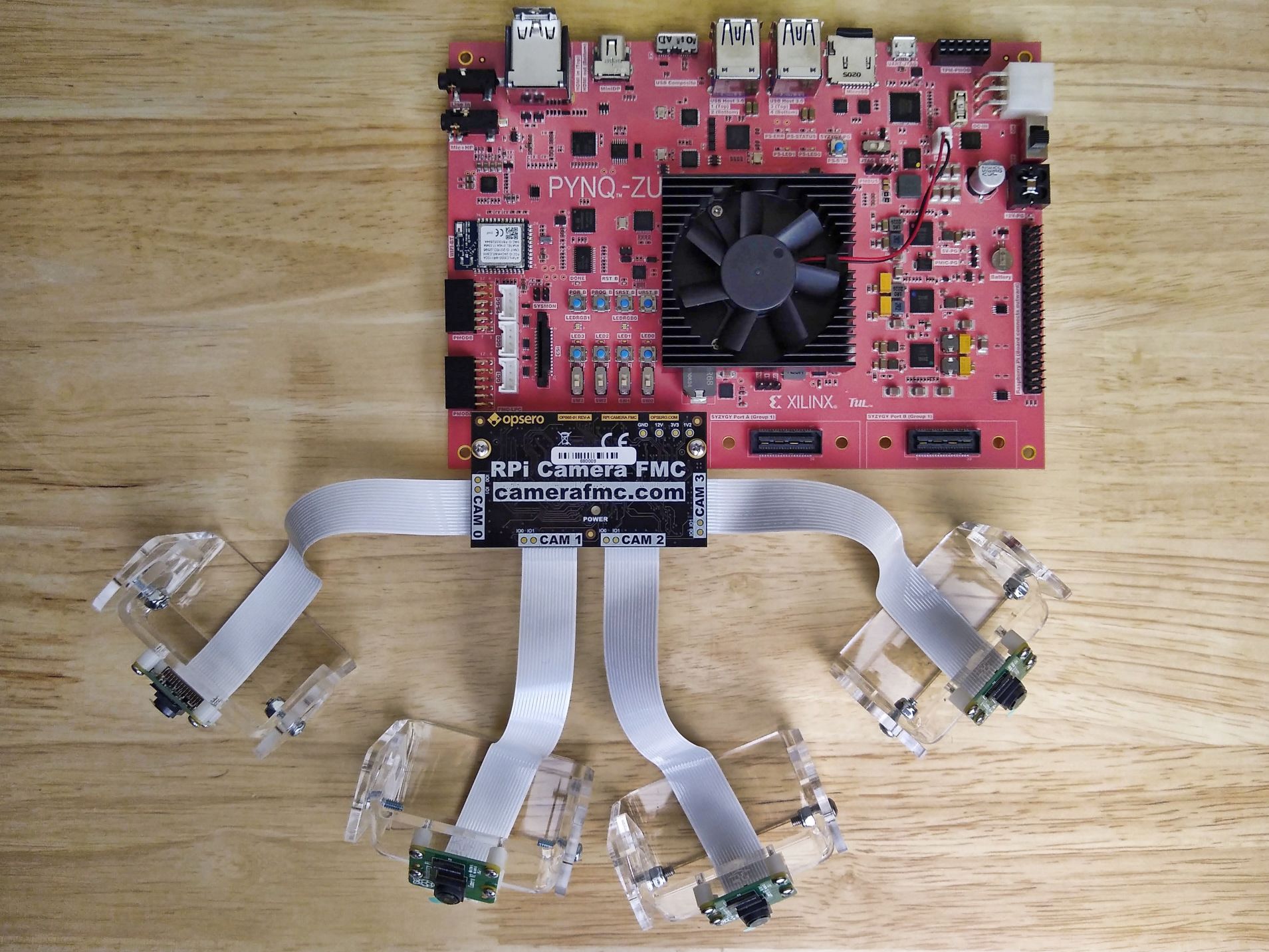
This project demonstrates the Opsero [RPi Camera FMC] (OP068) used to
connect up to 4x Raspberry Pi cameras (or compatible cameras) to one of the target FPGA/MPSoC boards listed below. The
designs contain:
* 4x MIPI CSI-2 capture pipelines
* Video Mixer IP based display pipeline to DisplayPort/HDMI output
* Video Codec Unit ([VCU])
Important links:
* The RPi Camera FMC [datasheet](https://camerafmc.com/docs/rpi-camera-fmc/overview/)
* The [user guide](https://rpi.camerafmc.com) for these reference designs
* To [report an issue](https://github.com/fpgadeveloper/rpi-camera-fmc/issues)
* For technical support: [Contact Opsero](https://opsero.com/contact-us)
## Architectures
The designs in this repository fall into two main architectural categories:
1. **Zynq UltraScale+ designs** – These designs integrate the ISP Pipeline IP, run within a PetaLinux environment,
and output video to a DisplayPort monitor.
2. **FPGA designs** – These designs implement a simpler video pipeline, are controlled by a bare-metal application,
and output video to an HDMI monitor.
### Zynq UltraScale+ designs
The high level block diagram below illustrates the design:

The video pipe sub-blocks are illustrated below:

### FPGA designs
Display pipeline of the FPGA designs:

The video pipeline of the FPGA designs:

## Requirements
This project is designed for version 2024.1 of the Xilinx tools (Vivado/Vitis/PetaLinux).
If you are using an older version of the Xilinx tools, then refer to the
[release tags](https://github.com/fpgadeveloper/rpi-camera-fmc/tags "releases")
to find the version of this repository that matches your version of the tools.
In order to test this design on hardware, you will need the following:
* Vivado 2024.1
* Vitis 2024.1
* One or more [Raspberry Pi Camera Module 2](https://www.raspberrypi.com/products/camera-module-v2/) and/or
[Digilent Pcam 5C](https://digilent.com/shop/pcam-5c-5-mp-fixed-focus-color-camera-module/) cameras
* 1x [RPi Camera FMC]
* One of the supported target boards listed below
### Design specific requirements
* **Zynq UltraScale+ designs**:
* PetaLinux Tools 2024.1
* 1x DisplayPort monitor that supports 1080p video
* Linux build PC (or virtual machine)
* **FPGA designs**:
* 1x HDMI monitor that supports 1080p video
* [License for the HDMI IP](https://www.amd.com/en/products/adaptive-socs-and-fpgas/intellectual-property/hdmi.html) (evaluation license available)
## Target designs
### FPGA designs
| Target board | Target design | FMC Slot | Cameras | VCU | Baremetal
App | PetaLinux
Build | Vivado
Edition |
|-----------------------|-----------------|----------|---------|-------|-------|-------|-------|
| [AUBoard 15P] | `auboard` | HPC | 2 | :x: | :white_check_mark: | :x: | Standard :free: |
### Zynq UltraScale+ designs
| Target board | Target design | FMC Slot | Cameras | VCU | Baremetal
App | PetaLinux
Build | Vivado
Edition |
|-----------------------|-----------------|----------|---------|-------|-------|-------|-------|
| [ZCU104] | `zcu104` | LPC | 4 | :white_check_mark: | :x: | :white_check_mark: | Standard :free: |
| [ZCU102] | `zcu102_hpc0` | HPC0 | 4 | :x: | :x: | :white_check_mark: | Standard :free: |
| [ZCU102] | `zcu102_hpc1` | HPC1 | 2 | :x: | :x: | :white_check_mark: | Standard :free: |
| [ZCU106] | `zcu106_hpc0` | HPC0 | 4 | :white_check_mark: | :x: | :white_check_mark: | Standard :free: |
| [PYNQ-ZU] | `pynqzu` | LPC | 2 | :x: | :x: | :white_check_mark: | Standard :free: |
| [UltraZed-EV Carrier] | `uzev` | HPC | 4 | :white_check_mark: | :x: | :white_check_mark: | Standard :free: |
[AUBoard 15P]: https://www.avnet.com/americas/products/avnet-boards/avnet-board-families/auboard-15p-fpga-development-kit/
[ZCU104]: https://www.xilinx.com/zcu104
[ZCU102]: https://www.xilinx.com/zcu102
[ZCU106]: https://www.xilinx.com/zcu106
[PYNQ-ZU]: https://www.amd.com/en/corporate/university-program/aup-boards/pynq-zu.html
[UltraZed-EV Carrier]: https://www.xilinx.com/products/boards-and-kits/1-1s78dxb.html
Notes:
1. The Vivado Edition column indicates which designs are supported by the Vivado *Standard* Edition, the
FREE edition which can be used without a license. Vivado *Enterprise* Edition requires
a license however a 30-day evaluation license is available from the AMD Xilinx Licensing site.
2. The HPC1 connector of the ZCU102 board can only support 2 cameras due to it's pin assignment. This design
supports the `CAM0` and `CAM1` slots as labelled on the RPi Camera FMC.
3. The `pynqzu` target design has video pipelines for only 2 cameras: `CAM1` and `CAM2` as
labelled on the RPi Camera FMC. This is due to the resource limitations of the devices on this board.
4. The `auboard` target design has video pipelines for only 2 cameras: `CAM0` and `CAM2` as labelled
on the RPi Camera FMC. This is due to the resource limitations of the Artix UltraScale+ device on this board.
## Software
### Baremetal application
Some of these designs can be driven by a baremetal application that will configure the connected cameras
and combine their video outputs into a single 1080p stream.
### PetaLinux
The Zynq UltraScale+ based reference designs can be driven within a PetaLinux environment.
The repository includes all necessary scripts and code to build the PetaLinux environment. The table
below outlines the corresponding applications available:
| Environment | Available Applications |
|------------------|-------------------------|
| PetaLinux | Built-in Linux commands
Additional tools: [GStreamer] |
## Build instructions
### FPGA designs
The FPGA designs do not require the submodules in this repo. To clone this repo, simply run:
```
git clone https://github.com/fpgadeveloper/rpi-camera-fmc.git
```
Source Vivado and Vitis tools:
```
source /2024.1/settings64.sh
source /2024.1/settings64.sh
```
Build all (Vivado project, Vitis workspace):
```
cd rpi-camera-fmc/Vitis
make workspace TARGET=auboard
```
### Zynq UltraScale+ designs
This repo contains submodules. To clone this repo, run:
```
git clone --recursive https://github.com/fpgadeveloper/rpi-camera-fmc.git
```
Source Vivado and PetaLinux tools:
```
source /2024.1/settings.sh
source /2024.1/settings64.sh
```
Build all (Vivado project, accelerator kernel and PetaLinux):
```
cd rpi-camera-fmc/PetaLinux
make petalinux TARGET=uzev
```
## Launch instructions
### FPGA designs
Launch Vitis, open the workspace that was generated using the make command. Select the test application and run it on the target
board.
### Zynq UltraScale+ designs
From the PetaLinux command line, run the following command to stream video from all *connected* cameras to the 4 quadrants of the
1080p DisplayPort monitor:
```
sudo displaycams.sh
```
If less than 4 cameras are physically connected, the unused quadrants of the monitor will be blue.
## Contribute
We strongly encourage community contribution to these projects. Please make a pull request if you
would like to share your work:
* if you've spotted and fixed any issues
* if you've added designs for other target platforms
* if you've added software support for other cameras
Thank you to everyone who supports us!
### The TODO list
* Develop PYNQ support
* Add a standalone application for the Zynq and ZynqMP designs
* Add support for some Versal boards
* Add VCU example scripts
* Get a Genesys-ZU board and test the design on hardware.
* Software support for more cameras (this will be an ongoing task due to the number of cameras available).
## About us
[Opsero Inc.](https://opsero.com "Opsero Inc.") is a team of FPGA developers delivering FPGA products and
design services to start-ups and tech companies. Follow our blog,
[FPGA Developer](https://www.fpgadeveloper.com "FPGA Developer"), for news, tutorials and
updates on the awesome projects we work on.
[RPi Camera FMC]: https://camerafmc.com/docs/rpi-camera-fmc/overview/
[GStreamer]: https://gstreamer.freedesktop.org/
[VCU]: https://xilinx-wiki.atlassian.net/wiki/spaces/A/pages/18842546/Xilinx+Zynq+UltraScale+MPSoC+Video+Codec+Unit