https://github.com/francescogabbrielli/sensor-logger
A "real time" dataset generator using device sensors and cameras
https://github.com/francescogabbrielli/sensor-logger
android-application camera datalogger datasets opencv-android sensors streaming-data streaming-video
Last synced: 2 months ago
JSON representation
A "real time" dataset generator using device sensors and cameras
- Host: GitHub
- URL: https://github.com/francescogabbrielli/sensor-logger
- Owner: francescogabbrielli
- License: mit
- Created: 2017-07-31T23:28:04.000Z (almost 9 years ago)
- Default Branch: master
- Last Pushed: 2019-05-27T20:22:57.000Z (about 7 years ago)
- Last Synced: 2025-05-30T08:51:52.880Z (about 1 year ago)
- Topics: android-application, camera, datalogger, datasets, opencv-android, sensors, streaming-data, streaming-video
- Language: Java
- Homepage:
- Size: 828 KB
- Stars: 1
- Watchers: 0
- Forks: 1
- Open Issues: 0
-
Metadata Files:
- Readme: README.md
Awesome Lists containing this project
README
# SensorLogger
A "real time" dataset generator using device sensors and camera
## Purpose
This Android app is stil a prototype, mainly for educational purposes.
The aims of the project are:
- to mantain as far as possible the corrispondence between frames and sensor data
- configurable to be lightweight and not memory/battery consuming
- as fast as possible!
## Features
- Record frames (video) and sensor data
- Stream both images and sensors to a remote client
- Upload to FTP
- Save locally on the phone
- Rotate sensor axes
- All of the above, together!
## Usage
Just start the app. To begin a recording session you can either:
- just launch the python client. The app is preset to automatically start streaming
- click the volume button
- tap the screen
- try any other button you may have.... it may work
More options to enjoy in the settings :)
## Build
The app uses OpenCV. There are 2 options to build the app
### Standard build
OpenCV will be linked through the OpenCV Manager app. You will be prompted to install it if you don't have it.
### Native build
If you don´t want to bother installing more stuff, in this case you will need to ship the correct native libraries together with OpenCV module. To do this just uncomment the `ndk` section in the app `build.gradle`
```gradle
ndk {
moduleName "sensor-logger"
abiFilters 'armeabi-v7a', 'arm64-v8a'
}
```
and the `sourceSets` section in the openCVLibrary module:
```gradle
sourceSets {
main {
jniLibs.srcDirs "sdk/native/libs"
}
}
```
where the path of `jniLibs.srcDirs` is where you will need to put the OpenCV static libraries (not included here) of your choice.
## Python client
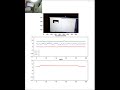
A simple python client is provided to capture the streaming of both sensors and images (because with a browser you can only access a video stream).
This is actually pretty slow, being implemented with matplolib, but is a good starting point for collecting and make use of "real-time" data within a data science python application
[](https://youtu.be/NInkmRc0F0s)
## Licenses
- [OpenCV](https://opencv.org/) - BSD