https://github.com/franckferman/powernest
🔹 PowerShell-Driven Google Nest Management. Manage Google Nest devices effortlessly from PowerShell — for when speaking out loud is not an option.
https://github.com/franckferman/powernest
disability-empowerment disability-support fun funny google google-assistant google-assistant-actions google-nest google-powershell hey-google powershell powershell-google powershell-scripting powershell-tts script scripting tts windows windows10 windows11
Last synced: over 1 year ago
JSON representation
🔹 PowerShell-Driven Google Nest Management. Manage Google Nest devices effortlessly from PowerShell — for when speaking out loud is not an option.
- Host: GitHub
- URL: https://github.com/franckferman/powernest
- Owner: franckferman
- License: agpl-3.0
- Created: 2022-04-13T22:46:00.000Z (over 4 years ago)
- Default Branch: stable
- Last Pushed: 2025-03-13T11:53:15.000Z (over 1 year ago)
- Last Synced: 2025-04-09T18:12:23.861Z (over 1 year ago)
- Topics: disability-empowerment, disability-support, fun, funny, google, google-assistant, google-assistant-actions, google-nest, google-powershell, hey-google, powershell, powershell-google, powershell-scripting, powershell-tts, script, scripting, tts, windows, windows10, windows11
- Language: PowerShell
- Homepage: https://github.com/franckferman/PowerNest
- Size: 44.9 KB
- Stars: 6
- Watchers: 1
- Forks: 1
- Open Issues: 0
-
Metadata Files:
- Readme: README.md
- License: LICENSE
Awesome Lists containing this project
README
[![Contributors][contributors-shield]](https://github.com/franckferman/PowerNest/graphs/contributors)
[![Forks][forks-shield]](https://github.com/franckferman/PowerNest/network/members)
[![Stargazers][stars-shield]](https://github.com/franckferman/PowerNest/stargazers)
[![License][license-shield]](https://github.com/franckferman/PowerNest/blob/stable/LICENSE)
🔹 PowerNest
PowerShell-Driven Google Nest Management.
Manage Google Nest devices effortlessly from PowerShell — for when speaking out loud is not an option.
## 📜 Table of Contents
Click to collapse/expand
## 📖 About
`PowerNest` started as a fun personal experiment — an alternative way to control my Google Nest without having to say "Hey Google" out loud every time.
As an IT and cybersecurity professional, I’m always looking for ways to make life easier and faster (yes, a good sysadmin is a bit lazy — but smart lazy!).
At first, it was just a tool to save time on simple tasks:
> "Instead of saying 'Hey Google, set an alarm for tomorrow at 7 AM', I can just run a PowerShell script that prompts me for the time and date, and sends the command automatically."
But over time, I realized PowerNest could be useful for others, and even go beyond that. It could become a command hub to preconfigure and automate recurring Google Nest tasks, making interactions even faster and more efficient — without needing to speak a word.
Today, PowerNest can help:
- People who can't (or don’t want to) use voice commands (accessibility, disabilities, privacy).
- IT pros, geeks, and automation lovers who want to streamline their smart home usage.
- IT experts for demos on smart assistant behaviors.
And... Easter egg hunters, because PowerNest also includes a lot of hidden funny commands.
Key features of PowerNest:
- Send custom commands directly to Google Nest.
- Say "Hey Google" and trigger follow-up commands — from PowerShell.
- Schedule alarms quickly without voice.
- Change Google Assistant’s voice on the fly.
- Launch random funny commands (Easter eggs).
- And in the future: automate and chain multiple tasks (routine-style commands, pre-configured scenarios, etc.).
> All of this entirely in PowerShell, without third-party tools — just leveraging Windows' built-in speech synthesis engine.
## 🚀 Installation
### Prerequisites
- **Windows OS** (Tested on **Windows 10 & 11** — may work on older versions but not officially supported).
- **PowerShell 5.1 or higher** (pre-installed on modern Windows).
> ⚠️ **Note**: 100% **pure PowerShell**, **no external software required**.
### Getting PowerNest
#### Option 1: One-liner with `Invoke-WebRequest` (Recommended)
```powershell
Invoke-WebRequest https://raw.githubusercontent.com/franckferman/PowerNest/stable/PowerNest.ps1 -OutFile PowerNest.ps1
```
#### Option 2: Clone via Git
```powershell
git clone https://github.com/franckferman/PowerNest.git
```
#### Option 3: **Direct Download** from GitHub
1. Go to GitHub repo.
2. Click `<> Code` → `Download ZIP`.
3. Extract the archive to your desired location.
## 🎮 Usage
### Getting started
1. Temporarily allow script execution:
```powershell
Set-ExecutionPolicy -ExecutionPolicy Unrestricted -Scope Process
```
> 🛑 Important: This command temporarily adjusts the execution policy to allow script execution for the current process only, minimizing security risks.
> Always examine scripts before executing them to ensure safety.
2. Run the script:
```powershell
.\PowerNest.ps1
```
Alternatively, for a streamlined approach, combine the execution policy adjustment with script launch in a single line:
```powershell
Set-ExecutionPolicy -ExecutionPolicy Unrestricted -Scope Process; .\PowerNest.ps1
```
> This command executes the script.
> The script provides a user-friendly graphical interface, facilitating navigation through various tasks and options with ease.
## 🤝 Contributing
We truly appreciate and welcome community involvement. Your contributions, feedback, and suggestions play a crucial role in improving the project for everyone. If you're interested in contributing or have ideas for enhancements, please feel free to open an issue or submit a pull request on our GitHub repository. Every contribution, no matter how big or small, is highly valued and greatly appreciated!
## 🌠 Star Evolution
Explore the star history of this project and see how it has evolved over time:
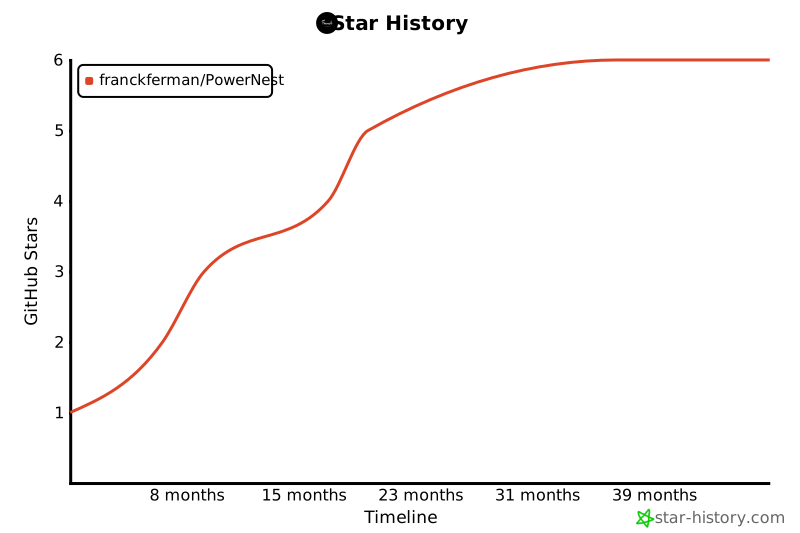
Your support is greatly appreciated. We're grateful for every star! Your backing fuels our passion. ✨
## 📚 License
This project is licensed under the GNU Affero General Public License, Version 3.0. For more details, please refer to the LICENSE file in the repository: [Read the license on GitHub](https://github.com/franckferman/PowerNest/blob/stable/LICENSE)
## 📞 Contact
[![ProtonMail][protonmail-shield]](mailto:contact@franckferman.fr)
[![LinkedIn][linkedin-shield]](https://www.linkedin.com/in/franckferman)
[![Twitter][twitter-shield]](https://www.twitter.com/franckferman)
[contributors-shield]: https://img.shields.io/github/contributors/franckferman/PowerNest.svg?style=for-the-badge
[contributors-url]: https://github.com/franckferman/PowerNest/graphs/contributors
[forks-shield]: https://img.shields.io/github/forks/franckferman/PowerNest.svg?style=for-the-badge
[forks-url]: https://github.com/franckferman/PowerNest/network/members
[stars-shield]: https://img.shields.io/github/stars/franckferman/PowerNest.svg?style=for-the-badge
[stars-url]: https://github.com/franckferman/PowerNest/stargazers
[license-shield]: https://img.shields.io/github/license/franckferman/PowerNest.svg?style=for-the-badge
[license-url]: https://github.com/franckferman/PowerNest/blob/stable/LICENSE
[protonmail-shield]: https://img.shields.io/badge/ProtonMail-8B89CC?style=for-the-badge&logo=protonmail&logoColor=blueviolet
[linkedin-shield]: https://img.shields.io/badge/-LinkedIn-black.svg?style=for-the-badge&logo=linkedin&colorB=blue
[twitter-shield]: https://img.shields.io/badge/-Twitter-black.svg?style=for-the-badge&logo=twitter&colorB=blue