https://github.com/franpog859/cleanaux-backend
☁️🛁 Cloud native REST API designed for planning regular cleaning or other systematic activities
https://github.com/franpog859/cleanaux-backend
api basicauth cloud gcp golang jwt kubernetes microservice mongodb mysql rest
Last synced: 3 months ago
JSON representation
☁️🛁 Cloud native REST API designed for planning regular cleaning or other systematic activities
- Host: GitHub
- URL: https://github.com/franpog859/cleanaux-backend
- Owner: franpog859
- License: apache-2.0
- Created: 2019-02-11T20:26:34.000Z (over 7 years ago)
- Default Branch: master
- Last Pushed: 2019-12-23T08:48:20.000Z (over 6 years ago)
- Last Synced: 2026-03-28T00:37:13.918Z (3 months ago)
- Topics: api, basicauth, cloud, gcp, golang, jwt, kubernetes, microservice, mongodb, mysql, rest
- Language: Go
- Homepage:
- Size: 23.8 MB
- Stars: 4
- Watchers: 0
- Forks: 2
- Open Issues: 0
-
Metadata Files:
- Readme: README.md
- License: LICENSE.md
Awesome Lists containing this project
README
# Cleanaux Backend
[](https://circleci.com/gh/franpog859/cleanaux-backend)
[](https://goreportcard.com/report/github.com/franpog859/cleanaux-backend)
[](https://hub.docker.com/r/franpog859/cleanaux-backend)
Cleanaux Backend provides a REST API with a list of things which should be cleaned regularly. If something wasn't cleaned for a long time it appears with a warning color (higher status). After the cleaning the item status is updated.
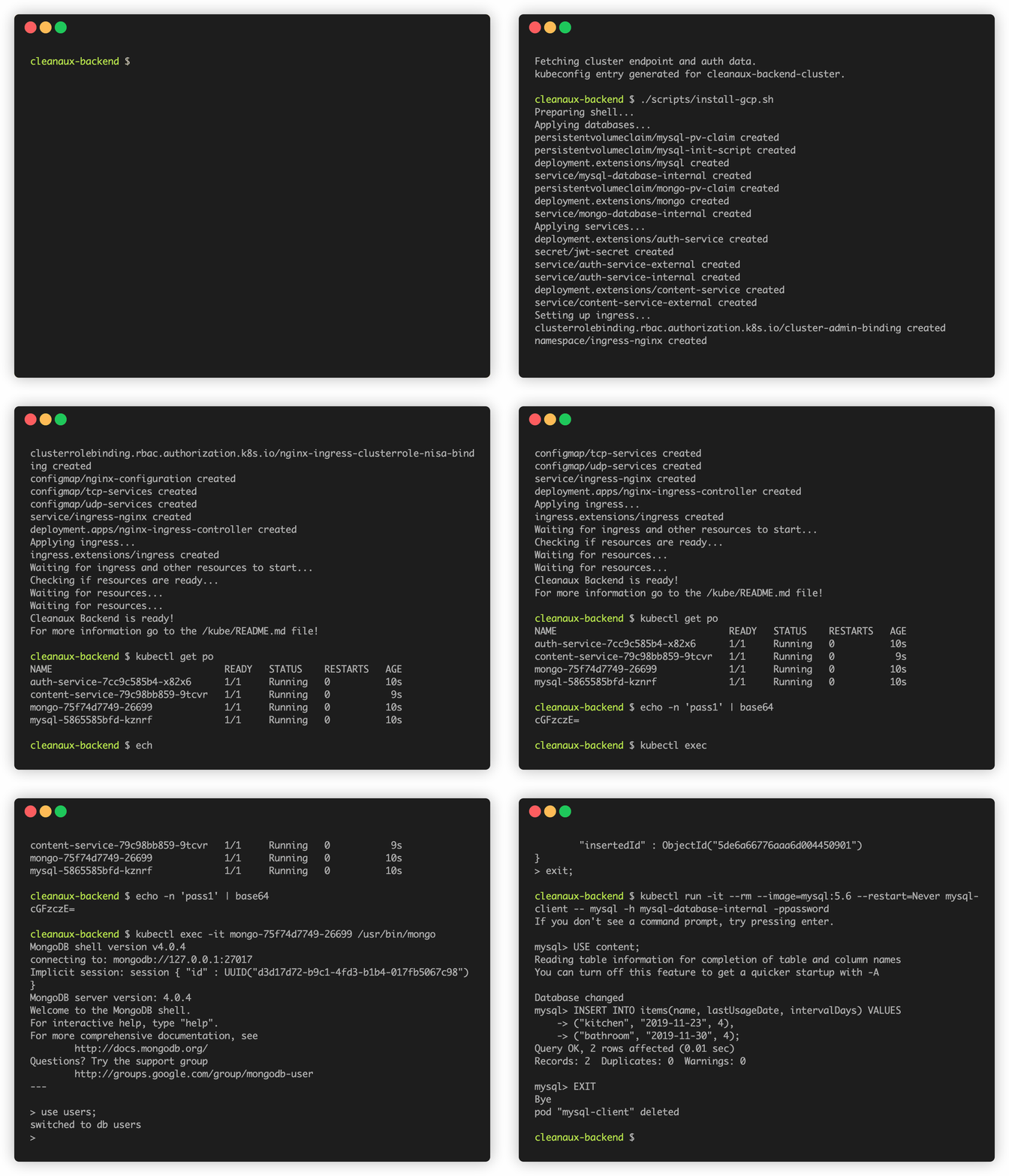
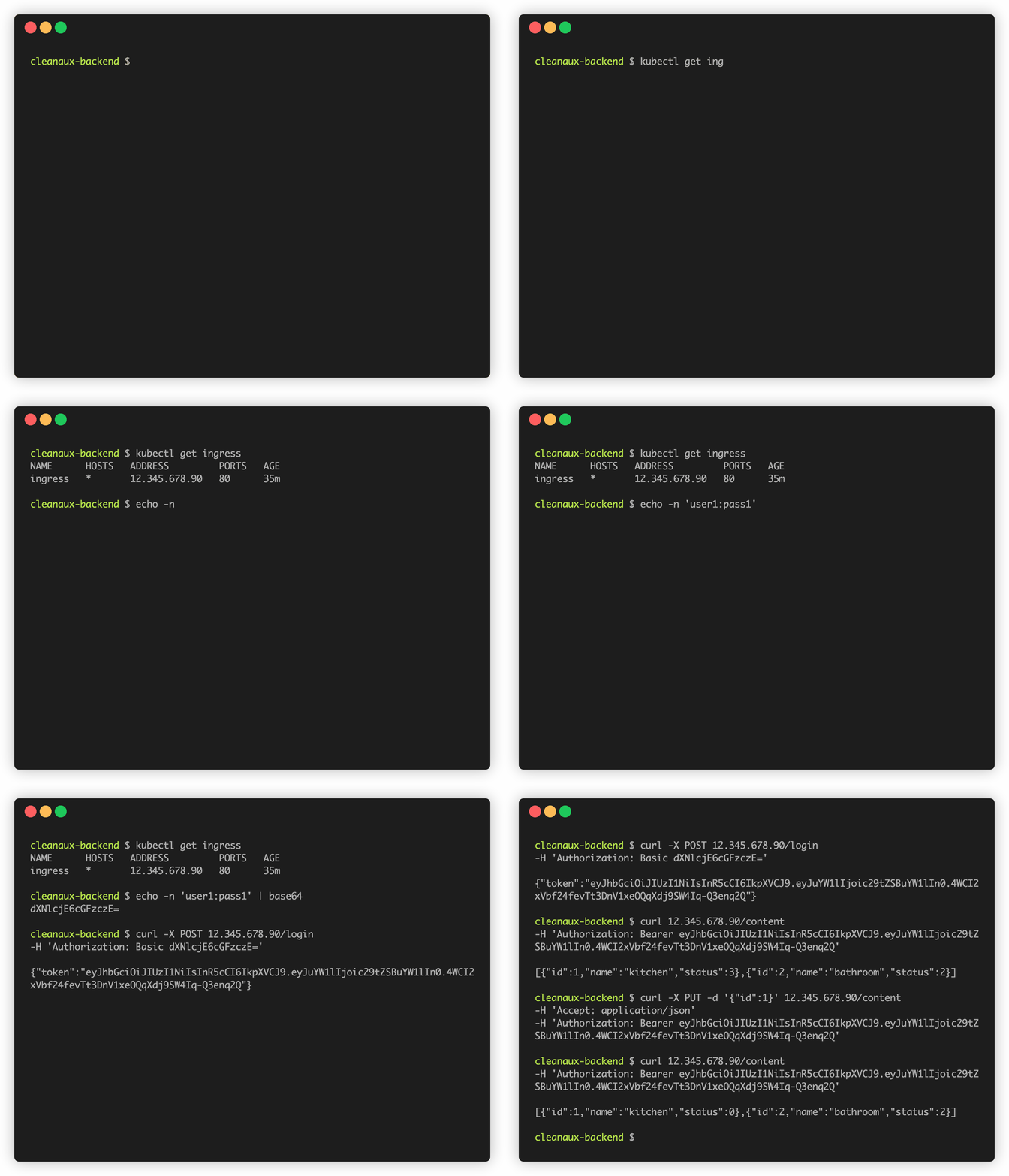
installation and setup
API usage
Project consist of two Go microservices - Content Service and Auth Service - exposing REST API via Ingress. Each of them is connected to separate database (this architecture was created more for learning purpose than to minify cloud resources). Every endpoint is secured with some method of authentication. See the [API exposed to the user](#api).
Whole backend is deployed as a cloud native application on Google Cloud Platform with Google Kubernetes Engine. See how to install it in the [production installation section](#production).
## Content Service
Content Service uses connected MySQL database to store the data aboud items to clean. It converts the data to the model used by the user. Database runs on separate pod and is initialized with an init container. Service proxies the JWT auth header to Auth Service to authorize user connection.
## Auth Service
Auth Service uses connected Mongo database to store users credentials. All passwords are encoded. Its job is to authorize user connection and provide JWT token signed with the secret key stored in Kubernetes Secret after Basic authentication. Service exposes also internal API for maintaining Content Service calls. Mongo database runs on separate pod.
## Structure
- `*-service/` directory contains specific service files
- `kube/` directory contains Kubernetes files for cloud deployment
- `scripts/` directory contains installation scripts
- `test/` directory contains some testing tips
- `docs/` directory contains some documentation files
## Production
> Note that it's not yet production ready. There has to be some work on HTTPS connection done!
**Before installing** the Cleanaux Backend on your cluster edit the default `jwtkey` value in the `kube/auth-service/secret.yaml` file.
To install Cleanaux Backend on Google Cloud Platform login into `gcloud`, connect to the cluster running the command provided by GCP and run the installation script:
```bash
gcloud auth login
gcloud container clusters get-credentials {CLUSTER_NAME} --zone {ZONE} --project {PROJECT}
bash scripts/install-gcp.sh
```
## Maintenance
To add a new user run MongoDB client:
```bash
kubectl exec -it $(kubectl get po | grep -oE "\b(mongo)([a-zA-Z0-9-])+\b") /usr/bin/mongo
```
And run script provided in `auth-service/init/db-test` file with your values instead of default ones. Remember that your credentials must consist of only letters and numbers and to put here a base64 encoded password. You can encode it running:
```bash
echo -n '{PASSWORD}' | base64
```
To add a new item to clean run MySQL client:
```bash
kubectl run -it --rm --image=mysql:5.6 --restart=Never mysql-client -- mysql -h mysql-database-internal -ppassword
```
And run script provided in `content-service/init/db-test.sql` file with your values instead of default ones.
To get the host IP run:
```bash
kubectl get ingress | grep -oE "\b([0-9]{1,3}\.){3}[0-9]{1,3}\b"
```
## API

The whole Swagger API you can find in `docs/api.yaml` file. Feel free to dive into the code if something is not clear enough!
## Development
To install Cleanaux Backend on minikube run:
```bash
bash scripts/install-minikube.sh
```
**Remember** to clean up the minikube after work by running:
```bash
bash scripts/cleanup-minikube.sh
```
To build Docker images from local repository and push them to the Docker Hub run:
```bash
bash scripts/build-and-push-images.sh {TAG}
```
To mock an interface go to its directory and run:
```bash
$GOPATH/bin/mockery -name={INTERFACE_NAME}
```
To run unit tests run:
```bash
bash scripts/check-code.sh
```
More information about testing is provided in the `test/README.md` file.
There are tools versions I use while development process:
```bash
go version: go1.11.5 linux/amd64
dep version: v0.5.3
kubectl client version: v1.15.2
kubectl server version: v1.13.3
gcloud version: Google Cloud SDK 256.0.0
minikube version: v0.34.1
git version: 2.17.1
```
## Contribution
If you see some bug or bad habit feel free to tell me! If you have some idea to make this project better just create an issue and talk about it. We all are learning!