https://github.com/frdl/install-setup-wizard
Frdlweb Workspace Setup Wizard
https://github.com/frdl/install-setup-wizard
Last synced: 7 months ago
JSON representation
Frdlweb Workspace Setup Wizard
- Host: GitHub
- URL: https://github.com/frdl/install-setup-wizard
- Owner: frdl
- License: mit
- Created: 2020-05-19T17:30:02.000Z (about 6 years ago)
- Default Branch: master
- Last Pushed: 2022-09-21T08:55:23.000Z (almost 4 years ago)
- Last Synced: 2025-05-27T01:19:12.819Z (about 1 year ago)
- Language: PHP
- Homepage: https://frdl.webfan.de/install/php/
- Size: 468 KB
- Stars: 0
- Watchers: 2
- Forks: 0
- Open Issues: 0
-
Metadata Files:
- Readme: README.md
- License: LICENSE
Awesome Lists containing this project
README
# Frdlweb Workspace Setup Wizard
[](https://packagist.org/packages/frdl/project)[](https://packagist.org/packages/frdl/project)[](https://packagist.org/packages/frdl/project)
Kickstarter boilerplate to be used by `composer create-project` command. Demo/Test Application.
# New Version(s)
New versions continue [here at `webfat`](https://github.com/frdlweb/webfat)!
## Installation
### Installation (via UI) - Recommended way
https://frdl.webfan.de/install/php/ provides an UI you can download and use to create projects by an [web-interface-UI](#webadmin).
### Configuration and Usage
* Create boilerplate (optional) `not yet supported`
````
composer create-project frdl/install-setup-wizard
````
* Make directory `./` public, e.g. by creating a vhost with this dir as DOCUMENT_ROOT.
* Login to `./admin.php` with the username of the process the current (web-)script is running on and the default-password "admin" and CHANGE THE PASSWORD!
* Setup:
* Visit the `System` Menu to setup and configure the requirements:
* Setup `Composer` in the `System`-Page
* Setup `Workspace Directory` in the `System`-Page
* Setup `Node.js`and `npm` in the `System`-Page
* Setup `git` in the `System`-Page
* Setup `frdl.js` in the `System`-Page
* Finalize the installation, klick `Install Webfan PHP-Installer` in the `System`-Page
* Manage your Projects:
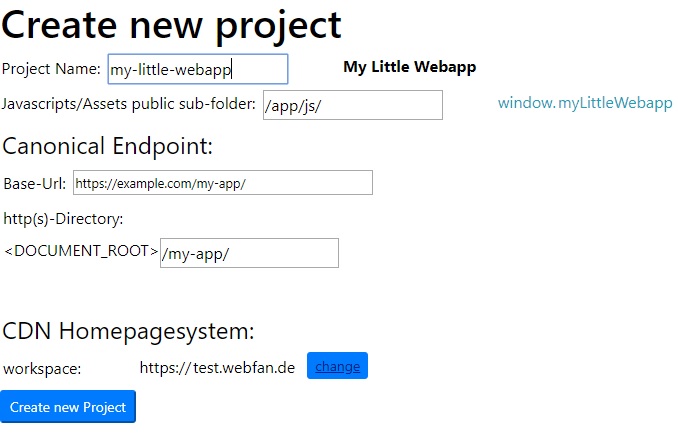
* Create your first project in the `Project`-Page via the `Create Project`-Button
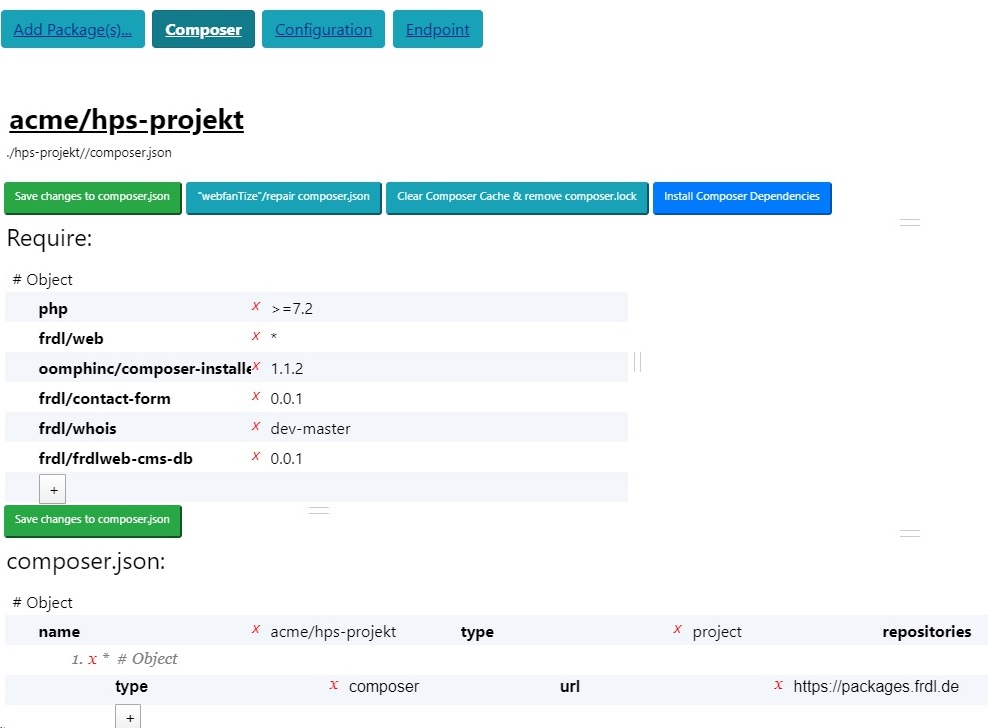
* Add the dependencies and `frdl-module` packages by visiting the `Project`->`Composer` Menu
* Install the dependencies
* Setup and configure your `frdl-module`s via visiting the `Project`->`Configuration`-Menu
* Click `Compile Project` in the `Endpoint`-Page to compile the application using `frdl` and `frdl.js`
* `Tip: rename the admin.php file to a new name harder to guess!`
* `Tip: enable the autoupdate and adminalert features and options if present!`
* `Tip: edit/uncomment the lines 100-101 of admin.php AFTER EVERY UPDATE/INSTALL!`
* (this SHOULD be provided as config option in next updates...)
## Screenshots

## Modules/Extensions
To develop a Module for this framework, you have to publish a package of e.g. type "frdl-module" or "frdl-extension".
Following the directory-structure and naming conventions of the framework it will be [compiled](https://frdl.webfan.de/install/?salt=&source=Webfan/App/AppBuilderServiceProvider) by frdl.
Documentation follows/to do...
### Example Modules
* [Official Frdlweb/Webfan Packages Repository...](https://packages.frdl.de/)
* [Domain Whois Module](https://github.com/frdl/whois)
* [Web Assets Extension Module](https://github.com/frdl/web-assets)
* [Contact Form Module](https://frdl.webfan.de/cdn/0.0.10.1/packages/frdl/contact-form/)
## Homepage
* [Getting started](https://frdl.webfan.de/install/)
* [Forum](https://frdl.webfan.de/forum/)