https://github.com/freelancer/phabricator-mcp
MCP server for Phabricator
https://github.com/freelancer/phabricator-mcp
ai claude conduit-api mcp model-context-protocol phabricator
Last synced: 5 months ago
JSON representation
MCP server for Phabricator
- Host: GitHub
- URL: https://github.com/freelancer/phabricator-mcp
- Owner: freelancer
- Created: 2026-01-27T15:31:16.000Z (6 months ago)
- Default Branch: main
- Last Pushed: 2026-02-20T11:36:12.000Z (5 months ago)
- Last Synced: 2026-02-20T15:57:01.974Z (5 months ago)
- Topics: ai, claude, conduit-api, mcp, model-context-protocol, phabricator
- Language: TypeScript
- Homepage: https://freelancer.github.io/phabricator-mcp/
- Size: 101 KB
- Stars: 10
- Watchers: 0
- Forks: 1
- Open Issues: 0
-
Metadata Files:
- Readme: README.md
Awesome Lists containing this project
README
# phabricator-mcp
An [MCP (Model Context Protocol)](https://modelcontextprotocol.io/) server that wraps Phabricator's Conduit API, enabling any MCP client to interact with Phabricator tasks, code reviews, repositories, and more.
## Star History
[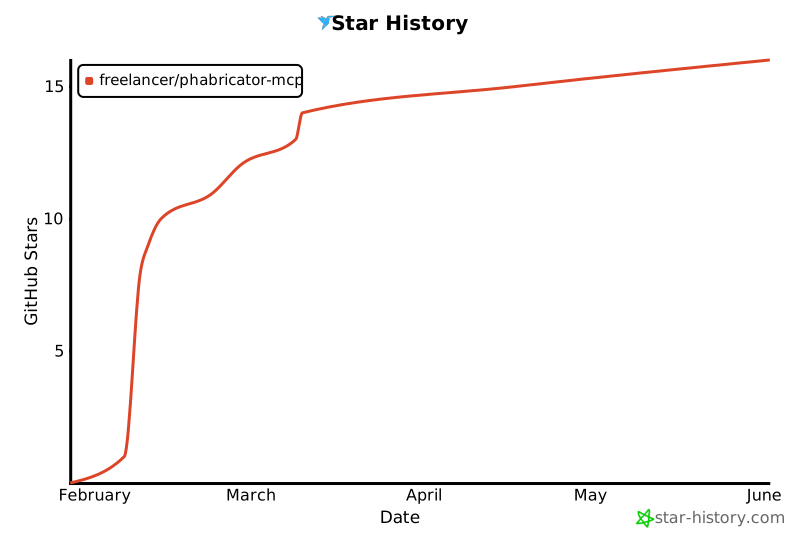](https://star-history.com/#freelancer/phabricator-mcp&Date)
## Installation
### Claude Code (CLI)
```bash
claude mcp add --scope user phabricator -- npx @freelancercom/phabricator-mcp@latest
```
Or with environment variables (if not using `~/.arcrc`):
```bash
claude mcp add --scope user phabricator \
-e PHABRICATOR_URL=https://phabricator.example.com \
-e PHABRICATOR_API_TOKEN=api-xxxxx \
-- npx @freelancercom/phabricator-mcp@latest
```
The `--scope user` flag installs the server globally, making it available in all projects.
### Codex (OpenAI CLI)
Add to your Codex config (`~/.codex/config.json`):
```json
{
"mcpServers": {
"phabricator": {
"command": "npx",
"args": ["@freelancercom/phabricator-mcp@latest"],
"env": {
"PHABRICATOR_URL": "https://phabricator.example.com",
"PHABRICATOR_API_TOKEN": "api-xxxxxxxxxxxxx"
}
}
}
}
```
### opencode
Add to your opencode config (`~/.config/opencode/config.json`):
```json
{
"mcp": {
"servers": {
"phabricator": {
"command": "npx",
"args": ["@freelancercom/phabricator-mcp@latest"],
"env": {
"PHABRICATOR_URL": "https://phabricator.example.com",
"PHABRICATOR_API_TOKEN": "api-xxxxxxxxxxxxx"
}
}
}
}
}
```
### VS Code with Claude Extension
Add to your VS Code `settings.json`:
```json
{
"claude.mcpServers": {
"phabricator": {
"command": "npx",
"args": ["@freelancercom/phabricator-mcp@latest"],
"env": {
"PHABRICATOR_URL": "https://phabricator.example.com",
"PHABRICATOR_API_TOKEN": "api-xxxxxxxxxxxxx"
}
}
}
}
```
### Cursor
Add to your Cursor MCP config (`~/.cursor/mcp.json`):
```json
{
"mcpServers": {
"phabricator": {
"command": "npx",
"args": ["@freelancercom/phabricator-mcp@latest"],
"env": {
"PHABRICATOR_URL": "https://phabricator.example.com",
"PHABRICATOR_API_TOKEN": "api-xxxxxxxxxxxxx"
}
}
}
}
```
### GitHub Copilot (VS Code)
Add to your VS Code `settings.json`:
```json
{
"github.copilot.chat.mcp.servers": {
"phabricator": {
"command": "npx",
"args": ["@freelancercom/phabricator-mcp@latest"],
"env": {
"PHABRICATOR_URL": "https://phabricator.example.com",
"PHABRICATOR_API_TOKEN": "api-xxxxxxxxxxxxx"
}
}
}
}
```
## Upgrading
The default install uses `@freelancercom/phabricator-mcp@latest`, which tells npx to check for updates on each run. No action needed.
If you pinned a specific version (e.g. `@freelancercom/phabricator-mcp@1.0.0`) or omitted the version suffix, npx caches the package and won't pick up new versions. To upgrade:
```bash
npx clear-npx-cache
```
Then restart your MCP client.
### Migrating from `github:freelancer/phabricator-mcp`
If you previously installed using the GitHub URL, update your config to use the npm package instead:
```bash
# Remove old server
claude mcp remove phabricator -s user
# Add new one
claude mcp add --scope user phabricator -- npx @freelancercom/phabricator-mcp@latest
```
For JSON configs, replace `["github:freelancer/phabricator-mcp"]` with `["@freelancercom/phabricator-mcp@latest"]` in your args.
## Configuration
The server automatically reads configuration from `~/.arcrc` (created by [Arcanist](https://secure.phabricator.com/book/phabricator/article/arcanist/)). No additional configuration is needed if you've already set up `arc`.
Alternatively, set environment variables (which take precedence over `.arcrc`):
- `PHABRICATOR_URL` - Phabricator instance URL
- `PHABRICATOR_API_TOKEN` - Conduit API token
You can get an API token from your Phabricator instance at: **Settings > Conduit API Tokens**
### Recommended: Allow Read-Only Tool Permissions
By default, Claude Code will prompt you for permission each time a Phabricator tool is called. It's recommended to allowlist the read-only tools so they run without prompts, while keeping write operations (create, edit, comment) behind a confirmation step.
Add to your `~/.claude/settings.json`:
```json
{
"permissions": {
"allow": [
"mcp__phabricator__phabricator_task_search",
"mcp__phabricator__phabricator_task_status_search",
"mcp__phabricator__phabricator_task_priority_search",
"mcp__phabricator__phabricator_revision_search",
"mcp__phabricator__phabricator_diff_search",
"mcp__phabricator__phabricator_diff_raw",
"mcp__phabricator__phabricator_revision_paths",
"mcp__phabricator__phabricator_repository_search",
"mcp__phabricator__phabricator_commit_search",
"mcp__phabricator__phabricator_repository_browse",
"mcp__phabricator__phabricator_repository_file_content",
"mcp__phabricator__phabricator_branch_search",
"mcp__phabricator__phabricator_tag_search",
"mcp__phabricator__phabricator_repository_file_history",
"mcp__phabricator__phabricator_repository_code_search",
"mcp__phabricator__phabricator_user_whoami",
"mcp__phabricator__phabricator_user_search",
"mcp__phabricator__phabricator_project_search",
"mcp__phabricator__phabricator_column_search",
"mcp__phabricator__phabricator_paste_search",
"mcp__phabricator__phabricator_document_search",
"mcp__phabricator__phabricator_blog_search",
"mcp__phabricator__phabricator_blog_post_search",
"mcp__phabricator__phabricator_file_search",
"mcp__phabricator__phabricator_file_info",
"mcp__phabricator__phabricator_buildable_search",
"mcp__phabricator__phabricator_build_search",
"mcp__phabricator__phabricator_build_target_search",
"mcp__phabricator__phabricator_build_log_search",
"mcp__phabricator__phabricator_build_plan_search",
"mcp__phabricator__phabricator_owners_search",
"mcp__phabricator__phabricator_feed_query",
"mcp__phabricator__phabricator_conpherence_search",
"mcp__phabricator__phabricator_conpherence_read",
"mcp__phabricator__phabricator_audit_query",
"mcp__phabricator__phabricator_phid_lookup",
"mcp__phabricator__phabricator_phid_query",
"mcp__phabricator__phabricator_transaction_search",
"mcp__phabricator__phabricator_version"
]
}
}
```
To allowlist all tools including write operations, use `"mcp__phabricator__*"` instead.
## Available Tools
### Task Management (Maniphest)
| Tool | Description |
|------|-------------|
| `phabricator_task_search` | Search tasks with filters (status, assignee, project, etc.) |
| `phabricator_task_create` | Create a new task |
| `phabricator_task_edit` | Edit an existing task |
| `phabricator_task_add_comment` | Add a comment to a task |
| `phabricator_task_status_search` | List all available task statuses on the instance |
| `phabricator_task_priority_search` | List all available task priorities on the instance |
### Code Reviews (Differential)
| Tool | Description |
|------|-------------|
| `phabricator_revision_search` | Search code review revisions |
| `phabricator_revision_edit` | Edit a revision (accept, reject, abandon, add reviewers, comment, etc.) |
| `phabricator_revision_inline_comment` | Create an inline comment on a specific line of a diff |
| `phabricator_diff_raw` | Get the raw diff/patch content for a diff by ID |
| `phabricator_diff_search` | Search diffs (code change snapshots within a revision) |
| `phabricator_revision_paths` | Get the list of changed file paths for a revision |
### Repositories (Diffusion)
| Tool | Description |
|------|-------------|
| `phabricator_repository_search` | Search repositories |
| `phabricator_commit_search` | Search commits |
| `phabricator_repository_browse` | Browse a repository directory tree |
| `phabricator_repository_file_content` | Read file contents from a repository |
| `phabricator_branch_search` | List branches in a repository |
| `phabricator_tag_search` | List tags in a repository |
| `phabricator_repository_file_history` | Get commit history for a file path |
| `phabricator_repository_code_search` | Search (grep) file contents within a repository |
| `phabricator_repository_edit` | Create or edit a Diffusion repository |
### Users
| Tool | Description |
|------|-------------|
| `phabricator_user_whoami` | Get current authenticated user |
| `phabricator_user_search` | Search users |
### Projects
| Tool | Description |
|------|-------------|
| `phabricator_project_search` | Search projects |
| `phabricator_project_edit` | Create or edit a project |
| `phabricator_column_search` | Search workboard columns |
### Pastes
| Tool | Description |
|------|-------------|
| `phabricator_paste_search` | Search pastes |
| `phabricator_paste_create` | Create a paste |
| `phabricator_paste_edit` | Edit an existing paste |
### Wiki (Phriction)
| Tool | Description |
|------|-------------|
| `phabricator_document_search` | Search wiki documents |
| `phabricator_document_edit` | Create or edit a wiki document |
| `phabricator_document_add_comment` | Add a comment to a wiki document |
### Blogs (Phame)
| Tool | Description |
|------|-------------|
| `phabricator_blog_search` | Search Phame blogs |
| `phabricator_blog_post_search` | Search blog posts |
| `phabricator_blog_post_create` | Create a new blog post |
| `phabricator_blog_post_edit` | Edit an existing blog post |
| `phabricator_blog_post_add_comment` | Add a comment to a blog post |
### Transactions
| Tool | Description |
|------|-------------|
| `phabricator_transaction_search` | Search transactions (comments, status changes, etc.) on any object |
### Files
| Tool | Description |
|------|-------------|
| `phabricator_file_upload` | Upload a file and get an ID for embedding in descriptions/comments via `{F}` |
| `phabricator_file_search` | Search for files |
| `phabricator_file_info` | Get file metadata (name, size, MIME type, URI) |
### Builds (Harbormaster)
| Tool | Description |
|------|-------------|
| `phabricator_buildable_search` | Search buildables (revisions/commits with builds) |
| `phabricator_build_search` | Search builds (CI/build results) |
| `phabricator_build_target_search` | Search build targets (individual build steps) |
| `phabricator_build_log_search` | Search build logs (output from build steps) |
| `phabricator_build_command` | Report build status to Harbormaster (pass, fail, work) |
| `phabricator_build_plan_search` | Search build plans (CI pipeline configurations) |
### Code Ownership (Owners)
| Tool | Description |
|------|-------------|
| `phabricator_owners_search` | Search code ownership packages |
### Activity Feed
| Tool | Description |
|------|-------------|
| `phabricator_feed_query` | Query the activity feed (recent task updates, revision changes, commits, etc.) |
### Chat (Conpherence)
| Tool | Description |
|------|-------------|
| `phabricator_conpherence_search` | Search chat rooms/threads |
| `phabricator_conpherence_create` | Create a new chat room/thread |
| `phabricator_conpherence_edit` | Edit a chat room (rename, manage participants) |
| `phabricator_conpherence_read` | Read messages from a chat thread |
| `phabricator_conpherence_send` | Send a message to a chat thread |
### Audits
| Tool | Description |
|------|-------------|
| `phabricator_audit_query` | Search commit audit requests |
### PHID Utilities
| Tool | Description |
|------|-------------|
| `phabricator_phid_lookup` | Look up PHIDs by name (e.g., "T123", "@username") |
| `phabricator_phid_query` | Get details about PHIDs |
### Server
| Tool | Description |
|------|-------------|
| `phabricator_version` | Get the version of the running phabricator-mcp server |
## Usage
Once connected, just ask your AI assistant to perform Phabricator tasks in natural language:
**Tasks**
- "Show my assigned tasks"
- "Create a task titled 'Fix login bug' in project Backend"
- "Add a comment to T12345 saying the fix is ready for review"
- "Close task T12345"
- "What custom fields are available for incident tasks?"
- "Set the start date and root cause category on T12345"
- "Make T456 a subtask of T123"
- "Upload this screenshot and add it to the description of T789"
**Code Reviews**
- "Show my open diffs"
- "What's the status of D6789?"
- "Review the code changes in D6789"
- "Add @alice as a reviewer to D6789"
- "Accept D6789"
- "Leave an inline comment on line 42 of src/index.ts in D6789"
**Repositories & Builds**
- "Show me the contents of src/config.ts in repo Backend"
- "Browse the /src directory in the main repo"
- "Is the build passing on D6789?"
- "Show me the build logs for D6789"
- "Who owns the code in /src/auth/?"
**Search & Lookup**
- "Find user john.doe"
- "Search for projects with 'backend' in the name"
- "Search commits by author alice"
- "Look up T123 and D456"
- "Show me the comments on D6789"
**Wiki & Pastes**
- "Find wiki pages about deployment"
- "Create a paste with this error log"
**Blogs**
- "Search for blog posts about release notes"
- "Create a new draft blog post titled 'Q1 Update' on the engineering blog"
- "Publish blog post J42"
- "Add a comment to blog post J15"
The appropriate tools are called automatically based on your request.
## Development
```bash
git clone https://github.com/freelancer/phabricator-mcp.git
cd phabricator-mcp
npm install
npm run build
npm run dev # watch mode
```
### Architecture
- `src/index.ts` - Entry point, MCP server with stdio transport
- `src/config.ts` - Config loader (reads `~/.arcrc` or env vars)
- `src/client/conduit.ts` - Phabricator Conduit API client
- `src/tools/*.ts` - Tool implementations per Phabricator application
## License
MIT