https://github.com/freethenation/rabbit-qps-exchange
Creates and maintains a rabbit exchange which enforces a QPS across queues
https://github.com/freethenation/rabbit-qps-exchange
Last synced: 5 months ago
JSON representation
Creates and maintains a rabbit exchange which enforces a QPS across queues
- Host: GitHub
- URL: https://github.com/freethenation/rabbit-qps-exchange
- Owner: freethenation
- License: mit
- Created: 2018-06-30T23:11:56.000Z (about 8 years ago)
- Default Branch: master
- Last Pushed: 2023-03-02T01:44:49.000Z (over 3 years ago)
- Last Synced: 2025-07-24T19:52:38.016Z (12 months ago)
- Language: JavaScript
- Size: 396 KB
- Stars: 3
- Watchers: 6
- Forks: 0
- Open Issues: 3
-
Metadata Files:
- Readme: README.md
- License: LICENSE.txt
Awesome Lists containing this project
README
# Rabbit QPS Exchange [](https://circleci.com/gh/freethenation/rabbit-qps-exchange)
Rabbit has no built in mechanism to limit the number of messages consumed per second. If a burst of messages are published, workers can quickly overload other internal or external services. This project is a simple node.js script which adds a way to limit consumption to rabbit.
Some example use cases:
* Limit calls to an external service which limits QPS (queries per second)
* Rate limit individual users without having to manage a queue per user. *Rabbit QPS Exchange will manage these queues for you.*
* Easier rate limiting for 3rd party APIs which are often rate limit on a per user basis.
* Batch together messages for database performance or APIs which provide batch operations.
* Easily add rate limiting to an existing project. Simply publish to a different exchange and add a few rabbit message headers.
## Basic Usage
1. Run `./rabbit_qps_shovel.js --management http://guest:guest@localhost:15672/ --connection RABBIT_CONNECTION_STRING start`
2. Publish your message to the `qps_exchange` with `qps-key` and `qps-delay` rabbit message headers
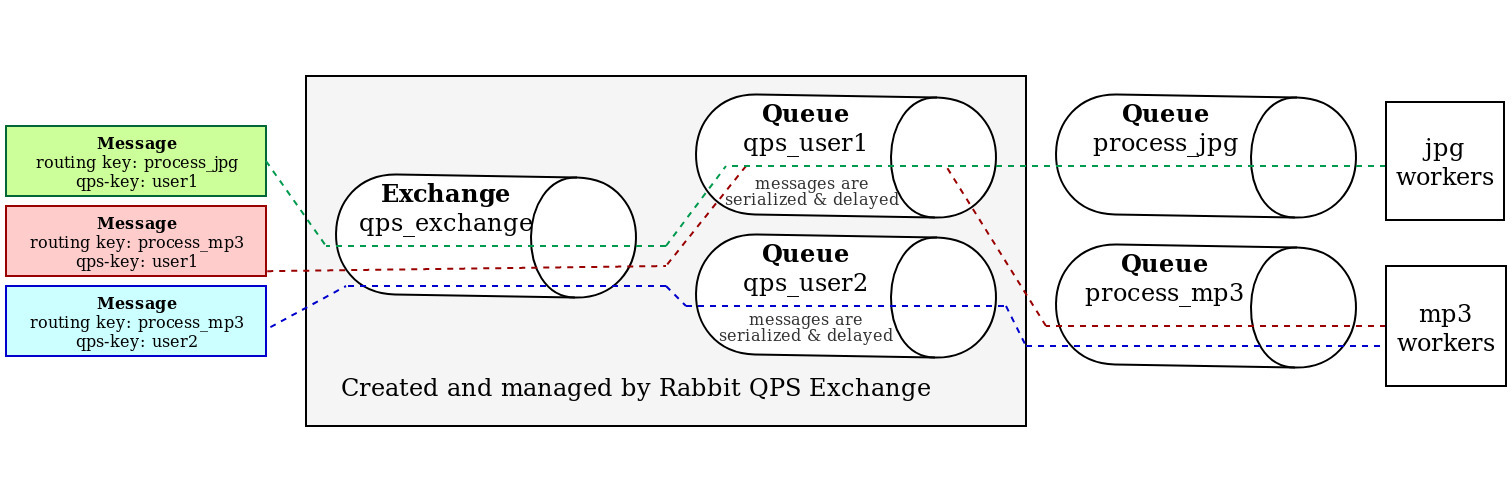
3. A queue is automatically created for the provided `qps-key` to serialize messages and respect `qps-delay`
4. Messages are routed to the [default exchange using their routing key](https://www.rabbitmq.com/tutorials/tutorial-four-javascript.html).
5. Your worker handles the message
## Installing
* The rabbit server version must be > 3.5.0
* The rabbit server must have the management plugin installed (its http interface is used)
* Install a modern version of node (async support is required)
* Run `npm install`
## Reference
Usage: `./rabbit_qps_shovel.js [OPTIONS] COMMAND`
commands:
* `help` show help
* `init` create exchange and required queues then exit
* `clean` clean up idle queues then exit
* `start` ensure exchange and required queues, clean idle queues, and then start processing messages
options:
* `--management` Rabbit management connection string. Example http://guest:guest@localhost:15672/ (REQUIRED)
* `--connection` Rabbit connection string. See https://www.rabbitmq.com/uri-spec.html (REQUIRED)
### Configuration headers
| Header | Description | Type | Default |
|---------------------|----------------------------------------------------------------------------------------------------------------------------|-----------|-----------------|
| qps-key | Used to serialize all messages sent to the `qps_exchange` | string | (required) |
| qps-delay | Delay (in milliseconds) to wait after routing the message to the default exchange. Use to approximate messages per second. | int/float | 1000 ms |
| qps-max-priority | Can be set along with normal Rabbit priority headers to allow prioritization | integer | no priority |
| qps-durable | If set, queues created and managed by rabbit qps exchange will be durable | boolean | false |
| qps-batch-size | If set, will group this many messages together into a batch, all of which will be sent as separate messages simultaneously | integer | 1 (no batching) |
| qps-batch-timeout | Maximum time (in millisecond) to wait for a full batch | int/float | 1000 ms |
| qps-batch-combine | If set, will combine batch messages together into a single message separated with ASCII newlines (`\n`, `0x0A`) | boolean | false |
| qps-delay-lock-key | Can be set to share the delay lock between multiple QPS keys. Defaults to `qps-key` if not set. (leaving as default recommended) | string | `qps-key` |
### Internal Queues
Rabbit QPS Exchange automatically creates and deletes queues as required and the diagram below exemplifies their organization
## Running Tests
* Run a rabbitmq server
* The rabbit server must have the management plugin installed
* Run tests with `npm test`
* The environment variables `RABBIT_CONN_STRING` and `MANAGEMENT_CONN_STRING` can be used to provide connection information