https://github.com/frost373/w2j-cli
JavaWeb CLI Framework,Simple and easy to use. 简单易用的Javaweb 命令行框架
https://github.com/frost373/w2j-cli
cli web
Last synced: 6 months ago
JSON representation
JavaWeb CLI Framework,Simple and easy to use. 简单易用的Javaweb 命令行框架
- Host: GitHub
- URL: https://github.com/frost373/w2j-cli
- Owner: frost373
- License: mit
- Created: 2018-04-25T12:48:36.000Z (about 8 years ago)
- Default Branch: master
- Last Pushed: 2019-02-27T11:07:49.000Z (over 7 years ago)
- Last Synced: 2025-07-21T11:49:32.966Z (12 months ago)
- Topics: cli, web
- Language: Java
- Homepage:
- Size: 104 KB
- Stars: 100
- Watchers: 22
- Forks: 5
- Open Issues: 1
-
Metadata Files:
- Readme: README.md
- License: LICENSE
Awesome Lists containing this project
README
# W2J-CLI
JavaWeb Command-line Framework, help you easily build a command line JavaWeb System.
It can be easily combined with any Java framework , and no other dependency.Even you don't need create a HTML page.
## Why need it
- Some functions are provided to professional and do not want to invest in developing front-end.
- Quick development for a simple management system
- provided some tools through a web page
- Quick,simple,fun,geek and so on
## Get it
##### Maven
```xml
top.thinkin
w2j-cli-core
0.1.3
```
##### Gradle
```
// https://mvnrepository.com/artifact/top.thinkin/w2j-cli-core
compile group: 'top.thinkin', name: 'w2j-cli-core', version: '0.1.3'
```
## Some examples
#### Base
Base input and output,Text-table, Confirm,Auto-Complete
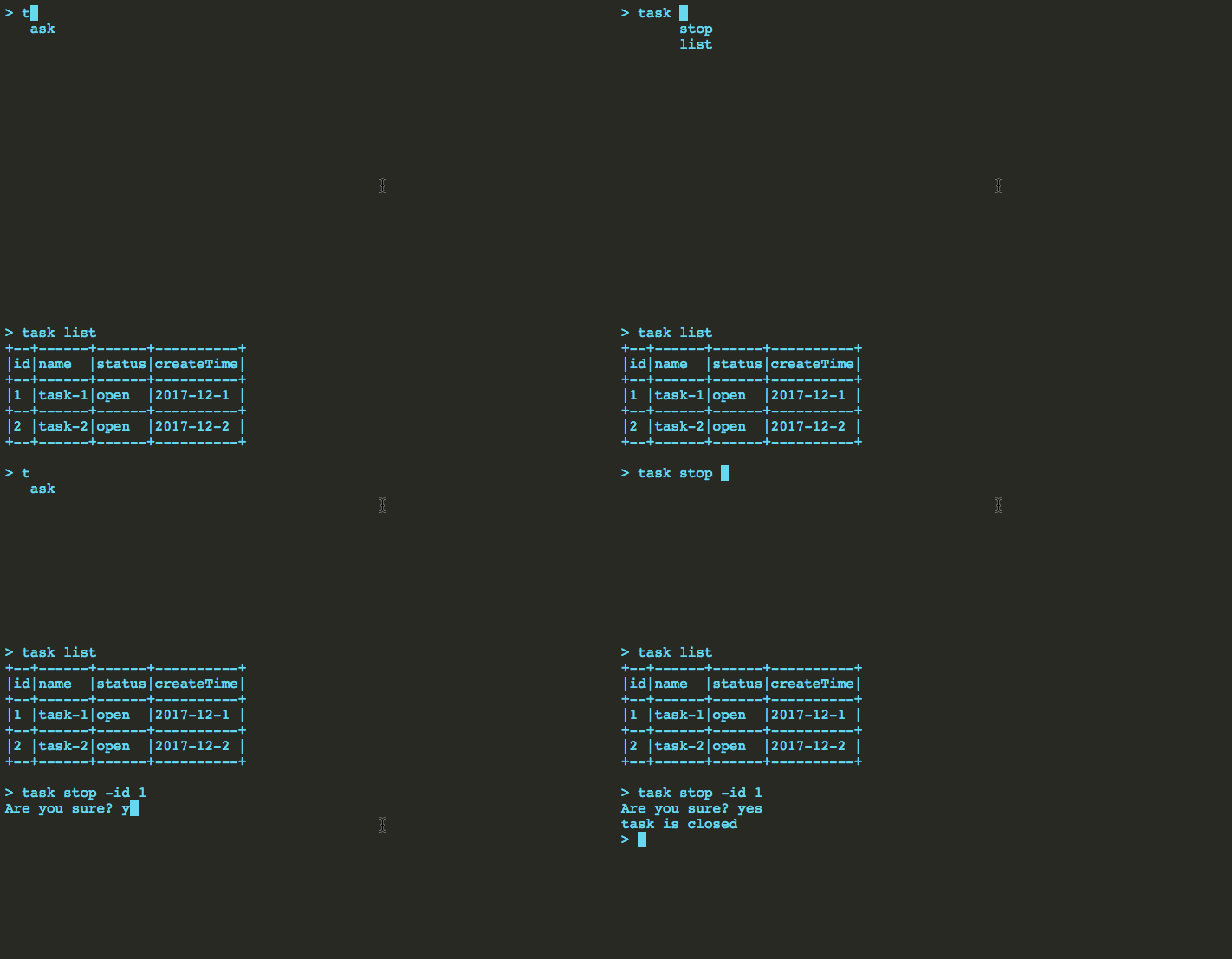
create a class and write annotations for root command,commands and parameters
```java
@HJRoot(name="task",help = "task related operation")
public class TaskTest {
@HJCommand(name = "list",help = "get the list of task")
public String list(
@HJValue(name="start",help = "start time. example:2017-12-1")
String start,
@HJValue(name="end",help = "end time. example:2018-12-1")
String end
) throws WjException {
TextTable table = TextTable.create();
table.config("id");
table.config("name");
table.config("status");
table.config("createTime");
table.add(Arrays.asList("1","task-1","open","2017-12-1"));
table.add(Arrays.asList("2","task-2","open","2017-12-2" ));
return View.text(table.buildTable());
}
@HJCommand(name = "stop",ask = true,help = "stop the task")
public String close(
@HJValue(name="id",help = "the task id",req = true)
String id,
@HJContext()
Context context
){
return View.text("task is closed");
}
}
```
#### Help
Based on you annotations, W2J-CLI could automatically generate the help documents
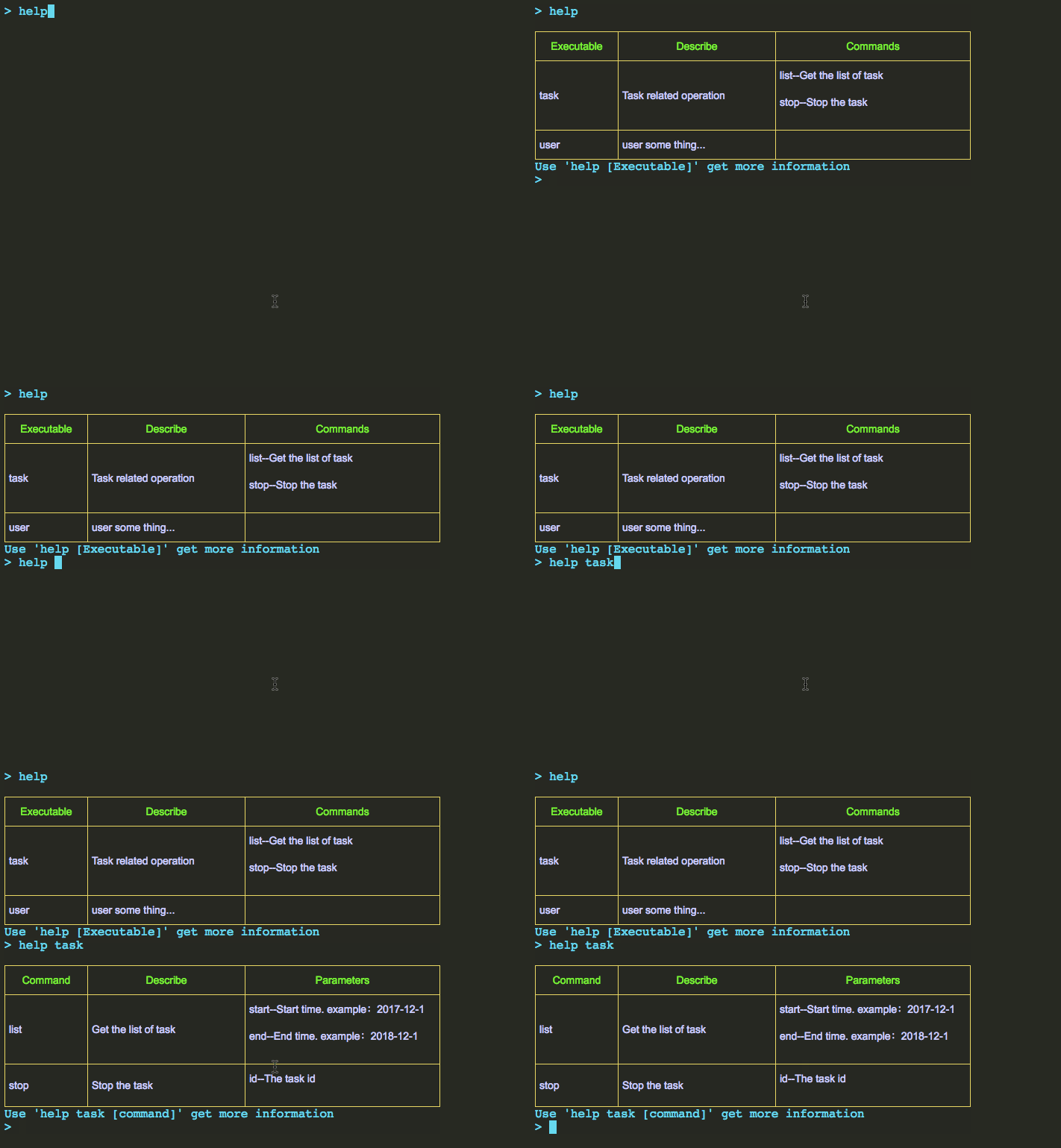
#### Login
W2J-CLI have provided a built-in login module.
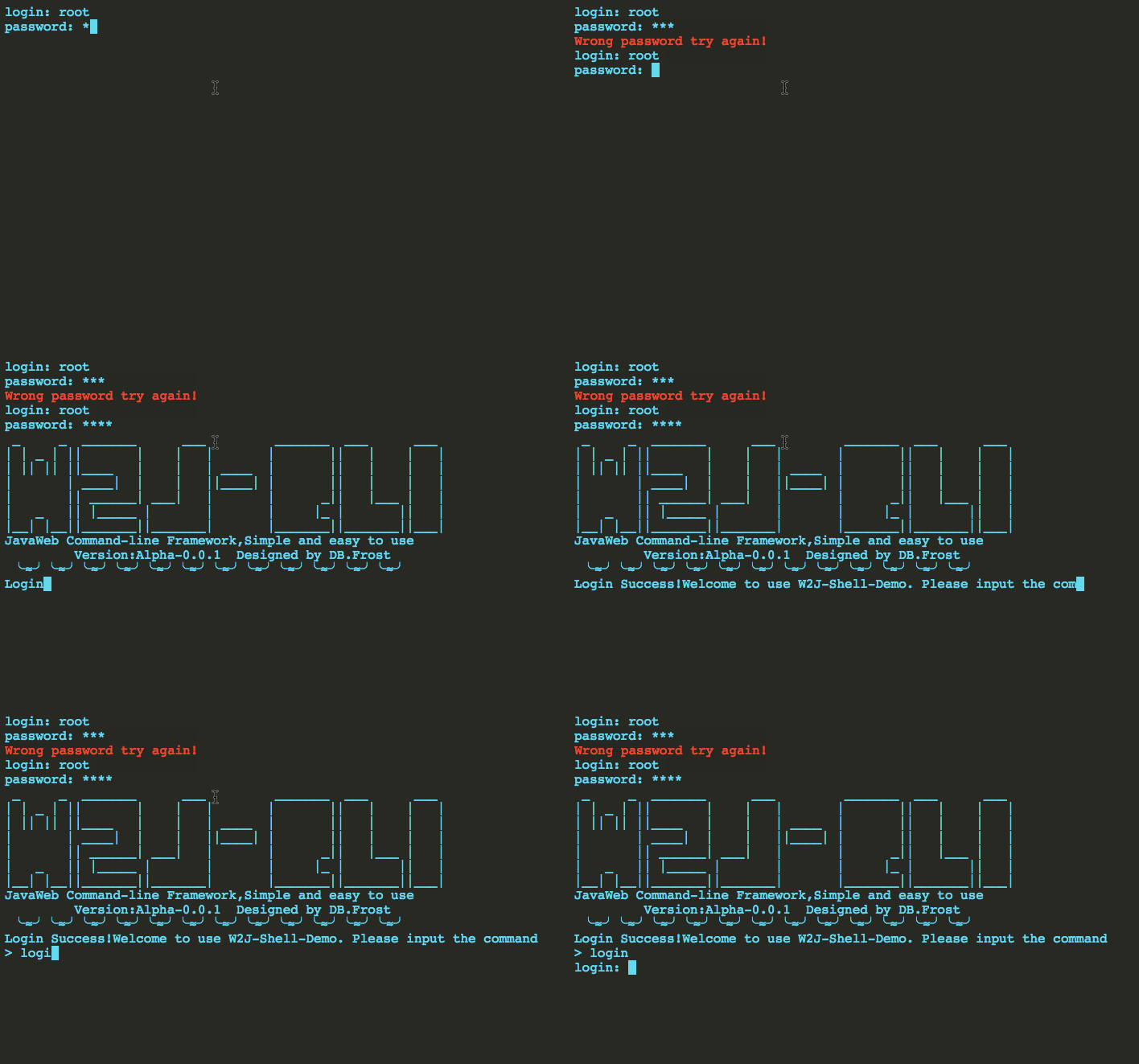
This codes simulates a simple logon process
```java
public class YesLogin implements WJLogin {
public final static String AUTH = "LX2F8rdCA2wKel9yR42";
public String login(String root, String pass, Context context) {
if("root".equals(root)&&"pass".equals(pass)){
return View.OK(AUTH);
}else{
return View.error("error");
}
}
public boolean filter(String auth, Context context) {
if(AUTH.equals(auth)){
return true;
}else{
return false;
}
}
}
```
#### Use scripts to get more powerful functions
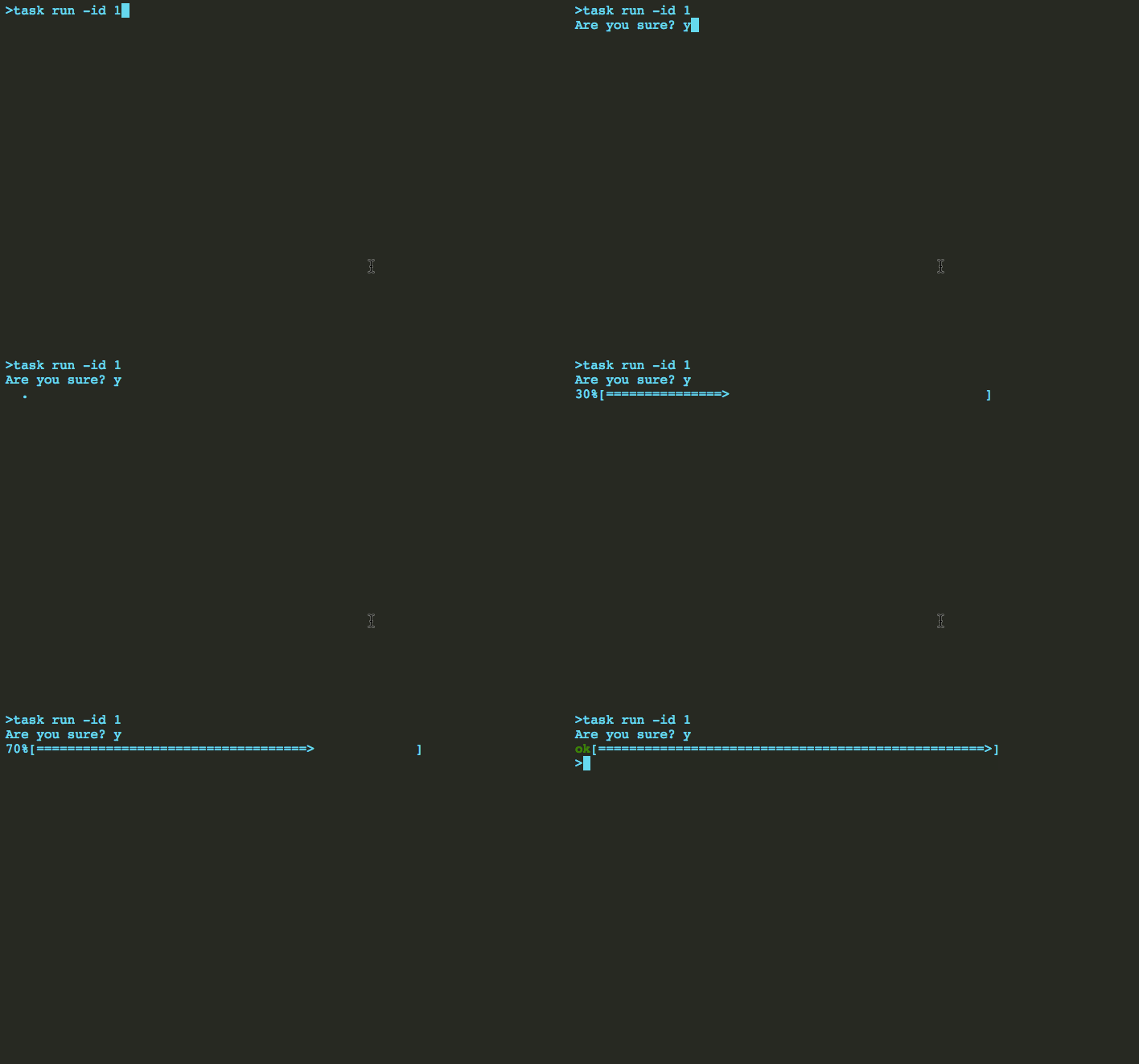
Users can create scripts to achieve stronger functionality.
Of course, there are some commonly used built-in scripts.Likes loop command script, you can use it to achieve some animation effects.
```Java
/**
* Circular sending command.
* The result will be displayed on the screen and overlay the last display.
* @param cli
* @param stopPrefix If the prefix is this, the loop will stop
* @param interval Time interval of a request
* @return
*/
String script = ScriptKits.LOOP_CLI("task get -id "+id,"ok",500);
```
## Getting Started
W2J-CLI can combined with any Java framework,likes spring,sptingMVC,struts2 and so on.
There has a example for combined with base servlet,you can get other ways in wiki
**build web.xml**
```xml
DispatcherServlet
top.test.web.TestAction
1
HtmlServlet
top.test.web.HtmlAction
1
DispatcherServlet
/api/*
HtmlServlet
/html
```
**build html Servlet**
```java
public class HtmlAction extends HttpServlet {
HTMLConfig config;
public void init() throws ServletException {
try {
// the postUrl is necessary ,if you use built-in login module needLogin must be true
// there has some other configuration items,you can get them in wiki
config = HTMLConfig.cteate().setPostUrl("http://127.0.0.1:8082/api").needLogin(true).build();
} catch (Exception e) {
e.printStackTrace();
}
}
protected void doGet(HttpServletRequest req, HttpServletResponse resp) throws ServletException, IOException {
req.setCharacterEncoding("UTF-8");
resp.setContentType("text/html;charset=UTF-8");
PrintWriter writer = resp.getWriter();
writer.write(config.html());
writer.close();
}
}
```
**build the handler Servlet**
```java
public class TestAction extends HttpServlet {
CommandManage commandManage;
public void init(){
try {
commandManage = CommandManage.config()
.setLogin(new YesLogin()).add(new HelloTest()).add(new TaskTest());
} catch (Exception e) {
e.printStackTrace();
}
}
protected void doPost(HttpServletRequest req, HttpServletResponse resp) throws IOException {
req.setCharacterEncoding("UTF-8");
Context context = new Context();//the context of your design
String cli = req.getParameter("cli");//get the command line
String auth = req.getParameter("auth");//get the login authcode
String x = null;
try {
x = commandManage.handleCommand(cli,context,auth);
} catch (Exception e) {
e.printStackTrace();
}
resp.setContentType("text/html;charset=UTF-8");
PrintWriter writer = resp.getWriter();
writer.write(x);
writer.close();
}
}
```
### Prerequisites
JDK 1.6+
## Authors
* **Dong Bin** - *Initial work* - [BOLG](http://thinkin.top)
## License
This project is licensed under the MIT License - see the [LICENSE](LICENSE) file for details
## Acknowledgments
* Hat tip to anyone who's code was used
* Inspiration
* etc