https://github.com/frsche/dwmblocksrs
Statusbar for dwm written in Rust
https://github.com/frsche/dwmblocksrs
Last synced: 5 months ago
JSON representation
Statusbar for dwm written in Rust
- Host: GitHub
- URL: https://github.com/frsche/dwmblocksrs
- Owner: frsche
- Created: 2022-03-06T14:57:10.000Z (over 4 years ago)
- Default Branch: main
- Last Pushed: 2022-09-10T22:31:07.000Z (almost 4 years ago)
- Last Synced: 2024-04-25T02:51:13.301Z (about 2 years ago)
- Language: Rust
- Homepage:
- Size: 67.4 KB
- Stars: 0
- Watchers: 1
- Forks: 0
- Open Issues: 0
-
Metadata Files:
- Readme: README.md
Awesome Lists containing this project
README
dwm statusbar heavily inspired by [dwmblocks](https://github.com/torrinfail/dwmblocks).
## Features:
- Each segment of the statusbar has an individual update interval
- Segments can also get manually updated by sending a signal to the process
- The statusbar is configurable through a configuration file
- You can also implement custom segments for the statusbar ([example](https://github.com/1117x/dwmblocksrs/blob/main/examples/custom_segment.rs))
- Color support (with the [statuscolor](https://dwm.suckless.org/patches/statuscolors/) patch)
## Example config:
```yaml
# default separator that all segments use
left_separator: " "
# scripts are expected to be in this folder
script_dir: "~/.status_scripts"
# signal that updates all the segments at once
update_all_signal: 0
# a mapping of the colors used in the config
# see section 'Colors' below
colors:
green: 10
red: 11
# default colors
# other options are left_separator_color, right_separator_color, icon_color
text_color: green
segments:
# scripts are run with sh
- script: "volume"
# this segments updates once per minute
update_interval: 60
# or when the signal SIGRTMIN+1 comes
# bind `pkill -RTMIN+1 dwmblocksrs` to your volume shortcuts
signals: [1]
- script: "battery"
update_interval: 10
# this segment is hidden when the script returns an empty string
hide_if_empty: true
- program: "date"
args: ["+%a. %d. %B %Y"]
update_interval: 60
# icons are displayed to the left of the output
icon: " "
- program: "date"
args: ["+%H:%M"]
update_interval: 60
icon: " "
# the default left separator gets overwritten
left_separator: " "
# as well as the default colors
text_color: red
icon_color: red
```
Run the statusbar with `dwmblocksrs -c example_config.yaml` or move the config file to `~/.config/dwmblocksrs/dwmblocksrs.yaml`.
The above config file produces the following statusbar in dwm:
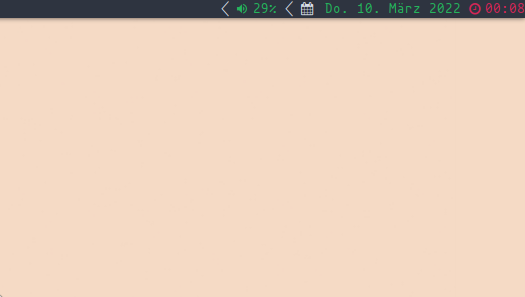
(the battery segment is hidden because the script outputs an empty string)
## Colors
In the example above, two colors are defined. The values these numbers are mapped to are defined in the dwm config.h file. See [statuscolor](https://dwm.suckless.org/patches/statuscolors/) for better explanation.
Colors are completly optional, and dwmblocksrs also works without the statuscolor patch in dwm. Besides that, the color-bytes explained in the statuscolor patch can also be manually generated from the script of a segment.