https://github.com/fsalinas26/cpp-login-menu
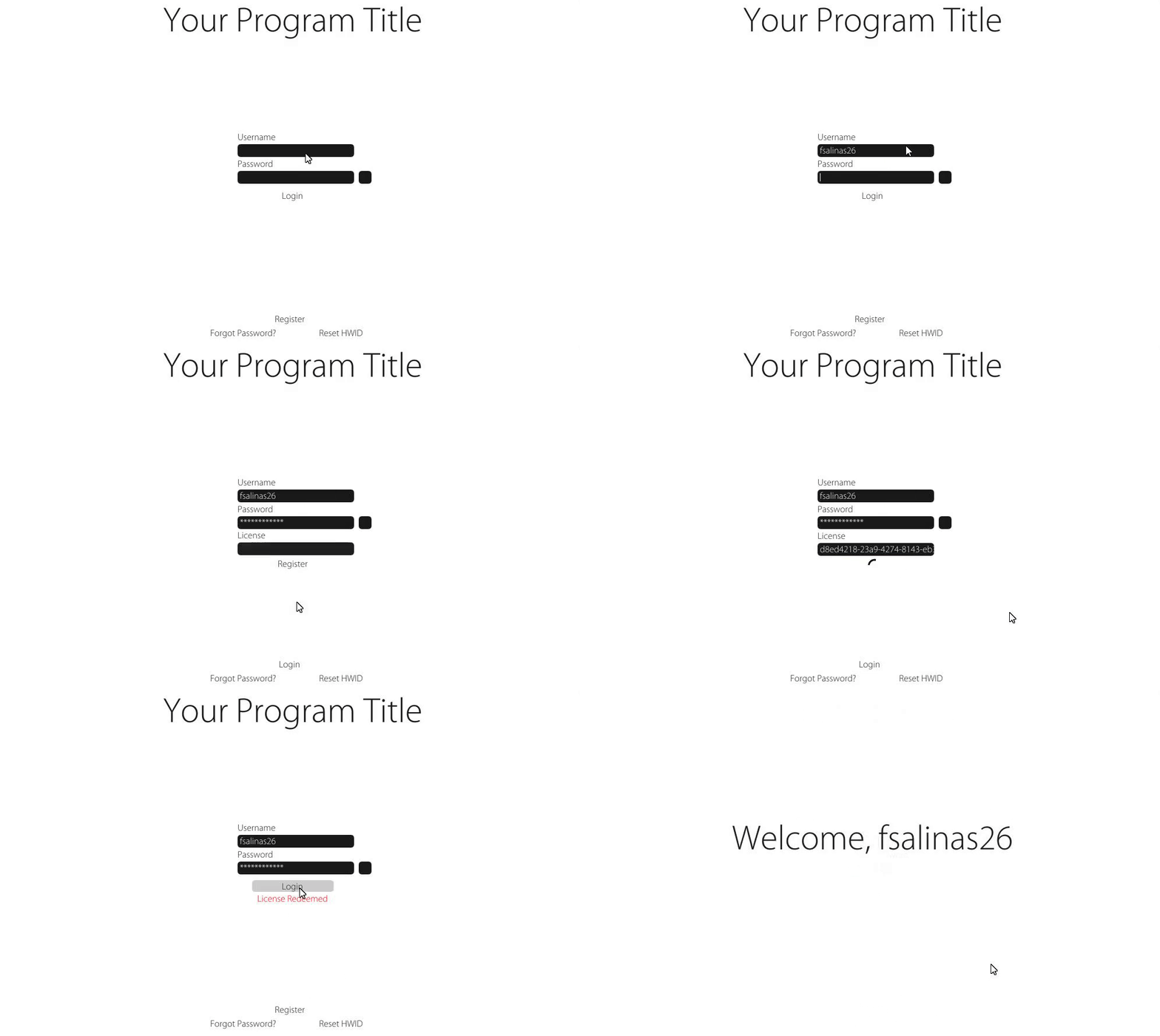
A simple and ready-to-use ImGui login menu with a fully functioning NodeJS Server for storing user info using SQLite.
https://github.com/fsalinas26/cpp-login-menu
imgui login-screen login-system sqlite user-interface
Last synced: 5 months ago
JSON representation
A simple and ready-to-use ImGui login menu with a fully functioning NodeJS Server for storing user info using SQLite.
- Host: GitHub
- URL: https://github.com/fsalinas26/cpp-login-menu
- Owner: fsalinas26
- Created: 2021-08-27T23:40:33.000Z (almost 5 years ago)
- Default Branch: master
- Last Pushed: 2021-12-31T21:42:01.000Z (over 4 years ago)
- Last Synced: 2023-03-10T10:17:47.884Z (over 3 years ago)
- Topics: imgui, login-screen, login-system, sqlite, user-interface
- Language: C++
- Homepage:
- Size: 10.8 MB
- Stars: 24
- Watchers: 2
- Forks: 10
- Open Issues: 1
-
Metadata Files:
- Readme: README.md
Awesome Lists containing this project
README
# cpp-login-menu
A simple and ready-to-use ImGui login menu with a fully functioning NodeJS Server for securely storing and accessing user info using SQLite.
* [Database Structure](https://github.com/fsalinas26/cpp-login-menu#sqlite-database-structure)
* [Database Commands](https://github.com/fsalinas26/cpp-login-menu#database-commands)
* [HTTP Request](https://github.com/fsalinas26/cpp-login-menu#http-request-c++)
* [REST API](https://github.com/fsalinas26/cpp-login-menu#rest-api-calls)
* [Encryption](https://github.com/fsalinas26/cpp-login-menu#Encryption)
## SQLite Database Structure
| Column | Type | Details |
| ------------- |---| ------------- |
| License |TEXT UNIQUE| For storing uuid4 serials. |
| Username |TEXT UNIQUE|For storing users usernames. |
| Password |TEXT|MD5 Password for hash authentication. |
| HWID |TEXT|MD5 Hardware Identifier to lock a license to a single PC. |
| LastLogin |TEXT| Time of last users login. |
| LastIP |TEXT|Most recent IP the user logged in with. |
| Expiry |TEXT|Expiry date of the license. |
| UserVar |TEXT|User variable that can be set to anything. |
| Rank |INTEGER|Rank of license. |
| LastReset |TEXT| Stores the last HWID reset time for cooldown period. |
## Database Commands
These are a list of [functions](https://github.com/fsalinas26/cpp-login-menu/tree/master/NodeJS%20Server/Commands) that can be performed on the database to insert, modify, or delete table entries.
*You can test most of these functions in Server.js or also use a REST Client to test the HTTP Request (use /admin route to bypass encryption). I plan on adding some kind of Admin Panel built into the menu to have control of all these callbacks*
Each command will take the form:
```javascript
module.exports = {
name:"login", //the command name to be reference in the request ex. {"command": "login"}
adminOnly: false, //declare if the function can be only accessed with API Token
execute(db,body,out_obj,adminMode){//see below
```
**db** is the working sqlite database.
**body** is the incoming request body (JSON Object).
**out_obj** is the outgoing response JSON object (Use this to pass any data from the database to your client)
**adminMode** When true, certain commands will not have cooldown/argument restrictions (resethwid, resetpw)
### ChangePassword.js
**Name:** resetpw
**body**: username, license, newPassword
Changes the password of the table entry where both username and license are found.
### ChangeRank.js (Admin Only)
**Name:** rank
**body:** username,newRank
Changes the rank of the table entry where username is found.
### CreateDB.js (Admin Only) **
**Name:** create
This function should only be called once if you want to create a new database.
### ExtendLicense.js (Admin Only)
**Name:** extend
**body:** username, extendBy
Extends the expiry date of the table entry where username is found. **extendBy** takes days.
### GenerateKey.js (Admin Only)
**Name:** generate
**body:** length, rank
Inserts a new license key into the table with length (in days) and rank.
### Login.js
**Name:** login
**body:** username, password, HWID
Returns rank, user variable, expiry date, and login success if an entry is found in the table.
### LookupUser.js (Admin Only)
**Name:** find
**body:** entry
Returns all key/value data of a user where either username or license are found in the table.
### Redeem.js
**Name:** redeem
**body:** username, password, hwid, license
Populates an entry in the table where license is found.
### ResetHWID.js (AdminOnly)
**Name:** resethwid
**body:** username, password (not required if calling from admin route)
Resets the HWID of an entry in the table where username is found. The HWID reset cooldown can be set in config.json.
### ShowAllUsers.js (AdminOnly)
**Name:** show
**body:** n/a
Returns an array of objects of all entries in the table.
## REST API Calls
To test any of the commands, simply provide the command name and the respective fields for each function (shown above). To test the calls w/o encryption, use the **/admin** endpoint instead of **/post**. Body of your request should be in JSON format.
**Generating a key**
```
POST http://localhost:80/admin
HTTP/1.1 content-type: application/json
Authorization: API_TOKEN
{
"command": "generate",
"length": "90",
"rank": "2",
"quantity": "1"
}
```
**Changing users rank**
```
POST http://localhost:80/admin
HTTP/1.1 content-type: application/json
Authorization: API_TOKEN
{
"command": "rank",
"username": "fsalinas26",
"newRank": "2"
}
```
[See .rest file](https://github.com/fsalinas26/cpp-login-menu/blob/master/NodeJS%20Server/REST%20API/API.rest)

Your API_TOKEN is declared in *config.json* and should be a random string of characters strictly for admin access.
## HTTP Request C++
Each request to the server will look similar. The content-type is **application/x-www-form-urlencoded**.
*Example of login request*
```js
request.add_field("command", c_crypto::encrypt("login", g_crypto.key, g_crypto.iv).c_str()); //command name to process
request.add_field("username", c_crypto::encrypt(username, g_crypto.key, g_crypto.iv).c_str());
request.add_field("password", c_crypto::encrypt(c_crypto::MD5_HASH(password), g_crypto.key, g_crypto.iv).c_str());
request.add_field("hwid", c_crypto::encrypt(c_crypto::MD5_HASH(HWID), g_crypto.key, g_crypto.iv).c_str());
request.add_field("token", c_crypto::encrypt(g_crypto.token, g_crypto.key, g_crypto.iv).c_str());
request.add_field("iv", (g_crypto.iv).c_str());
string tempRes;
vector headers = { PUBLIC_TOKEN };
send.post(L"http://localhost/post", tempRes, request, headers);
```
**Client Sends (encoded in x-www-form-urlencoded)...**
```
command=09i_bfA6N4jXPIAw3BlROQ&username=GSAPIBQPtX41HpyrjS5QQg&password=AauvnS62Zak5hXh7dlTVzgg2RrNbj0qj7_btyVoVoILwi1iRTJHDPQLPLJ-CiDGg&hwid=VoQq3PCzdNpOiNxObbdaQhWriuiG0-X5zaUtb_UsJWBkAlZITieRPKamDvneEBbP&token=cc5peF3JrISAlIFRs5YzHLlnQWDIHeQ8L5zkKoc0mss&iv=uz3ubFnxgvXIStPXmnza0w
```
**Server Receives...**
```js
{
command: 'Pwn--MvlX_K_Krm9z2mXjA',
username: 'hL6grsJbu9TGp0jWnmIhIw',
password: 'h8p97AgXxlk8Ioy4dVDF1wEVxQXQ7oYDsR-AFvKLZcK97wpAsPQywjnrF-tChQDj',
hwid: 'jYaktfdazKlC-RUVhkmG1X2aPyUFTGJDe5gO1OtIiR2zYj8gZxXH3m05BTMcdW5w',
token: 'm2BLP2fsWgthAmFdCyMb_VIQ7XK-2S2f1BNG2SsthJ8',
iv: 'u47uPTJ122TGXHL3PiQ_7w'
}
```
**After Decryption...**
```js
{
command: 'login',
username: 'fsalinas12',
password: '052A1A3C0142AD636571F88EA2506EAC',
hwid: 'B689E0F6033D6369780DD6E649A0DA29',
token: 'G5uqEUETtZvyQkuLvNO84A',
iv: 'u47uPTJ122TGXHL3PiQ_7w'
}
```
## Encryption
The body of each HTTP request and response is encrypted using **AES-256-CBC** with a randomly generated session IV that is initialized from the server. Both client and server will have a shared secret key. Each generated IV is stored in memory on the server and will become invalid after 30 seconds or destroyed after single use.
Each client request will include a randomly generated sequence of bytes encrypted using the session IV, which the server will decrypt for the client to compare.
I made this visual to show how the client communicates with the server.
