https://github.com/functionland/go-fula
Client-server stack for Web3! Turn your Raspberry Pi to a BAS server in minutes and enjoy the freedom of decentralized Web with a superior user experience!
https://github.com/functionland/go-fula
android fula go golang gomobile gomobile-bind graphsync ios libp2p web3
Last synced: 5 months ago
JSON representation
Client-server stack for Web3! Turn your Raspberry Pi to a BAS server in minutes and enjoy the freedom of decentralized Web with a superior user experience!
- Host: GitHub
- URL: https://github.com/functionland/go-fula
- Owner: functionland
- License: mit
- Created: 2022-04-27T05:21:29.000Z (about 4 years ago)
- Default Branch: main
- Last Pushed: 2026-02-20T07:13:59.000Z (5 months ago)
- Last Synced: 2026-02-20T08:39:58.241Z (5 months ago)
- Topics: android, fula, go, golang, gomobile, gomobile-bind, graphsync, ios, libp2p, web3
- Language: Go
- Homepage:
- Size: 183 MB
- Stars: 14
- Watchers: 3
- Forks: 6
- Open Issues: 21
-
Metadata Files:
- Readme: README.md
- License: LICENSE
Awesome Lists containing this project
README
# box
[](https://github.com/functionland/go-fula/actions/workflows/go-test.yml) [](https://jitpack.io/#functionland/fula-build-aar)
Client-server stack for Web3
[Intro blog](https://dev.to/fx/google-photos-open-source-alternative-with-react-native-80c#ending-big-techs-reign-by-building-opensource-p2p-apps)
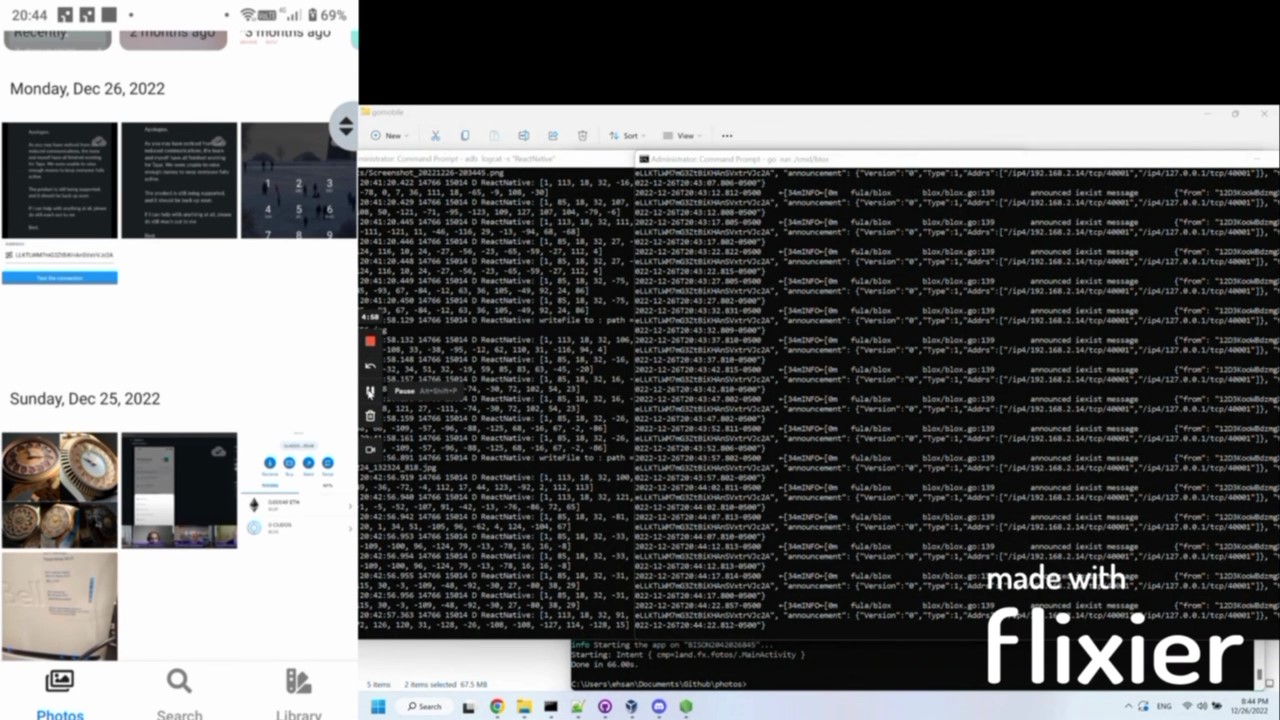
You can see it in action in our Flagship App: [Fx Fotos](https://github.com/functionland/fx-fotos)
[](https://gateway.pinata.cloud/ipfs/QmWUjQczA5jHC3ibLq4y7CizVrebr1DTFRaTdJgFyxR5Nh)
## Motivation
There are currently two ways to interact with Web3 storage solutions:
1. Through a pinning service and a gateway: the advantage is that files are served through URLs, an app can then access the files with conventional methods, e.g. simply putting a picture in ` `. The disadvantage is that there is a subscription payment associated with pinning services. Also this is not really decentralized!
2. Turn the device to a full IPFS node: this model works beautifully in Brave desktop browser as an example, and makes sense for laptop and PC since they normally have large HDDs. It's much harder on mobile devices, however, biggest hurdle is to have Apple on board with the idea of relaxing file system access in iOS! Even if all goes well, a mobile device is NOT a good candidate for hosting the future Web! They get lost easily and are resource constrained (battery, memory).
[**blox**](https://github.com/functionland/BLOX) aims to address these issues by creating a third alternative: **Personal Server**
A personal server is a commodity hardware device (such as a PC or Raspberry Pi) that is kept *at home* rather than carried with the user. It can help with actual decentralization and can save money in the long run, as there is a one-time cost for the hard drive and no monthly charges. From a privacy perspective, it also guarantees that data does not leave the premises unless the user specifically wants to share it.
To achieve this, we are developing protocols to accommodate client-server programming with minimal effort on developer's side.
## Architecture
`go-fula` is an implementation of the Fula protocol in Go (Golang). It is designed to facilitate smooth communication between clients and a mesh of backend devices (servers) and provide APIs for developers to build mobile-native decentralized applications (dApps).
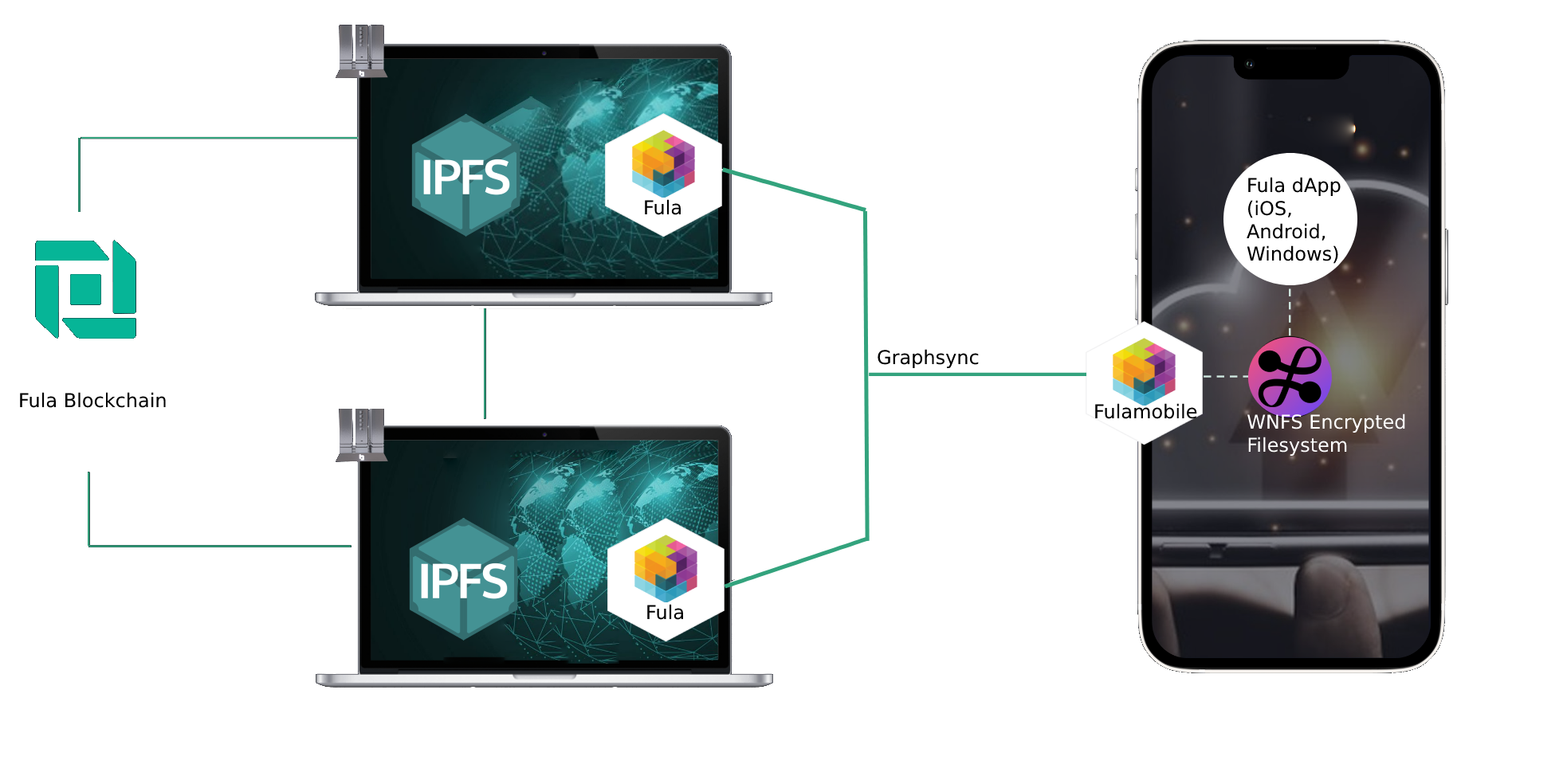
A React Native app can communicate with servers using the `@functionland/react-native-fula` library, which abstracts the underlying protocols and `libp2p` connection and exposes APIs similar to those of MongoDB for data persistence and S3 for file storage.
Data is encrypted on the client side using [WebNative Filesystem (WNFS)](https://github.com/wnfs-wg/rs-wnfs) ( with bridges for [Android](https://github.com/functionland/wnfs-android) and [iOS](https://github.com/functionland/wnfs-ios) ). The encrypted Merkle DAG is then transferred to the blox server using Graphsync.
The **blox** stack can provide backup guarantees by having the data pinned on multiple servers owned by the user. In cases where absolute assurance of data longevity is required (e.g. password records in a password manager app or scans of sensitive documents), the cids of encrypted data can be sent to the [Fula blockchain](https://github.com/functionland/sugarfunge-node) and backed up by other blox owners, who are rewarded for their efforts.
By default, Libp2p connections are established through Functionland's libp2p relay over the internet or directly over LAN without the use of a relay.
## Packages
| Name | Description |
| --- | --- |
| [blox](blox) | Blox provides the backend to receive the DAG created by fulamobile and store it |
| [mobile](mobile) | Initiates a libp2p instance and interacts with WNFS (as its datastore) to encrypt the data and Send and receive files in a browser or an Android or iOS app. Available for [React-Native here](https://github.com/functionland/react-native-fula) and for [Android here](https://github.com/functionland/fula-build-aar) |
| [exchange](exchange) | Fula exchange protocol is responsible for the actual transfer of data |
| [blockchain](blockchain) | On-chain interactions for pool management, manifests, and account operations |
| [wap](wap) | Wireless Access Point server — provides HTTP endpoints (`/properties`, `/readiness`, `/wifi/*`, `/peer/*`) on port 3500 and mDNS service discovery |
## Other related libraries
| Name | Description |
| --- | --- |
| [WNFS for Android](https://github.com/functionland/wnfs-android) | Android build for WNFS rust version |
| [WNFS for iOS](https://github.com/functionland/wnfs-ios) | iOS build for WNFS rust version |
## PeerID Architecture
Blox devices maintain two separate libp2p identities:
- **Kubo peerID** — Derived via HMAC-SHA256 (domain `"fula-kubo-identity-v1"`) from the main identity key. Used by the embedded IPFS (kubo) node. Always available.
- **ipfs-cluster peerID** — The original identity from `config.yaml`. Used by ipfs-cluster when installed.
Kubo is always running on the device; ipfs-cluster may not be installed. The `wifi.GetKuboPeerID()` utility function provides reliable access to the kubo peerID (via kubo API, falling back to config file) without depending on ipfs-cluster.
### Getting ipfs-cluster and kubo PeerIDs
There are several ways to retrieve peerIDs depending on which part of the system you are working with.
#### 1. WAP HTTP Endpoints (port 3500)
These endpoints are served by the WAP server on the device. Mobile apps connect to them over the local network.
**GET `/properties`**
Returns device properties including the kubo peerID.
```bash
curl http://:3500/properties
```
Response (relevant fields):
```json
{
"kubo_peer_id": "12D3KooWAbCdEf...",
"ipfs_cluster_peer_id": "12D3KooWXyZaBc...",
"hardwareID": "a1b2c3...",
"bloxFreeSpace": { "device_count": 1, "size": 500000000000, "used": 120000000000, "avail": 380000000000, "used_percentage": 24 },
"ota_version": "1.2.3",
"...": "..."
}
```
- `kubo_peer_id` — The kubo (IPFS) peerID. Always present when kubo is running.
- `ipfs_cluster_peer_id` — The ipfs-cluster peerID. Present when ipfs-cluster identity exists.
**GET `/readiness`**
Returns readiness status and properties, also including the kubo peerID.
```bash
curl http://:3500/readiness
```
Response (relevant fields):
```json
{
"name": "fula_go",
"kubo_peer_id": "12D3KooWAbCdEf...",
"...": "..."
}
```
#### 2. Mobile SDK (`GetClusterInfo`)
From the mobile app, call `GetClusterInfo()` on the Fula client. This uses libp2p to call the blox node directly (no HTTP needed).
```go
result, err := client.GetClusterInfo()
```
Response JSON:
```json
{
"cluster_peer_id": "12D3KooWXyZaBc...",
"cluster_peer_name": "12D3KooWAbCdEf..."
}
```
| Field | Description | When empty |
|-------|-------------|------------|
| `cluster_peer_id` | ipfs-cluster peerID (from `/uniondrive/ipfs-cluster/identity.json`) | ipfs-cluster is not installed |
| `cluster_peer_name` | kubo peerID (from kubo config or API) | Only if kubo is also unreachable |
When ipfs-cluster is not installed, the response will have an empty `cluster_peer_id` but `cluster_peer_name` (kubo peerID) will still be populated:
```json
{
"cluster_peer_id": "",
"cluster_peer_name": "12D3KooWAbCdEf..."
}
```
#### 3. Kubo API Directly (port 5001)
If you have direct access to the device, you can query kubo's identity endpoint:
```bash
curl -X POST http://127.0.0.1:5001/api/v0/id
```
Response:
```json
{
"ID": "12D3KooWAbCdEf...",
"PublicKey": "base64encodedkey...",
"Addresses": [],
"AgentVersion": "0.0.1",
"ProtocolVersion": "fx_exchange/0.0.1",
"Protocols": ["fx_exchange"]
}
```
- `ID` — The kubo peerID.
#### 4. mDNS Service Discovery
Blox devices advertise themselves on the local network via mDNS (multicast DNS), allowing mobile apps and other clients to discover devices without knowing their IP addresses.
**Service type:** `_fulatower._tcp`
**Instance naming:** Each device registers with a unique instance name derived from its kubo peerID: `fulatower_`. For example, a device with kubo peerID `12D3KooWAbCdEfGh12345` registers as `fulatower_12345`. If the peerID is not yet available (e.g. first boot before configuration), the device registers as `fulatower_NEW`. This ensures multiple blox devices on the same LAN are all discoverable without overwriting each other.
**TXT records:**
| TXT Key | Value | Description |
|---------|-------|-------------|
| `bloxPeerIdString` | `12D3KooWAbCdEf...` | Kubo peerID |
| `ipfsClusterID` | `12D3KooWXyZaBc...` | ipfs-cluster peerID |
| `poolName` | `my-pool` | Pool name from config |
| `authorizer` | `...` | Authorizer address |
| `hardwareID` | `a1b2c3...` | Device hardware ID |
If the config file is missing or identity derivation fails, `bloxPeerIdString` falls back to reading from kubo's config file via `GetKuboPeerID()`. Fields default to `"NA"` when unavailable.
**Discovering devices from the command line:**
Using `dns-sd` (macOS):
```bash
dns-sd -B _fulatower._tcp local.
```
Example output:
```
Browsing for _fulatower._tcp.local.
DATE: ---Mon 17 Feb 2026---
Timestamp A/R Flags if Domain Service Type Instance Name
10:23:45.123 Add 2 4 local. _fulatower._tcp. fulatower_12345
10:23:45.456 Add 2 4 local. _fulatower._tcp. fulatower_67890
```
To get full details (IP, port, TXT records) for a specific device:
```bash
dns-sd -L "fulatower_12345" _fulatower._tcp local.
```
Example output:
```
Lookup fulatower_12345._fulatower._tcp.local.
DATE: ---Mon 17 Feb 2026---
fulatower_12345._fulatower._tcp.local. can be reached at blox-device.local.:40001
bloxPeerIdString=12D3KooWAbCdEfGh12345
ipfsClusterID=12D3KooWXyZaBcDe67890
poolName=my-pool
authorizer=...
hardwareID=a1b2c3d4e5
```
Using `avahi-browse` (Linux):
```bash
avahi-browse -r _fulatower._tcp
```
Example output:
```
+ eth0 IPv4 fulatower_12345 _fulatower._tcp local
= eth0 IPv4 fulatower_12345 _fulatower._tcp local
hostname = [blox-device.local]
address = [192.168.1.100]
port = [40001]
txt = ["bloxPeerIdString=12D3KooWAbCdEfGh12345" "ipfsClusterID=12D3KooWXyZaBcDe67890" "poolName=my-pool" "authorizer=..." "hardwareID=a1b2c3d4e5"]
+ eth0 IPv4 fulatower_67890 _fulatower._tcp local
= eth0 IPv4 fulatower_67890 _fulatower._tcp local
hostname = [blox-device-2.local]
address = [192.168.1.101]
port = [40001]
txt = ["bloxPeerIdString=12D3KooWZzYyXxWw67890" "ipfsClusterID=12D3KooWQqRrSsTt11111" "poolName=my-pool" "authorizer=..." "hardwareID=f6g7h8i9j0"]
```
**Programmatic discovery (Go):**
```go
import "github.com/grandcat/zeroconf"
resolver, _ := zeroconf.NewResolver(nil)
entries := make(chan *zeroconf.ServiceEntry)
go func() {
for entry := range entries {
fmt.Printf("Found: %s at %s:%d\n", entry.Instance, entry.AddrIPv4, entry.Port)
for _, txt := range entry.Text {
fmt.Printf(" %s\n", txt)
}
}
}()
ctx, cancel := context.WithTimeout(context.Background(), 5*time.Second)
defer cancel()
resolver.Browse(ctx, "_fulatower._tcp", "local.", entries)
<-ctx.Done()
```
**Multi-device coexistence:** When multiple blox devices are on the same network, each registers with its own unique instance name. A browsing client will see all devices and can identify them by their TXT records (peerID, hardwareID, pool name). The service type `_fulatower._tcp` remains the same across all devices for compatibility — only the instance name varies.
#### 5. Go Code (`wifi.GetKuboPeerID()`)
For internal Go code that needs the kubo peerID, use the standalone utility function:
```go
import wifi "github.com/functionland/go-fula/wap/pkg/wifi"
kuboPeerID, err := wifi.GetKuboPeerID()
if err != nil {
// both kubo API and config file are unavailable
}
```
This function tries two sources in order:
1. Call kubo API at `POST http://127.0.0.1:5001/api/v0/id` and parse the `ID` field
2. Read `/internal/ipfs_data/config` and parse `Identity.PeerID`
It does not depend on ipfs-cluster being installed.
## WAP HTTP Server Reference
The WAP (Wireless Access Point) server runs on port `3500` (default bind: `10.42.0.1:3500`, fallback `127.0.0.1:3500`). It exposes HTTP endpoints used by BLE commands, mobile apps, and local services.
### GET /properties
Returns device properties, storage info, container status, and peer IDs.
```bash
curl http://:3500/properties
```
Response:
```json
{
"name": "fula_go",
"kubo_peer_id": "12D3KooWAbCdEf...",
"ipfs_cluster_peer_id": "12D3KooWXyZaBc...",
"hardwareID": "a1b2c3...",
"bloxFreeSpace": {
"device_count": 1,
"size": 500000000000,
"used": 120000000000,
"avail": 380000000000,
"used_percentage": 24
},
"containerInfo_fula": {
"image": "functionland/go-fula:release",
"version": "abc123",
"id": "d1c53fff7db3...",
"labels": {},
"created": "2026-02-17T10:00:00Z",
"repo_digests": ["functionland/go-fula@sha256:..."]
},
"containerInfo_fxsupport": { "image": "...", "..." : "..." },
"containerInfo_node": { "image": "...", "..." : "..." },
"ota_version": "1.2.3",
"restartNeeded": "false"
}
```
### GET /readiness
Returns system readiness status and the kubo peer ID.
```bash
curl http://:3500/readiness
```
Response:
```json
{
"name": "fula_go",
"kubo_peer_id": "12D3KooWAbCdEf..."
}
```
### GET /wifi/list
Scans and returns available WiFi networks (up to 6, strongest first, duplicates removed).
```bash
curl http://:3500/wifi/list
```
Response:
```json
[
{ "essid": "MyNetwork", "ssid": "MyNetwork", "rssi": -45 },
{ "essid": "Neighbor", "ssid": "Neighbor", "rssi": -72 }
]
```
### GET /wifi/status
Checks whether WiFi is currently connected.
```bash
curl http://:3500/wifi/status
```
Response:
```json
{ "status": true }
```
### POST /wifi/connect
Connects to a WiFi network. Deletes any existing connection with the same SSID, creates a new one with autoconnect and priority 20, and removes the FxBlox hotspot on success.
```bash
curl -X POST http://:3500/wifi/connect \
-d "ssid=MyNetwork&password=secret123&countryCode=US"
```
Parameters (form-encoded):
| Field | Required | Description |
|-------|----------|-------------|
| `ssid` | yes | Network SSID |
| `password` | yes | Network password |
| `countryCode` | no | ISO country code (default from config) |
Response: `"Wifi connected!"`
### GET /ap/enable
Enables the WiFi hotspot/access point.
```bash
curl http://:3500/ap/enable
```
Response:
```json
{ "status": "enabled" }
```
### GET /ap/disable
Disables the WiFi hotspot/access point.
```bash
curl http://:3500/ap/disable
```
Response:
```json
{ "status": "disable" }
```
### POST /partition
Creates a partition flag file to trigger disk partitioning.
```bash
curl -X POST http://:3500/partition
```
Response:
```json
{ "status": true, "message": "File created" }
```
### POST /delete-fula-config
Deletes the Fula configuration file (`/internal/config.yaml`).
```bash
curl -X POST http://:3500/delete-fula-config
```
Response:
```json
{ "status": true, "message": "Config file deleted successfully." }
```
### POST /peer/exchange
Initializes the blox identity from the mobile client's seed, then returns the **kubo peerID** that the mobile app should use to connect. The mobile app communicates through kubo's libp2p host, which internally forwards requests to go-fula.
```bash
curl -X POST http://:3500/peer/exchange \
-d "peer_id=12D3KooWClient...&seed=myseed123"
```
Parameters (form-encoded):
| Field | Required | Description |
|-------|----------|-------------|
| `peer_id` | yes | Client's libp2p peer ID |
| `seed` | yes | Seed value for key generation |
Response:
```json
{ "peer_id": "12D3KooWKuboPeerID..." }
```
The `peer_id` in the response is the kubo peerID (obtained from kubo API, falling back to kubo config file). This is the peerID the mobile app uses for all subsequent libp2p connections to the device.
### POST /peer/generate-identity
Generates a deterministic libp2p identity (Ed25519 key pair) from a seed.
```bash
curl -X POST http://:3500/peer/generate-identity \
-d "seed=myseed123"
```
Parameters (form-encoded):
| Field | Required | Description |
|-------|----------|-------------|
| `seed` | yes | Seed value for identity generation |
Response:
```json
{
"peer_id": "12D3KooWAbCdEf...",
"seed": "base64-encoded-private-key"
}
```
### POST /pools/join
Joins a storage/compute pool by writing the pool ID to `config.yaml`.
```bash
curl -X POST http://:3500/pools/join \
-H "Content-Type: application/json" \
-d '{"poolID": "my-pool-1"}'
```
Response:
```json
{ "status": "joined", "poolID": "my-pool-1" }
```
### POST /pools/leave
Leaves a storage/compute pool.
```bash
curl -X POST http://:3500/pools/leave \
-d "poolID=my-pool-1"
```
Response:
```json
{ "status": "left", "poolID": "my-pool-1" }
```
### POST /pools/cancel
Cancels a pending pool join.
```bash
curl -X POST http://:3500/pools/cancel \
-d "poolID=my-pool-1"
```
Response:
```json
{ "status": "cancelled", "poolID": "my-pool-1" }
```
### GET /chain/status
Returns blockchain sync status (stub implementation).
```bash
curl http://:3500/chain/status
```
Response:
```json
{ "isSynced": true, "syncProgress": 100 }
```
### GET /account/id
Returns the account ID from the device secrets.
```bash
curl http://:3500/account/id
```
Response:
```json
{ "accountId": "5GrwvaEF5zXb26Fz9rcQpDWS57CtERHpNehXCPcNoHGKutQY" }
```
### GET /account/seed
Returns the account seed from the device secrets.
```bash
curl http://:3500/account/seed
```
Response:
```json
{ "accountSeed": "bottom drive obey lake..." }
```
## BLE (Bluetooth Low Energy) Server Reference
The BLE server runs on the fxsupport container and provides a GATT service for mobile app communication during device setup and management.
### Service Details
| Property | Value |
|----------|-------|
| Service UUID | `00000001-710e-4a5b-8d75-3e5b444bc3cf` |
| Command Characteristic UUID | `00000003-710e-4a5b-8d75-3e5b444bc3cf` |
| Broadcast Characteristic UUID | `00000002-710e-4a5b-8d75-3e5b444bc3cf` |
| Advertised Name | `fulatower_` or `fulatower_NEW` |
The advertised name uses the kubo peerID to match the mDNS instance name. The kubo peerID is obtained from the kubo API (`POST http://127.0.0.1:5001/api/v0/id`), falling back to the kubo config file (`/home/pi/.internal/ipfs_data/config` → `Identity.PeerID`). If neither source is available (e.g. first boot before setup), the name defaults to `fulatower_NEW`.
### Response Chunking
Responses larger than 512 bytes are split into chunks:
**Header** (sent first):
```json
{ "type": "ble_header", "total_length": 2048, "chunks": 5 }
```
**Data chunks** (sent sequentially with 100ms delay):
```json
{ "type": "ble_chunk", "index": 1, "data": "..." }
```
The client reassembles by concatenating all `data` fields in order.
### BLE Commands
Commands are sent as UTF-8 strings via BLE write to the Command Characteristic. Responses are sent back via notifications or indications. Long-running commands send periodic `"Processing "` updates every 2 seconds.
#### properties
Returns device properties (proxies to `GET /properties`).
Write: `properties`
Response:
```json
{
"bloxFreeSpace": { "device_count": 1, "size": 500000000000, "used": 120000000000, "avail": 380000000000, "used_percentage": 24 },
"containerInfo_fula": {},
"containerInfo_fxsupport": {},
"containerInfo_node": {},
"hardwareID": "a1b2c3...",
"ota_version": "1.2.3",
"restartNeeded": "false",
"kubo_peer_id": "12D3KooWAbCdEf...",
"ipfs_cluster_peer_id": "12D3KooWXyZaBc..."
}
```
#### readiness
Returns system readiness (proxies to `GET /readiness`).
Write: `readiness`
#### wifi/list
Scans available WiFi networks (proxies to `GET /wifi/list`).
Write: `wifi/list`
Response:
```json
[
{ "essid": "MyNetwork", "ssid": "MyNetwork", "rssi": -45 }
]
```
#### wifi/status
Checks WiFi connection (proxies to `GET /wifi/status`).
Write: `wifi/status`
Response:
```json
{ "status": true }
```
#### wifi/connect
Connects to WiFi (proxies to `POST /wifi/connect`).
Write: `wifi/connect [country_code]`
Examples:
- `wifi/connect MyNetwork secret123`
- `wifi/connect MyNetwork secret123 US`
#### peer/exchange
Initializes blox identity and returns the kubo peerID for mobile connection (proxies to `POST /peer/exchange`).
Write: `peer/exchange `
Example: `peer/exchange 12D3KooWClient... myseed123`
Response:
```json
{ "peer_id": "12D3KooWKuboPeerID..." }
```
#### peer/generate-identity
Generates identity from seed (proxies to `POST /peer/generate-identity`).
Write: `peer/generate-identity `
Example: `peer/generate-identity myseed123`
Response:
```json
{ "peer_id": "12D3KooWAbCdEf...", "seed": "base64-private-key" }
```
#### ap/enable
Enables WiFi hotspot (proxies to `GET /ap/enable`).
Write: `ap/enable`
#### partition
Triggers disk partitioning (proxies to `POST /partition`).
Write: `partition`
#### reset
Factory reset with 20-second cancellation window. During the window, the LED turns red. After 20 seconds: deletes all WiFi connections, removes `config.yaml`, and reboots.
Write: `reset`
#### cancel
Cancels an in-progress reset (must be sent within 20 seconds of `reset`).
Write: `cancel`
#### stopleds
Stops all LED activity.
Write: `stopleds`
#### removedockercpblock
Removes the Docker copy block flag (`stop_docker_copy.txt`), allowing OTA file extraction to resume.
Write: `removedockercpblock`
#### logs
Retrieves container or system logs.
Write: `logs {"container_name":"fula_go","tail_count":"50"}`
Response: Log text from the specified container.
#### wireguard/start
Starts the WireGuard support tunnel. Registers with the support server if not already registered, then brings up the tunnel. This is a long-running command (threaded).
Write: `wireguard/start`
Response:
```json
{ "installed": true, "registered": true, "active": true, "endpoint": "support.fx.land:51820", "assigned_ip": "10.0.0.5/32", "peer_id_registered": "12D3KooW..." }
```
#### wireguard/stop
Stops the WireGuard support tunnel.
Write: `wireguard/stop`
Response:
```json
{ "status": "stopped" }
```
#### wireguard/status
Returns the current WireGuard support tunnel status without changing state.
Write: `wireguard/status`
Response:
```json
{ "installed": true, "registered": true, "active": false, "endpoint": "support.fx.land:51820", "assigned_ip": "10.0.0.5/32", "peer_id_registered": "12D3KooW..." }
```
#### forceupdate
Pulls the latest Docker images from Docker Hub (runs `fula.sh update`). This is a long-running command (threaded, up to 10-minute timeout). The LED turns purple during the update and yellow for 10 seconds after completion. Does not restart services — send `restart_fula` via `logs {"exec":["restart_fula"]}` separately if needed.
Write: `forceupdate`
Response (success):
```json
{ "status": "updated", "msg": "Docker images pulled successfully" }
```
Response (error):
```json
{ "status": "error", "msg": "stderr output (last 500 chars)" }
```
Response (timeout):
```json
{ "status": "timeout", "msg": "Update timed out after 10 minutes" }
```
Also available via the logs exec path:
Write: `logs {"exec":["force_update"]}`
### Error Responses
On any error, BLE commands return:
```json
{ "error": "error message", "status": "error" }
```
## Run
```go
git clone https://github.com/functionland/go-fula.git
cd go-fula
go run ./cmd/blox --authorizer [PeerID of client allowed to write to the backend] --logLevel=[info/debug] --ipniPublisherDisabled=[true/false]
```
example on `Windows` is:
```
go run ./cmd/blox --authorizer=12D3KooWMMt4C3FKui14ai4r1VWwznRw6DoP5DcgTfzx2D5VZoWx --config=C:\Users\me\.fula\blox2\config.yaml --storeDir=C:\Users\me\.fula\blox2 --secretsPath=C:\Users\me\.fula\blox2\secret_seed.txt --logLevel=debug
```
The default generated config goes to a YAML file in home directory, under `/.fula/blox/config.yaml`
## Build
```go
goreleaser --rm-dist --snapshot
```
## Build for the iOS platform (using gomobile)
This process includes some iOS specific preparation.
```sh
make fula-xcframework
```
## License
[MIT](LICENSE)
## Related Publications and News
- https://www.crunchbase.com/organization/functionland/signals_and_news