https://github.com/funkatron/poppop
https://github.com/funkatron/poppop
Last synced: 10 months ago
JSON representation
- Host: GitHub
- URL: https://github.com/funkatron/poppop
- Owner: funkatron
- Created: 2025-07-22T19:28:29.000Z (11 months ago)
- Default Branch: feature/singleton-console
- Last Pushed: 2025-07-22T19:28:30.000Z (11 months ago)
- Last Synced: 2025-08-16T12:34:16.557Z (11 months ago)
- Language: Python
- Size: 86.9 KB
- Stars: 0
- Watchers: 0
- Forks: 0
- Open Issues: 0
-
Metadata Files:
- Readme: README.md
Awesome Lists containing this project
README
# 🦴 Poppop
[](https://twitter.com/suno_ai_)
> 🔗 [Examples](#examples) • [Updates](#-updates) • [How to Use](#usage) • [Installation](#installation) • [FAQ](#faq)
[//]:
(vertical spaces around image)
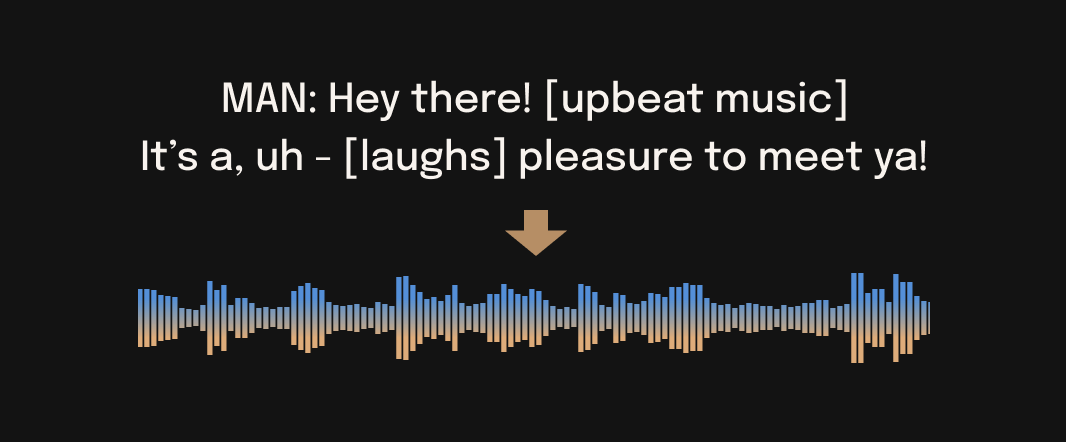
Poppop is a command-line interface (CLI) tool for sound generation tasks. It provides access to Suno's text-to-audio model for generating speech, music, and sound effects. Poppop is designed as a drop-in replacement for Bark's CLI, maintaining full argument compatibility while adding new features.
Features:
- Command-line interface for audio generation
- Multi-language support with automatic language detection
- Music and sound effect generation
- Support for emotional expressions and special tokens
- Resource management options for different hardware configurations
- Full compatibility with Bark's CLI arguments
Poppop uses Suno's text-to-audio model to generate speech and audio content. The model can produce speech in multiple languages, music, background noise, and sound effects. It also handles nonverbal sounds like laughter, sighs, and crying.
## ⚠ Disclaimer
## 📖 Quick Index
* [🚀 Updates](#-updates)
* [💻 Installation](#-installation)
* [🐍 Usage](#-usage-in-python)
* [❓ FAQ](#-faq)
## 🎧 Demos
## 🚀 Updates
**20250530**
- 🦴 Poppop release!
## 🐍 Usage in Python
🪑 Basics
```python
from poppop import SAMPLE_RATE, generate_audio, preload_models
from scipy.io.wavfile import write as write_wav
from IPython.display import Audio
# download and load all models
preload_models()
# generate audio from text
text_prompt = """
Hello, my name is Suno. And, uh — and I like pizza. [laughs]
But I also have other interests such as playing tic tac toe.
"""
audio_array = generate_audio(text_prompt)
# save audio to disk
write_wav("poppop_generation.wav", SAMPLE_RATE, audio_array)
# play text in notebook
Audio(audio_array, rate=SAMPLE_RATE)
```
[pizza1.webm](https://user-images.githubusercontent.com/34592747/cfa98e54-721c-4b9c-b962-688e09db684f.webm)
🌎 Foreign Language
Poppop supports various languages out-of-the-box and automatically determines language from input text. When prompted with code-switched text, Poppop will attempt to employ the native accent for the respective languages. English quality is best for the time being, and we expect other languages to further improve with scaling.
```python
text_prompt = """
추석은 내가 가장 좋아하는 명절이다. 나는 며칠 동안 휴식을 취하고 친구 및 가족과 시간을 보낼 수 있습니다.
"""
audio_array = generate_audio(text_prompt)
```
[suno_korean.webm](https://user-images.githubusercontent.com/32879321/235313033-dc4477b9-2da0-4b94-9c8b-a8c2d8f5bb5e.webm)
*Note: since Poppop recognizes languages automatically from input text, it is possible to use, for example, a german history prompt with english text. This usually leads to english audio with a german accent.*
```python
text_prompt = """
Der Dreißigjährige Krieg (1618-1648) war ein verheerender Konflikt, der Europa stark geprägt hat.
This is a beginning of the history. If you want to hear more, please continue.
"""
audio_array = generate_audio(text_prompt)
```
[suno_german_accent.webm](https://user-images.githubusercontent.com/34592747/3f96ab3e-02ec-49cb-97a6-cf5af0b3524a.webm)
🎶 Music
Poppop can generate all types of audio, and, in principle, doesn't see a difference between speech and music. Sometimes Poppop chooses to generate text as music, but you can help it out by adding music notes around your lyrics.
```python
text_prompt = """
♪ In the jungle, the mighty jungle, the lion barks tonight ♪
"""
audio_array = generate_audio(text_prompt)
```
[lion.webm](https://user-images.githubusercontent.com/5068315/230684766-97f5ea23-ad99-473c-924b-66b6fab24289.webm)
🎤 Voice Presets
Poppop supports 100+ speaker presets across [supported languages](#supported-languages). You can browse the library of supported voice presets [HERE](https://suno-ai.notion.site/8b8e8749ed514b0cbf3f699013548683?v=bc67cff786b04b50b3ceb756fd05f68c), or in the [code](poppop/assets/prompts). The community also often shares presets in [Discord](https://discord.gg/J2B2vsjKuE).
> Poppop tries to match the tone, pitch, emotion and prosody of a given preset, but does not currently support custom voice cloning. The model also attempts to preserve music, ambient noise, etc.
```python
text_prompt = """
I have a silky smooth voice, and today I will tell you about
the exercise regimen of the common sloth.
"""
audio_array = generate_audio(text_prompt, history_prompt="v2/en_speaker_1")
```
[sloth.webm](https://user-images.githubusercontent.com/5068315/230684883-a344c619-a560-4ff5-8b99-b4463a34487b.webm)
### 📃 Generating Longer Audio
By default, `generate_audio` works well with around 13 seconds of spoken text. For an example of how to do long-form generation, see 👉 **[Notebook](notebooks/long_form_generation.ipynb)** 👈
Click to toggle example long-form generations (from the example notebook)
[dialog.webm](https://user-images.githubusercontent.com/2565833/235463539-f57608da-e4cb-4062-8771-148e29512b01.webm)
[longform_advanced.webm](https://user-images.githubusercontent.com/2565833/235463547-1c0d8744-269b-43fe-9630-897ea5731652.webm)
[longform_basic.webm](https://user-images.githubusercontent.com/2565833/235463559-87efe9f8-a2db-4d59-b764-57db83f95270.webm)
## Command line
```commandline
python -m poppop "Hello, my name is Suno." --output_filename "example.wav"
```
## 💻 Installation
*‼️ CAUTION ‼️ Do NOT use `pip install poppop`. It installs a different package, which is not managed by Suno.*
```bash
pip install git+https://github.com/suno-ai/poppop.git
```
or
```bash
git clone https://github.com/suno-ai/poppop
cd poppop && pip install .
```
## 🤗 Transformers Usage
Poppop is available in the 🤗 Transformers library from version 4.31.0 onwards, requiring minimal dependencies
and additional packages. Steps to get started:
1. First install the 🤗 [Transformers library](https://github.com/huggingface/transformers) from main:
```
pip install git+https://github.com/huggingface/transformers.git
```
2. Run the following Python code to generate speech samples:
```py
from transformers import AutoProcessor, PoppopModel
processor = AutoProcessor.from_pretrained("suno/poppop")
model = PoppopModel.from_pretrained("suno/poppop")
voice_preset = "v2/en_speaker_6"
inputs = processor("Hello, my dog is cute", voice_preset=voice_preset)
audio_array = model.generate(**inputs)
audio_array = audio_array.cpu().numpy().squeeze()
```
3. Listen to the audio samples either in an ipynb notebook:
```py
from IPython.display import Audio
sample_rate = model.generation_config.sample_rate
Audio(audio_array, rate=sample_rate)
```
Or save them as a `.wav` file using a third-party library, e.g. `scipy`:
```py
import scipy
sample_rate = model.generation_config.sample_rate
scipy.io.wavfile.write("poppop_out.wav", rate=sample_rate, data=audio_array)
```
For more details on using the Poppop model for inference using the 🤗 Transformers library, refer to the
[Poppop docs](https://huggingface.co/docs/transformers/main/en/model_doc/poppop) or the hands-on
[Google Colab](https://colab.research.google.com/drive/1dWWkZzvu7L9Bunq9zvD-W02RFUXoW-Pd?usp=sharing).
## 🛠️ Hardware and Inference Speed
Poppop has been tested and works on both CPU and GPU (`pytorch 2.0+`, CUDA 11.7 and CUDA 12.0).
On enterprise GPUs and PyTorch nightly, Poppop can generate audio in roughly real-time. On older GPUs, default colab, or CPU, inference time might be significantly slower. For older GPUs or CPU you might want to consider using smaller models. Details can be found in out tutorial sections here.
The full version of Poppop requires around 12GB of VRAM to hold everything on GPU at the same time.
To use a smaller version of the models, which should fit into 8GB VRAM, set the environment flag `SUNO_USE_SMALL_MODELS=True`.
If you don't have hardware available or if you want to play with bigger versions of our models, you can also sign up for early access to our model playground [here](https://suno-ai.typeform.com/suno-studio).
## ⚙️ Details
Poppop is fully generative text-to-audio model devolved for research and demo purposes. It follows a GPT style architecture similar to [AudioLM](https://arxiv.org/abs/2209.03143) and [Vall-E](https://arxiv.org/abs/2301.02111) and a quantized Audio representation from [EnCodec](https://github.com/facebookresearch/encodec). It is not a conventional TTS model, but instead a fully generative text-to-audio model capable of deviating in unexpected ways from any given script. Different to previous approaches, the input text prompt is converted directly to audio without the intermediate use of phonemes. It can therefore generalize to arbitrary instructions beyond speech such as music lyrics, sound effects or other non-speech sounds.
Below is a list of some known non-speech sounds, but we are finding more every day. Please let us know if you find patterns that work particularly well on [Discord](https://suno.ai/discord)!
- `[laughter]`
- `[laughs]`
- `[sighs]`
- `[music]`
- `[gasps]`
- `[clears throat]`
- `—` or `...` for hesitations
- `♪` for song lyrics
- CAPITALIZATION for emphasis of a word
- `[MAN]` and `[WOMAN]` to bias Poppop toward male and female speakers, respectively
### Supported Languages
| Language | Status |
| --- | :---: |
| English (en) | ✅ |
| German (de) | ✅ |
| Spanish (es) | ✅ |
| French (fr) | ✅ |
| Hindi (hi) | ✅ |
| Italian (it) | ✅ |
| Japanese (ja) | ✅ |
| Korean (ko) | ✅ |
| Polish (pl) | ✅ |
| Portuguese (pt) | ✅ |
| Russian (ru) | ✅ |
| Turkish (tr) | ✅ |
| Chinese, simplified (zh) | ✅ |
Requests for future language support [here](https://github.com/suno-ai/poppop/discussions/111) or in the **#forums** channel on [Discord](https://suno.ai/discord).
## 🙏 Appreciation
- [nanoGPT](https://github.com/karpathy/nanoGPT) for a dead-simple and blazing fast implementation of GPT-style models
- [EnCodec](https://github.com/facebookresearch/encodec) for a state-of-the-art implementation of a fantastic audio codec
- [AudioLM](https://github.com/lucidrains/audiolm-pytorch) for related training and inference code
- [Vall-E](https://arxiv.org/abs/2301.02111), [AudioLM](https://arxiv.org/abs/2209.03143) and many other ground-breaking papers that enabled the development of Poppop
## © License
Poppop is licensed under the MIT License.
# 🎵 Poppop CLI
A user-friendly command-line interface for [Suno's Poppop](https://github.com/suno-ai/poppop) text-to-audio model.
## Features
- 🎤 Easy-to-use CLI for generating audio from text
- 🌍 Support for multiple languages and voice presets
- 🎵 Interactive mode for continuous generation
- 📊 Beautiful progress tracking and status updates
- 💾 Automatic output file management
- 🎛️ Configurable generation parameters
- 🖥️ Support for both full and small models
## Installation
```bash
pip install poppop-cli
```
## Usage
Poppop maintains compatibility with Bark's CLI arguments for easy migration:
```bash
# Basic usage (both formats supported)
poppop "Hello, this is funkatron"
poppop --text "Hello, this is funkatron"
# Save to file (both formats supported)
poppop "Hello" --output_filename greeting.wav
poppop "Hello" -o greeting.wav
# Voice selection (both formats supported)
poppop "Hello" --history_prompt v2/en_speaker_1
poppop "Hello" -v v2/en_speaker_1
```
### Command Line Arguments
Poppop supports all Bark CLI arguments:
```
--text TEXT Text to generate audio for
--output_filename FILENAME Output filename (default: generated_audio.wav)
--history_prompt PROMPT Voice preset to use
--text_temp TEMP Text generation temperature (0.0-1.0)
--waveform_temp TEMP Waveform generation temperature (0.0-1.0)
--small_model Use smaller model for lower VRAM usage
--offload_cpu Offload model to CPU
```
### Examples
Generate speech in different languages:
```bash
# Using positional argument
poppop "Hello, world" # English
poppop "Bonjour le monde" # French
poppop "こんにちは、世界" # Japanese
# Using --text argument (Bark style)
poppop --text "Hello, world" # English
poppop --text "Bonjour le monde" # French
poppop --text "こんにちは、世界" # Japanese
```
Add emotional expressions:
```bash
poppop "I'm so excited! [laughs] This is amazing... [gasps]"
```
Generate music:
```bash
poppop "♪ In the jungle, the mighty jungle, the lion sleeps tonight ♪"
```
### Voice Presets
Available voice presets follow the pattern `v2/{lang}_speaker_{number}`:
- English: `v2/en_speaker_0` through `v2/en_speaker_9`
- Other languages: `v2/{lang}_speaker_0`
List available voices:
```bash
poppop voices
```
### Python Module Usage
Poppop can also be used as a Python module, maintaining compatibility with Bark's API:
```python
from poppop import SAMPLE_RATE, generate_audio, preload_models
from scipy.io.wavfile import write as write_wav
preload_models()
audio_array = generate_audio("Hello, this is a test")
write_wav("output.wav", SAMPLE_RATE, audio_array)
```
## Development
1. Clone the repository:
```bash
git clone https://github.com/yourusername/poppop-cli.git
cd poppop-cli
```
2. Install development dependencies:
```bash
pip install -e ".[dev]"
```
3. Run tests:
```bash
pytest
```
## License
MIT License - see LICENSE file for details
## Acknowledgments
- [Suno's Poppop](https://github.com/suno-ai/poppop) for the amazing text-to-audio model
- [Click](https://click.palletsprojects.com/) for the CLI framework
- [Rich](https://github.com/Textualize/rich) for beautiful terminal formatting