https://github.com/fusepilot/prd-assistant-vscode
https://github.com/fusepilot/prd-assistant-vscode
ai prd vscode
Last synced: 12 months ago
JSON representation
- Host: GitHub
- URL: https://github.com/fusepilot/prd-assistant-vscode
- Owner: fusepilot
- License: mit
- Created: 2025-05-27T22:48:23.000Z (about 1 year ago)
- Default Branch: master
- Last Pushed: 2025-06-01T21:12:27.000Z (about 1 year ago)
- Last Synced: 2025-06-08T07:44:05.762Z (about 1 year ago)
- Topics: ai, prd, vscode
- Language: TypeScript
- Homepage: https://marketplace.visualstudio.com/items?itemName=fusepilot.prd-assistant
- Size: 971 KB
- Stars: 0
- Watchers: 0
- Forks: 0
- Open Issues: 0
-
Metadata Files:
- Readme: README.md
- Changelog: CHANGELOG.md
- License: LICENSE
Awesome Lists containing this project
README
# PRD Assistant - VSCode Extension
Transform your Product Requirements Documents into interactive, trackable project dashboards.
## 📸 Screenshots
### PRD Explorer Tree View
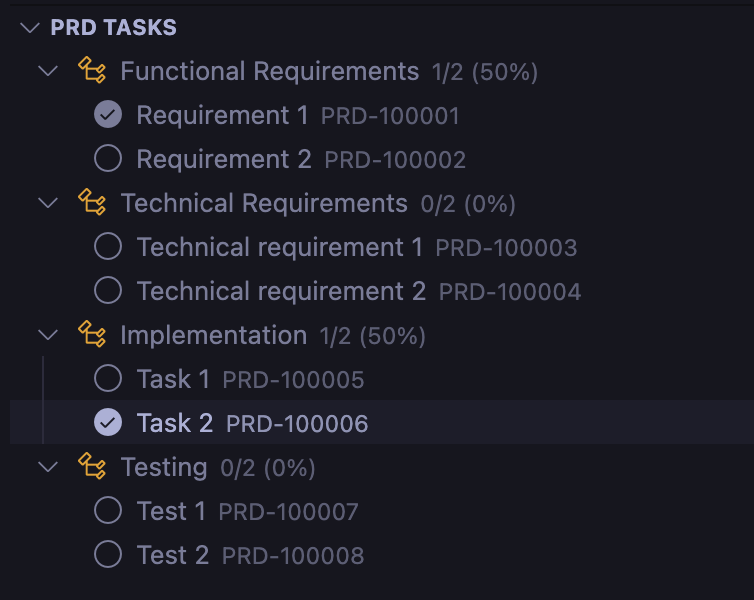
The PRD Explorer provides a hierarchical view of all your tasks organized by headers, with completion percentages and progress indicators.
### CodeLens Integration
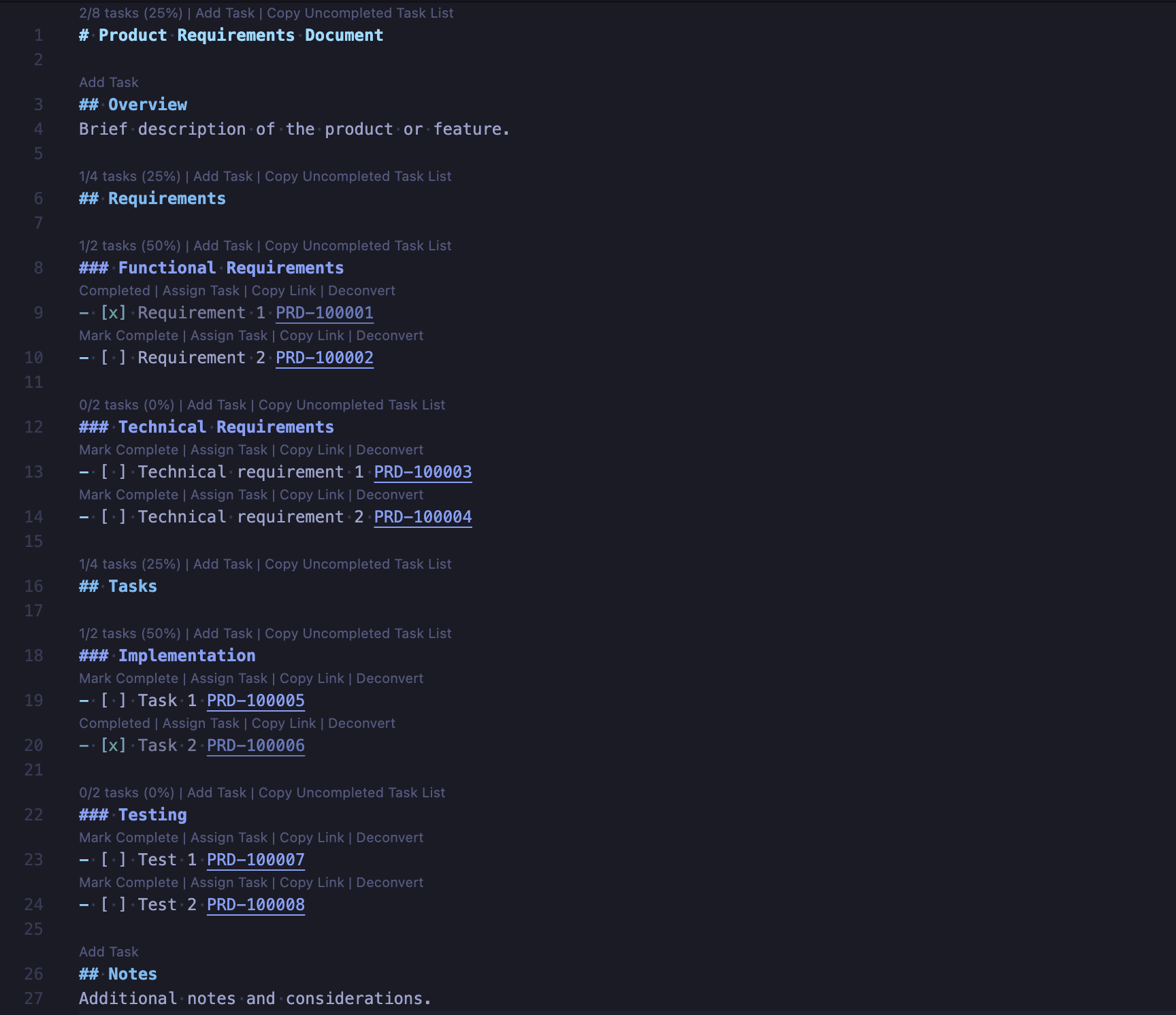
Inline CodeLens actions let you interact with tasks directly in the editor - toggle completion, assign users, copy IDs, and view statistics.
## 🎯 Features
### ✅ Interactive Task Management
Turn your markdown task lists into interactive checkboxes with automatic progress tracking.
- Click checkboxes to toggle completion status
- Automatic task ID generation (PRD-XXXXXX format)
- Visual progress indicators
- Nested task support with hierarchy tracking
- Convert regular list items to tasks with one click
### 👥 Smart Task Assignment
Assign tasks to team members with @-mention syntax.
- Syntax: `@username` for clear ownership
- Visual highlighting of assignees
- Bulk assignment capabilities
- Track workload by team member
### 🔗 Deep Linking System
Reference any task anywhere with automatic deep links.
- Every task gets a unique ID (e.g., PRD-123456)
- Click any PRD-XXXXXX reference to jump to that task
- Copy shareable links with one click
### 📊 Visual Progress Tracking
Get instant visibility into project progress with multiple views.
- Tree view explorer in sidebar with task hierarchy
- Inline CodeLens statistics and actions
- Progress reports with completion percentages
- Real-time updates as you work
- Export progress reports to CSV/JSON formats
### 🎨 Enhanced Editing Experience
- **CodeLens Actions**: Toggle tasks, assign users, copy IDs directly from the editor
- **Quick Fixes**: Automatically resolve duplicate task IDs
- **Format on Save**: Normalize checkbox formatting automatically
- **Conversion Tools**: Convert list items to tasks in bulk or individually
- **Tree View**: Organize tasks by headers with filtering options
## 📋 Requirements
- Visual Studio Code 1.100.0 or higher
## 🚀 Getting Started
### Installation from Marketplace
1. Open VSCode
2. Go to Extensions (Ctrl+Shift+X)
3. Search for "PRD Assistant"
4. Click Install
### First Use
1. **Create a PRD file**: Use the "Create Empty PRD File" button in the PRD Explorer or create any `.md` file with "PRD" in the name
2. **Add tasks**: Write tasks using markdown syntax:
```markdown
# My Project
## Tasks
- [ ] Complete user authentication PRD-100001
- [ ] Design database schema @john PRD-100002
- [ ] Implement API endpoints PRD-100003
```
3. **Interactive features**: Click checkboxes, use CodeLens actions, and view progress in the PRD Explorer
### Supported File Patterns
By default, PRD Assistant activates for files matching:
- `*prd*.md`
- `PRD*.md`
- `*PRD*.md`
You can also configure additional files in settings.
## 💻 Development Guide
### Development Workflow
1. **Launch Extension Development Host**
- Press `F5` in VSCode
- This opens a new "Extension Development Host" window
- Your extension is pre-installed in this window
2. **Making Changes**
- Edit source files in `src/`
- Use `npm run watch` for auto-compilation
- Reload with "Developer: Reload Window" (Ctrl+Shift+P)
3. **Testing**
- Create test PRD.md files
- Test checkboxes, assignments, deep links
- Check the PRD Explorer view
### Available Scripts
```bash
# Development
npm run compile # Build TypeScript
npm run watch # Watch mode for development
npm run lint # Run ESLint
npm run test # Run tests
# Packaging & Publishing
npm run package # Create .vsix file for testing
npm run package:pre # Create pre-release .vsix
npm run build:prod # Clean, compile, and package
# Publishing (requires vsce login)
npm run publish # Publish current version
npm run publish:patch # Bump patch version and publish
npm run publish:minor # Bump minor version and publish
npm run publish:major # Bump major version and publish
# Utilities
npm run clean # Remove build artifacts
```
### Project Structure
```
prd-assistant/
├── src/
│ ├── extension.ts # Main extension entry point
│ ├── managers/
│ │ └── prdTaskManager.ts # Core task management logic
│ ├── models/
│ │ ├── task.ts # Task data models
│ │ └── treeNode.ts # Tree view models
│ ├── providers/
│ │ ├── prdTreeProvider.ts # Sidebar tree view
│ │ ├── prdCodeLensProvider.ts # Inline actions
│ │ ├── prdDecorationProvider.ts # Text decorations
│ │ ├── prdDocumentLinkProvider.ts # Deep linking
│ │ ├── prdQuickFixProvider.ts # Auto-fixes
│ │ └── prdConversionCodeLensProvider.ts # List conversion
│ ├── utils/
│ │ └── prdUtils.ts # Utility functions
│ └── test/
│ └── extension.test.ts # Test suite
├── syntaxes/
│ └── prd.tmLanguage.json # Syntax highlighting
├── images/ # Extension icons
├── package.json # Extension manifest
└── README.md # This file
```
## ⚙️ Extension Settings
Configure PRD Assistant through VSCode settings:
### Core Settings
- `prdAssistant.autoGenerateIds`: Automatically generate task IDs (default: `true`)
- `prdAssistant.taskIdPrefix`: Prefix for generated task IDs (default: `"PRD"`)
- `prdAssistant.idFormat`: ID generation strategy - `"sequential"` or `"timestamp"` (default: `"sequential"`)
### Display Settings
- `prdAssistant.showCodeLens`: Show inline task actions (default: `true`)
- `prdAssistant.enableCodeLensForHeaders`: Show stats and 'Add Task' on headers (default: `true`)
- `prdAssistant.enableCodeLensForTasks`: Show action buttons on tasks (default: `true`)
- `prdAssistant.enableConversionCodeLens`: Show 'Convert to Task' on list items (default: `true`)
- `prdAssistant.showProgressInTreeView`: Display completion percentages (default: `true`)
### File Detection
- `prdAssistant.filePatterns`: File patterns to identify PRD files (default: `["*prd*.md", "PRD*.md", "*PRD*.md"]`)
- `prdAssistant.additionalFiles`: Specific files to enhance with PRD features (default: `[]`)
- Example: `["CLAUDE.md", "TODO.md", "TASKS.md"]`
- `prdAssistant.searchSubdirectoriesDepth`: Maximum directory depth to search (default: `1`)
- `0`: Only workspace root
- `1`: Root + immediate child folders (default)
- `2`: Root + 2 levels deep
- `99`: Search all subdirectories
- **Performance**: Lower values improve performance in large projects
### Behavior Settings
- `prdAssistant.normalizeCheckboxes`: Auto-fix checkbox formatting on save (default: `true`)
- `prdAssistant.autoProcessDocuments`: Auto-process PRD files when opened (default: `true`)
- `prdAssistant.showDuplicateWarnings`: Show warnings for duplicate task IDs (default: `true`)
- `prdAssistant.enableQuickFixes`: Enable auto-fixes for duplicates (default: `true`)
### Visual Enhancement
- `prdAssistant.decorateAssignees`: Highlight @-mentions (default: `true`)
- `prdAssistant.decorateDeepLinks`: Make task IDs clickable (default: `true`)
- `prdAssistant.enableDecorations`: Enable visual decorations (default: `true`)
## 🔧 Key Features Explained
### Task ID Generation
- **Sequential**: PRD-100001, PRD-100002, etc. (recommended)
- **Timestamp**: Based on current timestamp for uniqueness
- **Smart Collision Avoidance**: Automatically detects existing IDs
### CodeLens Actions
- **On Headers**: View completion stats, add tasks
- **On Tasks**: Toggle completion, assign users, copy IDs
- **On List Items**: Convert to tasks with auto-generated IDs
### Tree View Features
- **Hierarchical Display**: Tasks organized by headers
- **Progress Indicators**: Completion percentages
- **Filtering**: Show all, completed, or uncompleted tasks
- **Multi-file Support**: Handle multiple PRD files in workspace
### Checkbox Normalization
Automatically fixes common checkbox formatting issues:
- `[]` → `[ ]` (adds space for empty checkbox)
- `[x ]`, `[ x]`, `[ x ]` → `[x]` (normalizes checked checkbox)
## 🐛 Known Issues
- Task IDs might regenerate if file is edited outside VSCode
- Large files (>1000 tasks) may have performance impact
- Deep links only work within the same workspace
## ⚡ Performance Tips
- **Large Projects**: Use `prdAssistant.searchSubdirectoriesDepth: 0` to search only workspace root for maximum performance
- **Medium Projects**: Default depth of `1` provides good balance between performance and coverage
- **File Organization**: Place PRD files in the workspace root or immediate child folders for optimal performance
- **Deep Structures**: Use `additionalFiles` to explicitly list PRD files in deep subdirectories instead of increasing search depth
## 📝 Release Notes
### 1.0.0 - Initial Release
- ✅ Interactive checkbox functionality
- 🆔 Automatic task ID generation with collision avoidance
- 👥 Task assignment with @-mentions
- 🔗 Deep linking between tasks
- 📊 Progress tracking and reporting
- 🎨 Syntax highlighting for PRD files
- 🌳 Tree view explorer with hierarchy
- 📋 CodeLens integration for inline actions
- 🔄 List item to task conversion
- 📤 CSV/JSON export functionality
- 🔧 Quick fixes for duplicate IDs
- ⚡ Auto-format checkbox normalization
## 🤝 Contributing
We welcome contributions! Please see our [Contributing Guide](CONTRIBUTING.md) for details.
1. Fork the repository
2. Create your feature branch (`git checkout -b feature/AmazingFeature`)
3. Commit your changes (`git commit -m 'Add some AmazingFeature'`)
4. Push to the branch (`git push origin feature/AmazingFeature`)
5. Open a Pull Request
## 📄 License
This project is licensed under the MIT License - see the [LICENSE](LICENSE) file for details.
## 🙋♀️ Support
- **Issues**: [GitHub Issues](https://github.com/fusepilot/prd-assistant-vscode/issues)
- **Documentation**: Check this README and the extension's built-in help