https://github.com/fwd/nano-docker
1-Click Live Nano Node
https://github.com/fwd/nano-docker
docker nanocurrency
Last synced: about 1 year ago
JSON representation
1-Click Live Nano Node
- Host: GitHub
- URL: https://github.com/fwd/nano-docker
- Owner: fwd
- Created: 2022-06-09T22:36:42.000Z (about 4 years ago)
- Default Branch: master
- Last Pushed: 2025-01-08T18:02:08.000Z (over 1 year ago)
- Last Synced: 2025-04-02T22:51:16.632Z (over 1 year ago)
- Topics: docker, nanocurrency
- Language: Shell
- Homepage:
- Size: 183 KB
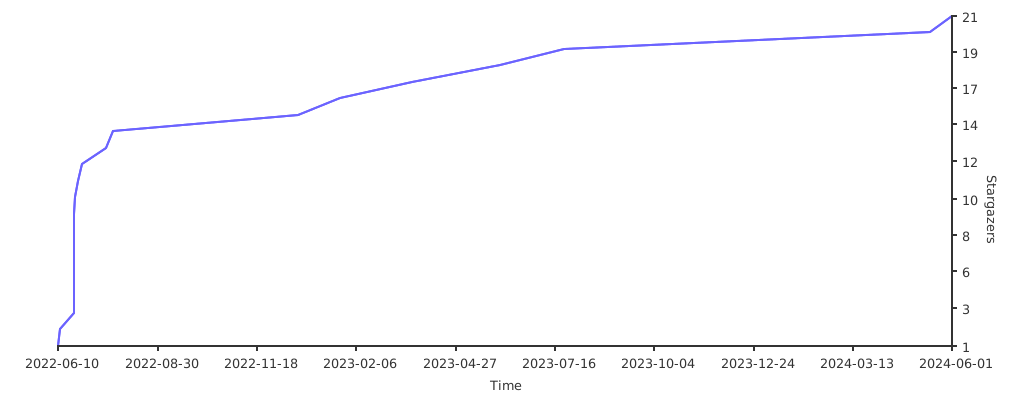
- Stars: 21
- Watchers: 2
- Forks: 2
- Open Issues: 0
-
Metadata Files:
- Readme: readme.md
Awesome Lists containing this project
README



## ❯ Quick
```bash
curl -sL "https://raw.github.com/fwd/nano-docker/master/install.sh" | sh
```

## ❯ Custom
```bash
git clone https://github.com/fwd/nano-docker.git
```
```bash
cd nano-docker && sudo ./setup.sh -f -t V27.1 -m -p 8080
```
#### Flags
- **-f**: Fast Sync (Default: True)
- **-t**: Node Version (Default: Latest)
- **-m**: Node [Monitor](https://github.com/NanoTools/nanoNodeMonitor) (Default: False)
- **-p**: Node Monitor Port (Default: 80)
- **-q**: Console Output (Default: False)
- **-s**: Print Private Key (Default: False)
- **-v**: Alias of **-t**. Because life.

## Requirements
**Software:**
- Ubuntu/Debian ✅
- Other Linux ❌
- Mac ❌ (Run Ubuntu in VM)
- Window ❌ (Run Ubuntu in VM)
**Minimum Hardware:**
- 4 CPU
- 8GB RAM
- 320 GB SSD (Ledger: ~110GB 7Zip, Expandable attached storage recommended)
- 1TB BANDWIDTH
- ON 24/7

## Sponsor (DigitalOcean)


Optional Reading: [How To Setup a Server on Digital Ocean](https://docs.digitalocean.com/products/droplets/how-to/create/)
---
### Understand The Magic 🪄 (Optional)
#### 1. Install [Docker](https://docs.docker.com/engine/install/ubuntu)
```bash
# Install Basic Tools
sudo apt-get -y install jq curl p7zip-full
# Add Docker PGP Key
curl -fsSL https://download.docker.com/linux/ubuntu/gpg | sudo gpg --dearmor -o /usr/share/keyrings/docker-archive-keyring.gpg
# Add Remote Docker Repo
echo \
"deb [arch=$(dpkg --print-architecture) signed-by=/usr/share/keyrings/docker-archive-keyring.gpg] https://download.docker.com/linux/ubuntu \
$(lsb_release -cs) stable" | sudo tee /etc/apt/sources.list.d/docker.list > /dev/null
# Run Update (Fetch latest packages)
sudo apt-get update
# Finally, Install Docker and Dependencies.
sudo apt-get -y install jq docker-ce docker-ce-cli containerd.io
```
#### 2. Install [Docker Compose](https://docs.docker.com/compose/)
```bash
# Download latest script.
curl -L "https://github.com/docker/compose/releases/download/1.29.2/docker-compose-$(uname -s)-$(uname -m)" -o /usr/local/bin/docker-compose
# Make it executable
sudo chmod +x /usr/local/bin/docker-compose
# Make it a global
sudo ln -s /usr/local/bin/docker-compose /usr/bin/docker-compose
```
#### 3. Install This Repo
```bash
# Move to HOME, and clone repo
cd ~ && git clone https://github.com/fwd/nano-docker.git
# For "Docker" reasons. We need to move in the cloned dir.
cd ~/nano-docker
# Leave -v blank for latest version
sudo ./setup.sh -s
```
#### 4. Configure Node
- [Unlock](https://docs.nano.org/running-a-node/wallet-setup/#update-configuration) Wallet RPC.
- Set up Node on localhost port 7076. Use '[::1]:7076' for IPv6.
- Node Websocket set up on localhost port 7078. Use '[::1]:7078' for IPv6.
- **Node **not** accessible from Internet. Bring your own "Proxy".**
- See [setup.sh](/setup.sh) for complete setup script.
#### 5. Talk to Node
```bash
Usage:
$ curl -g -d '{ "action": "version" }' '[::1]:7076'
$ curl -g -d '{ "action": "block_count" }' '[::1]:7076'
$ curl -g -d '{ "action": "telemetry" }' '[::1]:7076'
```
#### Node Docker IP
```
docker inspect -f '{{.Name}} - {{range .NetworkSettings.Networks}}{{.IPAddress}}{{end}}' $(docker ps -aq)
```
```
nano-node - 172.XX.X.X
```
## Further Reading
- [Official Node CLI Docs](https://docs.nano.org/commands/rpc-protocol)
- [Common RPC Errors](https://docs.nano.to/rpc-errors)
- [Nano.to Docs](https://docs.nano.to)
- [**More Packages**](https://github.com/fwd/nano-packages)

## Contributing
Give a ⭐️ if this project helped you!
Contributions, issues and feature requests are welcome at [issues page](https://github.com/fwd/nano-docker/issues).

## Nano.to Support
- Email: support@nano.to
- Twitter: [@nano2dev](https://twitter.com/nano2dev)
- Discord: [Nano.to Discord](https://discord.gg/HgqDCkzP)

## License
MIT License
Copyright [@nano2dev](https://twitter.com/nano2dev).

## ❯ Stargazers
[](https://starchart.cc/fwd/nano-docker)