https://github.com/g-s-c-code/fileconcatenator
A tool designed to efficiently gather and concatenate all code from a project, streamlining the process of gathering data. Built with .NET 8 and enhanced by the Spectre Console library, this cross-platform application offers a rich command-line interface. Users can specify targeted files.
https://github.com/g-s-c-code/fileconcatenator
concatenation console-application dotnet gpt spectre-console
Last synced: about 2 months ago
JSON representation
A tool designed to efficiently gather and concatenate all code from a project, streamlining the process of gathering data. Built with .NET 8 and enhanced by the Spectre Console library, this cross-platform application offers a rich command-line interface. Users can specify targeted files.
- Host: GitHub
- URL: https://github.com/g-s-c-code/fileconcatenator
- Owner: g-s-c-code
- License: mit
- Created: 2024-07-24T10:19:56.000Z (almost 2 years ago)
- Default Branch: master
- Last Pushed: 2025-01-02T15:35:18.000Z (over 1 year ago)
- Last Synced: 2025-02-05T14:48:15.682Z (over 1 year ago)
- Topics: concatenation, console-application, dotnet, gpt, spectre-console
- Language: C#
- Homepage:
- Size: 7.93 MB
- Stars: 0
- Watchers: 1
- Forks: 0
- Open Issues: 0
-
Metadata Files:
- Readme: README.md
- License: LICENSE
Awesome Lists containing this project
README
# FileConcatenator
## Overview
**FileConcatenator** is a utility designed to streamline the process of concatenating multiple code or text files into a single output. This tool is meant to help developers to quickly gather code from various files.
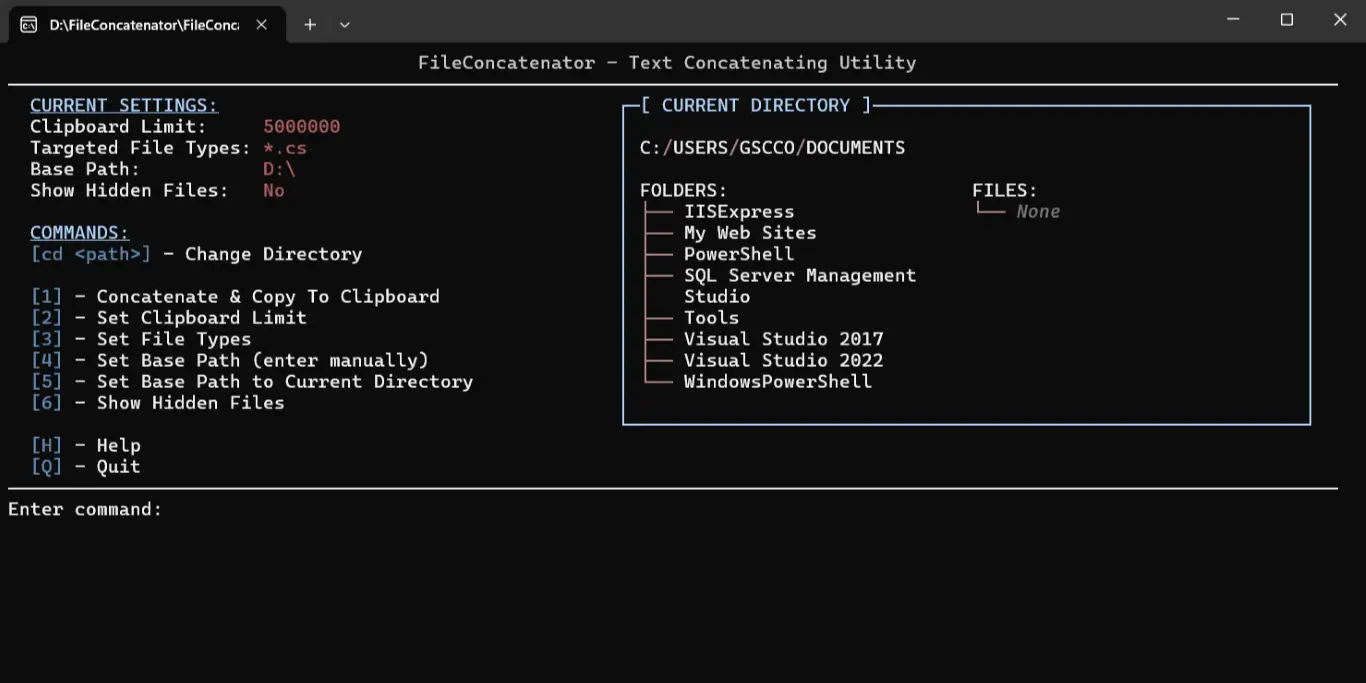
## Preview
## Features
- **Instant File Concatenation**: Merge files in a directory into a single output, with filtering by file type (e.g., `*.cs`, `*.txt`).
- **Clipboard Integration**: Automatically copies the result to the clipboard for easy sharing or pasting.
- **Customizable Settings**:
- **Base Directory**: Change the source directory shown upon start up.
- **Clipboard Limit**: Set the maximum characters for clipboard content.
- **File Type Selection**: Choose what file types should be targeted for concatenation.
- **Hidden Files**: Toggle inclusion of hidden files.
- **Persistent Configuration**: Settings are saved between sessions for a consistent experience.
- **User-Friendly Interface**: Command-line interface with Spectre.Console for easy navigation and command execution.
## Installation
To install **FileConcatenator**, ensure .NET 8.0 SDK is installed. Clone the repository, build, and run:
```bash
git clone https://github.com/g-s-c-code/FileConcatenator.git
cd FileConcatenator
dotnet build
dotnet run
```
## Creating Executables
To create a self-contained runnable file for different OSes, run the following:
- **Windows**:
```bash
dotnet publish -c Release -r win-x64 --self-contained true /p:PublishSingleFile=true /p:PublishTrimmed=true
```
- **Linux (ARM64)**:
```bash
dotnet publish -c Release -r linux-arm64 --self-contained true /p:PublishSingleFile=true /p:PublishTrimmed=true
```
- **Linux (x64)**:
```bash
dotnet publish -c Release -r linux-x64 --self-contained true /p:PublishSingleFile=true /p:PublishTrimmed=true
```
- **macOS (ARM64)**:
```bash
dotnet publish -c Release -r osx-arm64 --self-contained true /p:PublishSingleFile=true /p:PublishTrimmed=true
```
- **macOS (x64)**:
```bash
dotnet publish -c Release -r osx-x64 --self-contained true /p:PublishSingleFile=true /p:PublishTrimmed=true
```
## Configuration Management
The application maintains its configuration in a `settings.json` file (IMPORTANT: the file is created upon first use), automatically created in the base directory. This configuration includes:
- **BaseDirectoryPath**: The root directory for file operations.
- **ClipboardCharacterLimit**: Maximum characters allowed in the clipboard.
- **FileTypes**: Comma-separated list of file extensions to target.
- **ShowHiddenFiles**: Boolean value to determine if hidden files are included.
You can manually edit the `settings.json` file if needed, or adjust settings through the application's interface.
## Troubleshooting & Tips
- **Clipboard Issues**: If the clipboard limit is too high, some systems may have difficulty handling the data. If you encounter problems, try reducing the limit.
- **File Access**: Ensure you have the necessary permissions to access all files and directories within the base path. Unauthorized access will result in skipped files.
- **Directory Structure**: Use the `cd` command to navigate to the correct directory before concatenating files, especially if working in nested directory structures.
If you encounter any issues or have suggestions for improvements, feel free to contribute to the project or open an issue on the [GitHub repository](https://github.com/g-s-c-code/FileConcatenator).