https://github.com/g-s-c-code/pixporter
PixPorter is a simple image format converter built on .NET 8, designed to make converting image files simple and efficient. It supports popular formats such as PNG, JPG, JPEG, WebP, GIF, TIFF and BMP, and allows both single and batch conversions.
https://github.com/g-s-c-code/pixporter
conversion conversions converter dotnet image image-conversion image-converter image-processing images imagesharp spectre spectre-console
Last synced: about 2 months ago
JSON representation
PixPorter is a simple image format converter built on .NET 8, designed to make converting image files simple and efficient. It supports popular formats such as PNG, JPG, JPEG, WebP, GIF, TIFF and BMP, and allows both single and batch conversions.
- Host: GitHub
- URL: https://github.com/g-s-c-code/pixporter
- Owner: g-s-c-code
- License: mit
- Created: 2024-12-10T11:00:09.000Z (over 1 year ago)
- Default Branch: master
- Last Pushed: 2025-01-02T12:03:08.000Z (over 1 year ago)
- Last Synced: 2025-04-03T15:13:18.663Z (about 1 year ago)
- Topics: conversion, conversions, converter, dotnet, image, image-conversion, image-converter, image-processing, images, imagesharp, spectre, spectre-console
- Language: C#
- Homepage:
- Size: 39.3 MB
- Stars: 0
- Watchers: 1
- Forks: 0
- Open Issues: 0
-
Metadata Files:
- Readme: README.md
- License: LICENSE
Awesome Lists containing this project
README
# PixPorter
A fast, lightweight image format converter — convert single files, batch-convert entire folders, control quality, and strip metadata, all without leaving your workflow.
---
## Features
- **Drag & drop** images or folders directly into the app
- **Batch conversion** of entire directories
- **9 supported formats** — PNG, JPG, WEBP, GIF, BMP, TIFF, TGA, QOI, PBM
- **Quality control** for lossy and compression-based formats (JPG, WebP, PNG)
- **Metadata stripping** — removes EXIF, IPTC, XMP, and ICC profile data
- **Custom output folder** — redirect output anywhere, or default to alongside the source
- **Dark and light theme** with automatic system theme detection
- **CLI companion** for terminal-based and scripted workflows
---
## Default Format Mappings
When no output format is specified, PixPorter uses these defaults:
| Input | Output |
|-------|--------|
| `.webp` | `.png` |
| `.png` | `.webp` |
| `.jpg` / `.jpeg` | `.webp` |
| `.gif` | `.webp` |
| `.tiff` | `.webp` |
| `.bmp` | `.webp` |
| `.tga` | `.webp` |
| `.qoi` | `.webp` |
| `.pbm` | `.webp` |
---
## CLI Usage
```
# Convert a single file
my_photo.png
# Convert with a specific format
my_photo.png --jpg
# Convert with quality setting
my_photo.png --webp --quality=85
# Strip metadata
my_photo.png --jpg --stripmeta
# Convert all images in current directory
--ca
# Convert all to a specific format
--ca --png --quality=90
# Navigate directories
cd C:\Users\Photos
```
### CLI Flags
| Flag | Description |
|------|-------------|
| `--webp` | Convert to WebP* |
| `--png` | Convert to PNG* |
| `--jpg` | Convert to JPG* |
| `--gif` | Convert to GIF |
| `--tiff` | Convert to TIFF |
| `--bmp` | Convert to BMP |
| `--tga` | Convert to TGA |
| `--qoi` | Convert to QOI |
| `--pbm` | Convert to PBM |
| `--quality=N` | Set output quality 1–100 (* formats only) |
| `--stripmeta` | Strip all embedded metadata from output |
| `--ca` | Convert all images in the current directory |
---
## Quality
Quality applies to JPG, WebP, and PNG output. For JPG and WebP it controls pixel fidelity — lower values produce smaller, lossier files. For PNG it controls compression level only; PNG is always lossless and no pixel data is ever discarded.
---
## Screenshot
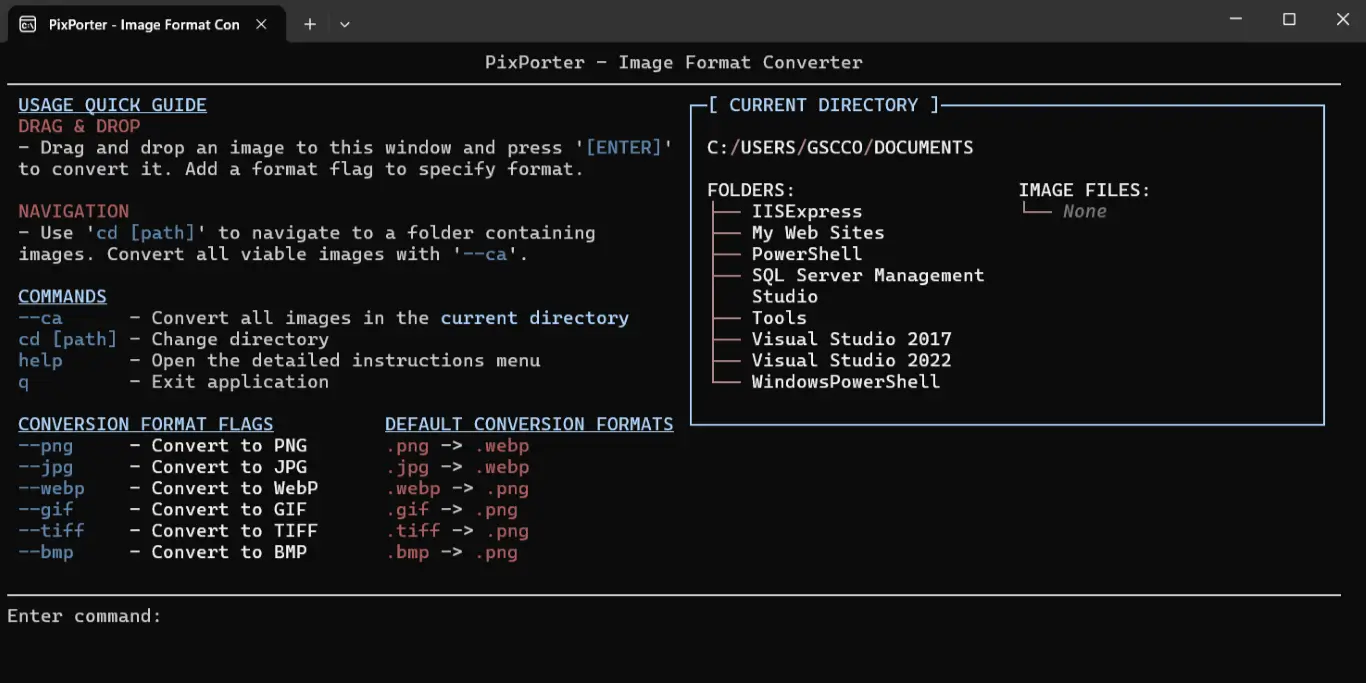
---
## Open Source
PixPorter is built on [SixLabors.ImageSharp](https://sixlabors.com/products/imagesharp/), a fully managed, cross-platform image processing library.
> Licensed under the Apache License 2.0. © Six Labors.