https://github.com/g0lab/g0efilter
Container Egress Traffic Filter
https://github.com/g0lab/g0efilter
alpine container dashboard docker docker-compose egress-filtering go network-filtering network-namespace traffic-filtering
Last synced: 5 months ago
JSON representation
Container Egress Traffic Filter
- Host: GitHub
- URL: https://github.com/g0lab/g0efilter
- Owner: g0lab
- License: mit
- Created: 2025-09-19T10:03:28.000Z (10 months ago)
- Default Branch: main
- Last Pushed: 2026-01-10T10:33:48.000Z (6 months ago)
- Last Synced: 2026-01-11T00:42:49.520Z (6 months ago)
- Topics: alpine, container, dashboard, docker, docker-compose, egress-filtering, go, network-filtering, network-namespace, traffic-filtering
- Language: Go
- Homepage:
- Size: 1.16 MB
- Stars: 3
- Watchers: 1
- Forks: 2
- Open Issues: 0
-
Metadata Files:
- Readme: README.md
- License: LICENSE
- Security: SECURITY.md
Awesome Lists containing this project
README
[](https://hub.docker.com/r/g0lab/g0efilter)
[](https://github.com/g0lab/g0efilter/actions/workflows/ci.yaml)
[](https://app.fossa.com/projects/git%2Bgithub.com%2Fg0lab%2Fg0efilter?ref=badge_shield&issueType=security)
[](https://goreportcard.com/report/g0lab/g0efilter)
[](https://codecov.io/gh/g0lab/g0efilter)
[](https://github.com/g0lab/g0efilter/blob/main/LICENSE)
> [!WARNING]
> g0efilter is in active development and its configuration may change often.
g0efilter is a lightweight container designed to filter outbound (egress) traffic from attached container workloads. Run g0efilter alongside your workloads and attach them to share its network namespace to enforce a simple IP and domain allowlist policy.
### Background
As a self-hoster running many open source apps, I wanted an easy way to restrict outbound connections from containers, as not all can be trusted. While Docker supports internal-only networks, some containers do need selective network and internet access. I wanted to support wildcard subdomains (e.g. `*.example.com`) without terminating TLS connections or relying on IP allowlisting alone, as CDNs can have multiple changing IPs and many subdomains. This could probably be achieved with third-party firewall products, but I wanted an open source, lightweight filter that runs alongside Docker Compose workloads...so here we are.
### Features
- **Egress filtering** - Explicitly allow specified IPs/CIDRs and domains in a policy file; anything not on the allowlist is blocked
- **Wildcard subdomain support** - Allow wildcard subdomains like `*.example.com` to match any subdomain level
- **Two filtering modes** - HTTPS (TLS SNI/HTTP Host inspection) or DNS-based filtering
- **Live policy reloading** - Update policy.yaml without restarting containers
- **Real-time dashboard** - Web UI with SSE streaming for traffic monitoring
- **Remote unblock** - Unblock domains/IPs from the dashboard UI (with auth middleware)
- **Notifications** - Gotify alerts for blocked traffic events
### Quick Start
Refer to the [examples](https://github.com/g0lab/g0efilter/tree/main/examples).
### How it works
Attach containers to g0efilter by setting `network_mode: "service:g0efilter"` in Docker Compose, which shares g0efilter's network namespace (network stack) with those containers. Traffic from attached containers is filtered based on a policy file that defines allowlisted IPs/CIDRs and domains.
**Traffic to allowlisted IPs/CIDRs** bypasses all filtering and passes through directly.
**Traffic to other IPs** is subject to domain-level filtering based on the `FILTER_MODE` environment variable (`https` or `dns`):
- **HTTPS mode (default):** Outbound HTTP/HTTPS traffic on ports 80/443 is intercepted and redirected to local services running inside g0efilter. These services inspect plain text packet data, including the HTTP `Host` header (for HTTP) or TLS SNI from the TLS Client Hello (for HTTPS, without terminating the connection), and cross-reference it against the allowlist. If the domain is allowed, the connection is established and traffic flows through (the service acts as a middleman). If not found in the allowlist, the connection is reset and traffic is blocked.
- **DNS mode:** DNS queries are intercepted and redirected to an internal DNS server. The server only resolves allowlisted domains and non-allowlisted queries receive NXDOMAIN responses. Note that direct IP connections bypass DNS filtering entirely.
**Filter Logic Flow (HTTPS mode):**
```
Start
│
├─► Is destination IP in allowlist? ── Yes ─► ALLOW (skip remaining steps, no redirect)
│ └─ No ─► continue
│
├─► Is connection already established? ── Yes ─► ALLOW (skip remaining steps, no redirect)
│ └─ No ─► continue
│
├─► Is destination port 80 or 443? ── No ─► BLOCK
│ └─ Yes ─► continue
│
├─► Redirect to local filter service (port 8080 for HTTP, 8443 for HTTPS)
│
├─► Extract domain from Host header (HTTP) or SNI (TLS)
│
├─► Does domain match allowlist? ── Yes ─► FORWARD to original destination
│ └─ No ─► DROP
│
└─► LOG decision → Send to dashboard (if enabled) ─► End
```
> [!NOTE]
> Attached containers share g0efilter's network namespace and must not bind to ports used by g0efilter.
> By default, g0efilter uses `HTTP_PORT` (8080), `HTTPS_PORT` (8443), and optionally `DNS_PORT` (53).
### Dashboard container
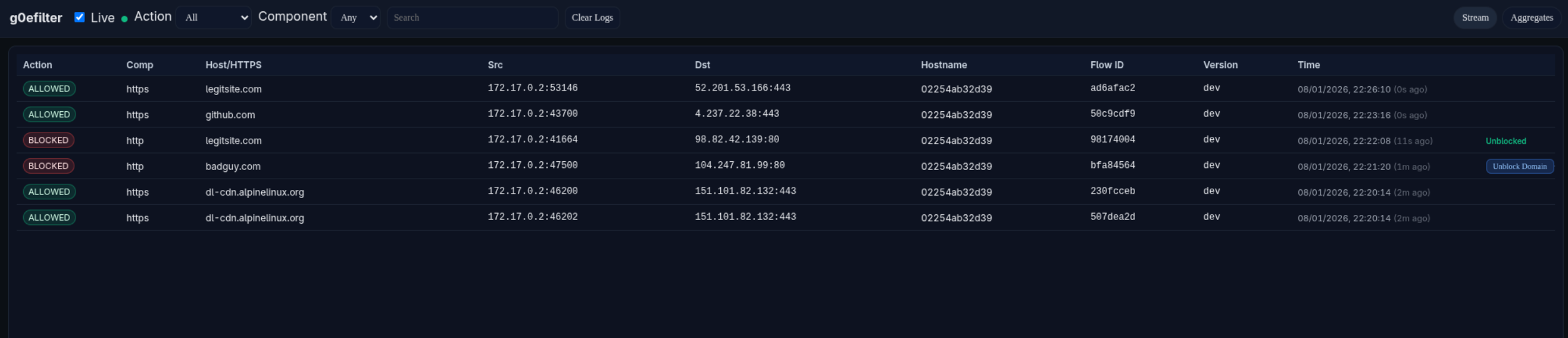
The optional **g0efilter-dashboard** container runs a web UI on **port 8081** (by default). If `DASHBOARD_HOST` and `DASHBOARD_API_KEY` are set, g0efilter will ship logs to the dashboard.
Example Dashboard Screenshot:
### Example policy.yaml
```yaml
allowlist:
ips:
- "1.1.1.1"
- "192.168.0.0/16"
- "10.1.1.1"
domains:
- "github.com"
- "*.alpinelinux.org"
```
> [!NOTE]
> - The policy file supports live reloading: edits to policy.yaml automatically trigger rule and service updates without needing to restart the container. The internal g0efilter services are restarted, but the container itself remains running.
> - If you do not need live reloading, you can use environment variables (ALLOWLIST_IPS, ALLOWLIST_DOMAINS) instead of a policy file. If both are present, environment variables take precedence.
### Environment variables
### g0efilter
| Variable | Description | Default |
| ------------------- | -------------------------------------------------- | ------------------- |
| `LOG_LEVEL` | Log level (TRACE, DEBUG, INFO, WARN, ERROR) | `INFO` |
| `HOSTNAME` | To identify which endpoint is sending the logs | unset |
| `HTTP_PORT` | Local HTTP port | `8080` |
| `HTTPS_PORT` | Local HTTPS port | `8443` |
| `POLICY_PATH` | Path to policy file inside container | `/app/policy.yaml` |
| `ALLOWLIST_IPS` | Comma-separated list of allowed IPs/CIDRs (takes precedence over policy file) | unset |
| `ALLOWLIST_DOMAINS` | Comma-separated list of allowed domains (takes precedence over policy file, supports wildcards like `*.example.com`) | unset |
| `FILTER_MODE` | `https` (TLS SNI/HTTP Host) or `dns` (DNS name filtering) | `https` |
| `DNS_PORT` | DNS listen port | `53` |
| `DNS_UPSTREAMS` | Upstream DNS servers (comma-separated). Uses Docker's default DNS if not specified | `127.0.0.11:53` |
| `DASHBOARD_HOST` | Dashboard URL for log shipping | unset |
| `DASHBOARD_API_KEY` | API key for dashboard authentication | unset |
| `DASHBOARD_QUEUE_SIZE` | Queue size for buffering logs before sending to dashboard. Logs are dropped if queue is full | `1024` |
| `DASHBOARD_START_DELAY` | Delay before starting dashboard log shipping (supports duration formats like `5s`, `1m`) | `5s` |
| `LOG_FILE` | Optional path for persistent log file | unset |
| `NFLOG_BUFSIZE` | Netfilter log buffer size | `96` |
| `NFLOG_QTHRESH` | Netfilter log queue threshold | `50` |
| `NOTIFICATION_HOST` | Gotify server URL for security alert notifications | unset |
| `NOTIFICATION_KEY` | Gotify application key for authentication | unset |
| `NOTIFICATION_BACKOFF_SECONDS` | Rate limit backoff period for duplicate alerts (in seconds) | `60` |
| `NOTIFICATION_IGNORE_DOMAINS` | Comma-separated list of domains to ignore for notifications (supports wildcards like `*.example.com`) | unset |
| `ENABLE_REMOTE_UNBLOCK` | Enable polling dashboard for remote unblock requests | `false` |
| `UNBLOCK_POLL_INTERVAL` | How often to poll dashboard for unblock requests (supports duration formats like `10s`, `1m`) | `10s` |
### g0efilter-dashboard
| Variable | Description | Default |
| --------------- | ----------------------------------------------------------------------------------------------------------------- | ------- |
| `PORT` | Address/port the dashboard listens on (HTTP UI + API). Can be just a port (`8081`) or address+port (`:8081`) | `:8081` |
| `API_KEY` | API key used to authenticate incoming log data from the `g0efilter` container. Must match `DASHBOARD_API_KEY` | unset |
| `LOG_LEVEL` | Log level (TRACE, DEBUG, INFO, WARN, ERROR) | `INFO` |
| `BUFFER_SIZE` | In-memory buffer size for events. Controls how many events can be queued before dropping | `5000` |
| `READ_LIMIT` | Maximum number of events returned per read/API request | `500` |
| `SSE_RETRY_MS` | Server-Sent Events (SSE) client retry interval in milliseconds | `2000` |
| `WRITE_TIMEOUT` | HTTP write timeout in seconds (0 = no timeout, recommended for SSE) | `0` |
| `RATE_RPS` | Maximum average requests per second (rate-limit) | `50` |
| `RATE_BURST` | Maximum burst size for rate-limiting (in requests) | `100` |
## Remote Unblock Feature
The **remote unblock** feature allows administrators to unblock domains or IPs directly from the dashboard UI. When enabled, g0efilter instances poll the dashboard for pending unblock requests and automatically update their policy files.
> [!WARNING]
> This feature is **disabled by default** (`ENABLE_REMOTE_UNBLOCK=false`). Do not enable this in non-test environments without proper authentication middleware protecting the dashboard. The `POST /api/v1/unblocks` endpoint must be protected by reverse proxy authentication (e.g., Authelia, Authentik, PocketID) to prevent unauthorized users from modifying your allowlist.
## Dashboard Reverse Proxy Suggestion
I would recommend to place the **g0efilter-dashboard** behind a reverse proxy such as Traefik with the following controls:
### API Endpoints
| Endpoint | Auth | Description |
|----------|------|-------------|
| `GET /health` | None | Health check for monitoring/load balancers |
| `POST /api/v1/logs` | API Key | Log ingestion from g0efilter containers |
| `GET /api/v1/unblocks?hostname=X` | API Key | Poll pending unblock requests (used by g0efilter) |
| `POST /api/v1/unblocks/ack` | API Key | Acknowledge processed unblock (used by g0efilter) |
| `GET /` | Middleware | Dashboard web UI |
| `GET /api/v1/logs` | Middleware | Read logs |
| `GET /api/v1/events` | Middleware | Server-Sent Events stream |
| `DELETE /api/v1/logs` | Middleware | Clear logs |
| `POST /api/v1/unblocks` | Middleware | Create unblock request (from dashboard UI) |
| `GET /api/v1/unblocks/status` | Middleware | Poll unblock status (from dashboard UI) |
### Example Traefik Configuration
If using Traefik as a reverse proxy, here's an example of a working yaml based configuration using two routers to handle different authentication requirements:
```yaml
http:
routers:
g0efilter-ingest-router:
entryPoints:
- websecure
rule: "Host(`g0efilter.example.com`) && ((PathPrefix(`/api/v1/logs`) && Method(`POST`)) || PathPrefix(`/health`) || (Path(`/api/v1/unblocks`) && Method(`GET`) && QueryRegexp(`hostname`, `^.+$`)) || (Path(`/api/v1/unblocks/ack`) && Method(`POST`)))"
service: g0efilter-dash-service
middlewares:
- security-headers
- ratelimit
tls:
certResolver: letsencrypt
domains:
- main: "example.com"
sans:
- "*.example.com"
g0efilter-dash-router:
entryPoints:
- websecure
rule: "Host(`g0efilter.example.com`)"
service: g0efilter-dash-service
middlewares:
- security-headers
- ratelimit
- auth-oidc # Your auth middleware
tls:
certResolver: letsencrypt
domains:
- main: "example.com"
sans:
- "*.example.com"
services:
g0efilter-dash-service:
loadBalancer:
servers:
- url: "http://g0efilter-dashboard:8081"
```
**How it works:**
- `g0efilter-ingest-router`: Matches `POST /api/v1/logs`, `/health`, `GET /api/v1/unblocks?hostname=X`, and `POST /api/v1/unblocks/ack` - no SSO required (API key auth)
- `g0efilter-dash-router`: Matches all other requests to the dashboard - requires SSO/OIDC authentication
- The more specific ingest router rule takes precedence for API calls and health checks
- All other traffic (UI, reads, etc.) goes through the dashboard router with SSO protection
### Example docker-compose.yaml
```yaml
services:
g0efilter:
image: docker.io/g0lab/g0efilter:latest
container_name: g0efilter
volumes:
- ./policy.yaml:/app/policy.yaml
cap_drop:
- ALL
cap_add:
- NET_ADMIN # Required for nftables modification
security_opt:
- no-new-privileges
# Host-exposed port for dashboard (dashboard runs in same netns)
ports:
- 8081:8081 # Dashboard port
read_only: true
restart: always
env_file:
- .env
g0efilter-dashboard:
image: docker.io/g0lab/g0efilter-dashboard:latest
container_name: g0efilter-dashboard
# optional - custom user
# user: 1000:1000
cap_drop:
- ALL
security_opt:
- no-new-privileges
read_only: true
env_file:
- .env.dashboard
network_mode: "service:g0efilter"
restart: always
example-container:
image: docker.io/alpine/curl:latest
command: sh -c "sleep infinity"
network_mode: "service:g0efilter"
```
### Verifying the Container Signatures
The g0efilter container images are signed with [Cosign](https://github.com/sigstore/cosign) using keyless signing:
```bash
# Verify g0efilter container
cosign verify g0lab/g0efilter:latest \
--certificate-identity-regexp=https://github.com/g0lab/g0efilter \
--certificate-oidc-issuer=https://token.actions.githubusercontent.com \
-o text
# Verify g0efilter-dashboard container
cosign verify g0lab/g0efilter-dashboard:latest \
--certificate-identity-regexp=https://github.com/g0lab/g0efilter \
--certificate-oidc-issuer=https://token.actions.githubusercontent.com \
-o text
```
## License
This project is licensed under the MIT License - see the [LICENSE](LICENSE) file for details.