https://github.com/gaboolic/moqi-im-windows
墨奇输入法windows版。已接入librime(中州韵),内置白霜拼音。原生支持AI功能。托盘菜单支持主题替换、输入状态切换等功能。群:696353204
https://github.com/gaboolic/moqi-im-windows
input-method input-methods
Last synced: 3 months ago
JSON representation
墨奇输入法windows版。已接入librime(中州韵),内置白霜拼音。原生支持AI功能。托盘菜单支持主题替换、输入状态切换等功能。群:696353204
- Host: GitHub
- URL: https://github.com/gaboolic/moqi-im-windows
- Owner: gaboolic
- License: mit
- Created: 2026-04-01T02:08:11.000Z (4 months ago)
- Default Branch: main
- Last Pushed: 2026-04-18T12:54:09.000Z (3 months ago)
- Last Synced: 2026-04-18T14:40:45.774Z (3 months ago)
- Topics: input-method, input-methods
- Language: C++
- Homepage:
- Size: 6.36 MB
- Stars: 33
- Watchers: 0
- Forks: 0
- Open Issues: 6
-
Metadata Files:
- Readme: README.md
- License: LICENSE
Awesome Lists containing this project
- awesome-rime - gaboolic/moqi-im-windows - 墨奇输入法windows版。已接入librime(中州韵),内置白霜拼音。原生支持AI功能。托盘菜单支持主题替换、输入状态切换等功能。 (其他)
README
# Moqi IM for Windows
Windows 端的输入法前端,负责把 `moqi-ime` 后端接入 **Microsoft Text Services Framework (TSF)**,并提供候选窗、语言栏按钮、组合串上屏等 Windows 平台能力。
当前状态:已实现 **[Rime / 中州韵](https://github.com/rime/librime)** 输入法接入,**fcitx5** 输入法接入中。
项目 TSF 层核心依赖:[`libIME2`](https://github.com/EasyIME/libIME2)。很大程度上参考了[PIME](https://github.com/EasyIME/PIME) 以及 [小狼毫](https://github.com/rime/weasel) 项目。
核心引擎:[`moqi-ime`](https://github.com/gaboolic/moqi-ime)。
默认输入法:[`白霜拼音`](https://github.com/gaboolic/rime-frost)
## 快速开始
下载安装包:[moqi-im-windows-setup.exe](https://github.com/gaboolic/moqi-im-windows/releases)
## 特色功能
- 托盘切换输入法状态:中英文 全半角 简繁
- 外观编辑:主题皮肤切换、字体调整、主题色切换、自定义快捷键
- 默认使用白霜拼音,支持切换方案集、切换输入方案、更新配置
- 置顶短语、超级简拼
- 输入设置:自动插入成对符号、分号键次选
- 原生ai功能:支持整句优化、翻译、问答等,只有想不到没有做不到。编辑C:\Users\用户名\AppData\Roaming\Moqi\Rime\ai_config.json 可以接入ai大模型以及自定义提示词、快捷键
```
{
"api": {
"base_url": "",
"api_key": "",
"model": ""
},
"actions": [
{
"name": "写好评",
"hotkey": "Ctrl+Shift+G",
"prompt": "请围绕“{{candidate_1}}”生成最多 3 条适合直接发布的中文好评,每条 20 字左右。"
},
{
"name": "优化整句",
"hotkey": "Ctrl+Shift+O",
"prompt": "上一句是:{{previous_commit}}\n原始输入拼音是:{{composition}}\n前三个候选词:\n{{candidates_top3}}\n请严格遵循原始输入拼音来选字,只能在符合这串拼音的候选范围内优化整句,不要凭空改成不匹配拼音的字词。只输出 1 条最通顺、最自然的整句候选,不要解释。"
},
{
"name": "中译英",
"hotkey": "Ctrl+Shift+E",
"prompt": "请把当前中文内容翻译成自然、地道的英文。 “{{candidate_1}}” 只输出 1 条英文翻译,不要解释。"
},
{
"name": "问答",
"hotkey": "Ctrl+Shift+Q",
"prompt": "用户询问: “{{candidate_1}}” 只输出 1 条答案,不要解释。"
}
]
}
```
## 功能演示
ai功能演示:https://github.com/gaboolic/moqi-im-windows/issues/4


## 运行架构
```
┌─────────────────────────────────────────────┐
│ Windows 应用程序 │
│ (记事本 / Word / 浏览器 / 其他) │
├─────────────────────────────────────────────┤
│ MoqiTextService.dll │
│ - TSF 接口实现 │
│ - 按键事件/组合串/候选窗处理 │
│ - 通过命名管道连接 Launcher │
├─────────────────────────────────────────────┤
│ MoqiLauncher.exe │
│ - 读取 backends.json │
│ - 管理后端进程生命周期 │
│ - 在命名管道与后端 stdin/stdout 之间转发消息│
├─────────────────────────────────────────────┤
│ moqi-ime\server.exe │
│ - Go 后端进程 │
│ - 加载 input_methods\*\ime.json │
│ - 返回候选、状态、上屏文本等 │
└─────────────────────────────────────────────┘
```
当前默认部署中,`backends.json` 指向 `moqi-ime\server.exe`;Windows 侧通过本地命名管道连到 `MoqLauncher`,`MoqLauncher` 再把请求按行写入后端的标准输入,并从标准输出读取响应。
## 核心职责
- **TSF 文本服务**:实现 `ITfTextInputProcessor`、`ITfKeyEventSink` 等接口
- **Windows UI**:管理候选窗口、消息窗口、语言栏按钮和 preserved keys
- **协议转换**:把按键与状态序列化为 JSON 请求,并应用后端返回的组合串、候选和提交文本
- **后端接入**:通过 `MoqLauncher` 读取 `backends.json`,按语言配置 GUID 路由到对应后端
## 与 `moqi-ime` 的关系
本仓库不实现拼音解析、候选生成、词库管理等输入法核心逻辑,这些能力由 `moqi-ime` 提供。
Windows 侧的职责主要是:
- 把 TSF 生命周期和按键事件转发给后端
- 根据后端返回结果更新候选窗、组合串和状态
- 从已安装后端目录扫描 `input_methods/*/ime.json`,为语言配置提供元数据与配置入口
因此,`moqi-im-windows` 与 `moqi-ime` 需要配套部署。
## 技术栈
- **语言**:C++ 、GO
- **框架**:Microsoft TSF、Win32 API
- **进程/IO**:命名管道、子进程 `stdin/stdout` 转发、`libuv`
- **数据格式**:protobuf(见/proto/moqi.proto)
- **日志**:`spdlog`
- **构建**:CMake + Visual Studio 2022 / MSBuild
## 源码布局
- `MoqiTextService`:TSF 文本服务,产出 `MoqiTextService.dll`
- `MoqLauncher`:后端启动器与消息转发器,产出 `MoqiLauncher.exe`
- `libIME2`:IME/TSF 基础库,也是本项目 TSF 层的核心依赖,来源:[`gaboolic/libIME2`](https://github.com/gaboolic/libIME2)
- `libuv`:Launcher 的事件循环与进程/管道依赖
- `backends.json`:后端清单,定义后端名称、启动命令和工作目录
- `scripts`:构建脚本
- `installer/`:Inno Setup 安装器脚本与输出目录
## 构建
前置:**Visual Studio 2022**、**CMake 3.21+**、Windows SDK。
在本仓库根目录执行:
`powershell -ExecutionPolicy Bypass -File .\scripts\_all_in_package.ps1`
该脚本会生成安装器:`installer\dist\moqi-im-windows-setup.exe`
## 参考文档
- [Microsoft TSF 文档](https://docs.microsoft.com/en-us/windows/win32/tsf/text-services-framework)
- [ITfTextInputProcessor 接口](https://docs.microsoft.com/en-us/windows/win32/api/msctf/nn-msctf-itftextinputprocessor)
- [PIME](https://github.com/EasyIME/PIME)
- [小狼毫](https://github.com/rime/weasel)
## 友情链接
白霜拼音
墨奇音形
墨奇五笔整句
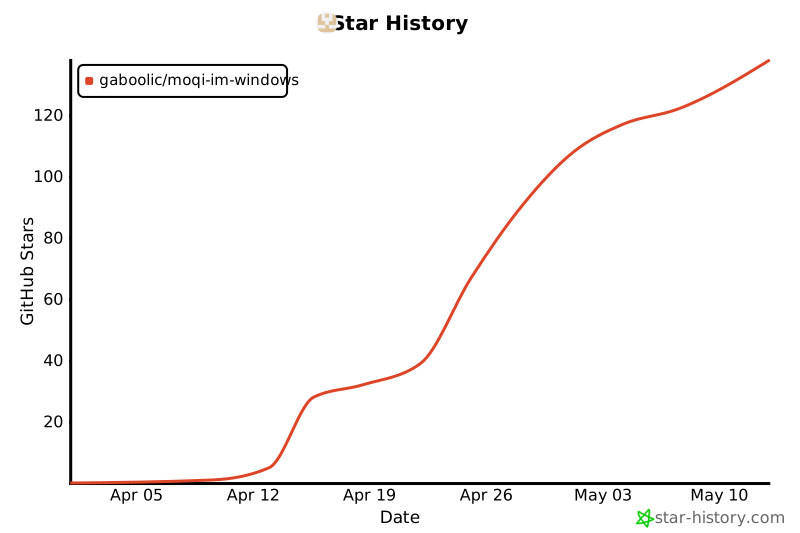
### Star History
[](https://star-history.com/#gaboolic/moqi-im-windows&Date)