https://github.com/gabrielmbmb/vuex-multi-tab-state
💾🔗🖥️ Share, synchronize and persist state between multiple tabs with this plugin for Vuex. TypeScript types included.
https://github.com/gabrielmbmb/vuex-multi-tab-state
hacktoberfest plugin state store sync tabs vue vuejs vuex
Last synced: over 1 year ago
JSON representation
💾🔗🖥️ Share, synchronize and persist state between multiple tabs with this plugin for Vuex. TypeScript types included.
- Host: GitHub
- URL: https://github.com/gabrielmbmb/vuex-multi-tab-state
- Owner: gabrielmbmb
- License: mit
- Created: 2020-02-15T15:16:42.000Z (over 6 years ago)
- Default Branch: master
- Last Pushed: 2023-03-04T21:51:59.000Z (over 3 years ago)
- Last Synced: 2025-03-29T19:06:57.350Z (over 1 year ago)
- Topics: hacktoberfest, plugin, state, store, sync, tabs, vue, vuejs, vuex
- Language: TypeScript
- Homepage:
- Size: 21.7 MB
- Stars: 160
- Watchers: 4
- Forks: 17
- Open Issues: 35
-
Metadata Files:
- Readme: README.md
- Funding: .github/FUNDING.yml
- License: LICENSE
- Code of conduct: .github/CODE_OF_CONDUCT.md
Awesome Lists containing this project
- awesome-vue - vuex-multi-tab-state - Share and synchronize status between multiple tabs with this plugin for Vuex. (Components & Libraries / Utilities)
- awesome-vue - vuex-multi-tab-state - Share, synchronize and persist state between multiple tabs with this plugin for Vuex. TypeScript types included. ` 📝 21 days ago` (Utilities [🔝](#readme))
README
# vuex-multi-tab-state

[](https://www.npmjs.com/package/vuex-multi-tab-state)
[](https://codecov.io/gh/gabrielmbmb/vuex-multi-tab-state)
[](https://codebeat.co/projects/github-com-gabrielmbmb-vuex-multi-tab-state-master)
[](https://www.npmjs.com/package/vuex-multi-tab-state)
[](https://www.npmjs.com/package/vuex-multi-tab-state)
[](https://www.npmjs.com/package/vuex-multi-tab-state)
[](https://github.com/prettier/prettier)
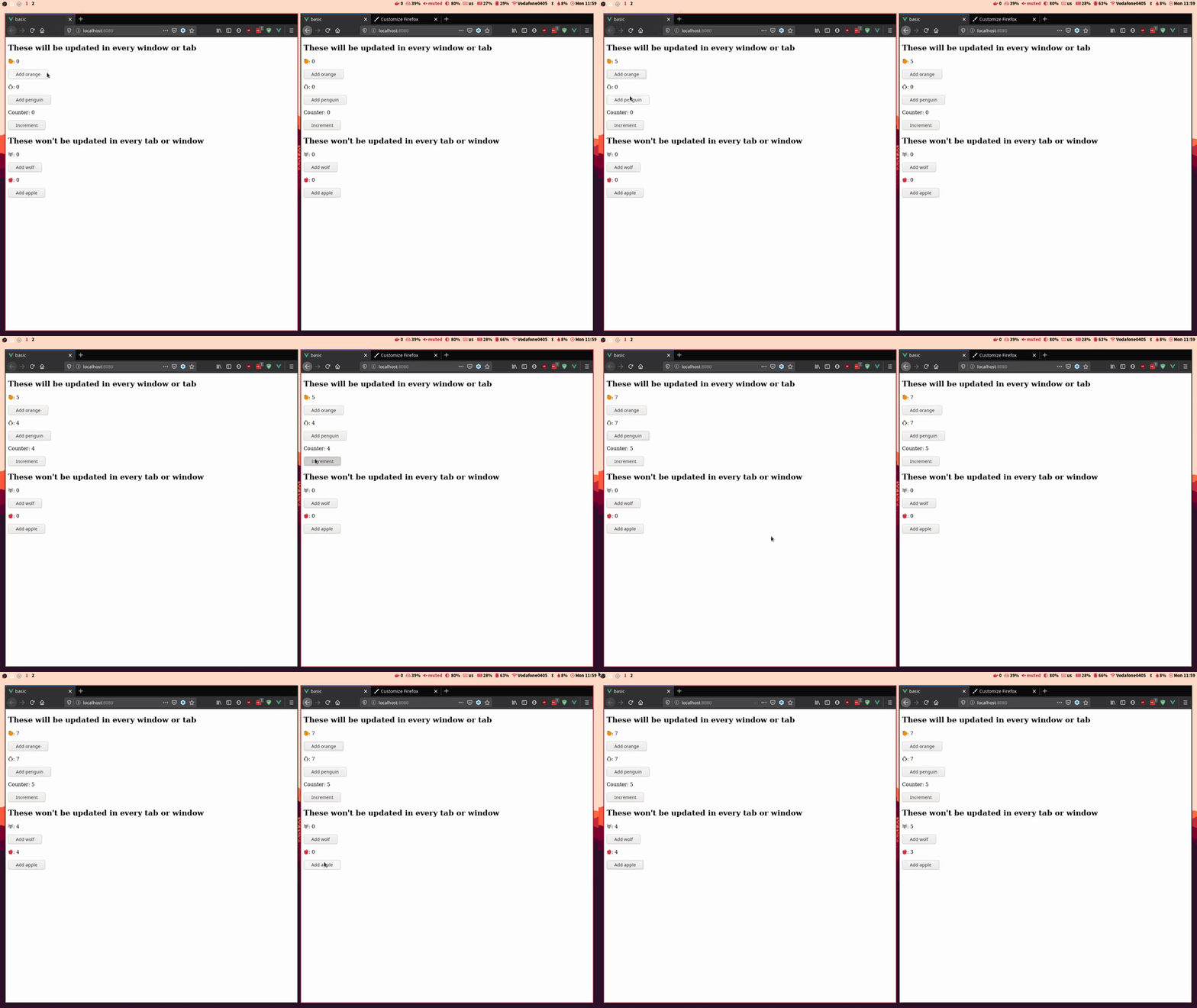
This Vuex plugin allows you to sync and share the status of your Vue application
across multiple tabs or windows using the local storage.
**This repository has a gitter chat where you can ask questions and propose new features:**
[](https://gitter.im/vuex-multi-tab-state/community?utm_source=badge&utm_medium=badge&utm_campaign=pr-badge)
### Vue 3 and Vuex 4 compatibility :warning:
The plugin has been tested with Vue 3 and Vuex 4 and no problems have been found.
There is an [issue](https://github.com/gabrielmbmb/vuex-multi-tab-state/issues/36)
where you can find how the plugin has been used using the new Vue 3 Composition
API. If you encounter a problem using the plugin with Vue 3 and Vuex 4, please
post it there.
## Installation
vuex-multi-tab-state is available in npm and can be installed with the following command:
npm i vuex-multi-tab-state
## Usage
Just import vuex-multi-tab-state and add it in the plugins list of your Vuex Store object.
```javascript
import Vue from 'vue';
import Vuex from 'vuex';
import createMultiTabState from 'vuex-multi-tab-state';
Vue.use(Vuex);
export default new Vuex.Store({
state: { ... },
mutations: { ... },
actions: { ... },
getters: { ... },
plugins: [
createMultiTabState(),
],
});
```
You can check the example provided [here](https://github.com/gabrielmbmb/vuex-multi-tab-state/tree/master/examples/basic)
## NuxtJS
Integrating the plugin in NuxtJS requires a little more effort than in Vue. First
of all, we have to create a file inside the `plugins` directory.
```javascript
// ~/plugins/multiTabState.client.js
import createMultiTabState from 'vuex-multi-tab-state';
export default ({ store }) => {
createMultiTabState()(store);
};
```
Note that the filename must have the following format `*.client.js`. The next
step is to add this plugin to NuxtJS in `nuxt.config.js`:
```javascript
// nuxt.config.js
export default {
...
plugins: [{ src: '~/plugins/multiTabState.client.js' }],
...
}
```
If you didn't name the file according to the specified format, you can add the
plugin this way:
```javascript
// nuxt.config.js
export default {
...
plugins: [{ src: '~/plugins/multiTabState.client.js', mode: 'client' }],
...
}
```
Both ways tell NuxtJS that the plugin should only be run client-side
(because the plugin uses `window`, not available server-side).
## API
### `createMultiTabState({options})`
Creates a new instance of the plugin with the given options. The possible options
are as follows:
- `statesPaths Array`: contains the name of the states to be synchronized
with dot notation. If the param is not provided, the whole state of your app will
be sync. Defaults to `[]`.
> Example: Only the oranges will be synchronized.
```javascript
export default new Vuex.Store({
state: {
fruits: {
oranges: 0,
apples: 0,
},
},
plugins: [createMultiTabState({
statesPaths: ['fruits.oranges'],
})],
});
```
- `key? `: key of the local storage in which the state will be stored.
Defaults to `'vuex-multi-tab'`.
- `onBeforeReplace? `: hook function that receives the state and allows to modify it before replacing it. The function can return either a modified state or a `falsy` value (which means that no modifications has been done inside the hook).
- `onBeforeSave? `: hook function that receives the state and allows to modify it before saving it in local storage. The function can return either a modified state or a `falsy` value (which means that no modifications has been done inside the hook).
```javascript
export default new Vuex.Store({
state: {
fruits: {
oranges: 0,
apples: 0,
},
},
plugins: [createMultiTabState({
statesPaths: ['fruits.oranges'],
onBeforeSave: (state) => {
// Modify state here
return state;
},
onBeforeReplace: (state) => {
// Modify state here
return state;
}
})],
});
```
## Test
The tests have been written with [mocha](https://github.com/mochajs/mocha) and [chai](https://github.com/chaijs/chai).
npm install
npm run test
## Collaborate

If you feel that something can be improved, go on, create a pull request! Please
follow the programming style and document your changes correctly.
## License
[](https://github.com/gabrielmbmb/vuex-multi-tab-state/blob/master/LICENSE)
This project is under the MIT license. More information [here](https://github.com/gabrielmbmb/vuex-multi-tab-state/blob/master/LICENSE).