https://github.com/gabrieltheodoropoulos/gtcodable
A custom protocol in Swift that lets you convert any struct or class object to dictionary, JSON, Plist or archived data and vice versa, save to files, load from files, initialise objects, encode, decode and more, in an amazingly simple, fast and natural way!
https://github.com/gabrieltheodoropoulos/gtcodable
archive decodable dictionary encodable json plist protocol protocol-oriented-programming reflection savefiles swift
Last synced: about 2 months ago
JSON representation
A custom protocol in Swift that lets you convert any struct or class object to dictionary, JSON, Plist or archived data and vice versa, save to files, load from files, initialise objects, encode, decode and more, in an amazingly simple, fast and natural way!
- Host: GitHub
- URL: https://github.com/gabrieltheodoropoulos/gtcodable
- Owner: gabrieltheodoropoulos
- License: mit
- Created: 2018-03-07T18:49:22.000Z (over 8 years ago)
- Default Branch: master
- Last Pushed: 2018-10-08T11:57:46.000Z (almost 8 years ago)
- Last Synced: 2025-01-23T09:43:37.944Z (over 1 year ago)
- Topics: archive, decodable, dictionary, encodable, json, plist, protocol, protocol-oriented-programming, reflection, savefiles, swift
- Language: Swift
- Homepage: https://gtiapps.com/?p=4411
- Size: 44.9 KB
- Stars: 1
- Watchers: 2
- Forks: 0
- Open Issues: 0
-
Metadata Files:
- Readme: Readme.md
- License: LICENSE
Awesome Lists containing this project
README
About GTCodable
---------------
As an iOS developer, I always wanted to have a really fast and natural way to convert data kept in a class or struct properties to dictionaries (key-value pairs), to JSON, or Plist files and vice versa. I wanted that mechanism to be totally generic and datatype independent, regardless of the number of properties and their kind existing in a class or a struct. I would always like to have a tool that would let me convert an object's data so it's easy to use them in RESTful APIs, or to assign fetched values to object properties without much effort. I also wanted to make it easy to save objects' data to files into the documents directory if possible in one move only, and to initialise objects by loading the stored data. And on top of all, I wanted something that would be easy to remember and use.
So, the **GTCodable** protocol came to life! It’s a combination of three different *forces* in Swift:
* _POP_ (Protocol Oriented Programming): It’s a _protocol_, it’s not a class, it’s not a struct. It’s a protocol with its extension and default function implementation, that allows any other custom class, struct or enum to conform to it and use its features right away.
* _Reflection_: The need to come up with a solution that would feel really natural without any weird workarounds led me towards Reflection, which even though is not that powerful in Swift and caused me a few troubles along the way, it made the difference by enabling me to access properties and values of objects in runtime and perform certain actions on them in a fully automatic fashion. For example, without reflection it wouldn’t be possible _to convert an object in to a dictionary_ (see more next) with GTCodable.
* _Encodable & Decodable Protocols_: Or in one word, the new _Codable_ protocol in Swift 4, which lets us JSON encode and decode at a blink of the eye. It’s not like the old _NSCoding_ protocol where we had to manually specify the properties to encode and decode. Encodable & Decodable protocols have vital effect on GTCodable.
With GTCodable protocol I’m not reinventing the wheel, I’m just putting together different tools that Swift provides us with and I’m automating certain tasks. In a fast forward mode, here’s what GTCodable has to offer:
* Convert an object into a dictionary, JSON, Plist, or archived data (archive made by NSKeyedArchiver) by just calling a simple method for each case (I don’t think it could be faster and more natural than that).
* Save a converted object as described above to the respective file format.
* Save manually JSON data, dictionary, or archive data to custom URLs with custom names.
* Exclude properties from being encoded or converted.
* Convert objects to dictionaries (have I said that?).
* Load data from JSON, Plist, or data file by calling one method only.
* Initialize objects and populate values to their properties with one function call only.
* Combine and nest custom types that conform to GTCodable protocol.
* Use collections and dictionaries and combination of them (dictionaries inside collections, collections inside dictionaries, etc) of objects conforming to GTCodable protocol.
* Use assistive functions to get String representations of JSON data, values of properties of an object, even the path to the documents directory so you don’t have to remember and type it again any longer.
Of course, like every new game that respects itself, there are some rules to follow, so please keep reading about how to use GTCodable, or at least read the Rules section later in this document.
How to Use GTCodable
--------------------
Clone or download the repository and drag the _GTCodable.swift_ file into your iOS Swift project.
GTCodable Provided Functions At A Glance
----------------------------------------
Here’s a list of functions provided by the GTCodable protocol. Names are self explanatory, and more details about each function exist in the next parts.
```swift
func toJson() -> Data?
func toJSON(fromDictionary:) -> Data?
func toDictionary() -> [String: Any]
func toDictionary(fromJson:) -> [String: Any]?
func archive() -> Data
func save(json:toURL:) -> Bool
func saveJSON() -> Bool
func savePlist(fromDictionary:toURL:) -> Bool
func savePlist() -> Bool
func save(archive:toURL:) -> Bool
func saveArchive() -> Bool
func loadJSON(fromURL:) -> Data?
func loadPlist(fromURL:) -> [String: Any]?
func loadArchive(fromURL:) -> Data?
mutating func initialize(usingJSON:) -> Bool
mutating func initialize(usingPlist:) -> Bool
mutating func initialize(usingArchive:) -> Bool
mutating func initFromJSON() -> Bool
mutating func initFromPlist() -> Bool
mutating func initFromArchive() -> Bool
func getDocDirPath() -> String
func getRaw() -> Any?
func getTextualRepresentation(fromJson:) -> String?
func describeSelf() -> String
```
GTCodable protocol contains some additional private functions that perform important work behind the scenes, but there’s no need to be listed here as they are used internally by the protocol only.
Using GTCodable
---------------
Consider the following `struct` that conforms to GTCodable protocol:
```swift
struct User: GTCodable {
var id: Int?
var username: String?
var email: String?
var avatarFile: String?
}
```
Let’s initialise an object of type `User`:
```swift
var user = User()
user.id = 11
user.username = "superman"
user.email = "superman@superheroes.org"
user.avatarFile = "superman.png"
```
Then, encoding into JSON and saving to file:
```swift
_ = user.saveJSON()
```
Saving a _Plist_ file containing the properties and their values:
```swift
_ = user.savePlist()
```
Archiving and saving to file:
```swift
_ = user.saveArchive()
```
The outcome:
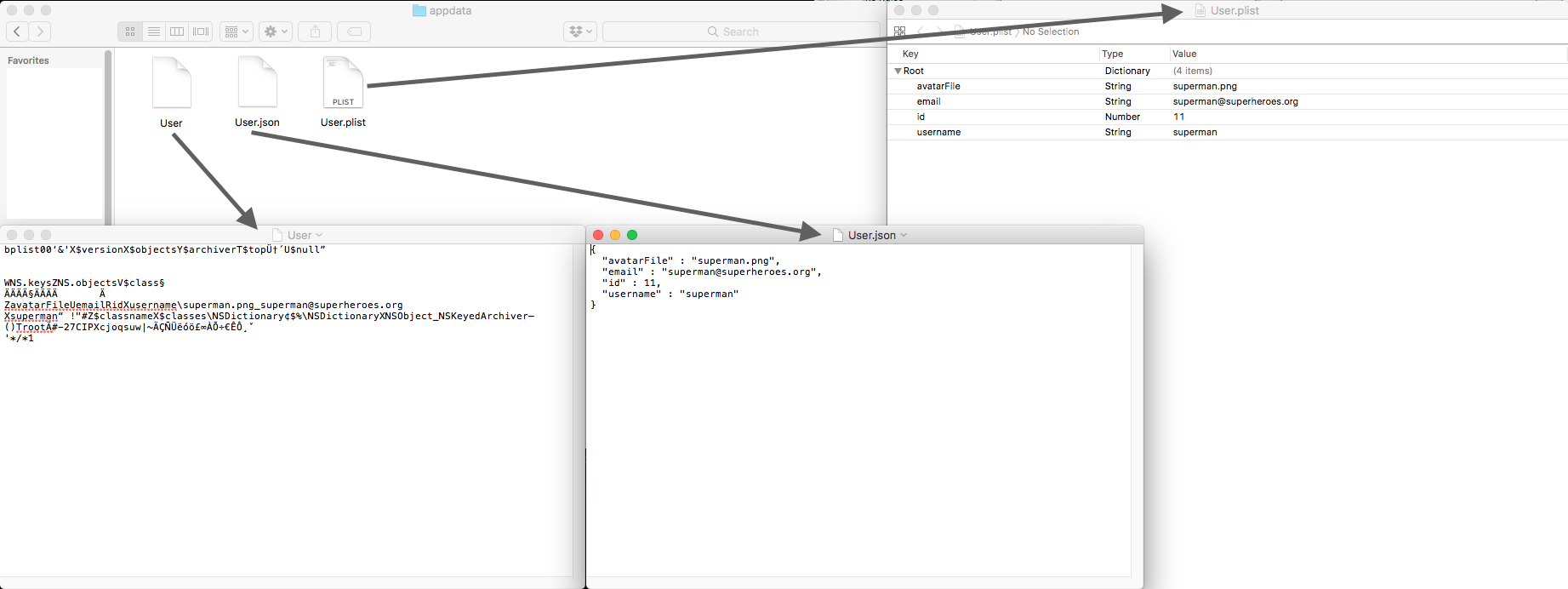
Generated files
All the above three functions return a Bool value that indicates whether each process was successful or not.
When using any of the functions that were just presented, the struct’s name is used automatically as the file name with the following cases applying:
* For JSON files, the _json_ extension is appended.
* For Plist files, the _plist_ extension is appended.
* For archives, no extension is appended.
Note that a directory called "appdata" is created automatically in the documents directory. It’s the place where GTCodable stores files and loads from.
Besides the above convenient functions to save an object using different formats by calling a single method only, you can also use the following methods to encode or convert and get the results as objects:
```swift
if let json = user.toJson() {
if let jsonToString = user.getTextualRepresentation(fromJson: json) {
print(jsonToString)
}
}
```
The `toJson()` function returns a JSON encoded object, if encoding is successful. The `getTextualRepresentation(fromJson:)` is another function provided by the GTCodable protocol, and returns a textual representation of a JSON object as its name suggests. Here’s what it’s printed:
{
"avatarFile" : "superman.png",
"email" : "superman@superheroes.org",
"id" : 11,
"username" : "superman"
}
To get an archived object:
```swift
let archive = user.archive()
// archive is a Data object. Do something with it.
```
However, one of the most interesting cases is that you can get a _dictionary_ containing all properties and their values, which practically means that _you can convert an object into a `[String: Any]` dictionary_:
```swift
let dictionary = user.toDictionary()
print(dictionary)
```
Output:
```swift
["avatarFile": Optional("superman.png"), "email": Optional("superman@superman.com"), "id": Optional(11), "username": Optional("superman")]
```
In addition to the `toDictionary()` function, you can use another one named `toDictionary(fromJson:)` if you want to get a dictionary from a JSON object:
```swift
if let json = user.toJson() {
let dict = user.toDictionary(fromJson: json)
}
```
GTCodable allows you to do the exact opposite fast as well, meaning to create a JSON object based on a given dictionary. For example:
```swift
let dictionary = user.toDictionary()
if let json = user.toJSON(fromDictionary: dictionary) {
// Do something with the json object.
}
```
To manually save a JSON object to a custom URL use the `save(json:toURL:)` function:
```swift
if let json = user.toJson() {
let url = [A custom URL]
user.save(json: json, toURL: url)
}
```
In a similar fashion, you can manually save a dictionary to a custom URL:
```swift
let dictionary = user.toDictionary()
let url = [A custom URL]
user.savePlist(fromDictionary: dictionary, toURL: url)
```
Same as above, if you have an archived object you can manually save it in case you don’t want to use the `saveArchive()` convenient function:
```swift
let archive = user.archive()
let url = [A custom URL]
user.save(archive: archive, toURL: url)
```
### Loading and Initializing With GTCodable Protocol
Going to the opposite direction, here’s how to load data from files that were originally created using any of the `saveJSON()`, `savePlist()` or `saveArchive()` functions.
Loading from from the default JSON file:
```swift
var anotherUser = User()
_ = anotherUser.initFromJSON()
```
From the default Plist file:
```swift
_ = anotherUser.initFromPlist()
```
And from the default file with archived data:
```swift
_ = anotherUser.initFromArchive()
```
These three functions return a `Bool` value indicating whether each action was performed successfully or not.
Except for the above convenient and fast functions, you can also load manually from custom URLs. Here’s how you can load JSON data:
```swift
let url = [A custom URL]
if let json = user.loadJSON(fromURL: url) {
// json is a Data object, do something with it.
}
```
Loading from a Plist file:
```swift
let url = [A custom URL]
if let dict = user.loadPlist(fromURL: url) {
// dict is a [String: Any] object, do something with it.
}
```
Loading archived data:
```swift
let url = [A custom URL]
if let archive = user.loadArchive(fromURL: url) {
// archive is a Data object, do something with it.
}
```
Lastly, you can populate data from a JSON object, dictionary, or an archive to a GTCodable-conforming object using any of the three "initialize(using…)" functions demonstrated next.
```swift
var user = User()
let json = [A JSON object]
_ = user.initialize(usingJSON: json)
```
```swift
var user = User()
let dict = [A [String: Any] dictionary]
_ = user.initialize(usingPlist: dict)
```
```swift
var user = User()
let arhive = [A NSKeyedArchiver object]
_ = user.initialize(usingArchive: archive)
```
Excluding Properties
--------------------
You won’t always want to include all properties when encoding an object as JSON or converting to dictionary. Suppose, for example, that we don’t want to include the `avatarFile` property when saving our JSON encoded data to file. With GTCodable is really easy to ignore properties, as all you need is _to declare an array of String objects named mandatorily **excludedProperties**, and append the names of the properties you want to be excluded to it_.
In action, and in the `User` struct, the easiest way to do it is as shown next:
```swift
struct User: GTCodable {
// Other property declarations here.
var excludedProperties = ["avatarFile"]
}
```
Of course, if more properties had to be ignored, then their names should be appended to that array. The following excludes not only the `avatarFile`, but the `id` and `username` properties as well:
```swift
var excludedProperties = ["avatarFile", "id", "username"]
```
It’s really important to stress this: _Properties you want to be excluded from encoding or conversion must be declared as Optionals_, like for example the following property:
```swift
var avatarFile: String?
```
in the `User` struct. This is a rule, and please respect it to avoid problems.
As an alternative, the `excludedProperties` array can be declared in the struct as Optional:
```swift
struct User: GTCodable {
// Other property declarations.
var excludedProperties: [String]?
}
```
Then, and after the initialisation of a `User` object, we can add values to it:
```swift
var user = User()
user.excludedProperties = ["avatarFile"]
```
Always make sure that the property names you add to the `excludedProperties` array match to the actual names and there are no typos.
Advanced Usage
--------------
The samples demonstrated previously are quite simple, and of course GTCodable’s powerfulness doesn’t stop there. Let’s extend our example by creating the following struct:
```swift
struct AdditionalInfo: GTCodable {
var firstName: String?
var lastName: String?
var gender: Gender?
enum Gender: Int, GTCodable {
case male = 1
case female
}
}
```
Both the `AdditionalInfo` struct and the `Gender` enum conform to GTCodable protocol, and this is a requirement for custom types. Notice also that a specific type (Int) is defined for the `Gender` enum, which is also another requirement.
Updating the `User` struct now:
```swift
struct User: GTCodable {
// Other property declarations
var additionalInfo: AdditionalInfo?
}
```
And initialising such an object:
```swift
var user = User()
// Other property configuration here
user.additionalInfo = AdditionalInfo(firstName: "Clark", lastName: "Kent", gender: .male)
```
By JSON-encoding the `user` object, the `additionalInfo` property will be included to the produced JSON data:
```swift
_ = user.saveJSON()
{
"additionalInfo" : {
"firstName" : "Clark",
"gender" : 1,
"lastName" : "Kent"
},
"email" : "superman@superheroes.org",
"id" : 11,
"username" : "superman"
}
```
The same, for example, will happen if we get a dictionary from the `user` object:
```swift
_ = user.toDictionary()
```
```swift
["additionalInfo": ["lastName": Optional("Kent"), "gender": 1, "firstName": Optional("Clark")], "email": Optional("superman@superheroes.org"), "id": Optional(11), "username": Optional("superman")]
```
What if we would want to exclude a property from the `AdditionalInfo` struct though? How would we exclude the `lastName`?
To do that, declare the `excludedProperties` String array in the `AdditionalInfo` struct, and add the name of the property or properties you want to be ignored:
```swift
struct AdditionalInfo: GTCodable {
// Other property declarations
var excludedProperties = ["lastName"]
}
```
In the output JSON the last name is missing now:
{
"additionalInfo" : {
"firstName" : "Clark",
"gender" : 1
},
"email" : "superman@superheroes.org",
"id" : 11,
"username" : "superman"
}
Alternatively, you can add values to the `excludedProperties` array while configuring the `user` object. At first, you need to declare the `excludedProperties` as an optional in the `AdditionalInfo` struct:
```swift
struct AdditionalInfo: GTCodable {
// Other property declarations
var excludedProperties: [String]?
}
```
Then:
```swift
var user = User()
// Other User property configuration here
user.additionalInfo = AdditionalInfo(firstName: "Clark", lastName: "Kent", gender: .male)
user.additionalInfo?.excludedProperties = ["lastName"]
```
**Important Tip**: Suppose that you have properties to ignore in the `AdditionalInfo` struct, but not in the `User`, which contains an object of the `AdditionalInfo`. Normally, you would expect to declare the `excludedProperties` array in the `AdditionalInfo` only. But not! Even if there are not excluded properties in the container class or struct (in our scenario in the `User` struct) but exist in the contained custom types, then _you have to mandatorily declare the `excludedProperties` array and initialize it in the container structure, without adding any content to it_.
That means that even if we wouldn’t have any properties to exclude in the `User` struct, we would still need to declare the following without adding any values:
```swift
var excludedProperties = [String]()
```
A GTCodable-conforming custom type can contain collections or dictionaries with GTCodable-conforming types as well. Consider the following array in the `User` struct:
```swift
struct User: GTCodable {
// Other property declarations
var buddies: [User]?
}
```
Let’s add a couple of buddies to our `user` object:
```swift
var user = User()
// Other User property configuration here
var batman = User(id: 15, username: "batman", email: "batman@superheroes.org", avatarFile: "batman.png")
batman.additionalInfo = AdditionalInfo(firstName: "Bruce", lastName: "Wayne", gender: .male)
var spiderman = User(id: 21, username: "spiderman", email: "spiderman@superheroes.org", avatarFile: "spiderman.png")
spiderman.additionalInfo = AdditionalInfo(firstName: "Peter", lastName: "Parker", gender: .male)
user.buddies = [batman, spiderman]
```
Let’s JSON encode and see the results:
{
"additionalInfo" : {
"firstName" : "Clark",
"gender" : 1
},
"buddies" : [
{
"additionalInfo" : {
"firstName" : "Bruce",
"gender" : 1
},
"email" : "batman@superheroes.org",
"id" : 15,
"username" : "batman"
},
{
"additionalInfo" : {
"firstName" : "Peter",
"gender" : 1
},
"email" : "spiderman@superheroes.org",
"id" : 21,
"username" : "spiderman"
}
],
"email" : "superman@superheroes.org",
"id" : 11,
"username" : "superman"
}
Notice that the properties that should be ignored are actually excluded from the final outcome.
Even though all previous examples contains structs only, the exact same principles and techniques apply to classes too!
Other Features
--------------
The most important and vital functions of the GTCodable protocol have been already presented and explained. However, GTCodable comes with a few more additional, auxiliary, let’s say "bonus" functions that can make our work a little bit faster.
We have already seen the first one; it’s the `getTextualRepresentation(fromJson:)` and returns a textual representation of a JSON object. You can use it with any JSON encoded object, not only those you create with GTCodable.
The next one is called `getDocDirPath()`. It returns the path to the documents directory as a String value. If your custom types conform to GTCodable, then you get that path for free and you don’t have to specify it again by yourself.
The `getRaw()` function returns the raw value of an enum (or more generally, a _RawRepresentable_ type) as `Any?` type. If no raw value exists, it just returns `nil`. If it doesn’t make any sense to you because we can use the `rawValue` property to get the enum value, you’re right. However, it’d be impossible to get an enum’s value without it while using Reflection.
Lastly, it’s the `describeSelf()` function. This one returns a String value that lists an object’s properties and their values. Take for example the `user` object of the `User` struct:
```swift
print(user.describeSelf())
```
Here’s what is printed in Xcode console:
id: Optional(11)
username: Optional("superman")
email: Optional("superman@superheroes.org")
avatarFile: Optional("superman.png")
additionalInfo: Optional(GTCodableApp.AdditionalInfo(firstName: Optional("Clark"), lastName: Optional("Kent"), gender: Optional(GTCodableApp.AdditionalInfo.Gender.male), excludedProperties: Optional(["lastName"])))
buddies: Optional([GTCodableApp.User(id: Optional(15), username: Optional("batman"), email: Optional("batman@superheroes.org"), avatarFile: Optional("batman.png"), additionalInfo: Optional(GTCodableApp.AdditionalInfo(firstName: Optional("Bruce"), lastName: Optional("Wayne"), gender: Optional(GTCodableApp.AdditionalInfo.Gender.male), excludedProperties: nil)), buddies: nil, excludedProperties: nil), GTCodableApp.User(id: Optional(21), username: Optional("spiderman"), email: Optional("spiderman@superheroes.org"), avatarFile: Optional("spiderman.png"), additionalInfo: Optional(GTCodableApp.AdditionalInfo(firstName: Optional("Peter"), lastName: Optional("Parker"), gender: Optional(GTCodableApp.AdditionalInfo.Gender.male), excludedProperties: nil)), buddies: nil, excludedProperties: nil)])
excludedProperties: Optional(["avatarFile"])
The Rules
---------
Please follow the next rules for a proper usage of the GTCodable protocol.
* Stating the obvious: Classes, structs and enums can conform to GTCodable protocol.
* When it’s necessary to exclude properties from encoding or conversion, declare a String array in your custom type (class or struct) and name it **excludedProperties** mandatorily.
* The names of the properties that should be excluded from encoding or conversion must be added to the `excludedProperties` array. Watch out for typos.
* Properties that should be excluded from encoding and conversion must be declared as _Optionals_. Avoiding doing that will result in failure when trying to load data to an object.
* Always declare and initialise the `excludedProperties` array if your class or struct contains custom types that conform to GTCodable protocol and the have their own properties that should be ignored.
* If any problems are met with properties of custom types inside a class or struct that conform to GTCodable protocol, try to initialise them at the time of declaration if possible.
* Always set an explicit type to Enums that conform to GTCodable.
* There is no need to adopt the Encodable, Decodable, or Codable Swift protocols when using GTCodable.
* Tuples are not supported; avoid tuples. Use arrays or dictionaries instead.