https://github.com/ganeshjadhavongithub/shared-object-library-using-rust
A sample project which creates a shared object (.so) file on linux using Rust programming language and calls it's function from another rust program.
https://github.com/ganeshjadhavongithub/shared-object-library-using-rust
dll-linux linux linux-runtime-library runtime-library rust rust-lang shared-lib shared-library shared-object shared-object-file shared-object-file-rust shared-object-library so so-file
Last synced: 6 months ago
JSON representation
A sample project which creates a shared object (.so) file on linux using Rust programming language and calls it's function from another rust program.
- Host: GitHub
- URL: https://github.com/ganeshjadhavongithub/shared-object-library-using-rust
- Owner: GaneshJadhavOnGitHub
- License: apache-2.0
- Created: 2023-04-25T12:43:41.000Z (about 3 years ago)
- Default Branch: main
- Last Pushed: 2025-11-28T13:29:35.000Z (7 months ago)
- Last Synced: 2025-11-30T20:13:32.133Z (7 months ago)
- Topics: dll-linux, linux, linux-runtime-library, runtime-library, rust, rust-lang, shared-lib, shared-library, shared-object, shared-object-file, shared-object-file-rust, shared-object-library, so, so-file
- Language: Rust
- Homepage: https://github.com/GaneshJadhavOnGitHub/Shared-Object-File-Using-Rust
- Size: 76.2 KB
- Stars: 0
- Watchers: 1
- Forks: 0
- Open Issues: 0
-
Metadata Files:
- Readme: README.md
- License: LICENSE
Awesome Lists containing this project
README
# Shared-Object-Library-Using-Rust
A sample project which creates a shared object (.so) library on linux using Rust programming language and calls it's function from another rust program.
-------------------
Shared Object (.so) File:-
In simple words, a '.so' file on Linux is similar to a 'dll' on Windows.
It is a shared library that is dynamically linked to the executable/binary, meaning it's not embedded inside the executable/binary like a static library (.a). Instead, the executable/binary contains references to the .so file, which is loaded into memory when the executable/binary is run and the library's functionality is referenced. This dynamic linking allows multiple executables/binaries to share the same library in memory, promoting efficient use of system resources.
------------------
For System Requirements please refer 'Application_Requirements.txt'
----------------------
How to run the project.
1. Clone the repository.
2. Navigate inside project folder 'addition_library' from terminal.
3. Build this Library project using following command -
cargo build
4. Navigate inside project folder 'addition_client' from terminal.
5. Build and run this binary project using following commands -
cargo build
cargo run
------------------------
Application is tested on Ubuntu 20.04.5 LTS with WSL2 on Windows 10, working well.
Tested on Ubuntu 22.04.2 LTS using github actions, working well.
-----------------------
Output :-
1. Build Library project :

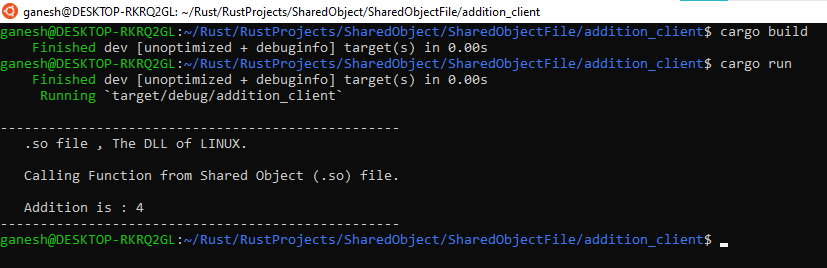
2. Build and Run Binary project :
--------------------
__addition_library project dependency tree__
```
addition_library v0.1.0 () -
```
__addition_client project dependency tree__
```
addition_client v0.1.0 () -
`-- addition_library feature "default"
`-- addition_library v0.1.0 () -
```
__Repository Tree Structure__
```
├── .github
└── workflows
│ └── rust.yml
├── Application_Requirements.txt
├── LICENSE
├── Output1.png
├── Output2.png
├── README.md
└── SharedObjectFile
├── addition_client
├── .gitignore
├── Cargo.lock
├── Cargo.toml
└── src
│ └── main.rs
└── addition_library
├── .gitignore
├── Cargo.toml
└── src
└── lib.rs
```