https://github.com/gares95/data-warehouse_aws-redshift
Building an ETL pipeline for a database hosted on Redshift. Project based on Udacity's template.
https://github.com/gares95/data-warehouse_aws-redshift
aws-redshift data-warehouse redshift udacity-nanodegree
Last synced: 5 months ago
JSON representation
Building an ETL pipeline for a database hosted on Redshift. Project based on Udacity's template.
- Host: GitHub
- URL: https://github.com/gares95/data-warehouse_aws-redshift
- Owner: Gares95
- Created: 2020-10-14T14:55:06.000Z (over 5 years ago)
- Default Branch: master
- Last Pushed: 2020-10-14T15:30:07.000Z (over 5 years ago)
- Last Synced: 2024-12-30T00:13:15.564Z (over 1 year ago)
- Topics: aws-redshift, data-warehouse, redshift, udacity-nanodegree
- Language: Jupyter Notebook
- Homepage:
- Size: 34.2 KB
- Stars: 0
- Watchers: 1
- Forks: 0
- Open Issues: 0
-
Metadata Files:
- Readme: README.md
Awesome Lists containing this project
README
# Data Warehouse with AWS Redshift
***
This project includes files to create and define tables for a database with a star schema by data modeling, and also to build an ETL pipeline for a database in Redshift.
This repository simulates the creation of an ETL pipeline for a music streaming startup whose data resides in S3 and want to transform it into a set of dimensional tables for their analytics team.
The data is extracted from JSON logs in S3 buckets in AWS where the clients have been loading all the information they've collected over some time. This data will be processed to allow the clients to **analyze** and to **extract new relevant information** which can help their decision-making process on future options regarding marketing, store availability...
Having this information available with queries is a powerful tool that will give the client plenty of flexibility.
The files that include this project are:
* create_tables.py
* sql_queries.py
* etl.py
* dwh.cfg
* Redshift_Management.ipynb
## Data Files
***
The datasets used for this project that reside in S3 are:
- Song data: s3://udacity-dend/song_data
- Log data: s3://udacity-dend/log_data
### Song Dataset
The first dataset is a subset of real data from the Million Song Dataset. Each file is in JSON format and contains metadata about a song and the artist of that song. The files are partitioned by the first three letters of each song's track ID. Here is an example of a filepath: _"song_data/A/B/C/TRABCEI128F424C983.json"_
And here is an example of one of the json files: _{"num_songs": 1, "artist_id": "ARJIE2Y1187B994AB7", "artist_latitude": null, "artist_longitude": null, "artist_location": "", "artist_name": "Line Renaud", "song_id": "SOUPIRU12A6D4FA1E1", "title": "Der Kleine Dompfaff", "duration": 152.92036, "year": 0}_
### Log Dataset
The second dataset consists of log files in JSON format generated by this _event simulator_ based on the songs in the dataset above. These simulate activity logs from a music streaming app based on specified configurations.
Here is an example of a filepath: _"log_data/2018/11/2018-11-12-events.json"_
And here is an example of a json file for these events: _{"artist": "None", "auth": "Logged In", "gender": "F", "itemInSession": 0, "lastName": "Williams", "length": "227.15873", "level": "free", "location": "Klamath Falls OR", "method": "GET", "page": "Home", "registration": "1.541078e-12", "sessionId": "438", "Song": "None", "status": "200", "ts": "15465488945234", "userAgent": "Mozilla/5.0(WindowsNT,6.1;WOW641)", "userId": "53"}_
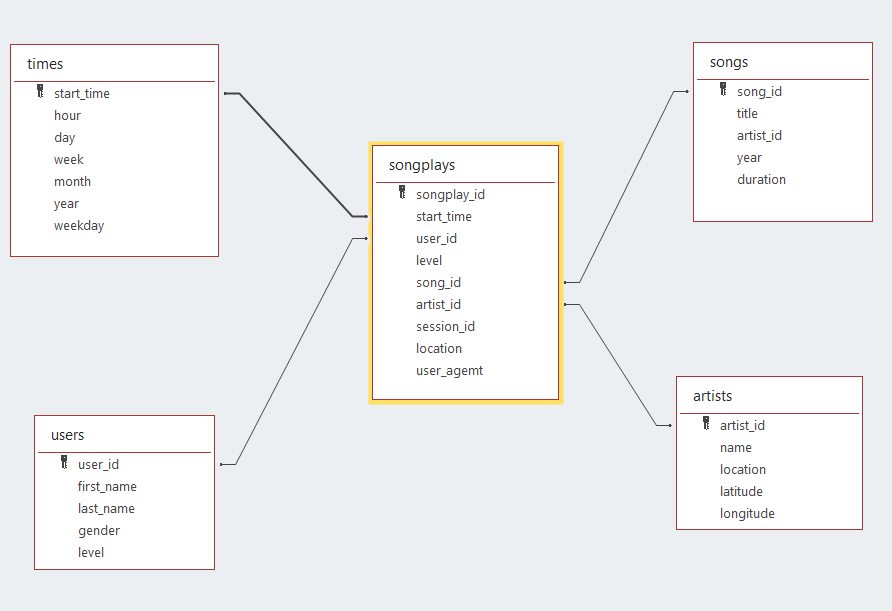
### The star schema tables
The star schema that is going to be created using this program will have the next structure:
- _Fact table_:
1. songplays [songplay_id, start_time, user_id, level, song_id, artist_id, session_id, location, user_agent]
- _Dimension tables_:
2. users [user_id, first_name, last_name, gender, level]
3. songs [song_id, title, artist_id, year, duration]
4. artist [artist_id, name, location, lattitude, longitude]
5. time [start_time, hour, day, week, month, year, weekday]
## Program files
***
### create_tables.py
This file creates the connection to the Redshift cluster previously created and it creates a set of dimensional tables that will contain the information for their analytics team to obtain information about which songs their users are listening to.
### sql_queries.py
This file contains the functions imported by the file create_tables.py
which will allow to create the set of dimensional tables with a star schema.
This functions will allow to Drop old tables, Create new ones and also, to Insert data into them.
### etl.py
With this file we will copy the data from the S3 buckets to some staging tables and subsequently process the data to load it into the fact and dimensional tables.
### dwh.cfg
This file contains the AWS credentials to access the S3 buckets and the Redshift cluster.
Here you will have to introduce your AWS key and secret access key:
### Redshift_Management.ipynb
This file will allow us to create the Redshift cluster if it hasn't been created yet and the IAM role that will be used. It requires the _access key_ and _secret access key_ of the AWS user.
This code will also return the ENDPOINT (HOST) and ARN that need to be in the _dwh.cfg_ file to access the cluster when creating the tables.
At the end of the code this file contains the commands to delete the Redshift cluster and the role created.