https://github.com/gdmeunier/android-pin-unblocker
Android PIN Unblocker :: Generate unblock codes for PKI smartcards using your Admin key and phone.
https://github.com/gdmeunier/android-pin-unblocker
pin-code pki-tools puk-code smartcard
Last synced: about 1 month ago
JSON representation
Android PIN Unblocker :: Generate unblock codes for PKI smartcards using your Admin key and phone.
- Host: GitHub
- URL: https://github.com/gdmeunier/android-pin-unblocker
- Owner: gdmeunier
- License: gpl-3.0
- Created: 2024-07-20T00:03:36.000Z (almost 2 years ago)
- Default Branch: main
- Last Pushed: 2026-04-06T03:39:29.000Z (3 months ago)
- Last Synced: 2026-04-06T05:28:44.923Z (3 months ago)
- Topics: pin-code, pki-tools, puk-code, smartcard
- Language: B4X
- Homepage:
- Size: 1.27 MB
- Stars: 3
- Watchers: 1
- Forks: 0
- Open Issues: 0
-
Metadata Files:
- Readme: readme.md
- License: LICENSE
- Code of conduct: code-of-conduct.md
Awesome Lists containing this project
README
> [!NOTE]
> This Android application will not comply with Google's [Android Developer Verification](https://news.itsfoss.com/new-android-sideloading-rules/) program.\
> Your options for installing this application in the future are the following:
>
> **1.** Keep using an older mobile phone with Android 15 or older,\
> **2.** Use a custom Android 16 ROM that removes the APK sideloading restriction,\
> **3.** Root your phone and use an Xposed module that removes the APK sideloading restriction.
# Android PIN Unblocker
A simple Android app written in [Basic4Android](https://www.b4x.com/b4a.html) (preferably [version 12.50](https://web.archive.org/web/20230719022719/https://www.b4x.com/android/files/B4A.exe) with its [older resources](https://web.archive.org/web/20240529212314/https://www.b4x.com/b4a.html) and the [B4X Help Viewer](https://www.b4x.com/android/forum/threads/b4x-help-viewer.46969/)).
Its purpose is to generate **smartcard** unblock codes using your *Admin Key* and your phone instead of requiring a computer.
The common **SLE4442** cards are memory cards only and lack a built-in processor, and thus are for data storage only.
Real smartcards are the ones such as the Gemalto IDPrime 930, YubiKey, JavacardOS *[...]*.
Its Windows equivalent would be the [Gemalto Response Code calculator](https://supportportal.thalesgroup.com/csm?id=kb_article_view&sysparm_article=KB0017162).
# Features
**Android PIN Unblocker** has a very simple set of features, it cans generate the *Response Code*, get the *Request Code* from QR code and hash text using *sha256* or *sha512*.
## Generate the Unblock Code
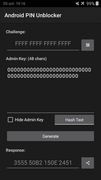 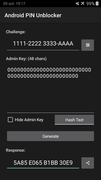
Here you can type the *Request Code* and also choose to hide the *Admin Key* with the checkbox below it.
The supported algorithms for unblock code generation are 3DES, 2DES, AES-128 & AES-256.\
The algorithm to be used is automatically determined by the Application based on your Admin key and Challenge code.
## Hide & reveal the Admin Key
 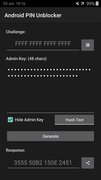
This application has been intended for situations where you're entering unblock codes for employees or people who stand-by next to you.
You can thus now easily type your *Admin Key* once, then hide it with the appropriate checkbox below it.
This way nobody accidentally grabs a picture of your *Admin Key* while unblocking your employees' smartcards.
## Scan QR Code for Request Code
I added the ability to scan QR codes in **Android PIN Unblocker** using the below Basic4Android library:
- [NewQRCodeReaderView](https://www.b4x.com/android/forum/threads/qrcodereaderview-new-release.82265/post-523013)
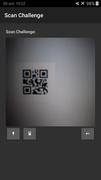
It's used alongside a PC application such as **[CodeTwo QR Code Reader & Generator](https://www.majorgeeks.com/files/details/codetwo_qr_code_desktop_reader_generator.html)** to do the card unblocking more efficiently.
The *Request Code* then automatically gets input in the appropriate field once detected.
## Generate Admin Key text hashes
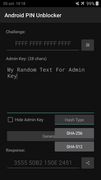 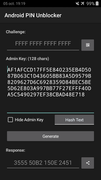
It's possible with **Android PIN Unblocker** (starting with version 3) to directly generate hashes within the App instead of having to write it in other ones.
The possible choices are currently *sha256* and *sha512* only.
The generated hash will automatically replace the previous *Admin Key* text.
## Share the Response Code
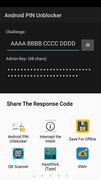
You can see on the previous screenshots a Share To button next to the generated *Response Code*, which will pop the native Android Intent chooser.
From there you can share the *Response Code* over to Telegram, Signal, WhatsApp, SMS, and so on.
Otherwise you could type the *Response Code* automatically on e.g. employees' computers with an agent program, using the Android *Share To* functionality.
*You can also generally type passwords & sensitive input material using your phone and an [USB InputStick](https://inputstick.com/) device, which is hardware and works for full-disk encryption as well. It has a KeePass2Android plugin, for example.*
## Share Admin Key to the App
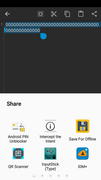 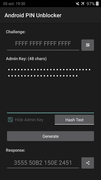
Here you can see that it's possible to write your *Admin Key* on a native Android note-taking application then select the text, which you can directly share to **Android PIN Unblocker**.
That's also where you can generate *Admin Key* hashes yourself with a different Android app then share the generated hash to **Android PIN Unblocker**.
The App automatically verifies whether the shared text is a valid *32*, *48* or *64* digits string and is made of *0-9 A-F* characters only (*hex chars*).
The App discards shared texts that are invalid *Admin Keys* and will simply behave as if you launched it yourself.
*I decided to allow 32- & 64-digits Admin Keys since that's what some smartcard manufacturers actually use (AES challenge/response instead of 3DES).*
## Prevent disclosing Admin Keys
 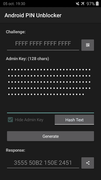
Whenever you share an Admin Key to the app instead of copy-pasting it yourself, the *Hide Admin Key* checkbox becomes disabled and you cannot unhide it.
This feature prevents accidental disclosure of your *Admin Key* while unblocking cards on your employees' computers.
> Make sure to verify whether your Android ROM doesn't have a clipboard history prior to copy-pasting Admin Keys (Samsung & Huawei have one).
> If clipboard history cannot be disabled then use a different keyboard application instead of your Android built-in one.
You can also type your original text in the Admin Key field and directly generate a *sha256* or *sha512* hash from within the app, by long-pressing the hashing buttons.
Long-pressing the SHA-256 or SHA-512 buttons actually generates the hash but also makes them unrevealable afterwards (single-click generates the hash normally without hiding it).
# License
Well I don't care about legalese anyway but let's pick **GNU GPLv3 (or later version)** since my friends at the [Free Software Foundation](https://www.gnu.org/proprietary/proprietary.html) recommend it.
**Basic4Android** also allows completely free usage of their IDE for both commercial and non-commercial purposes so it should be OK.