https://github.com/geertmeersman/cloudlibrary
Home Assistant integration for Cloud Library
https://github.com/geertmeersman/cloudlibrary
cloud-library cloudlibrary home-assistant homeassistant homeassistant-integration
Last synced: 5 months ago
JSON representation
Home Assistant integration for Cloud Library
- Host: GitHub
- URL: https://github.com/geertmeersman/cloudlibrary
- Owner: geertmeersman
- License: mit
- Created: 2023-12-15T19:23:53.000Z (over 2 years ago)
- Default Branch: main
- Last Pushed: 2025-12-15T11:12:52.000Z (6 months ago)
- Last Synced: 2025-12-17T06:48:03.894Z (6 months ago)
- Topics: cloud-library, cloudlibrary, home-assistant, homeassistant, homeassistant-integration
- Language: Python
- Homepage:
- Size: 906 KB
- Stars: 4
- Watchers: 1
- Forks: 1
- Open Issues: 0
-
Metadata Files:
- Readme: README.md
- Changelog: CHANGELOG.md
- Contributing: CONTRIBUTING.md
- Funding: .github/FUNDING.yml
- License: LICENSE
- Code of conduct: CODE_OF_CONDUCT.md
- Codeowners: .github/CODEOWNERS
- Security: SECURITY.md
Awesome Lists containing this project
README

# cloudLibrary for Home Assistant
A Home Assistant integration to monitor cloudLibrary
## Features
cloudLibrary sensors for
- current(): Fetches the current patron items.
- history(): Retrieves the patron's borrowing history.
- holds(): Retrieves the patron's holds.
- saved(): Retrieves the patron's saved items.
- featured(): Retrieves the patron's featured items.
- email(): Retrieves the patron's email settings.
- notifications(): Retrieves patron notifications (unread or archived).
---
[](https://github.com/geertmeersman)
[](https://www.buymeacoffee.com/geertmeersman)
[](https://discord.gg/QhvcnzjYzA)
[](https://github.com/geertmeersman/cloudlibrary/blob/master/LICENSE)
[](https://github.com/hacs/integration)
[](https://my.home-assistant.io/redirect/hacs_repository/?owner=geertmeersman&repository=cloudlibrary&category=integration)
[](https://github.com/geertmeersman/cloudlibrary/issues)
[](http://isitmaintained.com/project/geertmeersman/cloudlibrary)
[](http://isitmaintained.com/project/geertmeersman/cloudlibrary)
[](https://github.com/geertmeersman/cloudlibrary/pulls)
[](https://github.com/geertmeersman/cloudlibrary/actions/workflows/validate.yml)
[](https://github.com/geertmeersman/cloudlibrary/search?l=python)
[](https://github.com/geertmeersman/cloudlibrary)
[](https://github.com/geertmeersman/cloudlibrary/releases)
[](https://github.com/geertmeersman/cloudlibrary/releases)
[](https://github.com/geertmeersman/cloudlibrary/commits)
[](https://github.com/geertmeersman/cloudlibrary/graphs/contributors)
[](https://github.com/geertmeersman/cloudlibrary/commits/main)
## Table of contents
- [cloudLibrary for Home Assistant](#cloudlibrary-for-home-assistant)
- [Features](#features)
- [Table of contents](#table-of-contents)
- [Installation](#installation)
- [Using HACS (recommended)](#using-hacs-recommended)
- [Manual](#manual)
- [Configuration](#configuration)
- [Contributions are welcome!](#contributions-are-welcome)
- [Troubleshooting](#troubleshooting)
- [Enable debug logging](#enable-debug-logging)
- [Disable debug logging and download logs](#disable-debug-logging-and-download-logs)
- [Lovelace examples](#lovelace-examples)
## Installation
### Using [HACS](https://hacs.xyz/) (recommended)
**Click on this button:**
[](https://my.home-assistant.io/redirect/hacs_repository/?owner=geertmeersman&repository=cloudlibrary&category=integration)
**or follow these steps:**
1. Simply search for `cloudLibrary` in HACS and install it easily.
2. Restart Home Assistant
3. Add the 'cloudLibrary' integration via HA Settings > 'Devices and Services' > 'Integrations'
4. Provide your Robonect account details
### Manual
1. Copy the `custom_components/cloudlibrary` directory of this repository as `config/custom_components/cloudlibrary` in your Home Assistant installation.
2. Restart Home Assistant
3. Add the 'cloudLibrary' integration via HA Settings > 'Devices and Services' > 'Integrations'
4. Provide your cloudLibrary account details
This integration will set up the following platforms.
| Platform | Description |
| -------------- | ----------------------------------------- |
| `cloudlibrary` | Home Assistant component for cloudLibrary |
## Configuration
The integration needs 3 inputs:
- barcode: Your cloudLibrary login
- pin: Your cloudLibrary password
- library id: Your cloudLibrary ID (this you can fetch from the url when you connect to the website: https://ebook.yourcloudlibrary.com/library/< HERE YOU FIND THE LIBRARY ID >/mybooks/current)
## Contributions are welcome!
If you want to contribute to this please read the [Contribution guidelines](CONTRIBUTING.md)
## Troubleshooting
### Enable debug logging
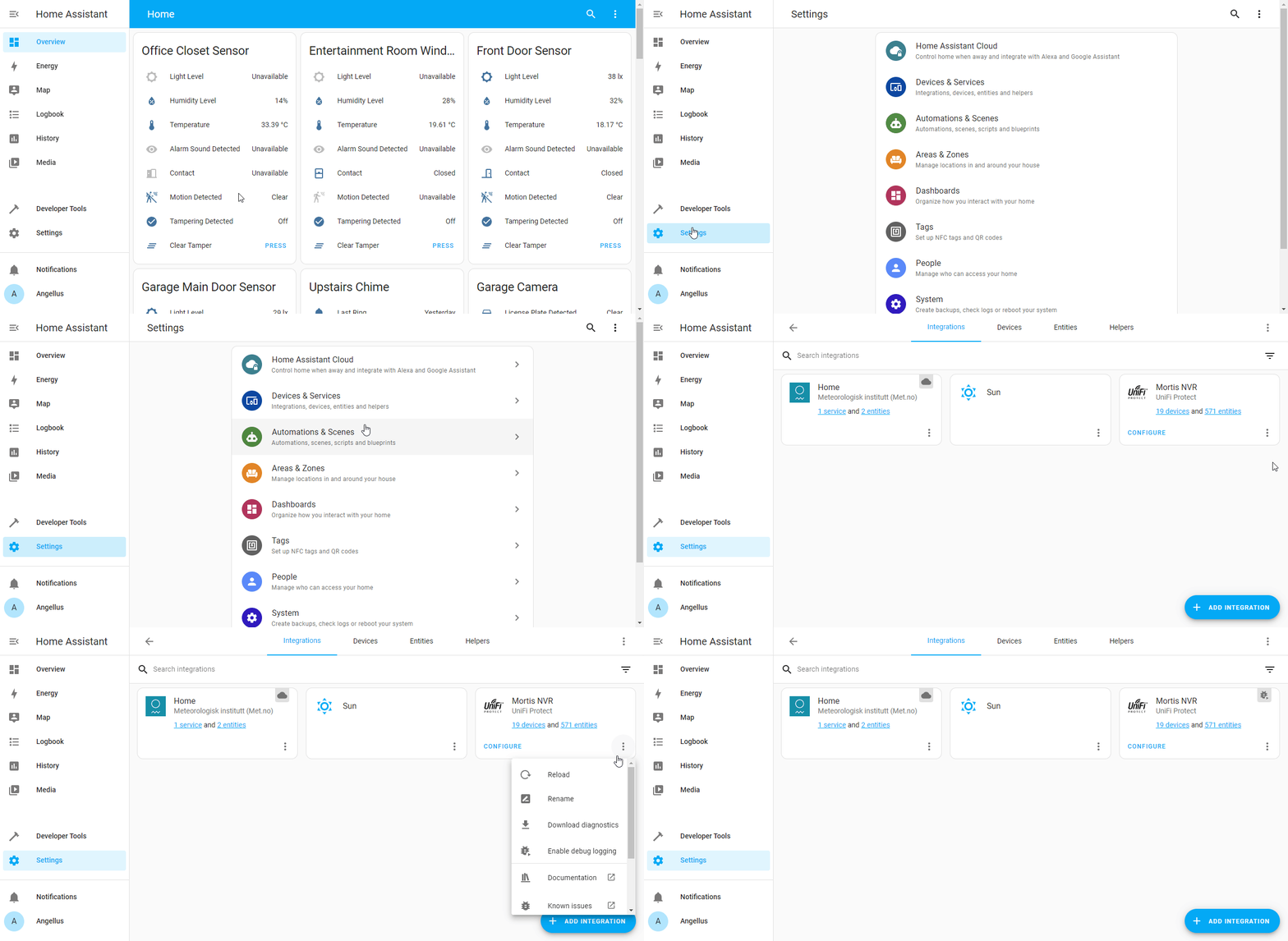
To enable debug logging, go to Settings -> Devices & Services and then click the triple dots for the cloudLibrary integration and click Enable Debug Logging.
### Disable debug logging and download logs
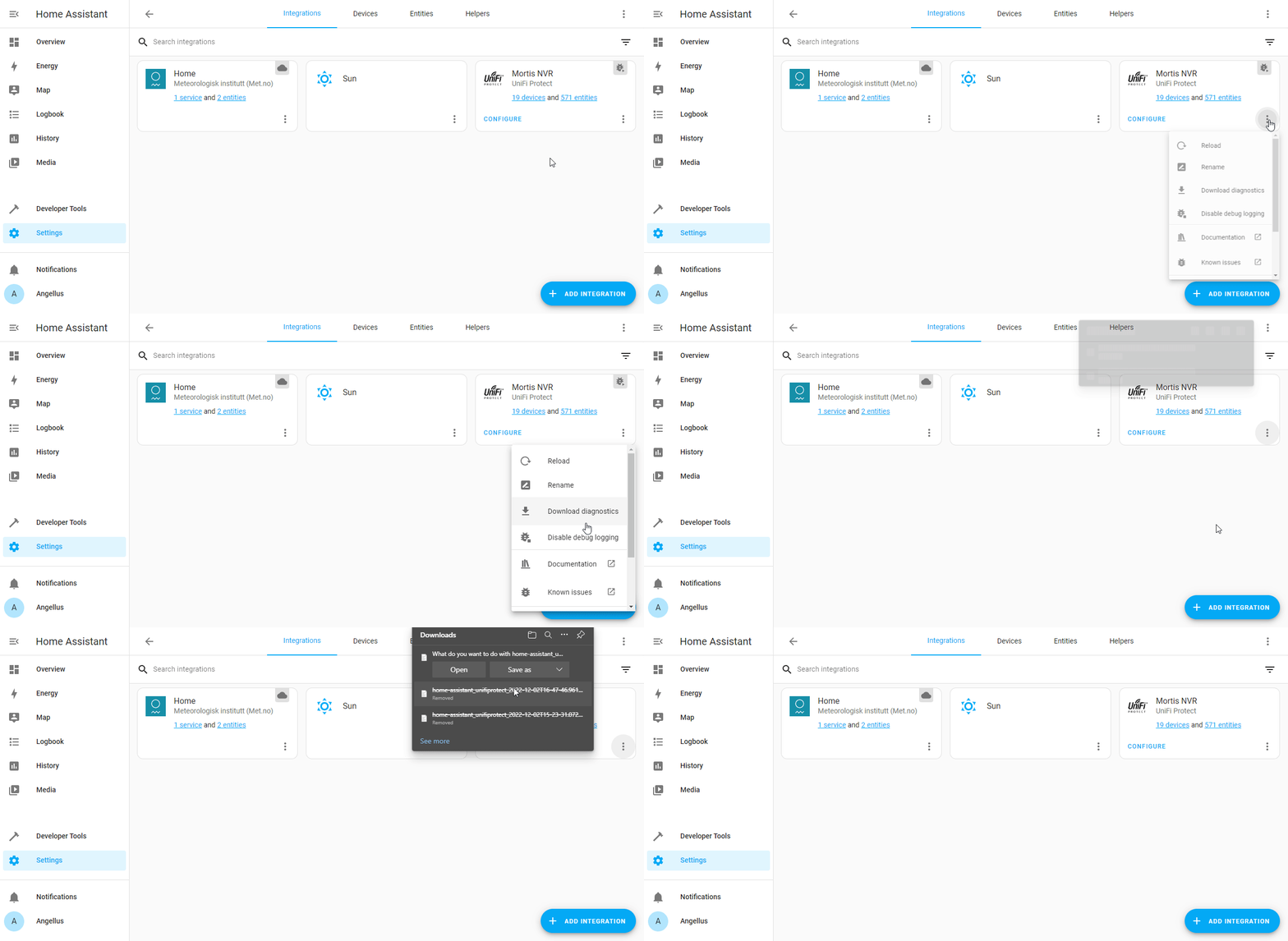
Once you enable debug logging, you ideally need to make the error happen. Run your automation, change up your device or whatever was giving you an error and then come back and disable Debug Logging. Disabling debug logging is the same as enabling, but now you will see Disable Debug Logging. After you disable debug logging, it will automatically prompt you to download your log file. Please provide this logfile.
## Lovelace examples
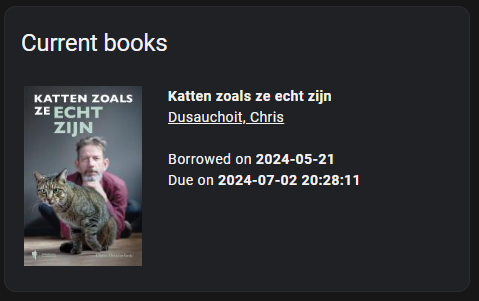
Show markdown code
```yaml
type: markdown
title: Current books
content: >-
{% for item in
states.sensor.cloudlibrary_current.attributes.patron_items -%}

{{ item.title }}
{% for author in item.contributors -%}
{% if 'name' in author -%}
{{ author.name }}
{% endif -%}
{% endfor -%}
{% if item.borrowedDate != None -%}
Borrowed on {{ item.borrowedDate }}
{% endif -%}
{% if item.returnedDate != None -%}
Returned on {{ item.returnedDate }}
{% endif -%}
{% if item.dueDate != None -%}
Due on {{ item.dueDate }}
{% endif -%}
{% if item.holdAvailableDate != None -%}
Available on {{ item.holdAvailableDate }}
{% endif -%}
{% endfor %}
```